
Peltor M2RX7A
Peltor Alert M2RX7A Hearing Protector User Manual
Model: M2RX7A
Муқаддима
The Peltor Alert M2RX7A hearing protector is designed to provide reliable hearing protection while allowing for simultaneous radio enjoyment with high-quality stereo sound. Its advanced level-dependent function amplifies ambient sounds, ensuring you remain aware of your surroundings, and automatically attenuates harmful noise levels above 82 dB. This dual functionality protects your hearing from damage while facilitating clear communication with colleagues and the recognition of important warning signals.
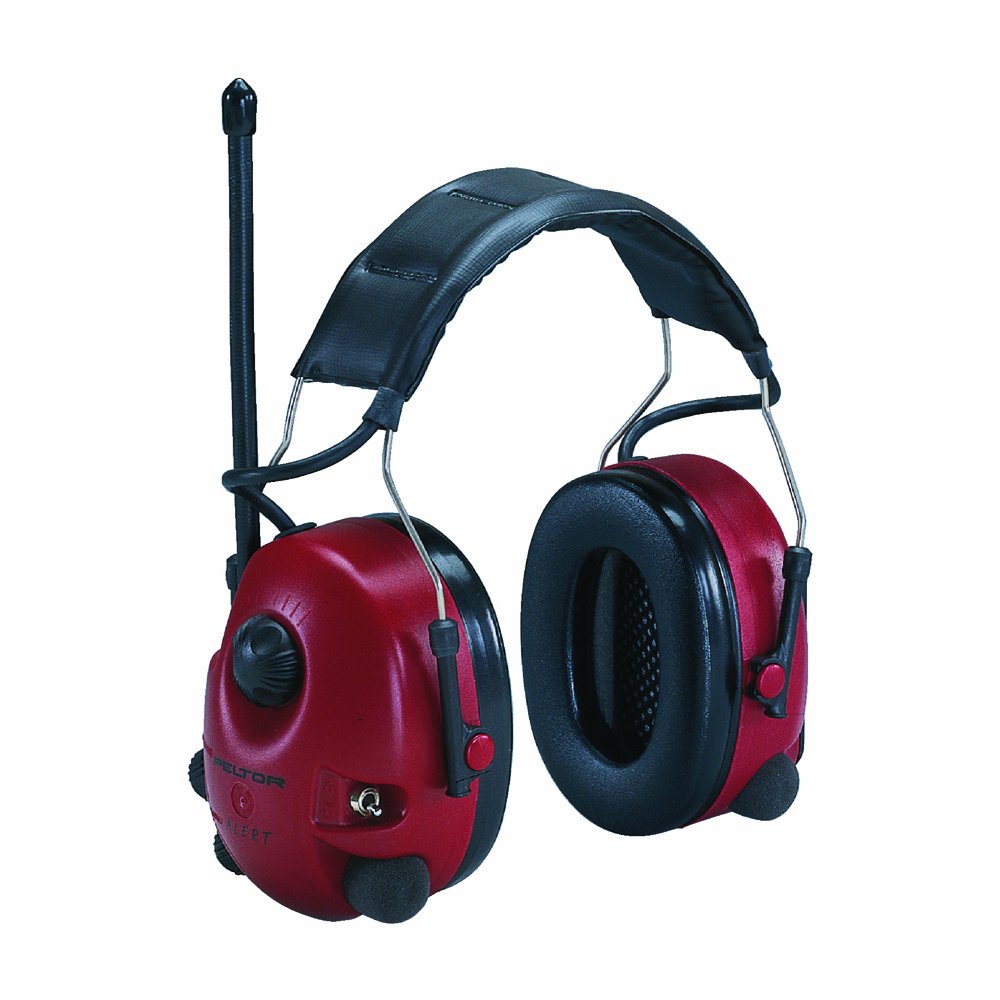
Расми 1: Peltor Alert M2RX7A Hearing Protector. This image shows the red earmuffs with a black padded headband and an antenna extending from the left earcup, indicating its radio functionality.
Маълумот оид ба бехатарӣ
Always read and understand all safety instructions before using the Peltor Alert M2RX7A. Failure to follow these instructions may result in hearing damage or other injuries.
- Ensure the hearing protector is properly fitted to achieve optimal noise attenuation.
- The level-dependent function is designed to amplify low-level sounds and attenuate high-level sounds. Do not rely solely on this function for protection in extremely high noise environments without additional precautions.
- Replace ear cushions and foam inserts regularly as per maintenance instructions to maintain hygiene and acoustic performance.
- Do not modify the hearing protector. Any modifications may compromise its protective capabilities.
- Store the device in a clean, dry place away from extreme temperatures.
Ташкил кардан
Насби батарея
The Peltor Alert M2RX7A requires two (2) AA batteries for operation. These are typically included with the product.
- Locate the battery compartment on one of the earcups.
- Сарпӯши қисмати батареяро кушоед.
- Ду батареяи АА-ро ҷойгир кунед, ки қутбияти дурустро (+/-) тавре ки дар дохили қисм нишон дода шудааст, таъмин кунед.
- Сарпӯши қисмати батареяро бехатар пӯшед.
Танзими банди сар
For optimal comfort and protection, adjust the headband to fit snugly over your head, ensuring the earcups fully enclose your ears.
- Slide the earcups up or down along the headband wires until the headband rests comfortably on the top of your head.
- Ensure the sealing cushions form a tight seal around your ears without excessive pressure.
Дастурҳои амалиётӣ
Фаъолкунӣ/хомӯшкунӣ ва назорати садо
The main control knob on the earcup manages both power and volume for the radio and level-dependent function.
- To turn on, rotate the knob clockwise until you hear a click.
- Барои зиёд кардани садо, гардишро дар самти ақрабаки соат идома диҳед.
- Барои кам кардани садо, баръакси самти ақрабаки соат гардонед.
- To turn off, rotate the knob counter-clockwise until you hear a click.
Функсияи радио
The integrated FM radio module provides entertainment while you work.
- Танзими: Use the dedicated tuning knob (often located near the volume knob) to select your desired radio station.
- AM/FM Toggle: A switch is provided to select between AM and FM bands.
- Қабулгоҳ: For optimal reception, ensure the antenna is extended. Reception quality may vary based on location and movement.
Level-Dependent Function (Tactical Function)
This feature allows for natural, spatial hearing by amplifying low-level ambient sounds and automatically attenuating impulse noise above 82 dB.
- Activate this function using the designated switch, typically located on the earcup.
- This allows you to hear conversations, warning signals, and machine sounds at a safe level, preventing a feeling of isolation.
Нигоҳдорӣ
Regular maintenance ensures the longevity and effectiveness of your Peltor Alert M2RX7A hearing protector.
Тозакунӣ
- Wipe the exterior of the earcups and headband with a damp матоъ ва собуни мулоим.
- Муҳофизати гӯширо ба об нагузоред.
- Аз истифодаи кимиёвии сахт ё тозакунандаи абразив худдорӣ намоед.
Hygiene Kits
For optimal hygiene and acoustic performance, it is recommended to replace the ear cushions and foam inserts periodically, typically every 6 months or more frequently with heavy use. Hygiene kits are available for purchase.
- Gently remove the old ear cushions and foam inserts.
- Clean the earcup surface before installing new components.
- Press the new ear cushions firmly into place, ensuring a secure fit.
- Insert the new foam inserts into the earcups.
Нигоҳдорӣ
Store the hearing protector in a clean, dry environment, away from direct sunlight and extreme temperatures, to prevent material degradation.
Мушкилкушо
| Мушкилот | Сабаби эҳтимолӣ | Ҳалли |
|---|---|---|
| No sound from radio/device |
|
|
| Poor noise attenuation |
|
|
| Static or poor radio reception |
|
|
Мушаххасоти
| Рақами модел | M2RX7A |
| Бренд | Peltor (3M) |
| Навъи | Hearing Protector with FM Radio |
| Пастшавии садо | Level-dependent function attenuates noise above 82 dB |
| Манбаи нерӯ | 2 x Батареяҳои АА (дохил) |
| Вазн | тахминан. 363 г (0.8 фунт) |
| Андозаҳо (L x W x H) | 19.05 x 13.97 x 10.16 см (7.5 x 5.5 x 4 инч) |
| Материал | Foam (sealing cushions), Plastic (earcups), Steel (headband) |
| Ранги | Шароби сурх |
Кафолат ва дастгирӣ
For warranty information, technical support, or to purchase replacement parts and hygiene kits, please contact 3M Peltor customer service or visit their official webсайт. Барои даъвоҳои кафолат далели хариди худро нигоҳ доред.
- Истеҳсолкунанда: 3M
- Webсайт: www.3m.com/peltor (Please check the official 3M webсайт барои тамос ва маълумоти охирин.)
Ask a question about this manual
Ask about setup, troubleshooting, compatibility, parts, safety, or missing instructions. Manuals+ will review the question and use this page’s manual context to help answer it.