
Муқаддима
Thank you for choosing the iConcepts M01517 Mobile 5-Port USB 2.0 Hub. This device is designed to expand the USB connectivity of your computer, allowing you to connect up to five USB 2.0 devices simultaneously. Its compact and mobile design makes it ideal for both desktop and portable use. Please read this manual carefully to ensure proper setup and operation.
Мундариҷаи баста
Лутфан тасдиқ кунед, ки ҳама ашё дар бастаи шумо мавҷуданд:
- iConcepts M01517 Mobile 5-Port USB 2.0 Hub unit
- Сими пайвасти USB
Ташкил кардан
Барои насб кардани маркази USB-и худ, ин қадамҳоро иҷро кунед:
- Hub-ро ба компютери худ пайваст кунед: Take the provided USB connection cable. Plug one end into the designated input port on the iConcepts M01517 hub. Plug the other end into an available USB port on your computer.
- Насби ронандаи худкор: Your operating system (Windows, macOS, Linux) should automatically detect the new hardware and install the necessary drivers. This process typically takes a few moments. No manual driver installation is usually required.
- Connect Your USB Devices: Once the hub is recognized by your computer, you can connect up to five USB devices (such as flash drives, keyboards, mice, printers, etc.) into the available ports on the iConcepts M01517 hub.
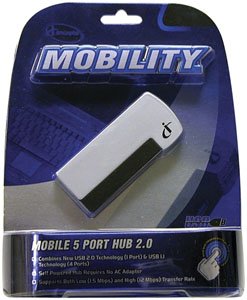
Image of the iConcepts M01517 Mobile 5-Port USB 2.0 Hub, showing its compact design and multiple USB ports ready for connection.
Фаъолият
The iConcepts M01517 hub operates as a standard USB 2.0 hub, providing additional ports for your devices.
- Шиносоии дастгоҳ: When a device is plugged into the hub, your computer will recognize it as if it were plugged directly into the computer's USB port.
- Интиқоли маълумот: The hub supports USB 2.0 data transfer speeds, which are suitable for most peripherals and data storage devices.
- Таъмини нерӯ: This mobile hub is typically bus-powered, meaning it draws power directly from the computer's USB port. For high-power consumption devices, ensure your computer's USB port can supply sufficient power.
Нигоҳдорӣ
To ensure the longevity and optimal performance of your iConcepts M01517 USB hub, follow these maintenance guidelines:
- Тозакунӣ: Use a soft, dry cloth to clean the exterior of the hub. Avoid using liquid cleaners or solvents, as they may damage the device.
- Нигоҳдорӣ: Вақте ки истифода намешавад, марказро дар ҷои хунук ва хушк, дур аз нури бевоситаи офтоб ва ҳарорати аз ҳад зиёд нигоҳ доред.
- Муносибат: Avoid dropping the hub or subjecting it to strong impacts. Do not attempt to disassemble the unit.
Мушкилкушо
If you encounter issues with your iConcepts M01517 USB hub, refer to the following common problems and solutions:
- Мушкилот: Connected device is not recognized.
Ҳалли:- Ensure the hub is securely connected to your computer's USB port.
- Try connecting the device to a different port on the hub.
- Барои боварӣ ҳосил кардан, ки дастгоҳ кор мекунад, кӯшиш кунед, ки онро мустақиман ба порти USB-и компютери худ пайваст кунед.
- Компютери худро бозоғоз намоед.
- Мушкилот: Суръати пасти интиқоли маълумот.
Ҳалли:- Ensure both the hub and the connected device support USB 2.0 for optimal speeds.
- Avoid connecting too many high-bandwidth devices simultaneously to the hub.
- Мушкилот: Hub or connected devices are not receiving power.
Ҳалли:- Verify the hub's connection to the computer's USB port is firm.
- Try connecting the hub to a different USB port on your computer, as some ports may provide more power.
- If connecting high-power devices, consider using a self-powered hub (if available for this model) or connecting high-power devices directly to the computer.
Мушаххасоти
| Бренд | iConcepts |
| Модели | М01517 |
| Интерфейси сахтафзор | USB |
| Ҳама портҳои USB | 5 |
| Шумораи портҳо | 5 |
| Вазни ашё | 5 фунт |
| Санаи аввалин дастрас | 7 феврали соли 2007 |
Кафолат ва дастгирӣ
Specific warranty details and direct support contact information are not provided in this manual. For warranty claims, technical support, or further assistance, please refer to the official iConcepts webсайт ё фурӯшандаи худ тамос гиред. Квитансияи хариди худро ҳамчун далели харид нигоҳ доред.