
1. Муқаддима
Thank you for choosing the LAFAYETTE SSD-82 SMD Soldering/Desoldering Station. This manual provides essential information for the safe and efficient operation, maintenance, and troubleshooting of your device. Please read this manual thoroughly before using the station and keep it for future reference.
The SSD-82 is a versatile tool designed for precision soldering and desoldering of Surface Mount Devices (SMD) and other electronic components, offering reliable performance for various electronic repair and assembly tasks.
2. Дастурамал оид ба бехатарӣ
Огоҳӣ: Риоя накардани ин дастурҳои бехатарӣ метавонад боиси зарбаи барқ, сӯхтор ё ҷароҳати вазнин гардад.
- Барои пешгирӣ аз нафаскашии буғҳо, ҳамеша истгоҳи кафшерро дар ҷои хуб вентилятсияшуда истифода баред.
- Wear appropriate personal protective equipment, including safety glasses, to protect against solder splashes.
- The soldering iron and desoldering gun tips reach very high temperatures. Avoid direct contact with skin or flammable materials.
- Always place the soldering iron and desoldering gun in their respective stands when not in use.
- Ensure the power cord is undamaged and properly grounded. Do not use the station if the cord is frayed or damaged.
- Do not expose the unit to moisture or operate it in wet conditions.
- Пеш аз тоза кардан ё анҷом додани ягон хидматрасонии техникӣ, дастгоҳро аз розетка ҷудо кунед.
- Аз дастрасии кӯдакон дур нигоҳ доред.
3. Маҳсулот ба охир расидview
The LAFAYETTE SSD-82 is an integrated soldering and desoldering station designed for precision work. It features a main control unit, a soldering iron, and a desoldering gun.
3.1 Унсурҳои асосӣ
- Воҳиди назорат: Houses the power supply, temperature control circuitry, and display.
- Оҳанни кафшерӣ: For precise soldering tasks, with interchangeable tips.
- Desoldering Gun: Features a vacuum pump for efficient removal of solder.
- Истгоҳи оҳани кафшерӣ: Provides a safe resting place for the hot soldering iron.
- Desoldering Gun Stand: Provides a safe resting place for the hot desoldering gun.
- Cleaning Sponge/Brass Wool: For cleaning soldering iron tips.
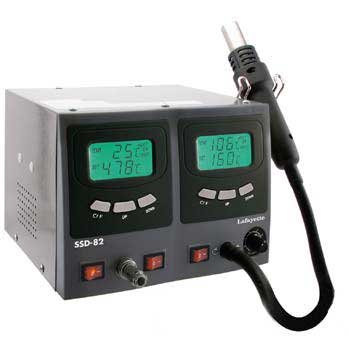
Figure 1: Main unit of the LAFAYETTE SSD-82 SMD Soldering/Desoldering Station, showing the control panel, soldering iron, and desoldering gun.
4. Танзимот
4.1 Кушодани баста
- Ҳама ҷузъҳоро аз бастабандӣ бодиққат хориҷ кунед.
- Check for any visible damage. If any damage is found, do not operate the unit and contact your supplier.
- Боварӣ ҳосил кунед, ки ҳамаи ҷузъҳои номбаршуда мавҷуданд.
4.2 Маҷлис
- Place the control unit on a stable, heat-resistant surface.
- Connect the soldering iron cable to the designated port on the control unit.
- Connect the desoldering gun cable to its designated port on the control unit.
- Place the soldering iron and desoldering gun in their respective stands.
- Connect the main power cord to the control unit and then to a grounded electrical outlet.
5. Дастурҳои истифодабарӣ
5.1 Фурӯзон/хомӯш кардан
- To power on, press the main power switch located on the front panel. The display will illuminate.
- To power off, press the main power switch again. Allow the tips to cool down completely before storing.
5.2 Танзими ҳарорат
- Use the temperature control knobs or buttons on the control unit to set the desired temperature for the soldering iron and desoldering gun.
- The display will show the set temperature and the actual temperature. Wait for the actual temperature to reach the set temperature before beginning work.
- Ҳарорати тавсияшаванда: Lead-free solder: 350-400°C; Leaded solder: 300-350°C. Adjust as needed for specific components and solder types.
5.3 Soldering Operation
- Ensure the soldering iron tip is clean. Use a damp sponge or brass wool to wipe off old solder and oxidation.
- Apply a small amount of fresh solder to the tip (tinning) to improve heat transfer and prevent oxidation.
- Place the hot tip on the component lead and pad simultaneously.
- Feed solder onto the joint, not directly onto the iron tip. Allow the solder to flow evenly around the joint.
- Remove the solder wire, then remove the soldering iron. Allow the joint to cool without disturbance.
5.4 Desoldering Operation
- Ensure the desoldering gun tip is clean and free of obstructions.
- Place the hot desoldering gun tip over the solder joint to be removed.
- Once the solder melts, activate the vacuum pump (usually via a button on the gun handle) to suck the molten solder into the gun's reservoir.
- Remove the gun from the joint. Repeat if necessary until all solder is removed.
- Regularly empty the solder reservoir and clean the filter to maintain optimal vacuum performance.
6. Нигоҳдорӣ
6.1 Тозакунӣ
- Нӯги оҳани кафшер: Clean frequently with a damp sponge or brass wool. Always re-tin the tip after cleaning.
- Desoldering Gun Tip: Clean the tip regularly to prevent solder buildup. Use the provided cleaning pin to clear any blockages.
- Solder Reservoir and Filter: For the desoldering gun, regularly open the reservoir, remove accumulated solder, and clean or replace the filter as needed. Refer to the specific instructions for your desoldering gun model.
- Воҳиди назорат: Дар беруни онро бо матои мулоим ва хушк пок кунед. Тозакунанда ё ҳалкунандаҳои абразивиро истифода набаред.
6.2 Иваз кардани нӯги сӯзан
- Ensure the unit is powered off and the tip has cooled down.
- Unscrew the retaining nut or collar that holds the tip in place.
- Carefully remove the old tip and insert a new, compatible tip.
- Secure the retaining nut/collar.
- Always use genuine LAFAYETTE replacement tips for optimal performance.
7. Баррасии мушкилот
If you encounter issues with your soldering station, refer to the table below for common problems and solutions.
| Мушкилот | Сабаби эҳтимолӣ | Ҳалли |
|---|---|---|
| Стансия фаъол намешавад. | Манбаи барқ надорад; сими барқ вайрон шудааст. | Check power outlet and connections. Inspect power cord for damage. |
| Soldering iron/desoldering gun not heating up. | Loose connection; faulty heating element/sensor. | Check cable connections to the control unit. If problem persists, contact support. |
| Poor solder joint quality. | Dirty/oxidized tip; incorrect temperature; improper technique. | Clean and re-tin tip. Adjust temperature. Review soldering technique. |
| Desoldering gun has weak suction. | Clogged tip; full solder reservoir; dirty/damaged filter. | Clean tip with cleaning pin. Empty solder reservoir. Clean or replace filter. |
If the problem persists after attempting these solutions, please contact LAFAYETTE customer support or your local service center.
8. Мушаххасоти
| Хусусият | Арзиш |
|---|---|
| Бренд | ЛАФАЙЕТ |
| Модели | SSD-82 |
| Маълумотномаи истеҳсолкунанда | 33410260 |
| Андозаҳои бастаҳо | 36.8 х 25.4 х 22.2 см |
| Вазни ашё | 5.48 килограмм |
| Батареяҳо дохил карда шудаанд | Бале |
| ASIN | B00CTV40RM |
| Санаи аввалини дастрас | 16 майи соли 2013 |
9. Кафолат ва дастгирӣ
The LAFAYETTE SSD-82 SMD Soldering/Desoldering Station is covered by a standard manufacturer's warranty against defects in materials and workmanship. The specific duration and terms of the warranty may vary by region and retailer. Please retain your proof of purchase for warranty claims.
For technical support, warranty service, or to purchase replacement parts, please contact your original retailer or visit the official LAFAYETTE website for contact information. Do not attempt to repair the unit yourself, as this may void the warranty and pose safety risks.