
Plugable UD-3900
Plugable UD-3900 Universal Laptop Docking Station
Дастури корбар
Муқаддима
This manual provides detailed instructions for setting up, operating, and troubleshooting your Plugable UD-3900 Universal Laptop Docking Station. This docking station is designed to expand the connectivity of your laptop, offering dual HDMI display outputs, multiple USB ports, Gigabit Ethernet, and audio jacks through a single connection to your host computer.
Маҳсулот ба охир расидview
The Plugable UD-3900 is a versatile docking solution for both Windows and Mac laptops. It features a hybrid 2-in-1 USB 3.0 and USB-C cable for broad compatibility.

Расми 1: Пеш ва пушти View of the Plugable UD-3900 Docking Station
Дар қуттӣ чӣ мавҷуд аст:
- Plugable UD-3900 USB Docking Station
- Power Adapter (UL 62368-1 Certified)
- Hybrid 2-in-1 USB 3.0 and USB-C Cable

Расми 2: Мундариҷаи баста
Хусусиятҳо ва портҳо
The UD-3900 docking station provides a comprehensive set of ports to expand your laptop's capabilities:

Figure 3: Port Layout and Features
- Dual HDMI Video Outputs: Supports resolutions up to 1920x1200 @ 60Hz for two displays. A single HDMI display can reach 2560x1440 @ 50Hz. Note: 4K resolution is not supported.
- Ethernet Gigabit: Пайвасти шабакаи симии устувор ва зудро таъмин мекунад.
- Ҷекҳои аудио: Separate 3.5mm jacks for headphone output and microphone input.
- Портҳои USB 3.0: Two (2) USB 3.0 ports for high-speed data transfer.
- Портҳои USB 2.0: Four (4) USB 2.0 ports for connecting various peripherals like keyboards, mice, and printers.
- Hybrid USB 3.0 / USB-C Cable: A single cable connects the dock to your host laptop, supporting both USB-A and USB-C ports.
Мутобиқати
The Plugable UD-3900 docking station is designed for universal compatibility with a wide range of operating systems and devices:

Figure 4: Operating System and Device Compatibility
- Windows: Compatible with Windows 11, 10, 8.x, and 7. Driver installation is typically plug-and-play via Windows Update.
- macOS: Compatible with macOS 10.14 or later. A manual DisplayLink driver installation is required. Instructions are provided with the product.
- ChromeOS: Compatible with ChromeOS 100 or later, requiring no additional setup.
- Системаҳои номувофиқ: Not compatible with Linux/Unix systems. Does not support some non-DisplayLink adapters, DisplayPort connections, or HDCP protected content.
Дастури насб
Follow these steps to set up your Plugable UD-3900 docking station:
- Пайваст кардани барқ: Connect the included power adapter to the DC 5V/4A input port on the back of the docking station, then plug the adapter into a wall outlet.
- Пайвастшавӣ ба ноутбуки мизбон: Use the provided hybrid 2-in-1 USB 3.0 and USB-C cable to connect the docking station to an available USB 3.0 (USB-A) or USB-C port on your laptop.
- Драйверҳоро насб кунед (агар лозим бошад):
- For Windows: Drivers typically install automatically via Windows Update upon first connection.
- For macOS: A manual DisplayLink driver installation is required. Please refer to the included instructions or the Plugable support website for the latest driver and installation guide.
- For ChromeOS: No additional driver installation is needed.
- Мониторҳоро пайваст кунед: Connect your HDMI monitors to the two HDMI output ports on the back of the docking station using HDMI cables.
- Дастгоҳҳои перифериро пайваст кунед: Plug your USB devices (keyboard, mouse, external drives), Ethernet cable, and audio devices into the corresponding ports on the docking station.
Дастурҳои амалиётӣ
Танзимоти намоиш:
Once connected, your operating system should detect the external monitors. You can configure your display settings (extend, duplicate, or primary display) through your computer's display settings. For optimal performance, ensure your display drivers are up to date.
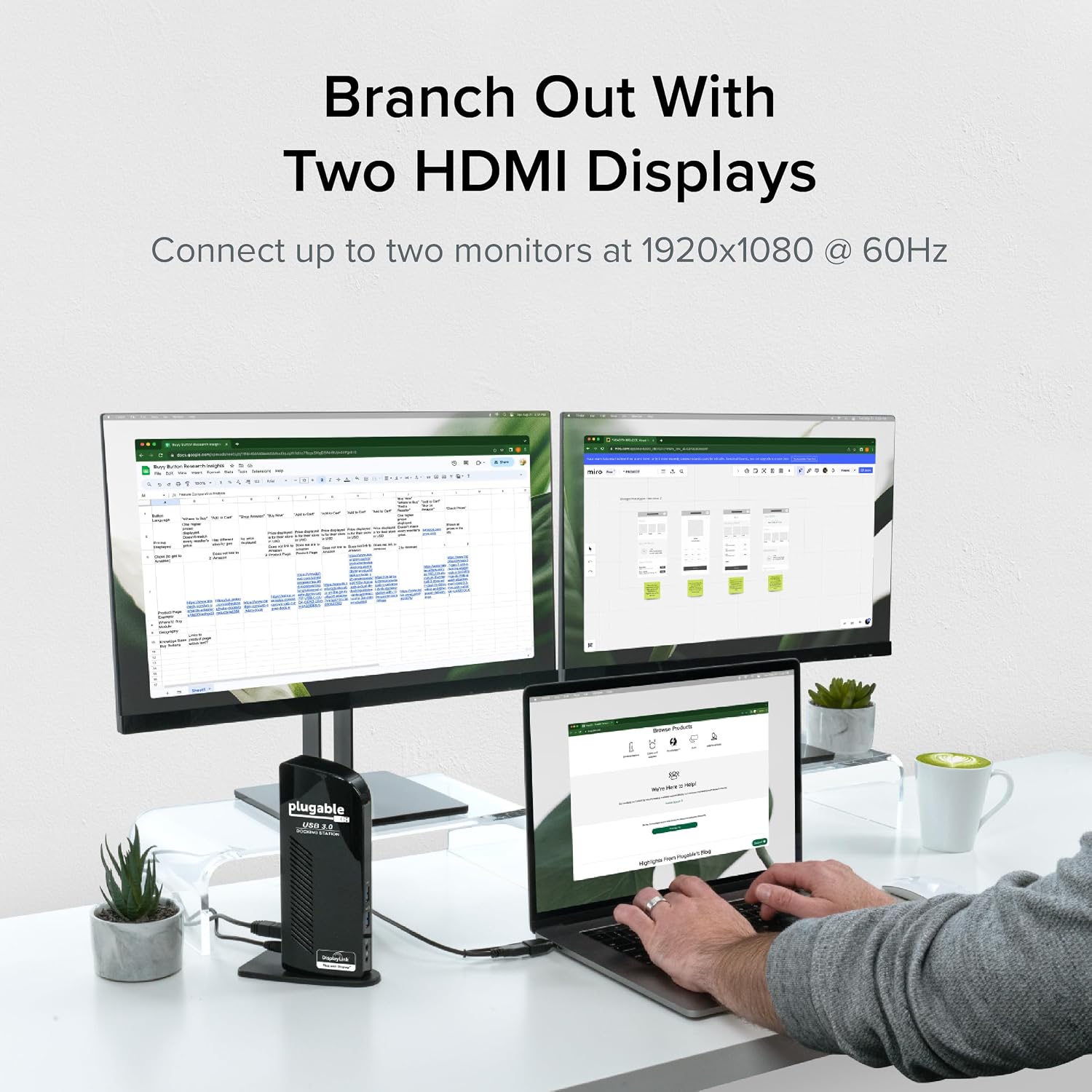
Figure 5: Dual Monitor Setup Example
Пуркунии ноутбук:
Important Note: This USB docking station does not charge the host laptop.
An external power supply is needed to charge your host system. The docking station provides power to its own internal components and connected USB peripherals, but not to the laptop itself.

Figure 6: Dock Does Not Charge Laptop
Тавсияҳои истифода:
The UD-3900 is ideal for web browsing, productivity software, and general office tasks. It is not recommended for gaming or applications requiring high-performance graphics due to the nature of DisplayLink technology.
Нигоҳдорӣ
Барои таъмини дарозумрӣ ва кори беҳтарини истгоҳи доки шумо:
- Дастгоҳро дар муҳити тоза ва хушк нигоҳ доред.
- Нагузоред, ки дастгоҳро ба ҳарорати аз ҳад зиёд ё нурҳои бевоситаи офтоб дучор кунед.
- Do not block the ventilation slots on the sides of the docking station.
- Қисми берунии онро бо матои нарм ва хушк тоза кунед. Аз тозакунандаҳои моеъ ё аэрозолҳо истифода набаред.
- Disconnect the power adapter when the device is not in use for extended periods.
Мушкилкушо
If you encounter issues with your Plugable UD-3900 docking station, please refer to the following common solutions or consult the official troubleshooting guide:
- Намоиши баромад: Ensure all cables (power, host, HDMI) are securely connected. Verify that the correct DisplayLink drivers are installed and up to date for your operating system. Try restarting your computer.
- Дастгоҳҳои USB кор намекунанд: Confirm the docking station is powered on and connected to your host. Try connecting the USB device to a different port on the dock or directly to your computer to isolate the issue.
- Масъалаҳои пайвастшавӣ ба шабака: Check the Ethernet cable connection to both the dock and your router/modem. Verify network settings on your computer.
- Мушкилоти аудио: Ensure speakers/headphones are properly connected to the audio output jack. Check your computer's sound settings to confirm the docking station's audio output is selected as the default device.
- Масъалаҳои ронандагӣ: If displays are not functioning correctly, reinstall the DisplayLink drivers. For macOS, manual installation is always required.
For more detailed troubleshooting steps, you can refer to the official Роҳнамои ҳалли мушкилот (PDF).
Маълумот дар бораи бехатарӣ:
Standard USB ports on the docking station are not primarily designed for charging USB devices. While some devices may charge in certain scenarios, USB device charging behavior can vary. For detailed information on device-specific charging behaviors, please consult the product listing page on the Plugable webсайт.
Мушаххасоти
| Хусусият | Мушаххасоти |
|---|---|
| Рақами модел | УД-3900 |
| Connectivity to Host | Hybrid USB 3.0 (USB-A) and USB-C |
| Натиҷаҳои видео | 2x HDMI |
| Max Resolution (Dual Display) | 1920x1200 @ 60 Гц |
| Max Resolution (Single Display) | 2560x1440 @ 50 Гц |
| Портҳои USB | 2x USB 3.0, 4x USB 2.0 (Total 6 USB Ports) |
| Ethernet | Gigabit Ethernet |
| Аудио | 3.5mm Headphone Output, 3.5mm Microphone Input |
| Манбаи нерӯ | DC Power Adapter (20 watts) |
| Андозаҳо (LxWxH) | 6.45 x 3.22 x 4.02 инч |
| Вазни ашё | 13 унция |
| Платформаи сахтафзор | PC |
Кафолат ва дастгирӣ
Every Plugable product, including the UD-3900 docking station, is covered against defects for 2 сол from the date of purchase. Plugable also provides дастгирии техникии умри for its products.
If you have any questions or require assistance, please do not hesitate to contact the Plugable North American-based support team. You can find contact information and additional resources on the official Plugable webсайт ё тавассути боздид аз Plugable Store on Amazon.
Ҳуҷҷатҳои марбут - УД-3900
 |
Дастури оғози зуд барои истгоҳи васлшавандаи UD-3900 Дастури оғозёбӣ барои истгоҳи пайвасткунаки Plugable UD-3900, ки чӣ тавр пайваст кардани дисплейҳо, дастгоҳҳои USB, Ethernet ва аудиоро муфассал шарҳ медиҳад. |
 |
Дастури насби фаврии истгоҳи пайвасткунии монитор барои пайвастшавандаи UD-3900 USB 3.0 Дастури насби фаврӣ барои истгоҳи пайвасткунии дугонаи монитори Plugable UD-3900 USB 3.0. Тарзи пайваст кардани дастгоҳҳо, насб кардани драйверҳо ва танзими режимҳои намоишро барои Windows омӯзед. |
 |
UD-3900 Docking Station User Guide | Plugable Comprehensive user guide for the Plugable UD-3900 docking station, covering setup, compatibility, and usage for Windows, macOS, and ChromeOS. |
 |
Plugable UD-3900 Docking Station: Troubleshooting Guide and FAQ Troubleshooting Guide and FAQ for the Plugable UD-3900 docking station. Covers compatibility with operating systems and computers, display resolution support, and power delivery capabilities. Find answers to common questions and learn how to optimize your setup. |
 |
UD-3900Z Troubleshooting Guide and FAQ Troubleshooting guide and frequently asked questions for the Plugable UD-3900Z docking station, covering compatibility, display support, power, and common issues. |
 |
Plugable UD-3900Z USB-C Docking Station User Guide and Setup Comprehensive user guide for the Plugable UD-3900Z USB-C docking station. Includes setup instructions for Windows, macOS, and ChromeOS, plus detailed compatibility information for laptops and monitors. |
Ask a question about this manual
Ask about setup, troubleshooting, compatibility, parts, safety, or missing instructions. Manuals+ will review the question and use this page’s manual context to help answer it.