
1. Муқаддима
This manual provides instructions for the setup, operation, and maintenance of your Uniden AS7412 Corded Phone. Please read this manual thoroughly before using your new phone.
The Uniden AS7412 is a corded telephone featuring a large LCD display and a speakerphone function, designed for clear communication and ease of use.
2. Маҳсулот ба охир расидview
Хусусиятҳои асосӣ:
- FSK/DTMF Caller ID Display
- Large LCD Display with Clock and Call Timer
- Функсияи баландгӯяк
- Pre-Dial Function and Last Number Redial
- Функсияи зидди дуздӣ
- Memory for 50 Incoming Calls and 15 Outgoing Calls
- 8 One-Touch Memory and 10 Two-Touch Memory Functions
- IDD Code and PABX Dial Out Code Setting
- Adjustable LCD Contrast
- Мусиқӣ дар нигоҳдорӣ
- Adjustable Flash Timing (90/95/100/120/180/300/600/1000mS)
Phone Components:
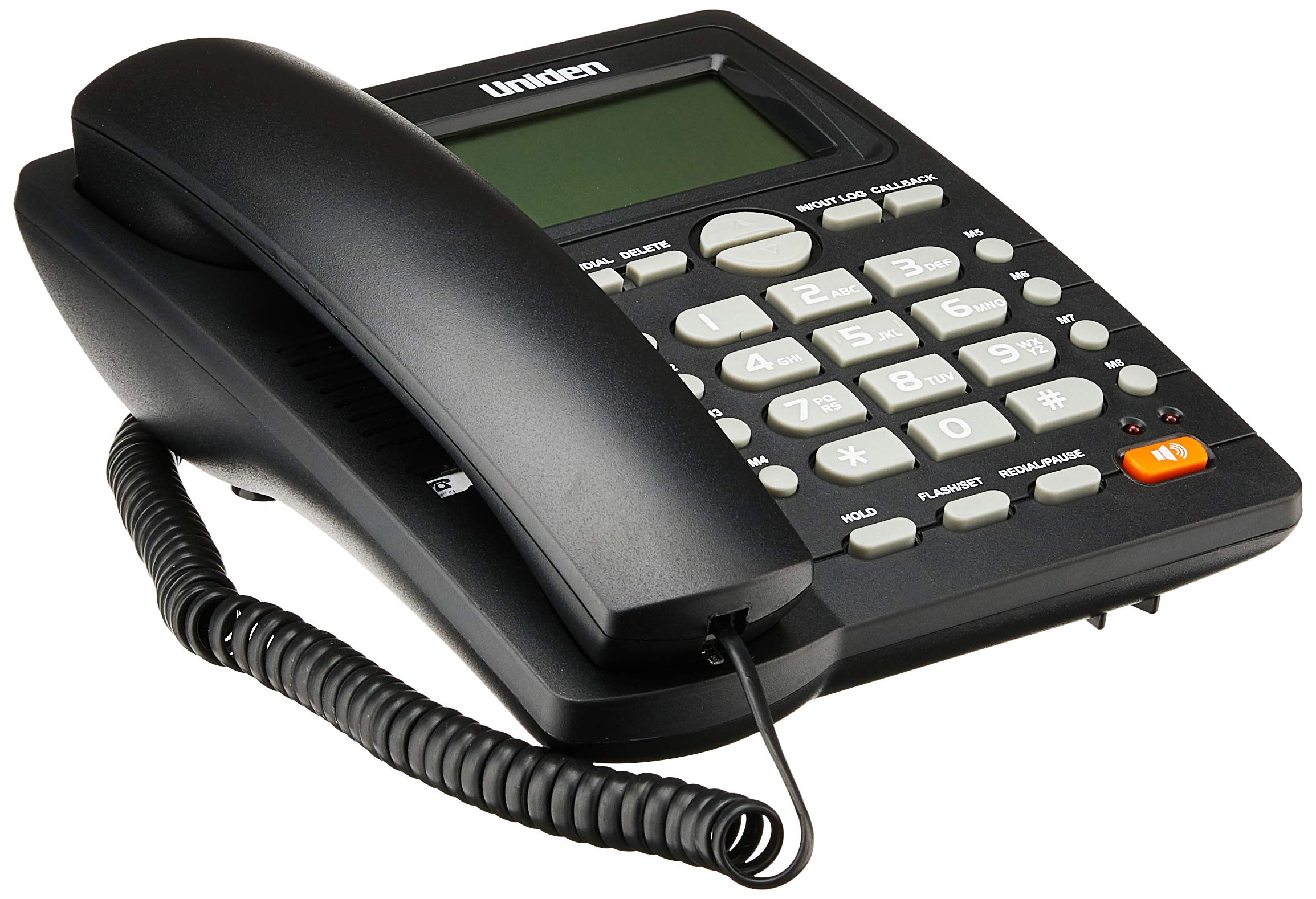
The phone features a standard handset, a numeric keypad, dedicated function buttons, and a large LCD display for caller information and settings. A prominent speakerphone button allows for hands-free communication.

On the rear of the unit, you will find the telephone line input port and a switch for adjusting the ringer volume.
3. Танзимот
- Гӯшмонакро пайваст кунед: Plug one end of the coiled cord into the handset and the other end into the handset jack on the side of the phone base unit.
- Хатти телефонро пайваст кунед: Plug one end of the telephone line cord into the "LINE" jack on the rear of the phone base unit (refer to Figure 2). Plug the other end into your telephone wall jack.
- Пайвасти барқ: The phone is powered by the telephone line. No external power adapter is required for basic operation.
- Намоиши ибтидоӣ: Upon connection, the LCD display should illuminate and show the current time or a default standby screen.
4. Дастурҳои истифодабарӣ
Занг задан:
- Истифодаи телефон: Lift the handset, wait for a dial tone, then dial the desired number using the keypad.
- Истифодаи баландгӯяк: -ро пахш кунед ГУФТОР button, wait for a dial tone, then dial the desired number. To end the call, press the ГУФТОР боз тугмаи.
- Рақамзании пешакӣ: Dial the number first, then lift the handset or press the ГУФТОР тугмаи барои оғоз кардани занг.
Қабули занг:
- Вақте ки телефон занг мезанад, телефонро бардоред ё тугмаро пахш кунед ГУФТОР тугмаи барои ҷавоб.
Рақами охирини такрорӣ:
- Телефонро бардоред ё пахш кунед ГУФТОР кнопкаро пахш кунед ТАКРАН ЗАН/ТАВААК тугма.
Caller ID Function:
- When a call comes in, the caller's number (and name, if available and subscribed to service) will be displayed on the LCD screen.
- -ро истифода баред IN/OUT LOG buttons (up/down arrows) to scroll through the incoming call history.
- To call back a number from the call log, select the number and press the CALLBACK тугма.
Memory Dialing (One-Touch and Two-Touch):
- Нигоҳ доштани рақамҳо:
- пахш кунед STORE/DIAL.
- Рақами телефонеро, ки мехоҳед захира кунед, занг занед.
- пахш кунед STORE/DIAL боз.
- Press the desired memory button (M1-M8 for one-touch, or a numeric key for two-touch).
- Рақамзанӣ аз хотира:
- One-Touch: Гӯшӣ телефонро бардоред ё пахш кунед ГУФТОР, сипас тугмаи хотираи дилхоҳро (M1-M8) пахш кунед.
- Two-Touch: Гӯшӣ телефонро бардоред ё пахш кунед ГУФТОР, пас пахш кунед STORE/DIAL followed by the numeric key where the number is stored.
Adjusting LCD Contrast:
- Refer to the on-screen menu or specific button combination (often involving FLASH/SET or similar) to access display settings and adjust contrast for optimal readability.
5. Нигоҳдорӣ
- Тозакунӣ: Телефонро бо матои нарм пок кунед, дamp матоъ. Моддаҳои кимиёвии сахт ё тозакунандаи абразивиро истифода набаред.
- Ҷойгиршавӣ: Place the phone on a stable surface, away from direct sunlight, heat sources, and moisture.
- Кортҳо: Боварӣ ҳосил кунед, ки ҳамаи симҳо боэътимод пайваст шудаанд ва печида ё фишурда нашудаанд.
6. Баррасии мушкилот
| Мушкилот | Сабаби эҳтимолӣ | Ҳалли |
|---|---|---|
| Оҳанги занг нест | Сими телефон канда шудааст ё вайрон шудааст. | Check the telephone line connection at both the phone and the wall jack. Try a different line cord if available. |
| LCD display is blank or dim | Contrast setting is too low or phone line power issue. | Adjust the LCD contrast setting. Ensure the phone line is active. |
| Занг задан ё қабул карда наметавонад | Incorrect line connection or service issue. | Verify all connections. Contact your telephone service provider if the issue persists. |
| Ringer does not sound | Ringer volume is set to OFF. | Adjust the ringer volume switch on the rear of the phone to LOW or HI (refer to Figure 2). |
7. Мушаххасоти
| Хусусият | Тафсилот |
|---|---|
| Бренд | Uniden |
| Модели | AS7412 |
| Ранги | Сиёҳ |
| Навъи телефон | Симдор |
| Материал | Пластмасса |
| Манбаи нерӯ | Электрикии симӣ (бо хат кор мекунад) |
| Dialler Type | Клавиатураи ягона |
| Андозаҳо (L x W x H) | 21.8 x 7 x 22 сантиметр |
| Вазни ашё | 650 грамм |
| Амалиёти бисёрсатрӣ | Амали як-хати |
| Шиносоии занг | Yes (FSK/DTMF) |
| Истеҳсолкунанда | НАКУНЕД |
8. Кафолат ва дастгирӣ
For warranty information and technical support, please refer to the warranty card included with your product or visit the official Uniden webсайт. Квитансияи хариди худро ҳамчун далели харид нигоҳ доред.
Эзоҳ: Хусусиятҳо ва хусусиятҳои маҳсулот метавонанд бидуни огоҳӣ тағир дода шаванд.