
1. Муқаддима
The PAC SWI-RC-1 Steering Wheel Control Interface is designed to seamlessly integrate your vehicle's factory steering wheel controls with an aftermarket radio. This universal interface supports a wide range of vehicles and major radio brands, allowing you to retain the convenience and safety of your steering wheel controls after upgrading your car's audio system.
2. Маълумот оид ба бехатарӣ
- Пеш аз оғози насб, ҳамеша терминали манфии батареяи мошинро ҷудо кунед.
- Барои иҷрои беҳтарин ва бехатарӣ насби касбӣ тавсия дода мешавад.
- Боварӣ ҳосил кунед, ки ҳамаи пайвастҳои ноқилҳо бехатар ва дуруст изолятсия карда шудаанд, то ноқилҳои кӯтоҳ пешгирӣ карда шаванд.
- Do not operate the vehicle or attempt to program the device while driving.
- Дастгоҳро аз намӣ ва ҳарорати аз ҳад зиёд дур нигоҳ доред.
3. Маҳсулот ба охир расидview
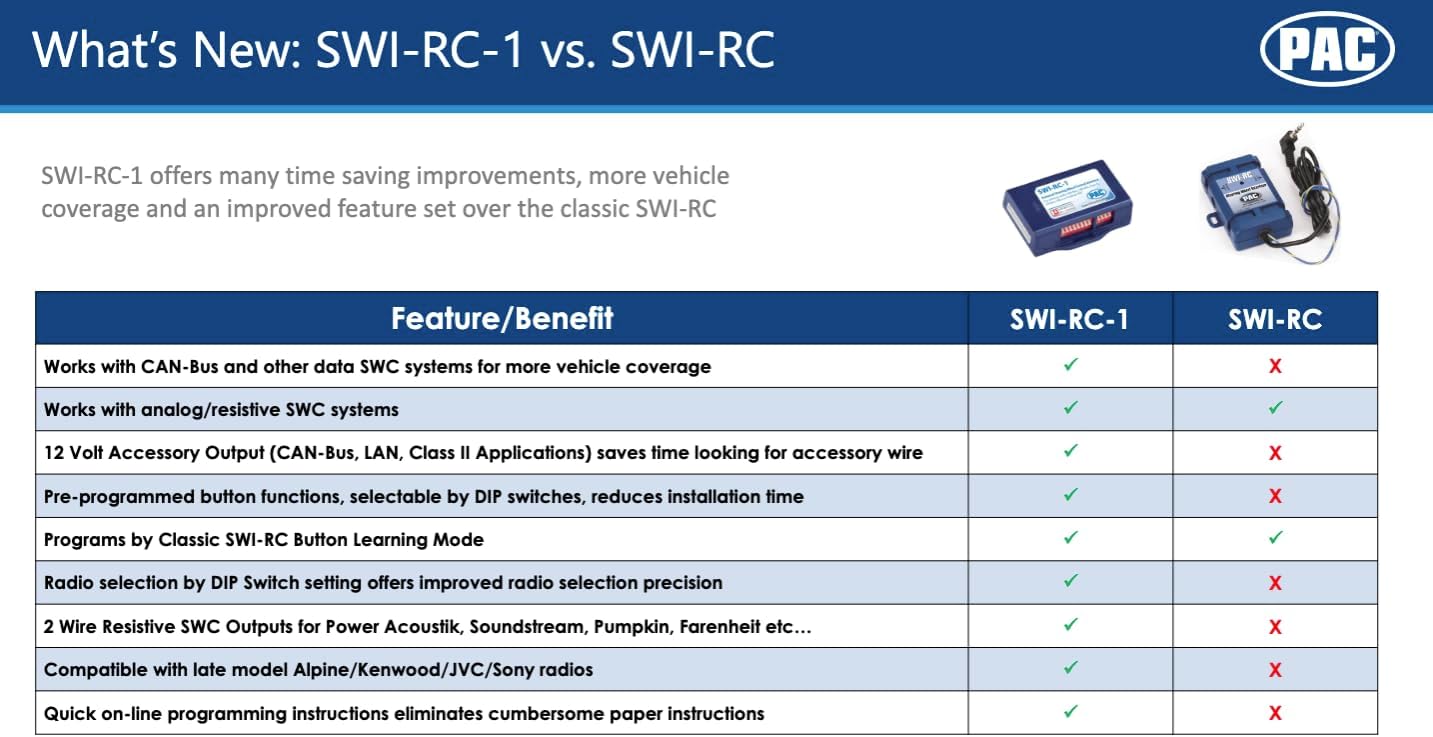
The PAC SWI-RC-1 offers advanced features for integrating steering wheel controls:
- Fast and easy steering wheel control retention for over 3000 vehicles.
- Quick and easy pre-programmed button function by DIP switch selection.
- Works on Analog (resistive) and Data SWC systems.
- Compatible with vehicles featuring CAN-Bus, GMLAN, CLASS II, LIN-Bus, I-BUS, or analog SWC.
- Supports classic, SWI-RC style button programming.
- Customizable button functions including short press, long press, and button reassignment.
- 2-ро пешниҳод мекунад amp, 12-volt accessory output for CAN-Bus, LAN, and Class II applications.
- Compatible with all late model brands of radios with 3.5mm or two-wire connections.

4. Мундариҷаи баста
Your PAC SWI-RC-1 package should include the following items:
- PAC SWI-RC-1 Interface Module
- Дастгоҳи асосии кабелӣ
- 3.5mm Jack to Two-Wire Connection Cable
- Дастури таълимӣ (ин ҳуҷҷат)
5. Насб ва насб
Installation of the PAC SWI-RC-1 involves three main steps:
5.1. Рӯйхати санҷиши пеш аз насб
- Ensure your aftermarket radio is equipped with a wired remote input (e.g., 3.5mm headphone style jack or a Blue/Yellow wire labeled W/R, REM, Wired Remote, Remote, Rem Cont).
- Gather necessary tools: wire strippers, crimpers, electrical tape, multimeter, and vehicle-specific panel removal tools.
5.2. Step 1: Select Your Device, Vehicle, and Radio via Web Барнома
Ба pac-audio.com/swi-rc-1 on your PC or mobile device. Follow the on-screen prompts to select your specific vehicle (make, model, year) and aftermarket radio brand and model. This step is crucial for generating the correct DIP switch settings and wiring diagram for your application.

5.3. Step 2: Set the DIP Switches
Based on the information provided by the PAC web app, set the DIP switches on the SWI-RC-1 module. The web app will display a clear image or diagram indicating the correct positions for your specific vehicle and radio combination.
5.4. Step 3: Wire the Module
Follow the detailed wiring diagram provided by the PAC web app. This diagram will show you how to connect the SWI-RC-1's wiring harness to your vehicle's factory wiring and your aftermarket radio. Ensure all connections are made accurately and securely.
Эзоҳҳои муҳими мутобиқат:
- Kenwood Models: KDC-X598, KDC-BT318U, KDCBT-758-HD, KDCBT-558U & KDC-X798 are not compatible. These models require the SWI-CP5.
- Clarion CZ500: Does not support remote Bluetooth controls.
- JVC KW-NT1 and KW-NT3HDT: Do not support Presets Up and Down from steering wheel controls.
- Pioneer AVIC-Fxxx Radios: Do not interpret radio preset seeking commands. This is a radio limitation.
- Pioneer Radios with Bluetooth: Steering wheel controls will not adjust phone call volume. Volume must be adjusted on the radio face. This is a radio limitation.
- Pioneer AVIC-Z110BT, Z120BT, Z130BT, Z140BH and AVIC-X920BT, X930BT, X940BT: Only these models support Voice Recognition via wired remote input.
6. Дастурҳои истифодабарӣ
Once installed and configured, the PAC SWI-RC-1 allows you to operate your aftermarket radio using your vehicle's factory steering wheel controls. The functionality of each button can be customized via the PAC web app during the setup process.
- Standard Functions: Typically, buttons like Volume Up/Down, Seek/Track Up/Down, and Mode/Source will function as expected.
- Функсияҳои танзимшаванда: The interface supports assigning different functions to a short press versus a long press of a button, allowing for expanded control options. Refer to your specific configuration from the PAC web app for assigned functions.
7. Нигоҳдорӣ
The PAC SWI-RC-1 is a low-maintenance device. To ensure its longevity and proper function:
- Keep the module and its connections free from dust and debris.
- Avoid exposing the module to excessive moisture or direct sunlight.
- Кӯшиш накунед, ки модули c-ро кушоедasing, as this may void the warranty.
8. Баррасии мушкилот
If you encounter issues with your PAC SWI-RC-1, consider the following:
- Функсия нест: Double-check all wiring connections for proper contact and insulation. Verify that the DIP switches are set correctly according to the PAC web барнома.
- Incorrect Button Response: Revisit the PAC web app to confirm your button programming. Ensure that the correct functions are assigned to each button press (short vs. long).
- Specific Radio Limitations: Refer to the compatibility notes in Section 5.4. Some radio models have inherent limitations that the SWI-RC-1 cannot overcome.
- Масъалаҳои барқ: Ensure the vehicle's battery is properly connected and providing adequate power.
For further assistance, consult the detailed installation guides available on the PAC webсайт ё бо дастгирии техникӣ тамос гиред.
9. Мушаххасоти
| Хусусият | Мушаххасоти |
|---|---|
| Модели | SWI-RC |
| Рақами модели ашё | SWI-RC-1 |
| Вазни ашё | 3.52 унция |
| Андозаҳои маҳсулот | 1 x 3 x 1 инч |
| Ҷилдиtage | 12 вольт |
| Хусусиятҳои махсус | Бесимӣ |
10. Кафолат
The PAC SWI-RC-1 Steering Wheel Control Interface comes with a Кафолати 3 сол аз рӯзи харид. Лутфан далели хариди худро барои даъвоҳои кафолат нигоҳ доред.
11. Дастгирӣ
For technical support or further inquiries, please contact PAC customer service:
- Телефон: 1-866-427-2999
- Соатҳои корӣ: Monday to Friday: 8:30 AM to 5:00 PM EST, Saturday: 10:00 AM to 4:00 PM EST
- Webсайт: www.pac-audio.com