
1. Муқаддима
Thank you for choosing the Baseus Encok S16 Neck Hung Bluetooth Wireless In-Ear Earphone. This manual provides detailed instructions for setup, operation, and maintenance to ensure optimal performance and longevity of your device. Please read this manual thoroughly before use.
2. Мундариҷаи баста
Боварӣ ҳосил кунед, ки ҳама ашё дар баста мавҷуд аст:
- 1 x Baseus Encok S16 Wireless Earphone
- 1 x кабели пуркунандаи барқ
- 1 x Дастури корбар
- 1 x Корти кафолат

Image: Contents of the Baseus Encok S16 earphone package, showing the earphones, charging cable, user manual, and warranty card.
3. Маҳсулот ба охир расидview
The Baseus Encok S16 earphones feature a neck-hung design for comfortable and secure wear. Key features include:
- Таъмини магнитӣ: Earbuds can be magnetically joined when not in use, preventing tangling and loss.
- Adjustable Coils: The earphone line length can be adjusted by sliding for a customized fit.
- Овози баландсифат: Equipped with a dynamic speaker unit, composite diaphragm, and independent tune trope structure for clear audio.
- Efficient Power: Utilizes a British CSR chip and 120mAh battery for low power consumption and extended battery life.
- Мутобиқати универсалӣ: Smartly matches with smartphones and tablet PCs, compatible with all Bluetooth 4.0 enabled devices.

Image: Close-up of the Baseus Encok S16 earbuds demonstrating their magnetic connection capability.
4. Танзимот
4.1 Пур кардани гӯшмонакҳо
- Connect the provided charging cable to the charging port on the earphone's control unit.
- Қисми дигари сими барқро ба манбаи барқи USB пайваст кунед (масалан, порти USB-и компютер, адаптери девори USB).
- The indicator light will illuminate during charging and turn off or change color when fully charged.
- Пардохти пурра одатан тақрибан 1.5 то 2 соатро мегирад.
4.2 Пайвасткунии Bluetooth
- Боварӣ ҳосил кунед, ки гӯшмонакҳо пурра пур карда шудаанд.
- Press and hold the Power button on the control unit until the indicator light flashes red and blue alternately, indicating pairing mode.
- Дар смартфон ё дастгоҳи Bluetooth фаъол, ба танзимоти Bluetooth гузаред.
- Ҷустуҷӯ available devices and select "Baseus Encok S16" from the list.
- Once connected, the indicator light will flash blue slowly or turn solid blue.
- Агар парол талаб карда шавад, "0000" ворид кунед.
5. Дастурҳои истифодабарӣ
5.1 Идоракунии асосӣ
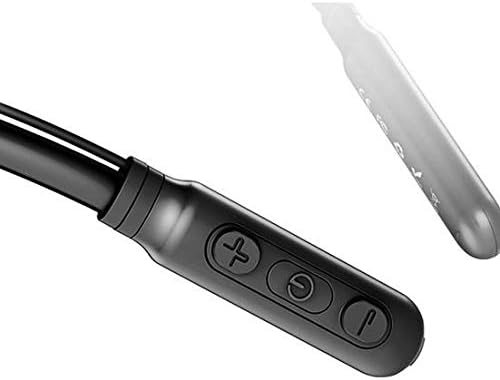
Image: Close-up of the Baseus Encok S16 earphone's inline control unit, showing the power/multi-function button, volume up, and volume down buttons.
| Тугма | Функсия |
|---|---|
| Тугмаи барқ (марказ) |
|
| Баланд бардоштани овоз (+) |
|
| Баланд шудани овоз (-) |
|
5.2 Пӯшидани гӯшмонакҳо
Place the neckband around your neck, ensuring the control unit is easily accessible. Insert the earbuds comfortably into your ears. Adjust the earphone line length using the sliding coils for a secure and comfortable fit.
6. Нигоҳдорӣ
- Гӯшмонакҳо ва дастгоҳи идоракуниро мунтазам бо матои нарм ва хушк тоза кунед.
- Avoid exposing the earphones to extreme temperatures, humidity, or corrosive liquids.
- Store the earphones in a cool, dry place when not in use. The magnetic earbuds can help prevent tangling during storage.
- Гӯшмонакҳоро худатон қисм-қисм ҷудо ё таъмир накунед, зеро ин кафолатро бекор мекунад.
7. Баррасии мушкилот
| Мушкилот | Ҳалли |
|---|---|
| Фаъол кардан мумкин нест | Ensure the earphones are fully charged. Press and hold the Power button for 3 seconds. |
| Бо дастгоҳ пайваст карда намешавад |
|
| Садо ва баландии овоз нест |
|
| Пайвастагии фосилавӣ |
|
8. Мушаххасоти
| Хусусият | Тафсилот |
|---|---|
| Бренд | Базеус |
| Рақами модел | FWP-E-S16 |
| Технологияи пайвастшавӣ | блутуз |
| Версияи Bluetooth | 4.0 (compatible with devices enabling Bluetooth 4.0) |
| Формаи форма | In Ear, Neck Hung |
| Навъи назорат | Voice Control, Touch (via buttons) |
| Иқтидори батарея | 120 мАч |
| Вазн | 30 грамм |
| Компонентҳои дохилшуда | Wireless Earphone, Charging Cable, User Manual, Warranty Card |
9. Кафолат ва дастгирӣ
This product comes with a Limited Warranty. Please refer to the included Warranty Card for detailed terms and conditions regarding coverage and duration.
For technical support or warranty claims, please contact your retailer or visit the official Baseus webсайт барои маълумоти хизматрасонӣ ба мизоҷон.
Рақами мушаххаси тиҷорати ҷаҳонӣ (GTIN): 06953156264489