
1. Муқаддима
The Browning Defender 850 (BTC-9D) is a high-performance trail camera designed for capturing wildlife images and videos. Featuring 20-megapixel resolution, Full HD video recording, and advanced infrared technology, it provides clear and detailed footage day or night. Its compact, camouflage design allows for discreet placement in various outdoor environments. This manual provides essential information for setting up, operating, and maintaining your camera.
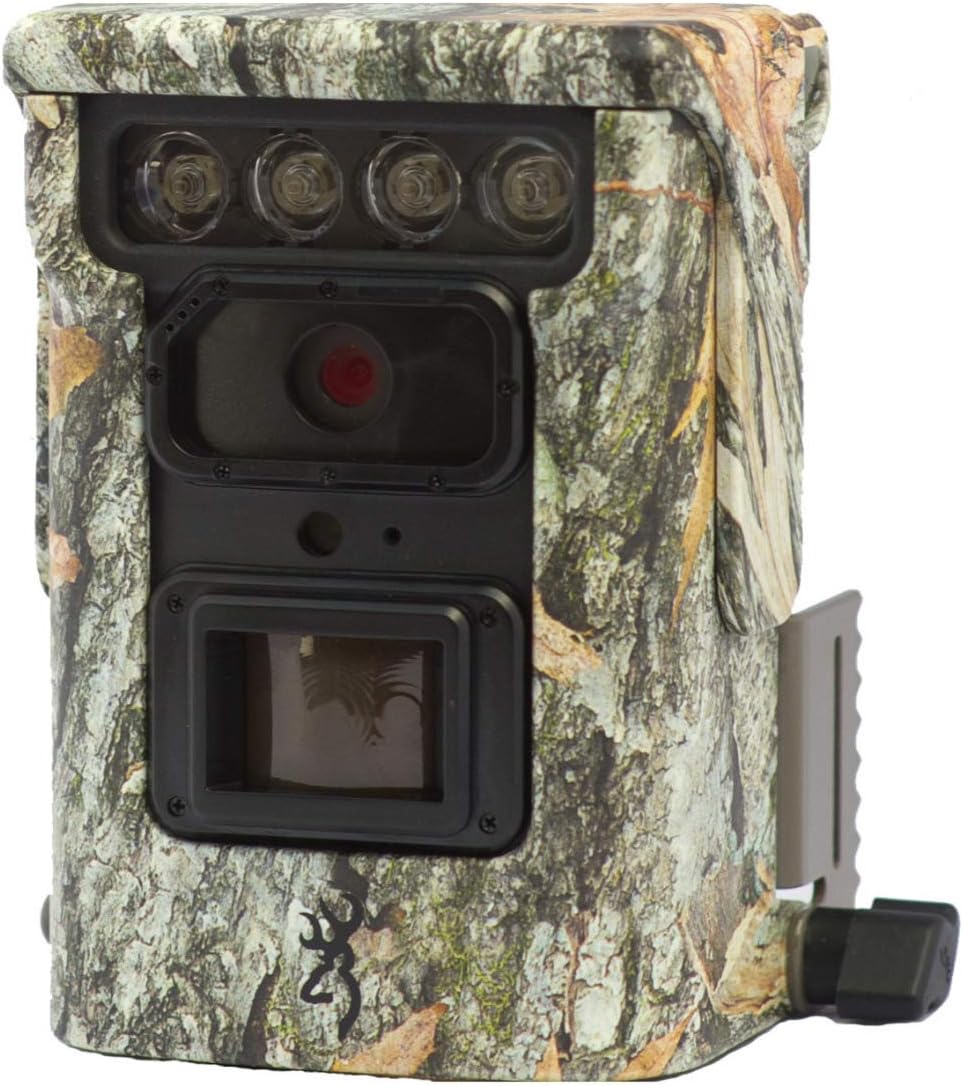
Тасвири 1.1: Пеш view of the Browning Defender 850 trail camera, showcasing its lens, IR emitters, and camouflage casing.
2. Мундариҷаи баста
Лутфан тасдиқ кунед, ки ҳамаи ҷузъҳои дар поён овардашуда ба бастаи шумо дохил карда шудаанд:
- 1x Browning Defender 850 Trail Camera (BTC-9D)
- 4x CR123 Lithium Batteries
- 1x 16GB SDXC SD Card
- CD with 'Time Lapse Viewer' Software
3. Хусусиятҳои асосӣ
The Browning Defender 850 is equipped with several advanced features to enhance your trail monitoring experience:
- Тасвири баландсифат: Captures still images at 20 Megapixels.
- Видеои Full HD: Records 1920x1080 Full HD videos with sound.
- Суръати тези триггер: Ultra-fast 0.4-second trigger speed to capture fast-moving subjects.
- Invisible IR Flash: Features 850 nm infrared flash for silent, nearly invisible night illumination up to 36 meters (120 feet).
- WiFi & Bluetooth Connectivity: Allows for wireless viewing and management of photos and videos via the Browning Trail Camera app on your smartphone or tablet.
- Multiple Capture Modes: Supports Photo, Video, Time-lapse, and Time-lapse Plus modes.
- Ҳолати таркиш: Captures 1-8 photos per trigger, with a fast burst option of 8 photos in 2 seconds.
- Қабати маълумот: Images and videos include time, date, camera ID, moon phase, and temperature stamps.
- Тарҳрезии компакт: Small and discreet camouflage housing.
4. Дастури насб
4.1. Насби батарея
The camera requires 4x CR123 Lithium batteries (included). To install:
- Қисми батареяро дар камера ҷойгир кунед.
- Дари хонаро кушоед.
- Insert the 4 CR123 batteries, ensuring correct polarity (+/-) as indicated inside the compartment.
- Дари қисмати батареяро бехатар пӯшед.
4.2. Ҷойгиркунии корти SD
A 16GB SDXC SD card is included. The camera supports up to 128GB SDXC cards. To insert:
- Locate the SD card slot, typically near the battery compartment.
- Insert the SD card with the label facing the front of the camera until it clicks into place.
- Барои хориҷ кардан, кортро оҳиста ба дарун пахш кунед, то он даме ки он берун ояд.
4.3. Ҷойгиркунии камера
The Defender 850 features a 1/4" tripod thread for versatile mounting options. It also comes with an integrated mounting bracket.
- Use the included strap or a compatible mounting accessory to secure the camera to a tree or post.
- Ensure the camera is stable and pointed towards the desired monitoring area.
- For optimal performance, position the camera at a height of approximately 1-2 meters (3-6 feet) from the ground.

Тасвир 4.1: Тараф view of the Browning Defender 850, illustrating the integrated mounting bracket.
5. Дастурҳои истифодабарӣ
5.1. Фурӯзон/хомӯшкунӣ
Once batteries and SD card are installed, the camera will enter a ready state. Most configuration and operation are managed through the Browning Trail Camera app.
5.2. Connecting via WiFi and Bluetooth
The Defender 850 utilizes WiFi and Bluetooth for seamless connectivity with your smartphone or tablet.
- Расмӣ зеркашӣ кунед Browning Trail Camera App аз мағозаи барномаҳои дастгоҳи худ (iOS ё Android).
- Боварӣ ҳосил кунед, ки Bluetooth дар смартфон / планшети шумо фаъол аст.
- Open the Browning Trail Camera App and follow the on-screen instructions to discover and connect to your BTC-9D camera via Bluetooth.
- Once connected via Bluetooth, the app will guide you to establish a WiFi connection for faster data transfer and live viewing (if supported).
5.3. Ҳолатҳо ва танзимоти камера
Through the Browning Trail Camera App, you can configure various settings:
- Ҳолати аксбардорӣ: Select between Photo, Video, Time-lapse, or Time-lapse Plus.
- Қарори акс: Set to 20 Megapixels for highest quality.
- Video Resolution & Length: Choose 1920x1080 Full HD. Adjust video length (5/10/20/30 seconds, 1/2 minutes).
- Trigger Delay/Image Delay: Set the delay between detections (5/10/20/30 seconds, 1/5/10/30/60 minutes).
- Burst Settings: Configure the number of photos taken per trigger (1-8 photos).
- Time-lapse Interval: Define the interval for time-lapse captures (5/10/20/30 seconds, 1/2/5/10/30/60 minutes).
- IR Flash Power: Adjust the infrared flash power (Power Save, Long Range, Fast Motion) based on your needs.
- Сана ва вақт: Synchronize the camera's clock with your device.
- ID камера: Assign a unique ID to your camera for easier identification if you operate multiple units.
5.4. Viewомӯзӣ ва идоракунӣ Files
Барнома ба шумо имкон медиҳад view captured images and videos directly on your device without retrieving the SD card.
- Browse thumbnails of captured media.
- Download selected photos or videos to your device.
- Нест кардани номатлуб fileс аз корти SD.
- For time-lapse sequences, use the included 'Time Lapse Viewer' software on a computer for optimal playback.
6. Нигоҳдорӣ
Proper maintenance ensures the longevity and optimal performance of your Browning Defender 850 camera.
- Тозакунӣ: Gently wipe the camera lens and IR emitters with a soft, lint-free cloth. Avoid abrasive materials or harsh chemicals. Keep the casing clean from dirt and debris.
- Нигоҳубини батарея: Replace batteries when the low battery indicator appears in the app. Remove batteries if the camera will be stored for an extended period to prevent leakage.
- Идоракунии корти SD: Periodically format the SD card using the camera's app or a computer to maintain optimal performance and prevent data corruption. Back up important files пеш аз формат кардан.
- Нигоҳдорӣ: Ҳангоми истифода нашудан, камераро дар ҷои хунук ва хушк дур аз нури бевоситаи офтоб ва ҳарорати аз ҳад зиёд нигоҳ доред.
7. Баррасии мушкилот
If you encounter issues with your Browning Defender 850, refer to the following common troubleshooting steps:
- Камера фаъол нест:
- Боварӣ ҳосил кунед, ки батареяҳо бо қутбҳои мувофиқ дуруст гузошта шудаанд.
- Replace with fresh CR123 Lithium batteries.
- Ягон тасвирҳо/видеоҳо гирифта нашудааст:
- Check if the SD card is properly inserted and not full.
- Ensure the SD card is formatted correctly (FAT32 or exFAT, depending on card size).
- Verify camera settings (e.g., trigger delay, operating schedule) via the app.
- Confirm the camera is in an active capture mode (Photo, Video, etc.).
- Сифати пасти тасвир/видео:
- Clean the camera lens and IR emitters.
- Ensure the camera is not too close or too far from the subject.
- Check IR flash settings for night captures.
- Cannot Connect via App (WiFi/Bluetooth):
- Ensure Bluetooth and WiFi are enabled on your smartphone/tablet.
- Make sure the camera is powered on and within range.
- Restart both the camera (by removing/reinserting batteries) and your smartphone/tablet.
- Update the Browning Trail Camera App to the latest version.
- Вақти гузашт Viewer Software Issues:
- Боварӣ ҳосил кунед, ки компютери шумо ба талаботи ҳадди ақали система барои нармафзор ҷавобгӯ аст.
- Reinstall the software from the provided CD.
If problems persist, contact Browning customer support for further assistance.
8. Мушаххасоти
Detailed technical specifications for the Browning Defender 850 (BTC-9D) trail camera:
| Хусусият | Мушаххасоти |
|---|---|
| Рақами модел | BTC-9D |
| Ҳалли тасвир | 20 мегапиксел |
| Ҳалли видео | 1920x1080 Full HD with Sound |
| Триггер Суръат | 0.4 сония |
| IR Flash Type | 850 nm Infrared (Invisible) |
| Диапазони дурахши IR | 36 метр (120 фут) |
| Манбаи нерӯ | 4x CR123A Lithium Batteries (included) |
| Қувваи беруна | Пайвасти 12 вольт |
| Дастгирии корти хотира | Up to 128GB SDXC (16GB included) |
| Пайвастшавӣ | WiFi, Bluetooth, USB, TV Out |
| Андозаҳо (HxWxD) | 127мм x 102мм x 64мм (тақрибан 5 x 4 x 2.5 инч) |
| Вазн | 453.59 g (approx. 1 lb) |
| Ранги | Камуфляж |
| Ҳарорати корӣ | Not specified, typical for outdoor use. |
9. Кафолат ва дастгирӣ
The Browning Defender 850 (BTC-9D) trail camera comes with a Кафолати 24-моҳа аз рӯзи харид, пӯшонидани камбудиҳои истеҳсолӣ.
For technical support, warranty claims, or further inquiries, please contact Browning customer service. Refer to the official Browning website or product packaging for the most up-to-date contact information.
Шарҳ: Ҳуҷҷати хариди худро барои тасдиқи кафолат нигоҳ доред.