
1. Муқаддима
The COUGAR GX-S 750W is an 80-PLUS Gold certified power supply unit (PSU) designed for reliable and efficient power delivery to your personal computer. Its compact design ensures compatibility with various PC cases, while advanced features like fan curve tuning and DC-DC power conversion technology contribute to stable voltage outputs and reduced noise levels. This manual provides essential information for the safe installation, operation, and maintenance of your GX-S 750W PSU.
2. Маълумот оид ба бехатарӣ
Please read and understand all safety instructions before installing or operating the power supply unit. Failure to comply with these instructions may result in electric shock, fire, or damage to the product and connected components.
- Always disconnect the AC power cord from the wall outlet before installing, removing, or cleaning the PSU.
- PSU-ро накушоед вasinг. Ҷилди баландtage components inside pose a risk of electric shock, even when the unit is unplugged.
- Ensure the PSU is properly grounded.
- This product is intended for indoor use only. Do not expose the PSU to water, moisture, or high humidity.
- Install the PSU in a well-ventilated area, away from heat sources and direct sunlight.
- Танҳо кабелҳоеро истифода баред, ки бо манбаи барқ муҷаҳҳаз шудаанд.
- Пайвасткунакҳоро маҷбур накунед. Пеш аз васл кардани кабелҳо, самти дурусти онҳоро санҷед.
3. Мундариҷаи баста
Боварӣ ҳосил кунед, ки ҳама ашё дар баста мавҷуд аст:
- COUGAR GX-S 750W Power Supply Unit
- Сими барқи AC
- Modular and Fixed Cables (24-pin ATX, 4+4-pin CPU, 6+2-pin PCIe, SATA, Molex)
- Виддаҳои васлкунӣ
- Дастури корбар
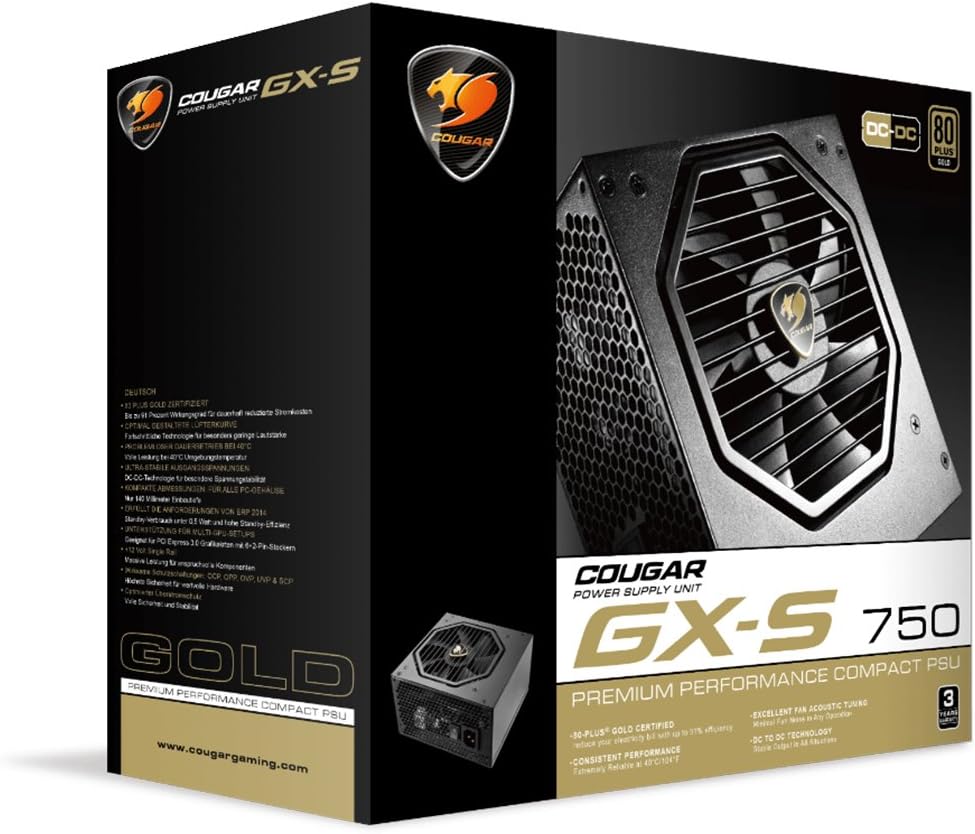
Image 3.1: COUGAR GX-S 750W Power Supply packaging. The image shows the retail box for the COUGAR GX-S 750W PSU, highlighting its 80 PLUS Gold certification and compact design.
4. Танзим ва насб
Follow these steps to install your COUGAR GX-S 750W Power Supply:
- Тайёрӣ: Боварӣ ҳосил кунед, ки компютери шумо пурра хомӯш карда шудааст ва аз васлаки деворӣ ҷудо карда шудааст. Парвандаи компютери худро кушоед, то ба майдони васлкунии PSU дастрасӣ пайдо кунед.
- Ҷойгиркунии PSU: Carefully place the GX-S 750W PSU into the designated PSU bay in your PC case. Align the screw holes on the PSU with those on the case. Secure the PSU using the provided mounting screws. Ensure the PSU fan is oriented correctly for optimal airflow (typically facing downwards if there's a vent, or upwards if not).
- Connecting Motherboard Power: Connect the 24-pin ATX power cable from the PSU to the corresponding 24-pin connector on your motherboard. Ensure it clicks securely into place.
- Connecting CPU Power: Connect the 4+4-pin EPS (CPU) power cable to the CPU power connector on your motherboard. This is usually located near the CPU socket. If your motherboard requires an 8-pin connector, combine the two 4-pin halves.
- Connecting PCIe Power (Graphics Cards): If you have a dedicated graphics card, connect the 6+2-pin PCIe power cables from the PSU to your graphics card(s). Some high-end graphics cards may require multiple PCIe power connectors.
- Connecting SATA/Molex Power: Connect SATA power cables to your storage drives (HDDs, SSDs) and optical drives. Use Molex connectors for any other peripherals that require them (e.g., case fans, fan controllers).
- Идоракунии кабелӣ: Route all cables neatly to improve airflow and aesthetics within your PC case. Use cable ties or straps if necessary.
- Санҷиши ниҳоӣ: Double-check all connections to ensure they are secure and correctly seated. Close your PC case.
- Фаъол: Сими барқи AC-ро ба PSU ва сипас ба васлаки деворӣ пайваст кунед. Калиди барқро дар қафои PSU ба ҳолати 'ON' гардонед. Шумо ҳоло метавонед компютери худро фаъол созед.

Image 4.1: COUGAR GX-S 750W Power Supply. This image displays the top-down view of the COUGAR GX-S 750W PSU, showing the fan grille, power input, and power switch, along with various cable connections.

Image 4.2: COUGAR GX-S 750W Power Supply side view. This image shows a side view of the COUGAR GX-S 750W PSU, illustrating the compact form factor and the exit point for fixed cables.
5. Дастурҳои истифодабарӣ
The COUGAR GX-S 750W PSU is designed for continuous operation within its specified limits. Once installed, its operation is largely automatic, managing power delivery to your system components.
- Самаранокӣ: The 80-PLUS Gold certification ensures high power efficiency (up to 91%), reducing electricity consumption and heat generation.
- хунуккунӣ: The PSU features an optimized fan curve tuning designed to minimize noise levels while maintaining effective cooling for internal components. The fan will adjust its speed based on the PSU's temperature and load.
- Қувваи устувор: DC-DC power conversion technology provides stable and reliable voltage outputs to all connected components, crucial for system stability and longevity.
- Шароити экологӣ: The PSU is designed to operate reliably even at ambient temperatures up to 40°C (104°F). Ensure adequate ventilation around your PC to prevent overheating.
6. Нигоҳдорӣ
Proper maintenance helps ensure the longevity and optimal performance of your COUGAR GX-S 750W PSU.
- Тоза кардани чанг: Periodically clean the exterior of the PSU and its fan grille to prevent dust buildup, which can impede airflow and reduce cooling efficiency. Use compressed air or a soft brush. Always disconnect the PSU from power before cleaning.
- Аз моеъ худдорӣ кунед: Never spray cleaning liquids directly onto the PSU. Use a slightly damp cloth for external cleaning only.
- Пайвастҳои кабелӣ: Occasionally check that all power cables are securely connected to the PSU and your components. Loose connections can lead to instability or damage.
7. Баррасии мушкилот
If you encounter issues with your COUGAR GX-S 750W PSU, refer to the following troubleshooting steps:
- Система фаъол намешавад:
- Боварӣ ҳосил кунед, ки сими барқи AC ҳам ба PSU ва ҳам ба васлаки деворӣ боэътимод пайваст карда шудааст.
- Санҷед, ки тугмаи барқ дар қафои PSU дар ҳолати "ON" аст.
- Verify that the 24-pin ATX and 4+4-pin CPU power cables are correctly connected to the motherboard.
- Васлаки девориро бо дастгоҳи дигар санҷед, то он ки қувваи барқ дорад, тасдиқ кунед.
- System Powers On but Shuts Down Immediately:
- This could indicate a short circuit or an overloaded component. Disconnect all non-essential components (e.g., extra drives, graphics card) and try powering on. Reconnect one by one to identify the problematic component.
- Ensure all components are compatible with the PSU's wattage.
- Садои аз ҳад зиёди мухлисон:
- Check for dust buildup on the fan grille and clean if necessary (after disconnecting power).
- Боварӣ ҳосил кунед, ки PSU боэътимод насб шудааст ва ба корпус ларзида намешавад.
- High fan speed can be normal under heavy system load. Monitor system temperatures.
- Ноустувории система / садамаҳо:
- Ensure all power connectors are firmly seated.
- Боварӣ ҳосил кунед, ки талаботи қувваи системаи шумо аз иқтидори 750 Вт-и PSU зиёд нест.
- This could also be related to other components (RAM, CPU, GPU). Test components individually if possible.
If these steps do not resolve the issue, please contact COUGAR customer support for further assistance.
8. Мушаххасоти
| Хусусият | Мушаххасоти |
|---|---|
| Бренд | КУГАР |
| Рақами модел | GXS750 |
| Натиҷаи Ватtage | 750 Ватт |
| Сертификати 80 PLUS | Тилло |
| Усули хунуккунӣ | Ҳаво |
| Андозаҳои ашё (L x W x H) | 5.9 x 3.4 x 5.5 инч (150 x 86 x 140 мм) |
| Вазни ашё | 88.15 унс (тақрибан 2.5 кг) |
| Дастгоҳҳои мувофиқ | Компютери шахсӣ |
| Навъи пайвасткунанда | PCI Express |
| UPC | 871520007974 |
9. Кафолат ва дастгирӣ
The COUGAR GX-S 750W Power Supply Unit comes with a Кафолати 5 сол аз рӯзи харид, пӯшонидани камбудиҳои мавод ва коркард дар ҳолати истифодаи муқаррарӣ.
For technical support, warranty claims, or further inquiries, please visit the official COUGAR webсайт ё шӯъбаи хидматрасонии муштариёни онҳо тамос гиред. Ҳуҷҷати хариди худро барои тасдиқи кафолат нигоҳ доред.
COUGAR Official Webсайт: www.cougargaming.com