
Муқаддима
The Plugable UD-3900H USB 3.0 Universal Docking Station offers flexible expandability for both modern and legacy laptops. This DisplayLink-powered docking station provides 12 port expansion, including dual video outputs, Gigabit Ethernet, audio, and six USB ports. It is designed for broad compatibility across Windows, macOS, and ChromeOS environments, making it ideal for mixed laptop setups in home offices, corporate environments, and educational settings.
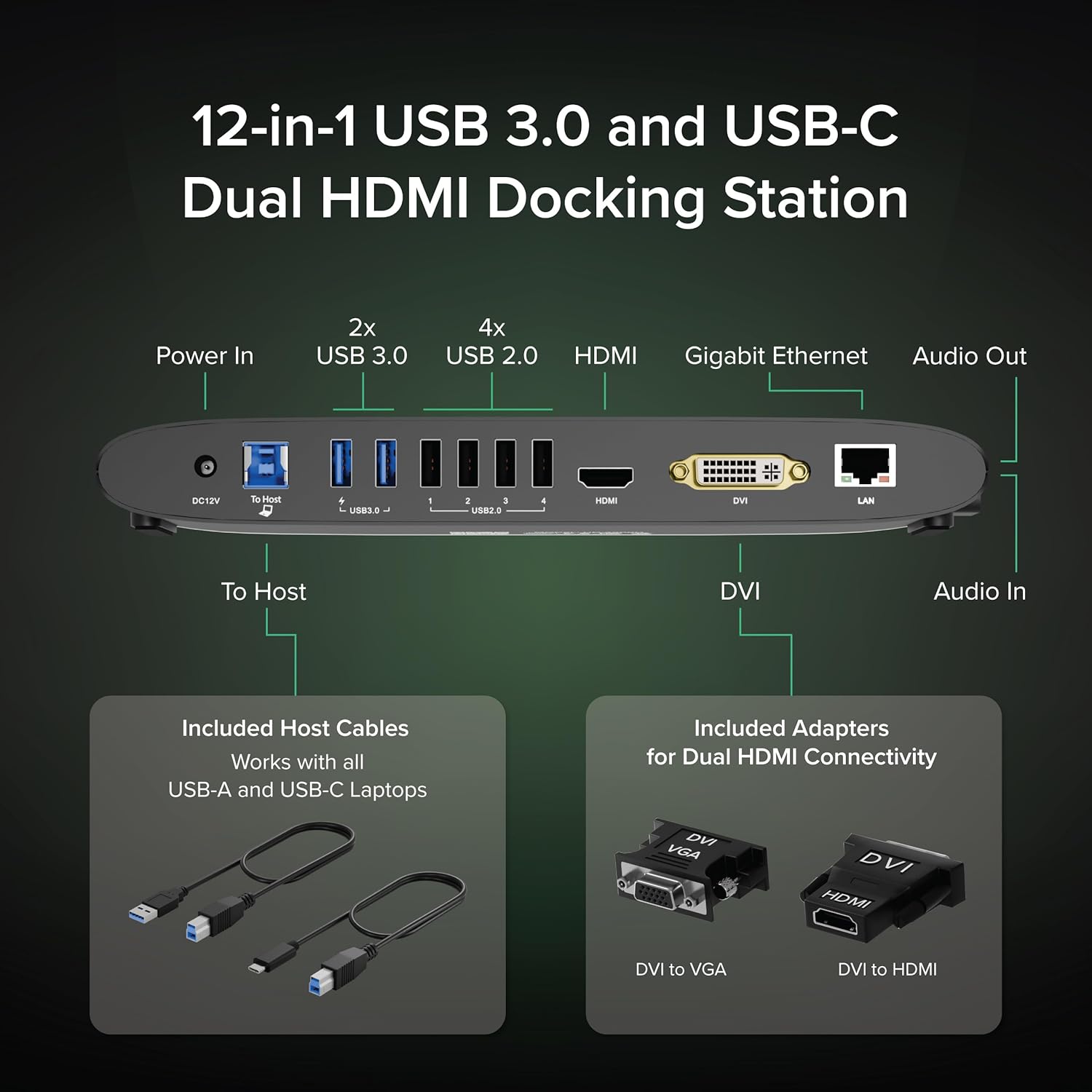
Image: The Plugable UD-3900H docking station, showcasinтарҳи паймон ва имконоти гуногуни пайвастшавӣ.
Ташкил кардан
1. Дар қуттӣ чӣ мавҷуд аст
Your Plugable UD-3900H package includes the following items:
- Plugable UD-3900H Docking Station
- Power Adapter (UL Listed)
- USB-B to USB-C Cable
- USB-B ба кабели USB-A
- DVI to HDMI Adapter
- DVI ба VGA адаптер
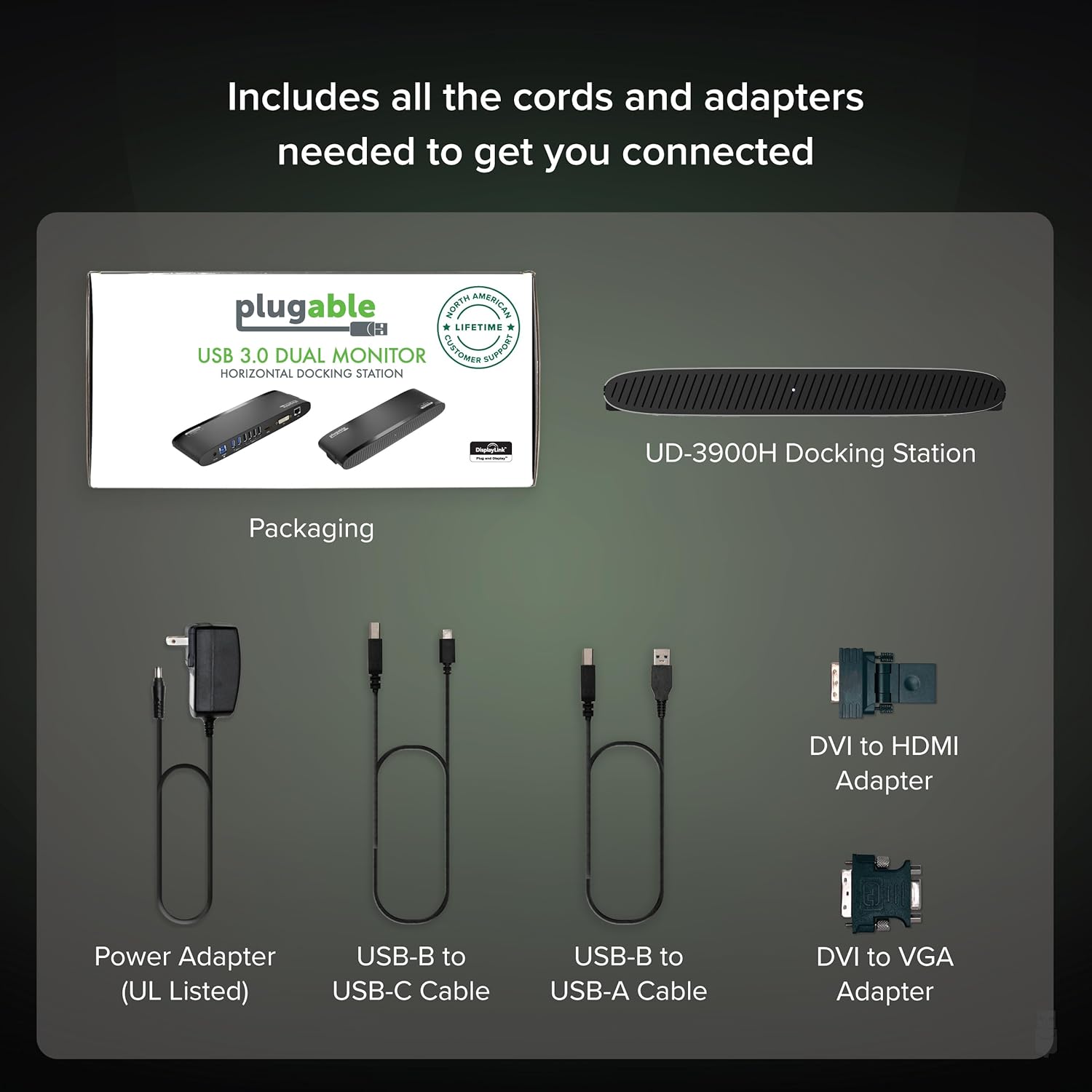
Image: All included components of the Plugable UD-3900H docking station: the unit, power adapter, USB cables, and DVI adapters.
2. Пайваст кардани док
- Пайваст кардани барқ: Plug the included power adapter into the DC 12V port on the back of the docking station, then plug it into a wall outlet.
- Пайвастшавӣ ба ноутбуки мизбон: Use either the USB-B to USB-C cable or the USB-B to USB-A cable to connect the docking station to your laptop's available USB port.
- Пайваст кардани намоишҳо:
- For the first display, use an HDMI cable to connect your monitor to the HDMI port on the docking station.
- For the second display, use the DVI port. You can connect a DVI monitor directly, or use the included DVI to HDMI adapter for an HDMI monitor, or the DVI to VGA adapter for a VGA monitor.
- Дастгоҳҳои перифериро пайваст кунед: Plug your USB devices (keyboard, mouse, printer, etc.) into the available USB 3.0 or USB 2.0 ports. Connect your Ethernet cable to the LAN port for a wired network connection. Connect headphones/speakers to the audio out port and a microphone to the audio in port.
Тасвир: Муфассал view of the rear ports on the UD-3900H, including power, host connection, USB 3.0, USB 2.0, HDMI, DVI, and LAN.
3. Насби ронанда
The Plugable UD-3900H utilizes DisplayLink technology for video output. Drivers are essential for proper functionality.
- Windows: Drivers are typically installed automatically via Windows Update when the dock is first connected to an internet-enabled system. If not, or for corporate deployments, manual installation is available.
- macOS: Manual driver installation is required. Download the DisplayLink Manager App from the Plugable website. Follow the on-screen instructions, including granting 'Screen Recording' permission in System Settings for display functionality.
- ChromeOS: No driver installation is typically needed.

Image: Step-by-step guide for installing the DisplayLink driver on macOS, highlighting the necessary security permissions.
Video: A Plugable Technologies video demonstrating how to install the DisplayLink Manager App, particularly useful if displays are not working.
Дастурҳои амалиётӣ
1. Танзимоти намоиш
The UD-3900H supports dual external displays up to 1920x1200 @ 60Hz. This includes systems like Apple M1, M2, M3, M4, or M5, which natively support only one external display.
- Намоиши ибтидоӣ: Connects via the HDMI port.
- Намоиши дуюм: Connects via the DVI port, which can be adapted to HDMI or VGA using the included adapters.
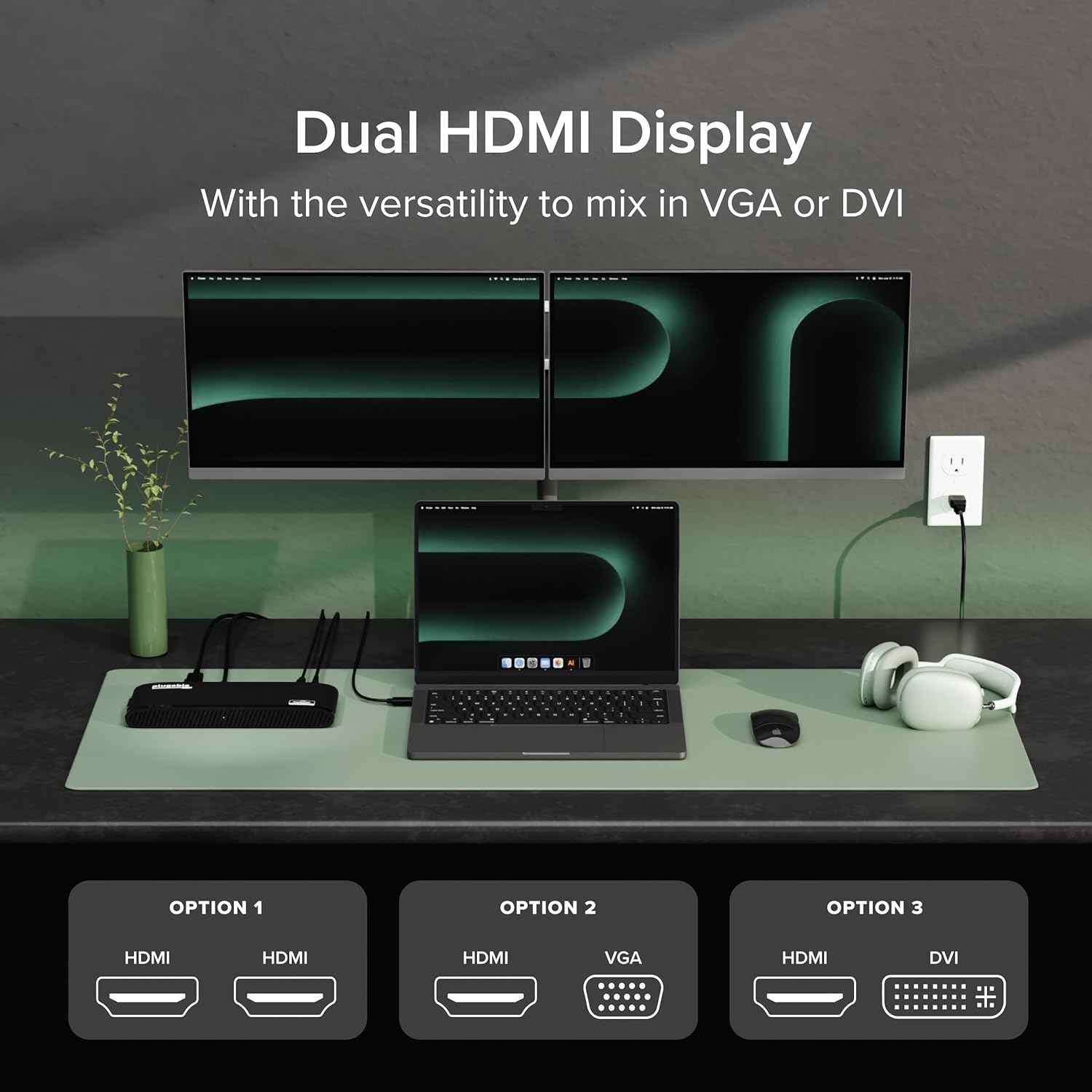
Image: A laptop connected to two external monitors, demonstrating the dual display capability of the docking station.

Image: Visual representation of the flexible dual display options, including HDMI, DVI, and VGA connections with adapters.
2. Портҳои USB
The docking station provides a total of six USB ports:
- 2 порти USB 3.0: For high-speed data transfer and charging compatible devices.
- 4 порти USB 2.0: Ideal for connecting keyboards, mice, and other standard peripherals.
3. Network and Audio
- Ethernet Gigabit: Provides a stable and fast wired network connection, superior to Wi-Fi for critical tasks.
- Ворид/баромади аудио: Dedicated 3.5mm jacks for connecting headphones/speakers and a microphone.
4. Мутобиқати универсалӣ
The UD-3900H is compatible with a wide range of operating systems and laptop types:
- Windows: 7 то 11.
- macOS: 10.14+ (Mojave and later), including Apple Silicon M1, M2, M3, M4, and M5 systems.
- ChromeOS: 100.x ё дертар.

Image: Icons representing Windows, macOS, and ChromeOS, indicating the broad operating system compatibility of the docking station.
Нигоҳдорӣ
To ensure the longevity and optimal performance of your Plugable UD-3900H docking station, follow these maintenance guidelines:
- Тозакунӣ: Use a soft, dry, lint-free cloth to gently wipe the exterior of the docking station. Avoid using liquid cleaners, aerosols, or solvents.
- Вентилятсия: Барои пешгирӣ аз гармшавии аз ҳад зиёд, боварӣ ҳосил кунед, ки истгоҳи васлкунӣ дар ҷои хуб вентилятсияшуда ҷойгир карда шудааст. Панҷараҳои вентилятсияро набандед.
- Нигоҳдорӣ: Вақте ки истгоҳи докро муддати тӯлонӣ истифода намебаред, онро дар ҷои хунук ва хушк, дур аз нури бевоситаи офтоб ва ҳарорати аз ҳад зиёд нигоҳ доред.
- Идоракунии кабелӣ: Avoid excessive bending or tugging on connected cables to prevent damage to the ports and cables themselves.
Мушкилкушо
Инҳоянд роҳҳои ҳалли мушкилоти умумӣ, ки шумо метавонед дучор шавед:
- Намоишҳо кор намекунанд:
- Ensure all display cables are securely connected to both the docking station and your monitors.
- Verify that the DisplayLink drivers are correctly installed. For macOS, this often requires manual installation and granting 'Screen Recording' permissions. Refer to the 'Driver Installation' section.
- Try restarting your computer and the docking station.
Video: A Plugable Technologies video demonstrating how to install the DisplayLink Manager App, particularly useful if displays are not working.
- No Laptop Charging: This docking station does not provide power delivery to charge your laptop. Your laptop will require its own power adapter connected directly.
- Intermittent USB Device Connection: Ensure the USB cable connecting the dock to your laptop is secure. Try connecting the device to a different USB port on the dock.
- Масъалаҳои пайвастшавӣ ба шабака: Check the Ethernet cable connection. Ensure your router/modem is functioning correctly.
- Мушкилоти аудио: Verify that your audio devices are correctly plugged into the audio jacks. Check your computer's sound settings to ensure the DisplayLink audio output is selected.

Image: A visual reminder that the Plugable UD-3900H docking station does not provide laptop charging.
Мушаххасоти
| Бренд | Васлшаванда |
| Рақами модел | UD-3900H |
| Мутобиқати системаи оператсионӣ | Chrome OS, Windows 10, Windows 11, Windows 8.1, macOS 10.14 Mojave+ |
| Вазни ашё | 11.4 унция |
| Андозаҳои маҳсулот (LxWxH) | 9.4" x 3.1" x 1.2" (23.88 x 7.87 x 3.05 см) |
| Ранги | Сиёҳ |
| Интерфейси сахтафзор | USB Type C, USB 3.0 |
| Ҳама портҳои USB | 6 (2x USB 3.0, 4x USB 2.0) |
| Натиҷаи видео | Dual HDMI (up to 1920x1200 @ 60Hz), DVI (with HDMI/VGA adapters) |
| Ethernet | Gigabit Ethernet (LAN) |
| Аудио | 3.5mm Audio In (Microphone), 3.5mm Audio Out (Headphones/Speakers) |
| Ватtage | 24 Вт |
Кафолат ва дастгирӣ
The Plugable UD-3900H is designed for reliability and comes with comprehensive support:
- Дастгирии якумрӣ: Includes lifetime support from Plugable's North American team of connectivity experts.
- Фарогирии 2-сола: Backed by a 2-year warranty, certified to exceed industry standards.
For further assistance, please visit the official Plugable webсайт ё бевосита бо дастаи дастгирии онҳо тамос гиред.