
1. Муқаддима
Thank you for choosing the Bearware Wireless Weather Station with Projection and Outdoor Sensor. This device provides accurate time via DCF radio signal, indoor and outdoor temperature readings, weather forecasts, and a convenient alarm function with projection. Please read this manual carefully to ensure proper use and optimal performance of your weather station.
2. Дастурамал оид ба бехатарӣ
- Дастгоҳи асосӣ ё сенсори берунаро дар ҳарорати аз ҳад зиёд, нури бевоситаи офтоб ё намӣ аз ҳад зиёд нагузоред.
- Дастгоҳро партофтан ё ба таъсири сахт дучор нашавед.
- Худатон кӯшиш накунед, ки дастгоҳро ба қисмҳо ҷудо кунед ё таъмир кунед. Ҳама хидматрасониро ба кормандони соҳибихтисос муроҷиат кунед.
- Батареяҳоро аз дастрасии кӯдакон дур нигоҳ доред. Батареяҳои истифодашударо мувофиқи қоидаҳои маҳаллӣ бомасъулият нобуд созед.
- Use only the provided power adapter or specified battery types.
3. Мундариҷаи баста
Лутфан бастаро барои ҷузъҳои зерин тафтиш кунед:
- Bearware Wireless Weather Station (Main Unit)
- Сенсори берунаи бесим
- DC 5V 1.2A адаптери барқ
- User Manual (Italian version available online)

Image: Contents of the Bearware Weather Station package, including the main unit, outdoor sensor, and power adapter.
4. Маҳсулот ба охир расидview
4.1 Шӯъбаи асосӣ (Пеш View)
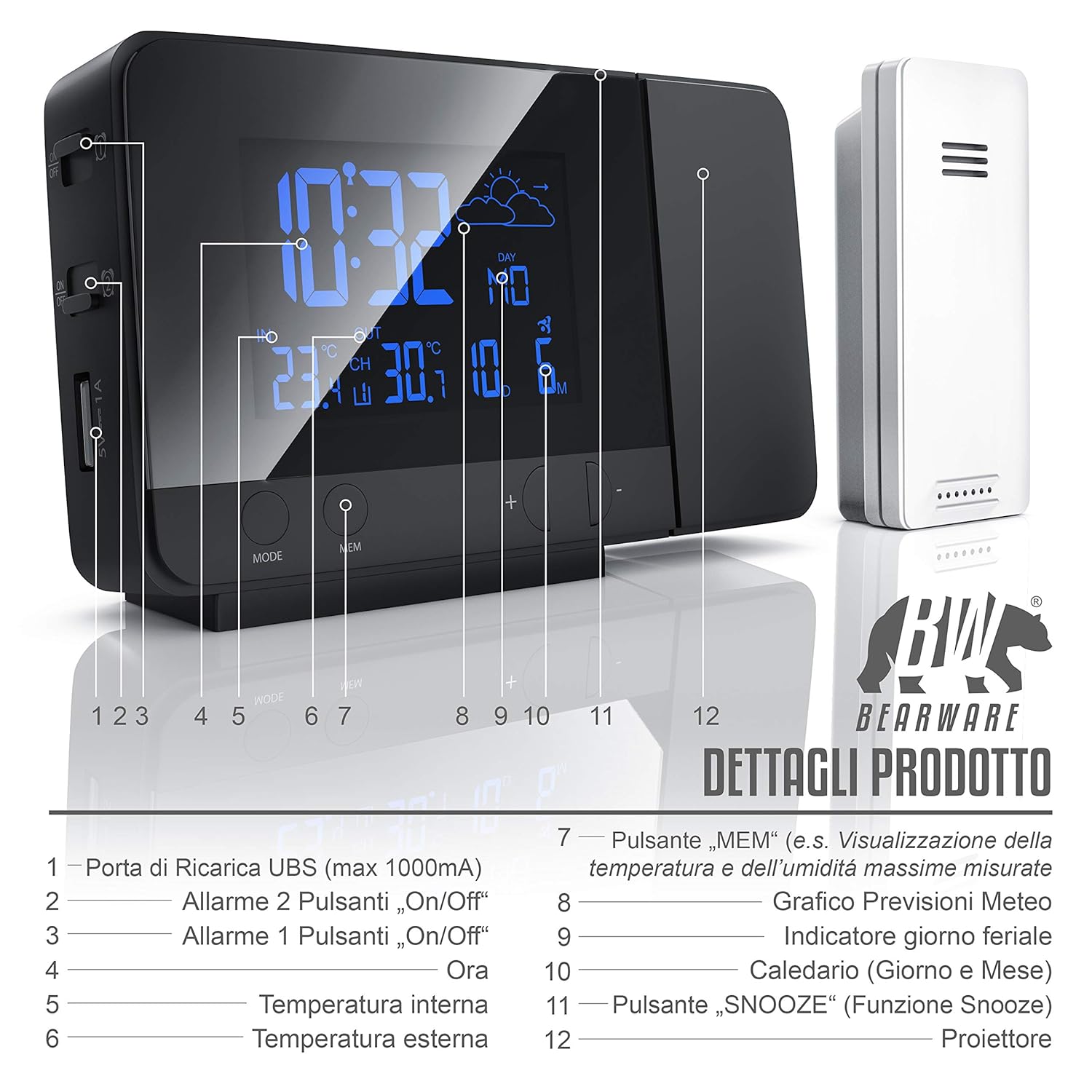
Тасвир: Пеш view of the weather station display and control buttons. Key elements include the time, indoor/outdoor temperature, weather forecast icon, day, and date. Buttons for MODE, MEM, and +/- are visible below the display.
- USB Charging Port (max 1000mA)
- Alarm 2 On/Off Button
- Alarm 1 On/Off Button
- Намоиши вақт
- Ҳарорат дар дохили бино
- Ҳарорати берунӣ
- "MEM" Button (e.g., Display Max/Min Temperature and Humidity)
- Weather Forecast Graph
- Нишондиҳандаи рӯзи ҳафта
- Calendar (Day and Month)
- "SNOOZE" Button (Snooze Function)
- Проектор
4.2 Main Unit (Side/Rear View)

Тасвир: паҳлӯ ва қафо view of the weather station, highlighting the control buttons and ports. This includes the snooze button, color change settings, alarm switches, battery compartment, and DC power input.
- SNOOZE Button (Stops and postpones alarm)
- Set Color Change in "Loop" (Automatic color cycle)
- Set Color Change in "Rainbow" (Specific color selection)
- Alarm 1 On/Off Switch
- Alarm 2 On/Off Switch
- Battery Compartment (2x 1.5V AAA Batteries)
- DC 5V 1.2A Power Adapter Input
4.3 Сенсори бесими берунӣ
The outdoor sensor measures external temperature and transmits data wirelessly to the main unit. It is protected against splashes (IPX4) and operates on 2x AAA 1.5V batteries.
5. Танзимот
5.1 Бо нерӯи барқ таъмин кардани агрегати асосӣ
- Қувваи батарея: Open the battery compartment on the rear of the main unit and insert 2 x 1.5V AAA batteries, observing polarity (+/-). This provides backup power in case of a power outage.
- Қувваи AC: Connect the included DC 5V 1.2A power adapter to the DC input port on the rear of the main unit, then plug it into a wall outlet. The display will light up.
5.2 Таъмин кардани сенсори беруна
- Open the battery compartment on the outdoor sensor and insert 2 x 1.5V AAA batteries, observing polarity (+/-).
- Place the outdoor sensor in a sheltered location, away from direct sunlight and rain, to ensure accurate readings. The maximum wireless range is approximately 10 meters.
5.3 Initial Synchronization (DCF Time & Sensor)
Upon initial power-up, the weather station will automatically attempt to synchronize with the DCF radio signal for accurate time and date. It will also search for the outdoor sensor.
- Place the main unit near a window for better DCF signal reception.
- The synchronization process may take several minutes or up to 6 hours.
- Once synchronized, the DCF icon will appear on the display.
- If the outdoor temperature does not appear, ensure the sensor batteries are correctly installed and it is within range. You may need to manually initiate a sensor search (refer to Operating Instructions).
6. Дастурҳои истифодабарӣ
6.1 Муқаррар кардани вақт ва сана
- In normal time display mode, press and hold the "MODE" button to enter time setting mode.
- Use the "+/-" buttons to adjust values. Press "MODE" to confirm and move to the next setting (e.g., 12/24 hour format, hour, minute, year, month, day, weekday language).
- The weekday display supports 7 different languages.
6.2 Танзимоти ҳушдор
The weather station features two independent alarms.
- Press the "MODE" button repeatedly to cycle through time, Alarm 1, and Alarm 2 display modes.
- To set an alarm, select Alarm 1 or Alarm 2 display, then press and hold the "MODE" button. Use "+/-" to adjust the hour and minute. Press "MODE" to confirm.
- Use the dedicated Alarm 1 On/Off and Alarm 2 On/Off switches on the side/rear of the unit to activate or deactivate each alarm.
- When an alarm sounds, press the "SNOOZE" button to activate the snooze function. The alarm will sound again after a few minutes. To stop the alarm completely, press any other button.
6.3 Display Settings (Backlight & Brightness)

Image: The weather station display showcasing its 8-color RGB backlight feature, with different colors like green, blue, red, and yellow.
- The display features an 8-color RGB backlight (green, turquoise, blue, purple, white, red, orange, yellow).
- Use the "Set Color Change in 'Loop'" switch on the side/rear to enable automatic color cycling.
- Use the "Set Color Change in 'Rainbow'" switch to manually select a specific color.
- Brightness can be adjusted (details not specified, typically via a dedicated button or holding a button).
6.4 Temperature Display & Min/Max Values
- The display shows both indoor and outdoor temperatures.
- Press the "MEM" button to view the minimum and maximum recorded temperatures. Press again to cycle through min/max indoor and outdoor temperatures.
- To switch between Celsius (°C) and Fahrenheit (°F), locate the °C/°F switch (often on the back or via a button combination).
6.5 Обу ҳаво
The weather station provides a weather forecast for approximately the next 12 hours based on changes in atmospheric pressure. Icons on the display will indicate sunny, partly cloudy, cloudy, rainy, or snowy conditions.
6.6 Функсияи пуркунии USB

Image: A smartphone connected to the USB charging port on the side of the Bearware Weather Station, illustrating its charging capability.
The main unit includes a USB Type A female port (max 1000mA output) for charging external devices like smartphones. Connect your device's USB charging cable to this port.
6.7 Функсияи проексия
The integrated projector can display the time and temperature onto a wall or ceiling. The projection angle can be adjusted. The projection is typically red for clear visibility in low light conditions.
7. Нигоҳдорӣ
- Тозакунӣ: Wipe the unit and sensor with a soft, dry cloth. Do not use abrasive cleaners or solvents.
- Иваз кардани батарея: Replace batteries in both the main unit and outdoor sensor when the low battery indicator appears on the display or when performance degrades. Ensure correct battery type (AAA) and polarity.
- Нигоҳдорӣ: Агар дастгоҳ барои муддати тӯлонӣ нигоҳ дошта шавад, ҳамаи батареяҳоро хориҷ кунед, то аз шоридан пешгирӣ кунад.
8. Баррасии мушкилот
| Мушкилот | Сабаби эҳтимолӣ | Ҳалли |
|---|---|---|
| Дисплей нест / Дастгоҳ фаъол нест | No power from adapter; dead batteries; incorrect battery polarity. | Check power adapter connection; replace batteries; ensure correct battery orientation. |
| Ҳарорати берунӣ нишон дода намешавад | Outdoor sensor out of range; dead sensor batteries; interference. | Move sensor closer to main unit; replace sensor batteries; try repositioning both units. |
| Вақти DCF ҳамоҳанг намешавад | Қабули сигнали суст; халал. | Move unit near a window; avoid electronic devices that may cause interference; allow more time for synchronization. |
| Хонишҳои нодурусти ҳарорат | Sensor exposed to direct sunlight or heat sources; poor ventilation. | Сенсорро ба ҷои сояафкан ва хуб вентилятсияшуда ҷойгир кунед. |
| Проексия норавшан ё норавшан аст | Incorrect focus; projection surface too far or uneven. | Adjust the projector's focus (if available); ensure projection surface is flat and within optimal distance. |
9. Мушаххасоти

Тасвир: боло ва пеш view of the Bearware Weather Station with key dimensions: 137mm length, 85mm height, and 33mm depth.
- Рақами модел: 302688
- Андозаҳо (Воҳиди асосӣ): 13.7 x 3.3 x 8.5 см (Л x В х Х)
- Вазн (Воҳиди асосӣ): 168 грамм
- Ранги: Сиёҳ (мат)
- Мавод: Пластмасса
- Power Supply (Main Unit): 2 x 1.5V AAA batteries or DC 5V 1.2A power adapter (included)
- Power Supply (Outdoor Sensor): 2 х 1.5В батареяҳои ААА
- Диапазони ҳарорати дарунӣ: -9.9 °C (14 °F) то 50 °C (122 °F)
- Диапазони ҳарорати берунӣ: -40 °C (-40 °F) то 70 °C (158 °F)
- Дурустии ҳарорат: 1 °C
- Технологияи сенсор: Бесимӣ
- Натиҷаи пуркунии USB: Max. 1000 mA (USB Type A female)
- Нури паси намоиш: 8-color RGB (green, turquoise, blue, purple, white, red, orange, yellow)
- Формати вақт: 12/24 соат
- Хусусиятҳои махсус: DCF radio-controlled time, 2 adjustable alarms, Snooze function, Min/Max temperature display, Weather trend function, USB charging port, Time projection on ceiling/wall.
10. Кафолат ва дастгирӣ
This Bearware product comes with a 24-month warranty from the date of purchase. In case of any issues or for technical support, please contact Bearware customer service. Please refer to the contact information provided with your purchase or on the official Bearware webсайт.