
Муқаддима
Thank you for choosing the MARVO KG925G Mechanical Gaming Keyboard. This manual provides essential information for setting up, operating, maintaining, and troubleshooting your new keyboard. Please read this manual carefully before use to ensure optimal performance and longevity of your device.
Мундариҷаи баста
Боварӣ ҳосил кунед, ки ҳама ашё дар баста мавҷуд аст:
- MARVO KG925G Mechanical Gaming Keyboard
- Дастури корбар (ин ҳуҷҷат)
Ташкил кардан
Талаботи система
- Системаи оператсионӣ: Windows 8 ё дертар
- Порти USB 2.0 дастрас
Пайваст кардани клавиатура
- Дар компютери шумо порти дастраси USB 2.0-ро ҷойгир кунед.
- Plug the USB connector of the MARVO KG925G keyboard into the USB port.
- Системаи оператсионӣ драйверҳои заруриро ба таври худкор муайян ва насб мекунад. Ин раванд метавонад чанд лаҳзаро дар бар гирад.
- Once the drivers are installed, the keyboard's backlighting will illuminate, indicating it is ready for use.
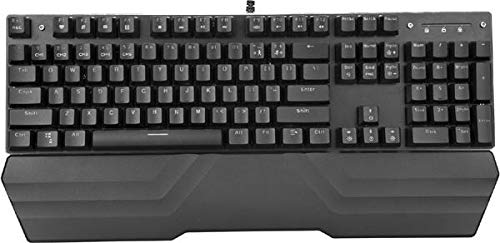
Image: The MARVO KG925G Mechanical Gaming Keyboard with its USB cable connected, ready for use. The keyboard features a wrist rest and illuminated keys.
Дастурҳои амалиётӣ
Функсияҳои асосии клавиатура
The MARVO KG925G functions as a standard QWERTY keyboard for typing and general computer use.
Калидҳои мултимедия
The keyboard includes dedicated multimedia functions, typically accessed via the Fn key combined with the F-keys (F1-F12). Refer to the keycap legends for specific functions such as volume control, media playback, and launching applications.
- Fn + F1-F12: Access various multimedia and system functions.
Назорати равшании паси
The MARVO KG925G features customizable backlighting. Specific key combinations are used to change lighting modes, brightness, and speed. Consult the keyboard's keycap legends or the manufacturer's website for detailed instructions on advanced lighting customization.
- Усулҳои равшанӣ: Typically cycled using a dedicated key or Fn + a specific key (e.g., Scroll Lock, Pause Break, or a dedicated lighting key).
- Танзими равшанӣ: Often controlled by Fn + Up/Down arrow keys.
Нигоҳдорӣ ва нигоҳубин
Нигоҳубини дуруст кори дарозмуддат ва самаранокии клавиатураи шуморо кафолат медиҳад.
- Тозакунӣ: Use a soft, dry cloth to wipe the keyboard surface. For deeper cleaning, use a can of compressed air to remove dust and debris from between the keycaps. Avoid using harsh chemicals or abrasive materials.
- Рехтан: In case of liquid spills, immediately unplug the keyboard from your computer. Turn it upside down to drain any liquid and allow it to dry completely for at least 24-48 hours before reconnecting. Do not attempt to use the keyboard while it is wet.
- Нигоҳдорӣ: Клавиатураро дар ҷои хунук ва хушк, дур аз нури бевоситаи офтоб ва ҳарорати аз ҳад зиёд нигоҳ доред.
Мушкилкушо
If you encounter issues with your MARVO KG925G keyboard, refer to the following common solutions:
| Мушкилот | Ҳалли имконпазир |
|---|---|
| Клавиатура ҷавоб намедиҳад. |
|
| Backlighting is not working. |
|
| Keys are not registering correctly. |
|
Мушаххасоти
- Модели: KG925G
- Бренд: МАРВО
- Пайвастшавӣ: USB 2.0
- Навъи клавиатура: Клавиатураи бозикунии механикӣ
- Вижагиҳо: Illumination, Wrist Rest, Multimedia Keys
- OS мувофиқ: Windows 8 ва боло
- Андозаҳо: Тақрибан 47.5 x 18.7 x 8.4 см (18.7 x 7.4 x 3.3 инч)
Кафолат ва дастгирӣ
For warranty information and technical support, please refer to the warranty card included with your product or visit the official MARVO webсайт. Барои даъвоҳои кафолат далели хариди худро нигоҳ доред.