
Муқаддима
Thank you for choosing the NEC NP-MC372X Portable Projector. This manual provides essential information for the safe and efficient use of your projector. Please read these instructions thoroughly before operating the device and retain them for future reference. The NEC NP-MC372X is an XGA LCD projector designed for clear and bright presentations, offering 3700 lumens of brightness and a native resolution of 1024x768.
Маълумот оид ба бехатарӣ
Барои пешгирӣ аз сӯхтор, зарбаи барқӣ ё ҷароҳат, ҳамеша чораҳои бехатарии зеринро риоя кунед:
- Кушодани вентилятсияро манъ накунед. Барои ҷараёни дурусти ҳаво дар атрофи проектор фазои мувофиқро таъмин кунед.
- Оё бевосита ба линзаи проектор нигоҳ накунед, вақте ки лamp фурӯзон аст, зеро нури дурахшон метавонад ба чашм зарар расонад.
- Проекторро дар болои ароба, стенд ё мизи ноустувор нагузоред.
- Unplug the projector from the power outlet before cleaning. Use a dry cloth for cleaning.
- Ҳама хидматрасониро ба кормандони соҳибихтисос муроҷиат кунед.
Мундариҷаи баста
Боварӣ ҳосил кунед, ки ҳамаи ҷузъҳои дар поён овардашуда ба бастаи шумо дохил карда шудаанд:
- NEC NP-MC372X Portable Projector
- Кабели барқ
- Кабели HDMI
- Назорати дурдаст
Маҳсулот ба охир расидview
The NEC NP-MC372X is a versatile projector featuring an LCD display, 1024x768 native resolution, and 3700 lumens brightness. It includes a 1.2x zoom lens and offers a lamp life of up to 10,000 hours. Connectivity options include Dual HDMI, VGA, and USB.
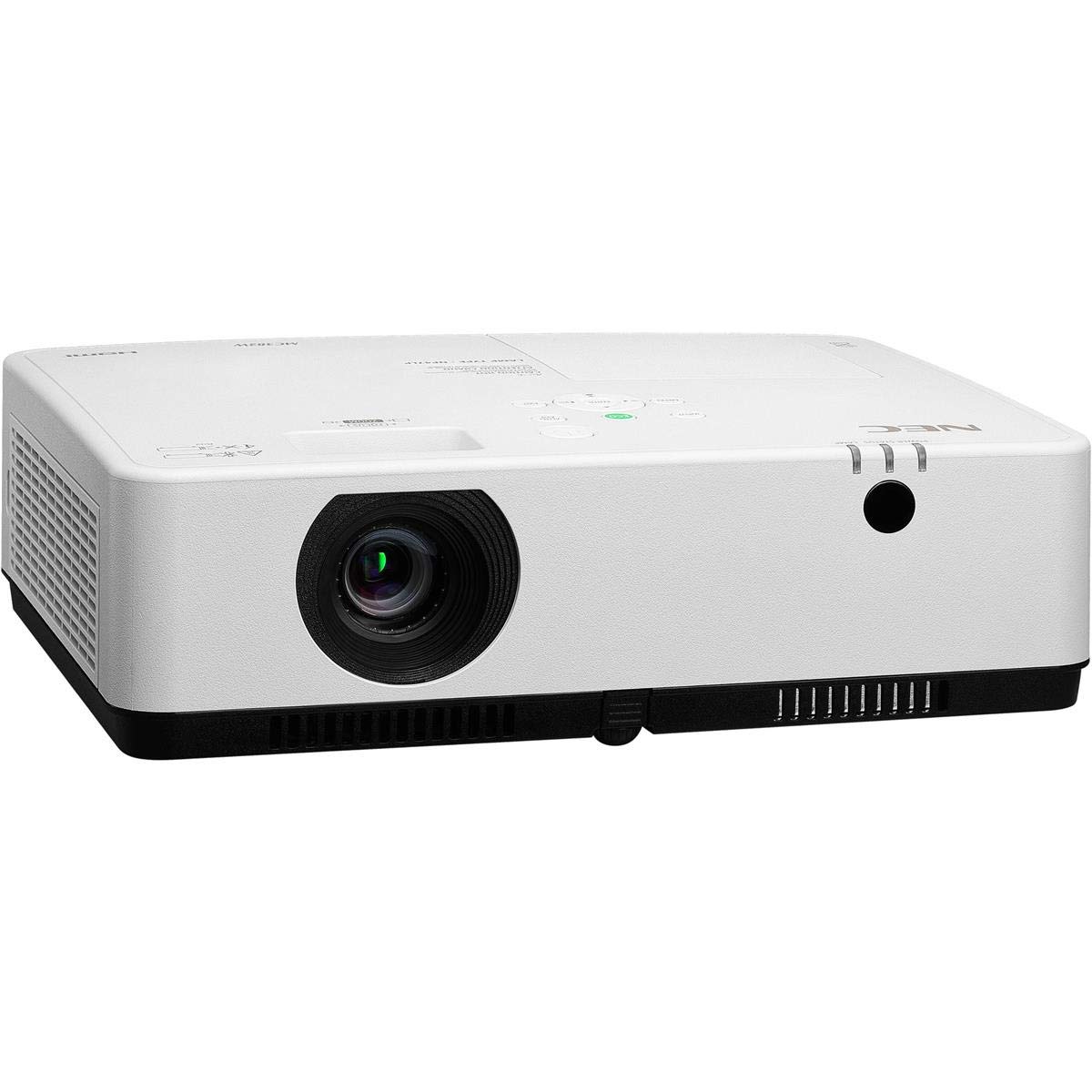
Расми 1: Пеш ва боло view of the NEC NP-MC372X Portable Projector, showing the lens and control panel.

Расми 2: Пеш view of the projector, highlighting the projection lens.

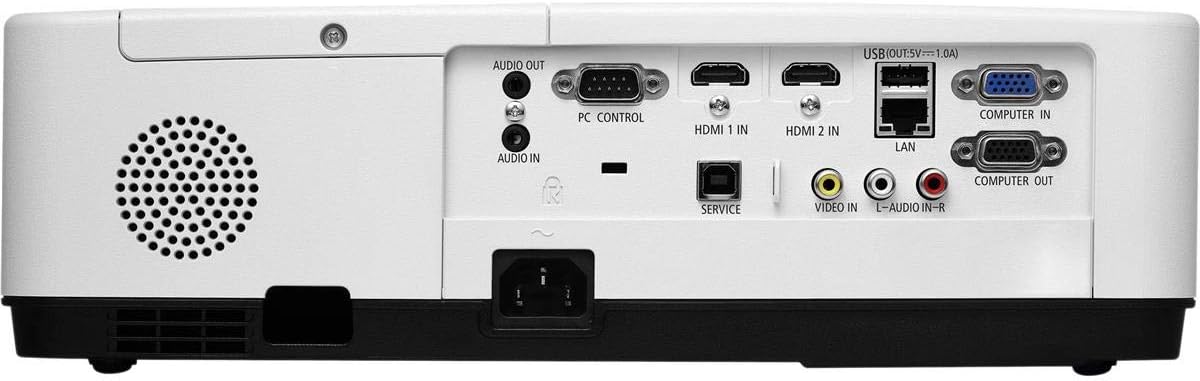
Расми 3: Қафо view of the projector, displaying the various input and output ports including HDMI, VGA, USB, LAN, and audio connections.
Расми 4: Тараф view of the projector, showing the ventilation grille for heat dissipation.
Ташкил кардан
Ҷойгиркунии ҷисмонӣ
Place the projector on a stable, flat surface or mount it securely. Ensure the projector is positioned at an appropriate distance from the screen to achieve the desired image size. Maintain clear space around the projector for ventilation.
Пайваст кардани дастгоҳҳо
Refer to Figure 3 for port locations. Connect your source device (e.g., laptop, gaming console) to the projector using one of the following methods:
- HDMI: Use an HDMI cable to connect to either HDMI 1 IN or HDMI 2 IN.
- VGA: Use a VGA cable to connect to COMPUTER IN. For audio, connect a 3.5mm audio cable to AUDIO IN.
- USB: Connect a USB device to the USB port for direct media playback.
- LAN: Connect an Ethernet cable to the LAN port for network connectivity.
Фурӯзон/хомӯшкунӣ
1. Connect the power cable to the projector and a power outlet.
2. Press the power button on the projector or the remote control to turn on the projector.
3. To turn off, press the power button again. Confirm shutdown when prompted.
Дастурҳои амалиётӣ
Basic Operation with Remote Control
Use the included remote control to navigate menus, select input sources, and adjust settings. Point the remote control towards the projector's remote sensor.
Интихоби манбаи вуруд
Press the 'Input' button on the remote control or projector control panel to cycle through available input sources (HDMI 1, HDMI 2, Computer In, USB).
Танзими тасвир
- Фокус: Ҳалқаи фокусро дар линза то он даме ки тасвир тез бошад, гардонед.
- Масштаб: Use the zoom ring on the lens to adjust the image size without moving the projector. The projector features a 1.2x optical zoom.
- Ислоҳи санги калидӣ: If the image appears trapezoidal, use the keystone correction function in the projector menu to square the image.
Хусусиятҳои махсус
- Multi Presenter: This feature allows multiple users to connect and display content wirelessly from their devices. Refer to the on-screen menu for setup instructions.
- USB Viewer Capability: Insert a USB drive into the USB port to directly view photos, videos, and documents without a connected computer.
- Сарлавҳаи пӯшида: Enable closed captioning for compatible video sources through the projector's menu settings.
Нигоҳдорӣ
Lamp Иваз кардан
Проектор Лamp has an operating life of up to 10,000 hours. When the lamp reaches the end of its life, a warning message will appear. Consult a qualified service technician for lamp replacement to ensure proper installation and safety.
Тозакунӣ
- берунӣ: Проекторро тоза кунед вasing бо матои мулоим, хушк ва бе лин. Барои аломатҳои якрав, каме гampдар матои об.
- Линза: Use a professional lens cleaning kit or a soft, dry cloth specifically designed for optical lenses. Avoid harsh chemicals.
- Филтри ҳаво: Филтри ҳаворо мунтазам тафтиш ва тоза кунед, то ҷамъшавии чангро пешгирӣ кунед, ки метавонад ба кор ва л таъсир расонадamp life. Refer to the projector's on-screen menu for filter usage time.
Мушкилкушо
Агар шумо бо мушкилот дучор шавед, пеш аз тамос бо дастгирӣ роҳҳои ҳалли зеринро санҷед:
- Тасвир нест: Ensure all cables are securely connected. Verify the correct input source is selected. Check if the lens cap is removed.
- Овоз нест: Confirm audio cables are connected (if applicable). Adjust volume on both the projector and the source device.
- Идоракунии дурдаст кор намекунад: Check the batteries in the remote. Ensure there are no obstructions between the remote and the projector's sensor.
- Тасвир норавшан аст: Adjust the focus ring on the lens. Ensure the projection surface is flat.
- Огоҳӣ аз ҳад зиёд гармӣ: Ensure ventilation openings are not blocked. Clean the air filter if necessary.
Мушаххасоти
| Хусусият | Мушаххасоти |
|---|---|
| Бренд | NEC |
| Номи модел | MC372X |
| Рақами модел | NP-MC372X |
| Навъи намоиш | LCD |
| Қарори ватанӣ | 1024 x 768 (XGA) |
| Равшанӣ | 3700 люмен |
| Технологияи пайвастшавӣ | HDMI, USB, VGA, LAN |
| Масштаб | 1.2x оптикӣ |
| Ҳаёти кори манбаи нур | 10,000 соат |
| Ватtage | 267 watts (typical 120V) |
| Навъи назораткунанда | Назорати дурдаст |
| Вазни ашё | 7.1 фунт |
| Ҷилдиtage | 120 вольт |
| UPC | 805736070248 |
Кафолат ва дастгирӣ
The NEC NP-MC372X Portable Projector comes with a Кафолати маҳдуди 3 сол. For warranty claims or technical support, please contact NEC customer service. You can find contact information on the official NEC webсайт ё тавассути фурӯшандаи маҳсулоти шумо.