
Муқаддима
The MUSKY DY28 is a versatile device combining a Bluetooth speaker, smart touch lamp, alarm clock, and MP3 player into a single unit. This manual provides instructions for its setup, operation, and maintenance to ensure optimal performance.
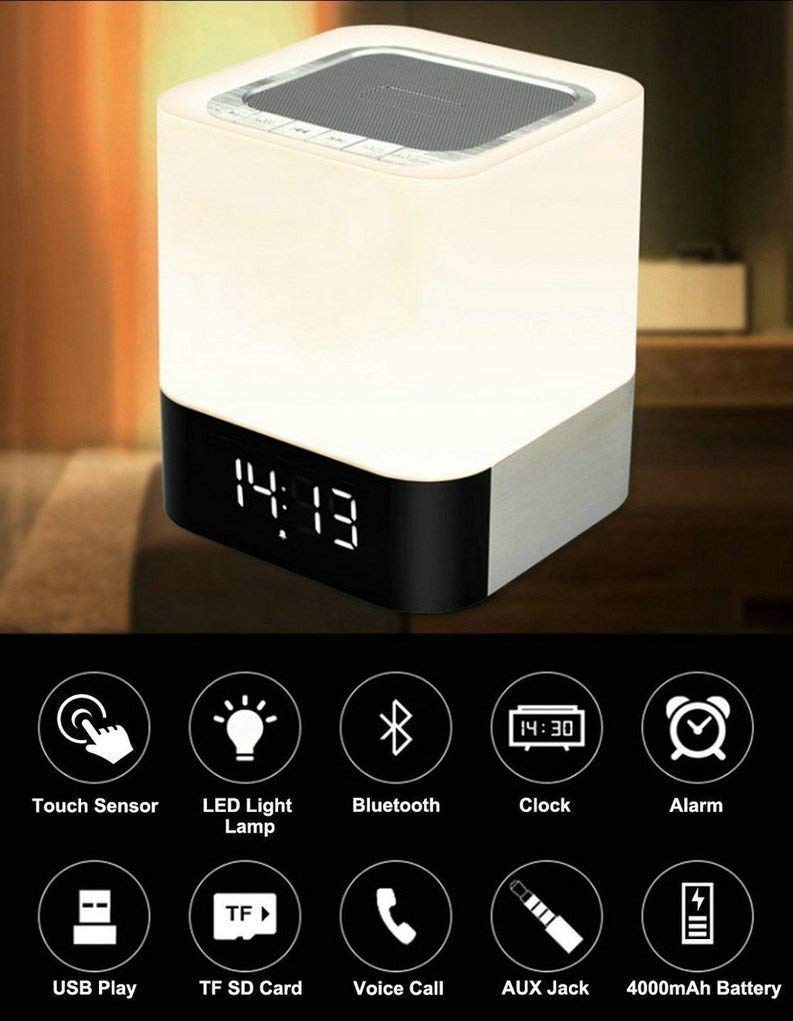
Image: The MUSKY DY28 device, showcasing its integrated clock display and touch-sensitive light panel.
Мундариҷаи қуттӣ
- MUSKY DY28 Bluetooth Speaker
- Дастури корбар
- Кабели пуркунандаи барқ
Хусусиятҳои маҳсулот
- Бисёрфунксионалӣ: Bluetooth speaker, smart touch lamp, alarm clock, and MP3 player.
- Bluetooth 4.0: Easy and stable connection with Bluetooth-enabled devices.
- Нури танзимшавандаи LED: Warm LED light with adjustable brightness (Max 20 Lumen) via touch sensor.
- Digital Clock & Alarm: Big digit 12/24H alarm clock with calendar, alarm, and sleep mode functions.
- Усулҳои чанд бозикунии: Supports MP3 playback via USB, micro TF/SD Card, and 3.5mm AUX input.
- Сифати аудио: 5W single acoustic driver with enhanced passive low-frequency radiator for clear sound and solid bass.
- Ҳаёти батареяи дароз: Built-in 4000mAh battery provides up to 15 hours of lighting or 9 hours of music playback (depending on usage).
- Зангҳои ройгон: Integrated microphone for answering calls.
Ташкил кардан
1. Пуркунии дастгоҳ
Before first use, fully charge the speaker. Connect the provided USB charging cable to the charging port on the device and to a standard USB power adapter (not included) or a computer's USB port. The charging indicator will show the charging status.
2. Фаъол/хомӯш
Locate the Power On/Off switch on the device. Slide the switch to the 'ON' position to power on the speaker. Slide it to 'OFF' to power off.
3. Ҷуфти Bluetooth
- Ensure the speaker is powered on and in Bluetooth mode (indicated by a flashing blue light or voice prompt).
- Дар дастгоҳи мобилии худ Bluetooth-ро фаъол созед ва дастгоҳҳои дастрасро ҷустуҷӯ кунед.
- Select 'MUSKY DY28' from the list of devices.
- Once paired, the speaker will indicate a successful connection (e.g., solid blue light or voice prompt).
4. Танзими вақт ва ҳушдор
Refer to the detailed control diagram for button locations. Use the 'Mode' button to cycle through functions until the clock setting is displayed. Use the 'Previous' and 'Next' buttons to adjust hours and minutes, and the 'Play/Pause' button to confirm. For alarm settings, follow a similar procedure, activating the alarm function and setting the desired time.

Тасвир: Муфассал view of the MUSKY DY28's control panel, highlighting buttons for power, charging, audio inputs, playback, volume, and the touch sensor.
Дастурҳои амалиётӣ
1. Бозикунии мусиқӣ
The DY28 supports multiple music sources:
- Усули Bluetooth: After successful pairing, play music from your connected device. Use the speaker's 'Play/Pause', 'Previous', and 'Next' buttons to control playback.
- Вуруди USB: Диски флеши USB-ро, ки дорои MP3 мебошад, ҷойгир кунед fileс ба порти USB. Баландгӯяк ба таври худкор ба ҳолати USB мегузарад ва навозишро оғоз мекунад.
- Micro TF/SD Card: Insert a micro TF/SD card with MP3 files into the Micro SD Slot. The speaker will automatically switch to TF/SD card mode and play music.
- Вуруди AUX: Connect an external audio device using a 3.5mm AUX cable to the AUX port. The speaker will switch to AUX mode. Control playback from your external device.

Image: Visual guide demonstrating the three primary ways to play music on the DY28: via Bluetooth, Micro SD card, and USB drive.
2. Light Operation
The top panel of the speaker features a touch sensor for controlling the LED light. Tap the touch sensor to turn the light on/off and cycle through different brightness levels. The light offers a warm glow suitable for various environments.

Image: The MUSKY DY28 speaker illuminated, serving as a night light with its digital clock display visible in a low-light environment.
3. Вазифаҳои соати зангдор
Once the alarm is set, it will sound at the designated time. To snooze, tap the touch sensor. To turn off the alarm, press the 'Mode' button or power off the device. The sleep mode feature allows the lamp and speaker to automatically turn off after a set period.
4. Зангҳои бе даст
When a call comes in while connected via Bluetooth, the speaker will ring. Press the 'Play/Pause' button to answer the call. Press it again to end the call. The integrated microphone allows for hands-free conversation.
Мушаххасоти
| Хусусият | Тафсилот |
|---|---|
| Бренд | МУШКИ |
| Рақами модел | DY28 |
| Технологияи пайвастшавӣ | Ёрӣ, Bluetooth, USB |
| Навъи технологияи бесим | блутуз |
| Навъи васлкунӣ | Монтажи болои миз |
| Навъи баландгӯяк | Рафи китоб |
| Хусусиятҳои маҳсулот | Light for emergency use |
| Навъи назораткунанда | Touchpad |
| Усули назорат | ламс кунед |
| Ранги | Сафед |
| Иқтидори батарея | 4000mAh (дарунсохт) |
| Battery Life (Lighting) | То 15 соат |
| Battery Life (Music Play) | То 9 соат |
| Вақти пуркунии барқ | 2-4 соат |
| Диапазони Bluetooth | 33 фут / 10 метр |
| Манбаи нерӯ | Батареяе |
| Шумораи каналҳои аудиоӣ | 5 ватт |
| Обногузар аст | ДУРУСТ |
| Вазни ашё | 700 грамм |
| Дастгоҳҳои мувофиқ | Плеери MP3, Смартфон, Планшет |
Мушкилкушо
- Не қудрат: Ensure the device is fully charged. Check the power switch is in the 'ON' position.
- Bluetooth пайваст карда намешавад: Make sure the speaker is in Bluetooth pairing mode. Ensure your device's Bluetooth is enabled and within range (10 meters). Try restarting both devices.
- Овоз нест: Check the volume level on both the speaker and your connected device. Ensure the correct input mode (Bluetooth, USB, TF/SD, AUX) is selected.
- Нур кор намекунад: Tap the touch sensor on the top of the speaker. Ensure the device has sufficient battery charge.
- Огоҳӣ садо намедиҳад: Verify the alarm time is set correctly and the alarm function is activated.
Нигоҳдорӣ
- Дастгоҳро бо матои хушк ва мулоим тоза кунед. Тозакунанда ё ҳалкунандаҳои абразивиро истифода набаред.
- Аз таъсири ҳарорати аз ҳад зиёд, нури бевоситаи офтоб ё намӣ баланд худдорӣ кунед.
- Дастгоҳро дар ҷои хунук ва хушк нигоҳ доред, вақте ки дар муддати тӯлонӣ истифода намешаванд.
- Дастгоҳро худатон ба қисмҳо ҷудо кунед ё таъмир накунед, зеро ин кафолатро бекор мекунад.
Видеои расмии маҳсулот
Video: Official product video demonstrating the key features and functions of the MUSKY DY28 Bluetooth Speaker, Smart Touch Lamp, and Alarm Clock.
Кафолат ва дастгирӣ
Барои маълумоти кафолат ва дастгирии муштариён, лутфан ба ҳуҷҷатҳое, ки ҳангоми хариди шумо пешниҳод шудаанд, муроҷиат кунед ё бевосита бо истеҳсолкунанда тамос гиред. Барои ҳама даъвоҳои кафолат далели хариди худро нигоҳ доред.