
Муқаддима
This manual provides instructions for the safe and efficient operation of your RIDGID R84086B 18-Volt Cordless Mini Bluetooth Radio. This compact and versatile device offers portable audio entertainment and device charging, featuring AM/FM radio, Bluetooth connectivity, and an auxiliary input. It is powered by RIDGID 18-Volt batteries and can also function as a power bank for charging other devices.
Маълумот оид ба бехатарӣ
Always read and understand all safety warnings and instructions before operating this product. Failure to follow these instructions may result in electric shock, fire, and/or serious injury.
- Do not expose the radio to rain or wet conditions. Water entering the radio will increase the risk of electric shock.
- Use only with specified battery packs. Using any other battery packs may create a risk of injury and fire.
- Do not operate the radio in explosive atmospheres, such as in the presence of flammable liquids, gases, or dust.
- Keep the radio away from heat sources, direct sunlight, and extreme temperatures.
- Always ensure the battery is properly seated before use.
Маҳсулот ба охир расидview
Familiarize yourself with the components of your RIDGID R84086B radio.
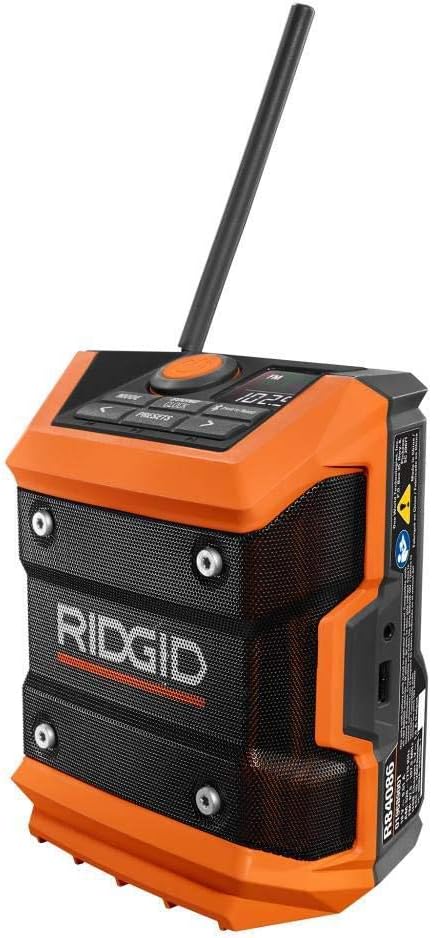
Расми 1: Пеш view of the RIDGID R84086B radio, showing the control panel, speaker, and extended antenna.

Figure 2: The RIDGID R84086B radio in a workshop setting, demonstrating its portability and use with a smartphone.
Ташкил кардан
Насби батарея
- Боварӣ ҳосил кунед, ки радио хомӯш аст.
- Align a charged RIDGID 18-Volt battery pack with the battery port on the radio.
- Қуттии батареяро ба порт лағжонед, то он даме, ки он бехатар дар ҷои худ клик кунад.
Танзими антенна
For optimal radio reception, extend and adjust the antenna as needed. The antenna can be rotated and tilted to improve signal strength.
Дастурҳои амалиётӣ
Фаъол/хомӯш
Press the orange power button located on the control panel to turn the radio on or off.
Интихоби режим
-ро пахш кунед РЕЖИМ button to cycle through available audio sources: FM Radio, AM Radio, Bluetooth, and Auxiliary (AUX) input.
Radio Tuning (AM/FM)
- Select FM or AM mode using the РЕЖИМ тугма.
- Use the left (<) ва рост (>) arrow buttons to manually tune to a desired frequency.
- To save a station as a preset, press and hold the ПЕШАКИ button, then use the arrow buttons to select a preset number and press ПЕШАКИ бори дигар барои тасдиқ.
Ҷуфти Bluetooth
- Ҳолати Bluetooth-ро бо истифода аз РЕЖИМ button. The Bluetooth icon on the display will flash, indicating it is in pairing mode.
- Дар дастгоҳи мобилии худ Bluetooth-ро фаъол созед ва дастгоҳҳои дастрасро ҷустуҷӯ кунед.
- Select "RIDGID Radio" from the list of devices to pair. Once paired, the Bluetooth icon will stop flashing and remain solid.
Вуруди ёрирасон
To use the auxiliary input, connect an audio device (e.g., smartphone, MP3 player) to the 3.5mm AUX port on the side of the radio using a standard audio cable. Select AUX mode using the РЕЖИМ тугма.
Танзими садо
-ро пахш кунед SOUND/CLOCK button to access sound settings. Use the arrow buttons to adjust bass and treble levels for your preferred audio experience.
Функсияи бонки барқ
The radio features a USB port that allows you to charge compatible devices. Connect your device to the USB port using an appropriate charging cable. The radio's battery will provide power to charge your device.
Video: Demonstration of the RIDGID R84086B radio's features, including battery installation, mode selection, radio tuning, auxiliary input, and power bank functionality.
Нигоҳдорӣ
Тозакунӣ
Regularly clean the radio with a soft, damp матоъ. Моддаҳои кимиёвии сахт ё тозакунандаи абразивиро истифода набаред. Боварӣ ҳосил кунед, ки ҳама бандарҳо аз чанг ва хошок холӣ мебошанд.
Нигоҳубини батарея
Store battery packs in a cool, dry place away from direct sunlight. Do not store battery packs in a discharged condition. Always charge batteries fully before extended storage.
Мушкилкушо
Не қудрат
- Ensure the battery pack is fully charged and properly inserted.
- Check for any obstructions in the battery port.
Қабули сусти радио
- Extend and adjust the antenna for better signal.
- Move the radio to a different location to avoid interference.
Масъалаҳои пайвасти Bluetooth
- Ensure the radio is in Bluetooth pairing mode.
- Make sure your mobile device's Bluetooth is enabled and within range.
- Кӯшиш кунед, ки дастгоҳро ҷудо кунед ва аз нав пайваст кунед.
Мушаххасоти
| Бренд | РИДГИД |
| Рақами модел | R84086B |
| Технологияи пайвастшавӣ | блутуз |
| Манбаи нерӯ | Battery Powered (RIDGID 18-Volt) |
| Вазни ашё | 1.75 фунт |
| Дастгоҳҳои мувофиқ | Смартфон |
| Интерфейси сахтафзор | USB |
| UPC | 723548648427 |
Кафолат ва дастгирӣ
Маълумот дар бораи кафолат
This product comes with a 90-day limited warranty. Please refer to the warranty card included with your purchase for full terms and conditions.
Дастгирии муштариён
For technical assistance, troubleshooting, or warranty claims, please contact RIDGID customer support. Contact information can typically be found on the official RIDGID webсайт ё дар бастаи маҳсулоти шумо.