Муқаддима
This manual provides detailed instructions for the installation, operation, and customization of your ECOELER YM2108 In-Wall PIR Motion Sensor Light Switch. Please read this manual thoroughly before installation and use to ensure proper function and safety.
Хусусиятҳои асосӣ:
- Hands-free lighting control with motion detection.
- UL Certified, FCC Listed, and California Title 24 Compliant.
- Compatible with 300W LED, 300W CFL, and 600W incandescent light bulbs.
- Supports Occupancy (OCC) and Vacancy (VAC) modes for flexible control.
- Adjustable time delays, sensitivity, and light level sensing.
- Requires a neutral wire for stable and reliable connection.
Маълумот оид ба бехатарӣ
Огоҳӣ: To prevent severe injury or death from electric shock, always turn off the power at the circuit breaker or fuse box before wiring. It is highly recommended to consult a qualified electrician to determine if you have the proper wiring for this device.
This automatic light switch requires a neutral wire for proper operation. Ensure your electrical setup includes a neutral wire before attempting installation.
Мундариҷаи баста
Пеш аз оғози насбкунӣ тасдиқ кунед, ки ҳама ҷузъҳо мавҷуданд:
- ECOELER YM2108 Motion Sensor Switch
- Плитаи девор
- 4 винтҳо
- 4 Terminal Caps
- Дастури корбар (ин ҳуҷҷат)

Figure 1: Included accessories for the ECOELER YM2108 Motion Sensor Switch.
Насбкунӣ
Follow these steps for safe and correct installation:
- Хомӯш кардани барқ: Locate the circuit breaker or fuse box controlling the light switch you intend to replace. Turn off the power to that circuit. Verify power is off using a voltagсанҷанда
- Калиди кӯҳнаро хориҷ кунед: Carefully remove the existing wall plate and unscrew the old switch from the electrical box. Disconnect the wires from the old switch, noting their connections.
- Муайян кардани симҳо: Identify the Hot (Black), Load (Red), Neutral (White), and Ground (Green or bare copper) wires from your electrical box.
- Wire the New Switch: Connect the wires from the electrical box to the corresponding wires on the ECOELER YM2108 switch using the provided terminal caps. Ensure all connections are secure.
- Black wire from box to Black wire on switch (Hot).
- Red wire from box to Red wire on switch (Load to power light or fan).
- White wire from box to White wire on switch (Neutral - required).
- Green or bare copper wire from box to Green wire on switch (Ground).
- Гузаришро насб кунед: Калиди симдорро бодиққат ба қуттии барқӣ тела диҳед. Онро бо винтҳои додашуда маҳкам кунед.
- Плитаи деворро насб кунед: Attach the new wall plate over the switch.
- Барқарор кардани қудрат: Қувваи барқро дар ноқилҳои барқгиранда дубора фурӯзон кунед.

Figure 2: Wiring Guide for ECOELER YM2108 Motion Sensor Switch. A neutral wire is required.
Усулҳои амалиёт
The ECOELER YM2108 switch offers two primary operation modes: Occupancy (OCC) and Vacancy (VAC). These modes can be selected via a switch located on the device.
- Occupancy (OCC) Mode: In this mode, the lights automatically turn ON when motion is detected and automatically turn OFF when the space becomes unoccupied after a set time delay. This is ideal for high-traffic areas where hands-free operation is desired.
- Ҳолати холӣ (VAC): In this mode, the lights must be manually turned ON. They will then automatically turn OFF when no motion is detected for the set time delay. This mode is suitable for rooms where manual activation is preferred, but automatic shut-off is desired for energy saving.
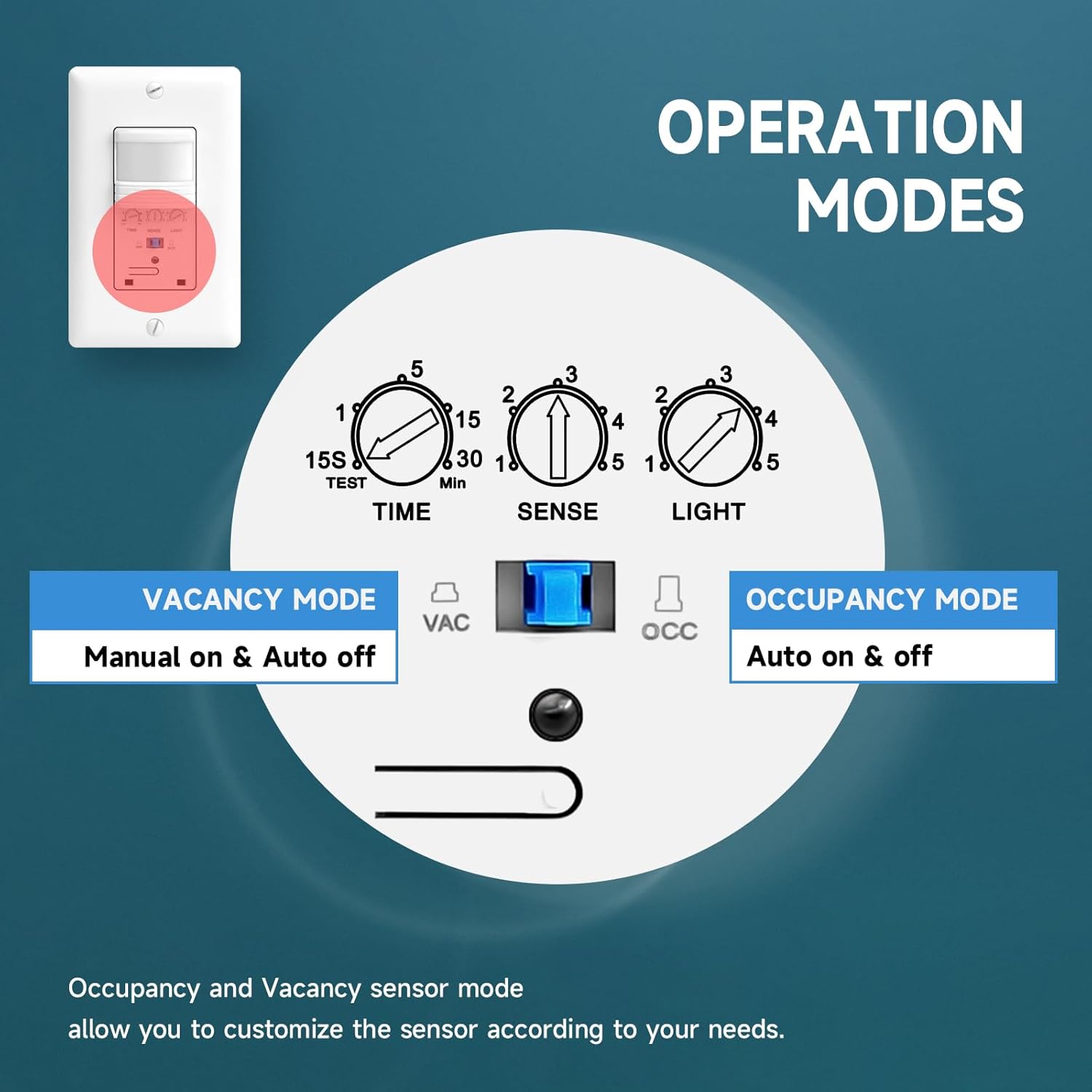
Figure 3: Operation Modes and adjustable settings for the ECOELER YM2108.
Мутобиқсозӣ
The ECOELER YM2108 allows for fine-tuning of its performance to suit your specific needs. Adjustments are made using small rotary potentiometers on the switch face.
- Adjustable Time Delay (TIME): This setting determines how long the lights remain on after the last detected motion. It can be adjusted from 15 seconds to 30 minutes.
- Adjustable Sensitivity (SENSE): This controls the range and responsiveness of the motion sensor. Adjusting this can prevent false triggers or ensure detection in larger areas.
- Adjustable Light Level (LIGHT): This feature allows you to set the ambient light threshold at which the sensor will activate the lights. For example, you can set it so lights only turn on if the room is already dark, saving energy during daylight hours. Setting it to '5' typically disables the ambient light sensor, allowing lights to turn on regardless of existing light.
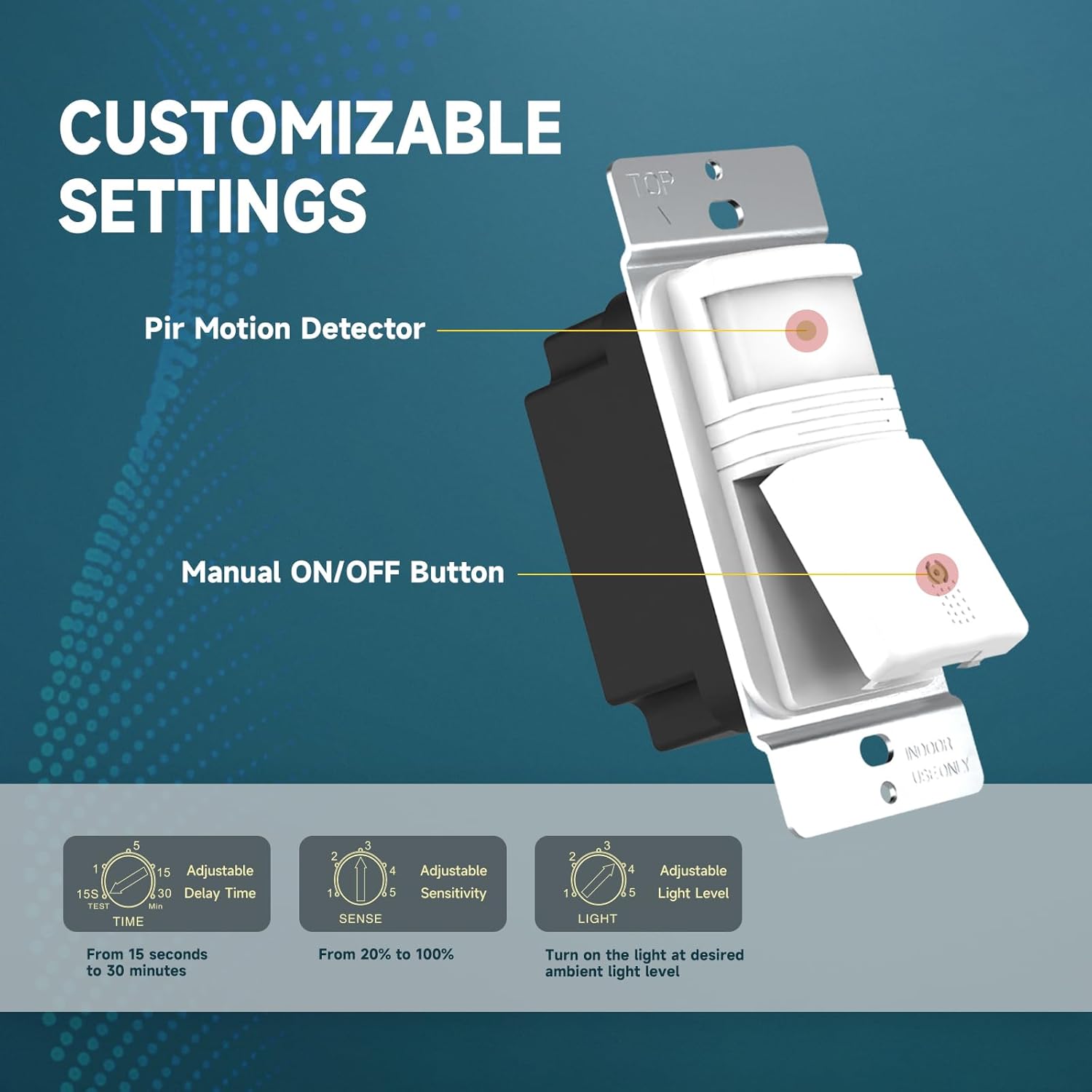
Figure 4: Customizable settings on the ECOELER YM2108 switch.
Мушаххасоти
| Рақами модел | YM2108 |
| Режими амалиёт | ДАРОМАД-ХОМУШ-ФУРОИШ |
| Рейтинги ҷорӣ | 15 Amps |
| Ҷилди амалиётӣtage | 120 вольт (AC) |
| Дастгоҳҳои мувофиқ | CFL, LED, Incandescent bulbs |
| Макс Вотtage | 300W LED, 300W CFL, 600W Incandescent |
| Навъи васлкунӣ | Монтажи девор |
| Усули назорат | Sensor (Motion Detection) |
| Андозаҳо (L x W x H) | 4.72 x 2.87 x 2.24 инч |
| Ҳарорати корӣ | 32°F то 131°F (0°C то 55°C) |
| Рейтинги байналмилалии муҳофизат | IP54 |
| Сертификатсияҳо | UL Certified, FCC Listed, California Title 24 Compliant |
Мушкилкушо
- Чароғҳо фурӯзон намешаванд: Verify that the power is on at the circuit breaker. Check all wiring connections for tightness and correctness, especially the neutral wire. Ensure the ambient light sensor (LIGHT setting) is not preventing activation if the room is already bright. Adjust sensitivity (SENSE) if motion is not being detected.
- Lights not turning off: Ensure there is no continuous motion within the sensor's field of view. Check the time delay (TIME) setting; the lights will remain on for this duration after the last detected motion.
- False triggers (lights turn on without motion): Reduce the sensitivity (SENSE) setting. Ensure the sensor is not exposed to drafts, heat sources, or direct sunlight, which can cause false detections.
- Inconsistent operation: Confirm the switch is set to the desired OCC or VAC mode. Ensure the sensor lens is clean and unobstructed.
If issues persist after following these steps, please contact customer support or a qualified electrician.
Нигоҳдорӣ
The ECOELER YM2108 Motion Sensor Light Switch requires minimal maintenance. Periodically, gently wipe the sensor lens with a soft, dry cloth to remove dust or debris that may obstruct its field of view. Do not use abrasive cleaners or solvents, as these can damage the device.
Кафолат ва дастгирӣ
Ин маҳсулот бо як меояд Кафолати маҳдуди 1-сола, covering manufacturing defects under normal use. In case of a defect, a replacement or refund may be available. For support or warranty claims, please contact the seller via Amazon.
Намоиши маҳсулот