
1. Муқаддима
The Dual DAB 3A Digital Radio Adapter is designed to upgrade your existing audio system with modern digital radio reception and Bluetooth streaming capabilities. This adapter allows you to enjoy DAB+ and FM radio broadcasts with clear digital quality and stream audio wirelessly from compatible devices. Its user-friendly interface and remote control ensure convenient operation.
2. Маълумот оид ба бехатарӣ
- Таъмини нерӯ: Танҳо адаптери барқи додашударо истифода баред. Боварӣ ҳосил кунед, ки ҳаҷмtage ба талаботи дар адаптер пешбинишуда мувофиқат мекунад.
- Об ва намӣ: Do not expose the device to rain, moisture, or dripping/splashing liquids. Keep it away from water sources.
- Вентилятсия: Ensure adequate ventilation around the unit. Do not block ventilation openings. Avoid placing the device on soft surfaces that may obstruct airflow.
- Сарчашмаҳои гармӣ: Дастгоҳро аз манбаъҳои гармӣ, аз қабили радиаторҳо, регистрҳои гармӣ, бухорӣ ё дигар асбобҳои гармидиҳанда дур нигоҳ доред.
- Тозакунӣ: Пеш аз тоза кардан, барқро ҷудо кунед. Аз матои мулоим ва хушк истифода баред. Аз тозакунандаҳои моеъ ё аэрозолӣ истифода набаред.
- Хизматрасонӣ: Худатон кӯшиш накунед, ки ба ин маҳсулот хидмат расонад. Ҳама хидматрасониро ба кормандони соҳибихтисос муроҷиат кунед.
3. Мундариҷаи баста
Лутфан тафтиш кунед, ки ҳамаи ҷузъҳои дар поён овардашуда ба бастаи шумо дохил карда шудаанд:
- Dual DAB 3A Digital Radio Adapter
- Адаптери барқии AC
- Назорати дурдаст
- Дастури молик
- External Wire Antenna
4. Маҳсулот ба охир расидview
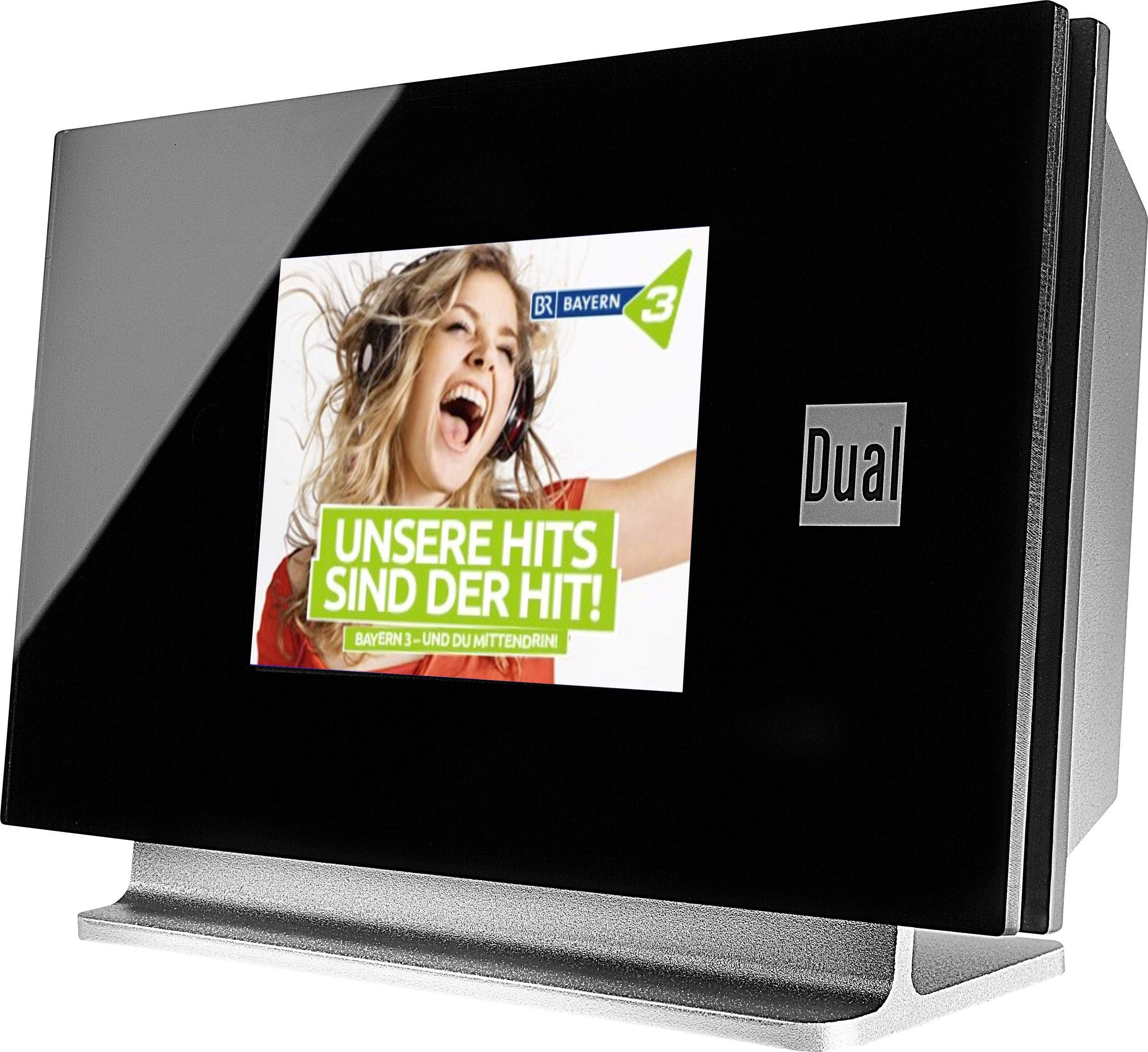
This image displays the Dual DAB 3A Digital Radio Adapter from a front-side angle. The front features a large, black TFT color display showing a radio station's album art and text. The side view indicates the product dimensions: 15 cm (width), 6 cm (depth), and 10.49 cm (height).
Панели пеши
- Намоиши рангаи TFT: Shows station information, track details, album art, and menu options.
Пайвастҳои панели пушти сар
- Вуруди антенна: For connecting the external wire antenna or a commercially available antenna.
- AUX-Out: Audio output for connecting to an external ampлифт ё системаи аудио.
- Вуруди барқ: Барои пайваст кардани адаптери барқи AC.
Назорати дурдаст
The included remote control provides full functionality for navigating menus, changing stations, adjusting volume, and selecting input modes.
5. Танзимот
- Пайваст кардани антенна: Connect the supplied external wire antenna to the antenna input on the rear panel of the DAB 3A adapter. For optimal reception, extend the antenna fully.
- Ба системаи аудио пайваст шавед: Use an appropriate audio cable (not included) to connect the AUX-OUT port on the rear of the DAB 3A to an available audio input (e.g., AUX-IN, Line-IN) on your existing ampлифт ё системаи стерео.
- Пайваст кардани барқ: Plug the AC power adapter into the power input on the rear of the DAB 3A, then plug the adapter into a wall outlet.
- Фаъол: Press the Power button on the unit or the remote control to turn on the adapter. The display will illuminate.
- Initial Scan (DAB+): Upon first power-on, the unit may automatically perform a scan for available DAB+ stations. Allow this process to complete.
6. Амалиёт
Фаъол/хомӯш
- -ро пахш кунед Қувва тугмаи дар дастгоҳ ё идоракунии дурдаст бударо пахш кунед, то дастгоҳро фаъол ё хомӯш кунед.
DAB+ Radio Mode
- -ро пахш кунед Режим button on the remote control until DAB+ mode is selected.
- If no stations are found or you wish to rescan, navigate to the 'Full Scan' option in the menu and confirm. The adapter will search for available DAB+ stations.
- -ро истифода баред Боло/Поён navigation buttons on the remote to browse through the list of available stations.
- пахш кунед Хуб/Ворид барои интихоб кардани истгоҳ.
- The TFT display will show station name, program information, and potentially album art or weather data.
Ҳолати радиои FM
- -ро пахш кунед Режим button on the remote control until FM mode is selected.
- Барои худкор скан кардани истгоҳҳо, -ро пахш карда нигоҳ доред Скан button (or equivalent on remote). The adapter will tune to the next strong station.
- Барои дастӣ танзим кардан, -ро истифода баред Боло/Поён navigation buttons to adjust the frequency.
Ҳолати Bluetooth
- -ро пахш кунед Режим button on the remote control until Bluetooth mode is selected. The display will show 'Bluetooth Pairing' or similar.
- Дар смартфон ё планшетатон Bluetooth-ро фаъол созед ва дастгоҳҳои дастрасро ҷустуҷӯ кунед.
- Select 'Dual DAB 3A' from the list of devices to pair.
- Once paired, you can stream audio from your device to the DAB 3A adapter.
Ҳолати AUX-IN
- Connect an external audio source (e.g., MP3 player, CD player) to the AUX-IN port on the rear of the DAB 3A using a 3.5mm audio cable (not included).
- -ро пахш кунед Режим button on the remote control until AUX-IN mode is selected.
- Audio from the connected external device will now play through your audio system.
7. Нигоҳдорӣ
- Тоза кардани дастгоҳ: Disconnect the power adapter before cleaning. Use a soft, dry, lint-free cloth to wipe the surface of the unit. Do not use abrasive cleaners, waxes, or solvents.
- Тоза кардани дисплей: Gently wipe the TFT display with a soft, dry microfiber cloth. Avoid pressing hard on the screen.
- Нигоҳдорӣ: If storing the unit for an extended period, disconnect it from the power supply and store it in a cool, dry place away from direct sunlight and extreme temperatures.
8. Баррасии мушкилот
| Мушкилот | Сабаби эҳтимолӣ | Ҳалли |
|---|---|---|
| Не қудрат | Адаптери барқ пайваст нашудааст ё васлаки нодуруст. | Боварӣ ҳосил кунед, ки адаптери барқ ба дастгоҳ ва васлаки барқии корӣ боэътимод пайваст шудааст. |
| Poor DAB+/FM reception | Antenna not properly connected or poor signal strength. | Ensure the antenna is fully extended and properly connected. Try repositioning the antenna or the unit. Consider using a stronger external antenna if available. |
| Пайвасткунии Bluetooth ноком мешавад | Bluetooth not enabled on source device or adapter is not in pairing mode. | Ensure Bluetooth is enabled on your smartphone/tablet and the DAB 3A is in Bluetooth mode. Try restarting both devices. |
| Садо нест | Volume too low, incorrect input selected on amplifier, or audio cable issue. | Increase the volume on both the DAB 3A and your ampлифтер. Боварӣ ҳосил кунед amplifier is set to the correct input (e.g., AUX-IN). Check the audio cable connections. |
9. Мушаххасоти
- Модели: 75862
- Технологияи танзимкунанда: DAB Plus, FM
- Пайвастшавӣ: блутуз
- Гурӯҳҳои радиои дастгирӣшаванда: FM, DAB+
- Навъи намоиш: Намоиши ранг
- Манбаи нерӯ: Адаптери AC
- Интерфейси сахтафзор: блутуз
- Дастгоҳҳои мувофиқ: Смартфон, ноутбук
- Хусусиятҳои махсус: Bluetooth, Идоракунии дурдаст
- Андозаҳои маҳсулот: 15 х 6 х 10.5 см
- Вазни ашё: 540 гр
10. Кафолат ва дастгирӣ
This product comes with a standard manufacturer's warranty. For detailed warranty information, please refer to the warranty card included in your package or visit the official Dual website. For technical support, troubleshooting assistance, or service inquiries, please contact Dual customer support through their official channels.