
1. Маҳсулот ба охир расидview
The Schneider SC600SND is a versatile 2.0 channel soundbar designed to enhance your audio experience. It offers a total output power of 30W (15W x 2) and supports multiple connectivity options including Bluetooth, HDMI (ARC), Optical, and Aux. A unique feature of this soundbar is its convertible design, allowing it to be used as a single horizontal unit or split into two vertical speaker columns.

Image 1.1: The Schneider SC600SND Soundbar in its standard monoblock configuration.
2. Танзимот
2.1 Кушодан ва ҷойгиркунӣ
Carefully remove all components from the packaging. Ensure you have the soundbar unit, remote control, and 3.5mm Jack cable.
The SC600SND soundbar offers two primary placement options:
- Monoblock Configuration: Use the soundbar as a single horizontal unit, ideal for placing below your television.
- Split Column Configuration: The soundbar can be separated into two vertical speaker columns. This allows for flexible placement on either side of your television or entertainment unit. To split, gently twist and pull the two halves apart at the central connection point. Attach the provided bases to each column for stability.

Image 2.1: Detail of the central connection point, allowing the soundbar to be split into two columns.
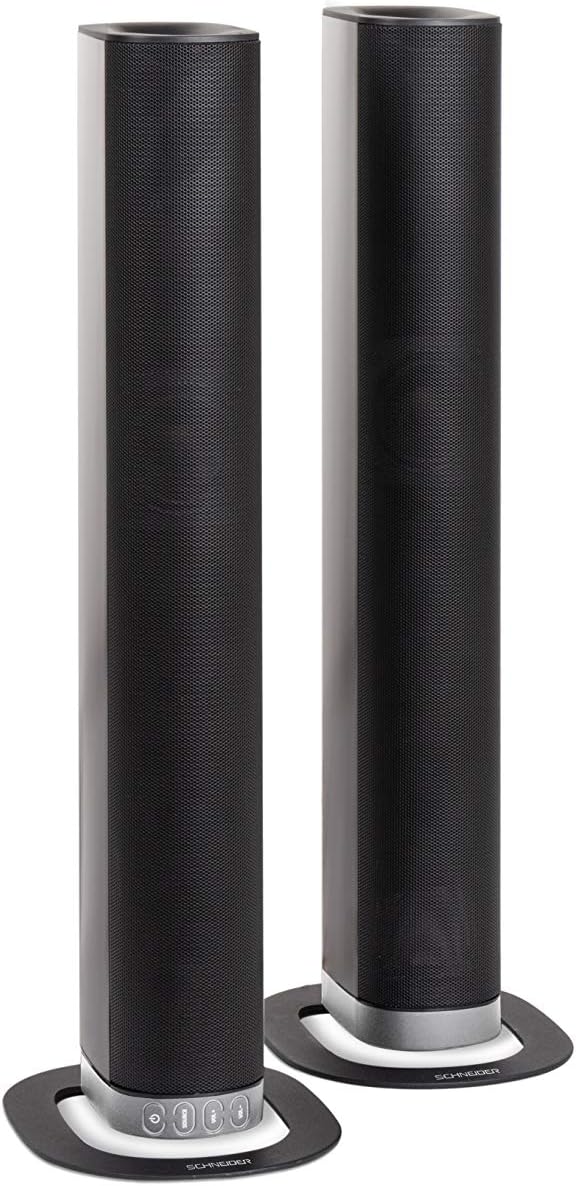
Image 2.2: The soundbar configured as two independent vertical speaker columns.
2.2 Пайвастшавӣ ба барқ
Connect the power cable to the soundbar's power input and then to a suitable wall outlet. The soundbar will enter standby mode.
2.3 Пайвастҳои аудио
Барои пайваст кардани манбаи аудио яке аз усулҳои зеринро интихоб кунед:
- HDMI (ARC): For optimal audio quality and control, connect an HDMI cable from the soundbar's HDMI ARC port to your TV's HDMI ARC port. This allows your TV remote to control the soundbar's volume.
- Оптикӣ: Connect an optical cable from the soundbar's OPTICAL input to your TV's optical output.
- AUX: Use the included 3.5mm Jack cable to connect the soundbar's AUX input to the headphone jack or audio output of your device (e.g., TV, smartphone, MP3 player).
- Блутуз: For wireless connection, refer to the Bluetooth pairing instructions in the Operating section.
3. Дастурҳои истифодабарӣ
3.1 Фаъол кардан/хомӯш кардан
-ро пахш кунед Қувва тугмаи дар садои панел ё пулти дурдаст барои фурӯзон ё хомӯш кардани дастгоҳ.
3.2 Интихоби манбаъ
-ро пахш кунед МАНБА button on the soundbar or the remote control to cycle through the available input sources: Bluetooth (BT), HDMI (ARC), Optical, and AUX.

Image 3.1: On-unit control buttons for power, source selection, and volume adjustment.
3.3 Назорати баландии овоз
-ро истифода баред VOL+ ва ВОЛ- buttons on the soundbar or remote control to adjust the volume. Press the ХОМУШ барои муваққатан хомӯш кардани садо тугмаи пулти пултро пахш кунед.
3.4 Пайвасткунии Bluetooth
- Select Bluetooth as the source input. The soundbar will enter pairing mode, indicated by a flashing LED.
- Дар дастгоҳи мобилии худ (смартфон, планшет ва ғайра) Bluetooth-ро фаъол созед ва дастгоҳҳои дастрасро ҷустуҷӯ кунед.
- Select "SC600SND" from the list of devices.
- Once paired, the LED indicator on the soundbar will stop flashing and remain solid. You can now play audio wirelessly from your device.
3.5 Усулҳои садо
The remote control includes dedicated buttons for different sound modes to optimize your listening experience:
- ХАБАРХО: Enhances vocal clarity for news broadcasts and dialogue.
- ФИЛМ: Provides a more immersive soundstagд барои фильмхо.
- Мусиқӣ: Аудиоро барои навохтани мусиқӣ оптимизатсия мекунад.

Image 3.2: The included remote control with dedicated buttons for power, source, volume, mute, and sound modes.
4. Нигоҳдорӣ
Барои таъмини мӯҳлати хизмати дарозмуддат ва кори беҳтарини саундбар, ин дастурҳои нигоҳдориро риоя кунед:
- Тозакунӣ: Use a soft, dry cloth to clean the exterior surfaces of the soundbar. Do not use liquid cleaners, aerosols, or abrasive materials, as these can damage the finish or internal components.
- Вентилятсия: Боварӣ ҳосил кунед, ки сӯрохиҳои вентилятсияи саундбар баста нашудаанд. Ҷараёни дурусти ҳаво аз гармшавии аз ҳад зиёд пешгирӣ мекунад.
- Нигоҳдорӣ: If storing the soundbar for an extended period, disconnect it from power and store it in a cool, dry place, away from direct sunlight and extreme temperatures.
- Муносибат: Аз афтидан ё дучор шудан ба зарбаҳои сахти саундбар худдорӣ кунед.
5. Баррасии мушкилот
If you encounter issues with your SC600SND soundbar, refer to the following common problems and solutions:
- Не қудрат:
- Боварӣ ҳосил кунед, ки сими барқӣ ба ҳам саундбар ва ҳам ба розеткаи барқии корӣ пайваст аст.
- Бо васл кардани дастгоҳи дигар санҷед, ки васлаки барқ кор мекунад ё не.
- Овоз нест:
- Verify that the correct input source (HDMI, Optical, AUX, Bluetooth) is selected on the soundbar.
- Increase the volume on both the soundbar and your connected audio source (e.g., TV, smartphone).
- Ensure the soundbar is not muted.
- Check all audio cables for secure connections and damage. Try a different cable if possible.
- If using HDMI ARC, ensure your TV's HDMI ARC function is enabled in its settings.
- Poor Sound Quality / Distorted Audio:
- Adjust the volume levels to avoid distortion.
- Try switching between the different sound modes (NEWS, MOVIE, MUSIC) to see if one improves the audio for your content.
- Ensure the soundbar is placed on a stable surface and not vibrating excessively.
- If using Bluetooth, ensure your device is within range and there are no obstructions causing interference.
- Масъалаҳои пайвасткунии Bluetooth:
- Боварӣ ҳосил кунед, ки саундбар дар ҳолати ҷуфткунии Bluetooth қарор дорад (LED милт-милт мекунад).
- Make sure your device's Bluetooth is enabled and it is searching for new devices.
- Дастгоҳи худро ба панели садо наздиктар кунед.
- Агар қаблан дастгоҳ ҷуфт карда шуда бошад, кӯшиш кунед, ки ҷудо кунед ва аз нав ҷуфт кунед.
- Идоракунии дурдаст кор намекунад:
- Батареяҳои пулти дурдастро тафтиш ва иваз кунед.
- Боварӣ ҳосил кунед, ки байни пулти фосилавӣ ва сенсори садои панел ягон монеа вуҷуд надорад.
- Дастгоҳи дурдаст бевосита ба садои панел ишора кунед.
6. Мушаххасоти
| Хусусият | Мушаххасоти |
|---|---|
| Рақами модел | SC600SND |
| Каналҳо | 2.0 |
| Қувваи баромад | 30Вт (15Вт x 2) |
| Технологияи пайвастшавӣ | Bluetooth, HDMI (ARC), Optical, Aux |
| Алоқаи бесим | блутуз |
| Усули назорат | Назорати дурдаст |
| Навъи баландгӯяк | Саундбар |
| Андозаи баландгӯяк | 2 инч |
| Манбаи нерӯ | Кабели электрики |
| Product Dimensions (Monoblock) | 80.5 х 6.2 х 9 см |
| Вазни маҳсулот | 2.5 килограмм |
| Компонентҳои дохилшуда | Remote Control, 3.5mm Jack Cable |
| Ранги | Сиёҳ |
7. Кафолат ва дастгирӣ
7.1 Кафолати маҳдуд
This Schneider SC600SND Soundbar is covered by a Limited Warranty. Please refer to the warranty card included with your product or contact your retailer for specific terms and conditions regarding warranty coverage and duration.
7.2 Дастгирии муштариён
For technical assistance, troubleshooting beyond this manual, or warranty claims, please contact the retailer where you purchased the product or visit the official Schneider webсайт барои маълумоти дастгирӣ.