
1. Дастурҳои муҳим оид ба бехатарӣ
Лутфан, пеш аз истифодаи ин телевизор ҳамаи дастурҳои бехатарӣ ва истифодабариро бодиққат хонед. Ин дастурҳоро барои истифода дар оянда нигоҳ доред.
- Манбаи нерӯ: Телевизорро танҳо ба манбаи барқе, ки дар тамға нишон дода шудааст, пайваст кунед.
- Вентилятсия: Вентилятсияи дурустро таъмин кунед. Кушодани вентилятсияро манъ накунед.
- Тозакунӣ: Пеш аз тоза кардан, телевизорро аз розетка ҷудо кунед. Аз матои мулоим ва хушк истифода баред. Аз тозакунандаҳои моеъ ё аэрозолӣ истифода набаред.
- Об ва намӣ: Do not use this TV near water, such as a bathtub, washbowl, kitchen sink, laundry tub, swimming pool, or in a wet basement.
- Гармӣ: Position the TV away from heat sources such as radiators, heat registers, stoves, or other products (including ampлифтҳо), ки гармӣ истеҳсол мекунанд.
- Кабелҳо: Protect the power cord from being walked on or pinched, particularly at plugs, convenience receptacles, and the point where they exit from the TV.
- Барқ: Ҳангоми тӯфони барқӣ ё дар муддати тӯлонӣ истифода нашудани ин телевизор аз розетка ҷудо кунед.
- Хизматрасонӣ: Do not attempt to service this TV yourself. Refer all servicing to qualified service personnel.
2. Маҳсулот ба охир расидview
The CHIQ L40H7N is a 40-inch Full HD Smart TV designed to provide an immersive viewing experience with integrated smart features. It offers a resolution of 1080p and includes connectivity options such as Wi-Fi and Bluetooth.
Хусусиятҳои асосӣ:
- Full HD (1080p) Resolution: Тасвирҳои равшан ва муфассалро пешниҳод мекунад.
- Функсияи ТВ Smart: Access popular streaming services like Netflix, YouTube, and Prime Video.
- Integrated Wi-Fi and Bluetooth: For wireless connectivity and device pairing.
- Multiple Connectivity Ports: Includes 3 HDMI and 2 USB ports for various external devices.
- Танзимгари сегона: Supports DVB-T/T2/C/S/S2 for versatile broadcast reception.
- Dolby Audio: Enhanced sound experience.
- Дастгирии HDR10: Provides improved contrast and color reproduction.
- Quad Core CPU: Ensures smooth performance for smart features and applications.

Тасвир: Пеш view of the CHIQ L40H7N Smart TV, showcasinчаҳорчӯба ва дисплейи борикаш.
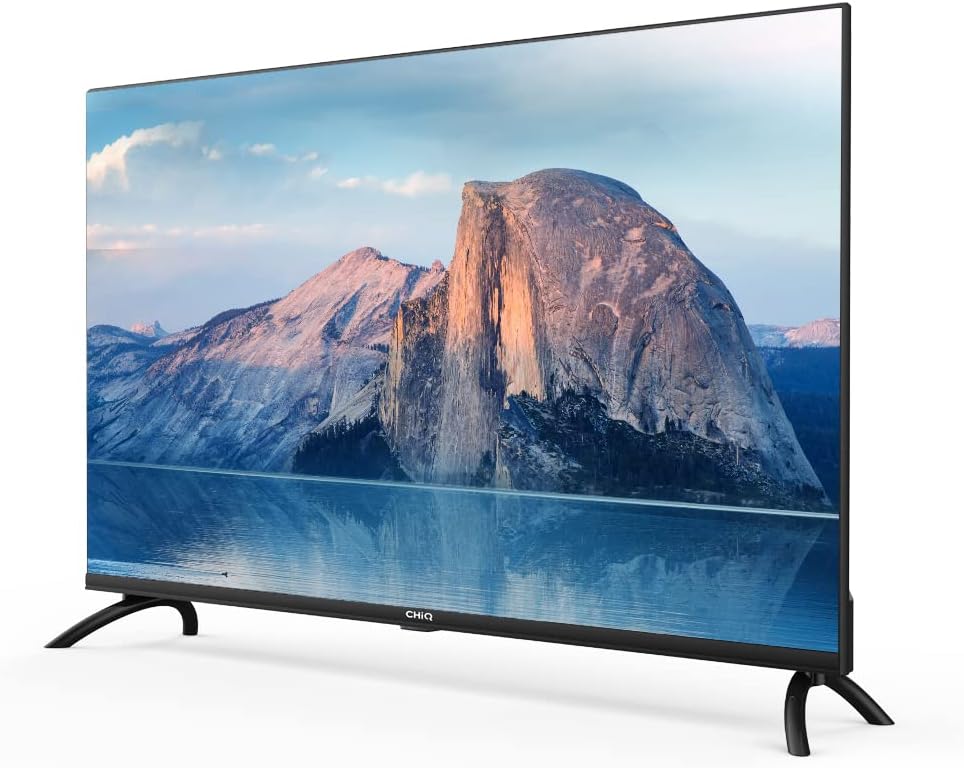
Тасвир: тараф view of the CHIQ L40H7N Smart TV, highlighting its thin profile.
3. Танзимот
3.1 Кушодани баста
- Carefully open the packaging and remove the TV and all accessories.
- Ensure all components are present: TV unit, remote control, batteries, power cord, stand components, and user manual.
- Маводҳои бастабандиро барои интиқол ё хидматрасонии минбаъда нигоҳ доред.
3.2 Насб кардани стенд
Барои насб кардани стенди телевизионӣ:
- Place the TV face down on a soft, flat surface (e.g., a blanket or foam) to prevent screen damage.
- Пойҳои истодаро бо слотҳои мувофиқ дар поёни телевизор мувофиқ кунед.
- Пойҳои пойгоҳро бо истифода аз винтҳои додашуда мустаҳкам кунед. Боварӣ ҳосил кунед, ки онҳо сахт мустаҳкам карда шудаанд.

Image: Diagram showing the dimensions of the CHIQ L40H7N TV, including height with stand (568.9mm), width (900.3mm), and depth with stand (178.9mm).
3.3 Васлкунии девор (ихтиёрӣ)
If you choose to wall mount your TV, please consult a professional installer and refer to the specific instructions provided with your wall mount bracket. Ensure the wall mount is compatible with the TV's VESA mounting pattern.
3.4 Пайваст кардани дастгоҳҳои периферӣ
Дастгоҳҳои берунаи худро ба портҳои телевизион пайваст кунед:
- HDMI: Connect Blu-ray players, game consoles, or set-top boxes to the HDMI ports (HDMI1, HDMI2, HDMI3).
- USB: Insert USB drives for media playback into the USB ports (USB1, USB2).
- Антенна/кабел: Connect your antenna or cable TV signal to the appropriate input.
- Ethernet: Барои пайвасти устувори сими интернет, сими Ethernet-ро ба порти LAN пайваст кунед.
3.5 Пайвастшавии барқ
After connecting all necessary cables, plug the power cord into the TV's power input, then into a wall outlet.
3.6 Фаъолсозии ибтидоӣ
Press the power button on the remote control or on the TV. Follow the on-screen instructions to complete the initial setup, including language selection, network connection, and channel scanning.
4. Истифода бурдани телевизор
4.1 Функсияҳои идоракунии дурдаст
Пулти дурдаст ба шумо имкон медиҳад, ки хусусиятҳои телевизорро паймоиш кунед:
- Тугмаи барқ: Телевизорро фурӯзон ё хомӯш мекунад.
- Ҷилди +/-: Сатҳи овозро танзим мекунад.
- Канал +/-: Шабакаҳои телевизиониро иваз мекунад.
- Вуруд/Манбаъ: Манбаи вуруд (HDMI, USB, TV)-ро интихоб мекунад.
- Тугмаҳои паймоиш (боло/поён/чап/рост/OK): Менюҳоро паймоиш мекунад ва интихобҳоро тасдиқ мекунад.
- Home/Smart Hub: Ба интерфейси Smart TV дастрасӣ пайдо мекунад.
- Тугмаҳои барнома: Dedicated buttons for Netflix, YouTube, Prime Video, etc.
4.2 Хусусиятҳои ТВ Smart
Your CHIQ L40H7N TV provides access to a range of smart features and applications:
- Дастрасӣ ба барномаҳо: Press the Home button or dedicated app buttons to launch applications like Netflix, YouTube, and Prime Video.
- Дӯкони барномаҳо: Замимаҳои иловагиро аз мағозаи барномаҳои ҳамгирошуда зеркашӣ ва насб кунед.
- Зеркашии экран: Мундариҷаро аз смартфонҳо ё планшетҳои мувофиқ ба телевизори худ пахш кунед.

Image: The CHIQ Smart TV displaying the Netflix application interface, along with other streaming apps like YouTube and Prime Video.

Image: A CHIQ Smart TV screen showing a variety of content from streaming services, indicating a rich media experience.
4.3 Пайвастшавӣ ба шабака
To use Smart TV features, connect your TV to the internet:
- Вай-фай: Go to Settings > Network > Wi-Fi, select your network, and enter the password.
- Ethernet: Connect an Ethernet cable from your router to the TV's LAN port. The TV will automatically detect the wired connection.
4.4 Пайвасти Bluetooth
Pair Bluetooth devices like headphones or speakers:
- Enable Bluetooth on your external device and set it to pairing mode.
- On the TV, go to Settings > Remotes & Accessories > Bluetooth.
- Select your device from the list and follow the on-screen prompts to pair.
4.5 Интихоби вуруд
Press the 'Input' or 'Source' button on your remote to switch between connected devices (HDMI1, HDMI2, HDMI3, USB, TV Tuner).
4.6 Танзимоти тасвир ва садо
Adjust display and audio preferences via the Settings menu:
- Ҳолати тасвир: Choose from standard, dynamic, movie, or custom settings.
- Равшанӣ/Контраст/Ранг: Сифати тасвирро дақиқ кунед.
- Ҳолати садо: Select audio presets like standard, music, movie, or custom.
- Dolby Audio: The TV supports Dolby Audio for enhanced sound.
- HDR10: Experience improved contrast and color with HDR10 content.

Image: The CHIQ L40H7N TV displaying a scene with the Dolby Audio logo, indicating support for enhanced sound.

Image: A split-screen comparison on the CHIQ L40H7N TV, demonstrating the visual improvement with HDR10 technology, showing richer colors and contrast.

Image: An illustration of a Quad Core CPU, representing the processing power within the CHIQ L40H7N TV for smooth operation.

Image: The CHIQ L40H7N TV positioned on a media console in a living room, showcasing its aesthetic integration into a home environment.
5. Нигоҳдорӣ
5.1 Тоза кардани телевизор
Барои нигоҳ доштани намуди зоҳирӣ ва кори телевизор:
- Экран: Экранро бо матои мулоим ва бе пахта нарм тоза кунед. Барои аломатҳои якрав, сабук гampба матои об ё асбоби махсуси экран тоза кунед (бевосита ба экран пошед).
- Кабинет: Кабинети телевизорро бо матои мулоими хушк пок кунед. Истифодаи тозакунакҳои абразивӣ ё ҳалкунандаҳоро худдорӣ кунед.
- Пеш аз тоза кардан ҳамеша телевизорро аз розетка ҷудо кунед.
5.2 Навсозии нармафзор
Regular software updates can improve performance and add new features:
- Навсозии худкор: Боварӣ ҳосил кунед, ки телевизиони шумо ба интернет пайваст аст, то навсозиҳои худкор.
- Санҷиши дастӣ: You can manually check for updates in the Settings menu (e.g., Settings > About > System Update).
6. Баррасии мушкилот
Агар шумо бо телевизиони худ бо мушкилот рӯ ба рӯ шавед, ба мушкилоти умумӣ ва роҳҳои ҳалли зерин муроҷиат кунед:
- Не қудрат:
- Check if the power cord is securely plugged into the TV and the wall outlet.
- Ensure the wall outlet is functioning by testing it with another device.
- Try pressing the power button on the TV itself, not just the remote. - Тасвир нест, аммо садо мавҷуд аст:
- Check the input source. Ensure it matches the device you are trying to view (e.g., HDMI1 for a Blu-ray player).
- Verify that the external device is powered on and functioning correctly.
- Try a different HDMI cable or port. - Садо нест, аммо тасвир мавҷуд аст:
- Check the volume level and ensure the TV is not muted.
- Verify audio output settings in the TV menu (e.g., internal speakers, external audio system).
- If using an external device, check its volume and audio settings. - Идоракунии дурдаст кор намекунад:
- Replace the batteries in the remote control.
- Ensure there are no obstructions between the remote and the TV's IR sensor.
- Point the remote directly at the TV. - Масъалаҳои пайвастшавӣ ба шабака:
- Restart your router and modem.
- Check Wi-Fi password if connecting wirelessly.
- If using a wired connection, ensure the Ethernet cable is properly connected.
If the problem persists, consult the CHiQ customer support or a qualified technician.
7. Мушаххасоти
Below are the technical specifications for the CHIQ L40H7N Smart TV:
| Хусусият | Мушаххасоти |
|---|---|
| Бренд | CHiQ |
| Номи модел | L40H7N |
| Андозаи экран | 40 инч |
| Технологияи намоиш | LCD |
| Резолюция | 1080p (HD Full) |
| Меъёри навсозӣ | 60 Гц |
| Хусусияти махсус | Full HD, Smart TV, HDR10, Dolby Audio |
| Технологияи пайвастшавӣ | Bluetooth, Ethernet, HDMI (3 ports), USB (2 ports), Wi-Fi |
| Хидматҳои интернетии дастгирӣшаванда | Видеои фаврии Amazon, Netflix, YouTube |
| Дастгоҳҳои мувофиқ | Laptop, Smart Speaker, Smart Watch, Tablet, Car Audio System, Cellphone |
| Истеъмоли нерӯи барқ (SDR) | 47.0 В |
| Синфи самаранокии энергия (SDR) | G |
| Screen Diagonal (cm) | 100.3 см |
| Screen Resolution (pixels) | 1920 х 1080 |
| Minimum Guaranteed Software Updates Until | 20-01-2030 |
| Minimum Guaranteed Spare Parts Until | 20-01-2029 |
Барои маълумоти муфассал оид ба энергия, лутфан ба базаи EPREL муроҷиат кунед: https://eprel.ec.europa.eu/qr/454406

Image: The EU Energy Label for the CHIQ L40H7N TV, showing an energy efficiency class G and consumption of 47 kWh/1000h.
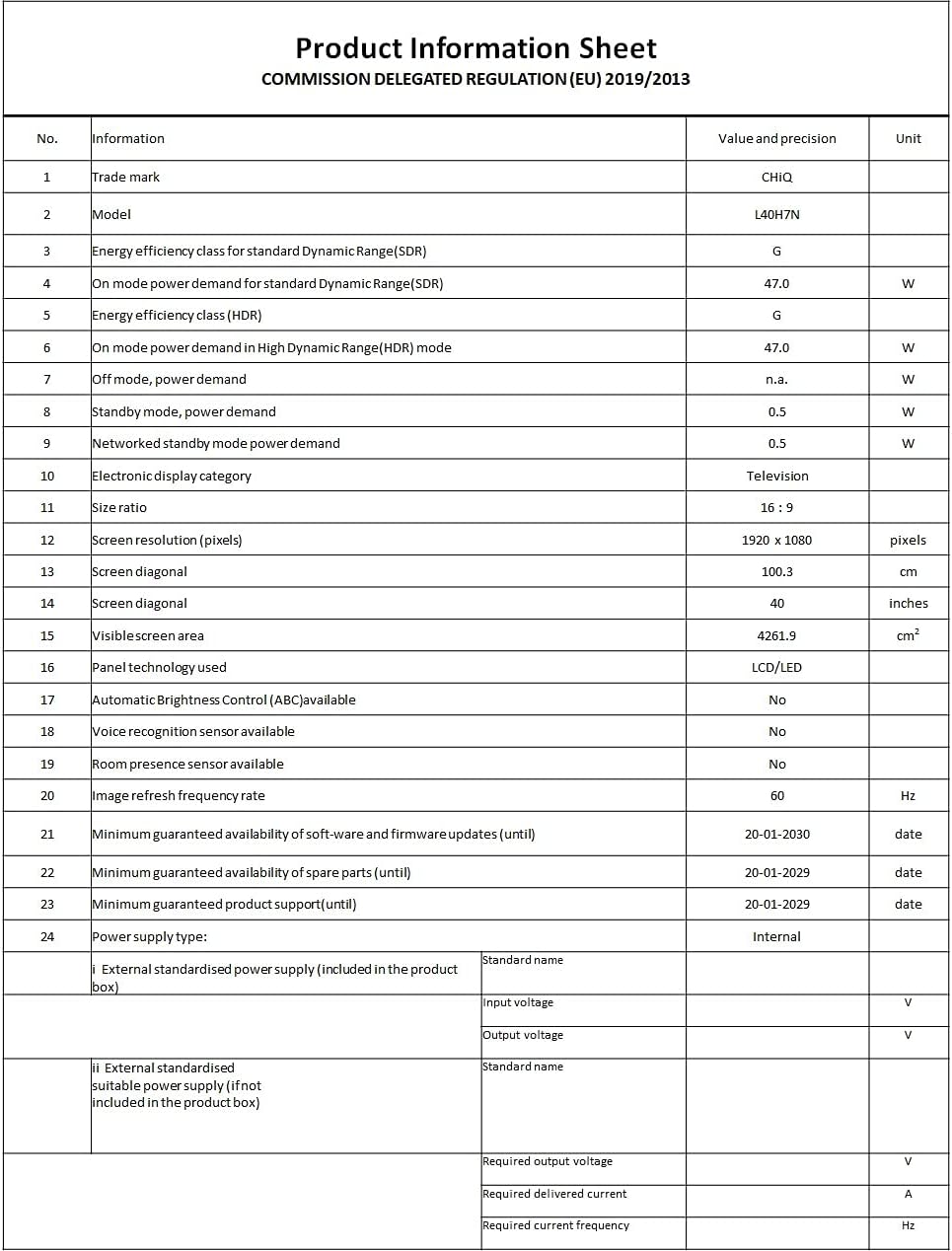
Image: A Product Information Sheet for the CHIQ L40H7N, detailing various specifications and compliance with COMMISSION DELEGATED REGULATION (EU) 2019/2013.
8. Кафолат ва дастгирӣ
Your CHIQ L40H7N Smart TV comes with a manufacturer's warranty. Please refer to the warranty card included in your product packaging for specific terms and conditions, including warranty period and coverage details.
Дастгирии муштариён:
For technical assistance, troubleshooting, or warranty claims, please contact CHiQ customer support. Contact information can typically be found on the CHiQ official webсайт ё дар ҳуҷҷатҳои маҳсулоти шумо.