
1. Маҳсулот ба охир расидview
The Alecto WS-1560 is a wireless weather station designed to provide accurate indoor and outdoor environmental data. Featuring a clear color display and a remote outdoor sensor, it offers comprehensive weather information and additional useful functions for your home.
Хусусиятҳои асосӣ:
- Measures indoor and outdoor temperature and humidity.
- Long-range wireless outdoor sensor (up to 100 meters).
- 5.7-inch well-lit color display with animated weather forecast icons.
- Temperature and ice alarm functions.
- Соати зангдор бо функсияи такрорӣ.
- Memory function for latest and highest readings.
- Moon phase indicator, date, day, and time display.
- Battery-operated main unit and outdoor sensor with backup batteries.

Figure 1.1: Alecto WS-1560 Main Unit and Wireless Outdoor Sensor.
2. Мундариҷаи баста
Ҳангоми кушодани бастабандӣ, боварӣ ҳосил кунед, ки ҳамаи ҷузъҳо мавҷуданд ва дар ҳолати хуб қарор доранд:
- Қисми асосии Alecto WS-1560 (Дисплейи дохилӣ)
- Сенсори берунаи бесим
- Дастури корбар
- (Power adapter and batteries may be included depending on package)
Video 2.1: Illustrative video showing typical weather station components and basic setup. (Note: This video is for a related product and may not show the exact Alecto WS-1560 model.)
3. Танзим ва насб
3.1. Насби батарея
Both the main unit and the outdoor sensor require batteries for operation. Ensure you use the correct type and polarity.
- Сенсори беруна:
- Қисми батареяро дар қафои сенсори бесими беруна кушоед.
- Insert 2x AA batteries (not included) according to the polarity markings (+/-).
- Қисмати батареяро бехатар пӯшед.
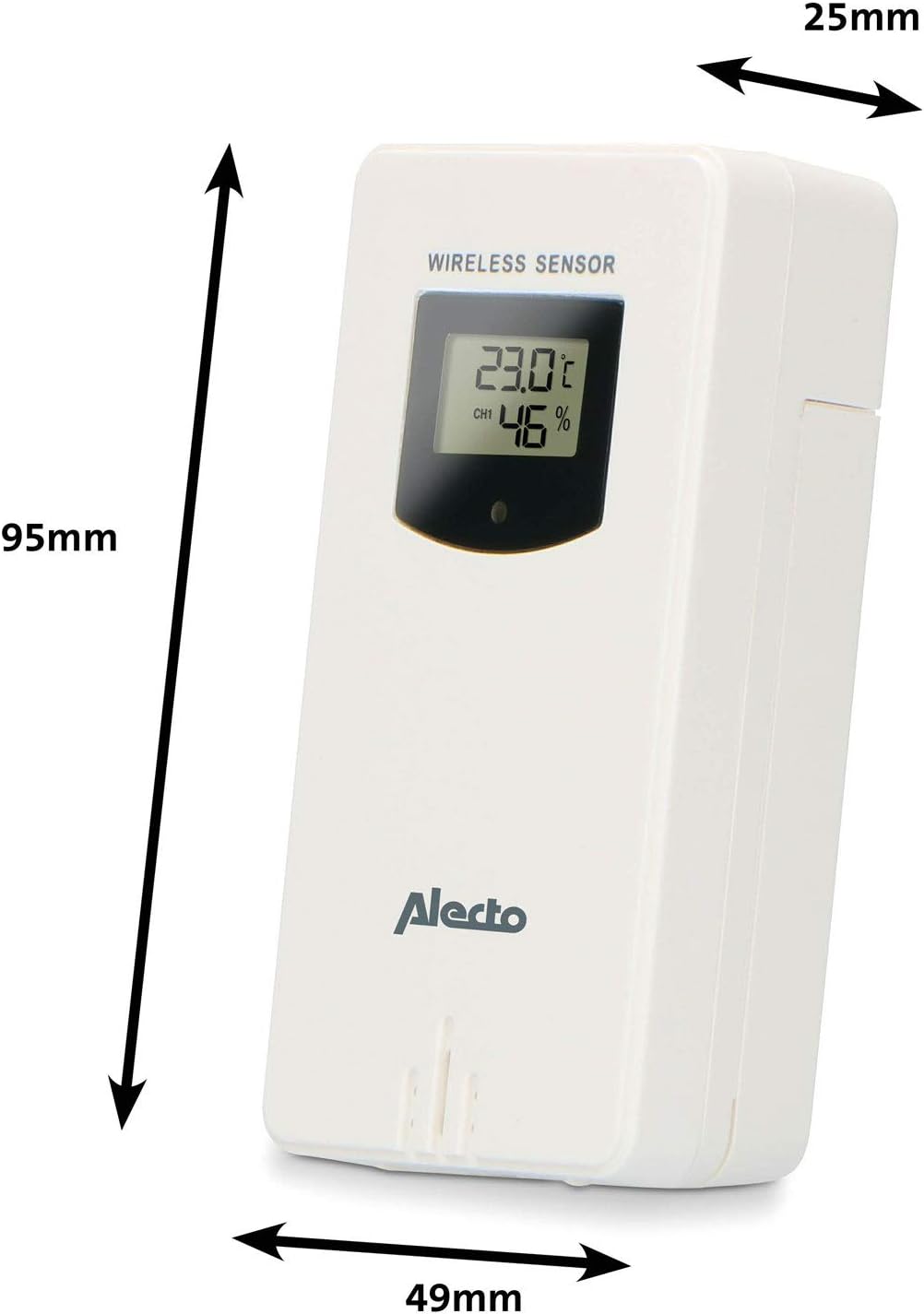
Figure 3.1: Wireless Outdoor Sensor dimensions and battery compartment location.
- Воҳиди асосӣ:
- Open the battery compartment on the back of the main unit.
- Insert 2x AA batteries (not included) according to the polarity markings (+/-). These serve as backup batteries.
- Қисмати батареяро бехатар пӯшед.
- Connect the main unit to a power outlet using the provided power adapter (if included).

Figure 3.2: Main Unit dimensions and power input.
3.2. Ҷойгиркунии сенсор
For accurate outdoor readings, proper placement of the wireless sensor is crucial:
- Place the sensor in a shaded area, away from direct sunlight, to prevent inaccurate temperature readings.
- Ensure good air circulation around the sensor.
- Mount the sensor vertically, approximately 1.5 to 2.5 meters (5 to 8 feet) above the ground.
- Avoid placing the sensor near heat sources (e.g., vents, windows) or moisture sources.
- The maximum transmission range is 100 meters (328 feet) in open air. Walls and other obstacles will reduce this range.

Расми 3.3: Мисample of outdoor sensor placement on a wall.
3.3. Pairing the Sensor with the Main Unit
The main unit and sensor should automatically pair once both are powered on. If pairing does not occur:
- Ensure both units have fresh batteries and are within range.
- Press the "TX" button inside the outdoor sensor's battery compartment to manually send a signal.
- On the main unit, you may need to initiate a search for the outdoor sensor (refer to the "Operation" section for specific button functions).
4. Амалиёт
4.1. Намоиши тарҳ
The 5.7-inch color display provides a clear overview of all measured data. Key areas include:
- Ҳарорат ва намӣ дар беруни бино: Displays current outdoor conditions.
- Ҳарорат ва намӣ дар дохили бино: Displays current indoor conditions.
- Пешгӯии обу ҳавои аниматсионӣ: Icons predict upcoming weather (sunny, partly cloudy, cloudy, rainy, snowy).
- Вақт ва сана: Current time, day, and date.
- Фишори барометрӣ: Фишори атмосфераи ҷорӣ.
- Марҳилаи моҳ: Graphical representation of the current moon phase.
- Temperature/Ice Alarm Indicators: Alerts for specific temperature thresholds or potential ice conditions.

Расми 4.1: Муфассал view of the main unit's color display.
4.2. Функсияҳои тугмаҳо
The main unit features several buttons for setting and adjusting functions. Common buttons include:
- Муқаррар: Enters setup mode for time, date, and other settings.
- РЕЖМ: Switches between display modes or confirms settings.
- БОЛО/ПОЁН (ё +/-): Adjusts values during setup or cycles through channels.
- Ҳушдор: Sets or activates the alarm function.
- МЭМ: Displays maximum/minimum temperature and humidity records. Long press to clear records.
- СНУЗ / НУР: Activates snooze during an alarm or adjusts backlight brightness.
Video 4.2: Illustrative video demonstrating various features and settings of a weather station. (Note: This video is for a related product and may not show the exact Alecto WS-1560 model.)
4.3. Муқаррар кардани вақт ва сана
- Press and hold the "SET" button until the time display starts flashing.
- Use the "UP" or "DOWN" buttons to adjust the hour, then press "SET" to confirm and move to minutes.
- Барои дақиқаҳо, сол, моҳ ва рӯз такрор кунед.
- Press "SET" again to exit the setting mode.
4.4. Танзимоти ҳушдор
- Press the "ALARM" button once to view вақти ҳушдор.
- Press and hold the "ALARM" button until the alarm time starts flashing.
- Use the "UP" or "DOWN" buttons to set the desired alarm hour and minute.
- Press "ALARM" to confirm.
- To activate/deactivate the alarm, press the "ALARM" button briefly when the alarm time is displayed. An alarm icon will appear/disappear.
4.5. Max/Min Records
The weather station automatically records the maximum and minimum temperature and humidity values over a 24-hour period.
- Press the "MEM" button briefly to view the maximum recorded values.
- Press "MEM" again to view the minimum recorded values.
- Press "MEM" a third time to return to current readings.
- To clear the records, press and hold the "MEM" button for a few seconds.
5. Нигоҳдорӣ
- Тозакунӣ: Сатҳҳои дисплей ва дастгоҳро бо матои нарм пок кунедamp матоъ. Тозакунанда ё ҳалкунандаҳои абразивиро истифода набаред.
- Иваз кардани батарея: Вақте ки нишондиҳандаи кам будани батарея дар дисплей пайдо мешавад, батареяҳои ҳам дастгоҳи асосӣ ва ҳам сенсори берунаро иваз кунед. Ҳамеша ҳамаи батареяҳоро якбора бо батареяҳои нав аз як намуд иваз кунед.
- Нигоҳубини сенсор: Periodically check the outdoor sensor for debris or obstructions that might affect its readings. Ensure it remains in a shaded, well-ventilated area.
6. Баррасии мушкилот
| Мушкилот | Сабаби эҳтимолӣ | Ҳалли |
|---|---|---|
| No outdoor temperature/humidity reading (or "---" displayed) |
|
|
| Хонишҳои нодурусти ҳарорат/намӣ |
|
|
| Дисплей хира ё холӣ аст |
|
|
7. Мушаххасоти
| Рақами модел | WS-1560 |
| Бренд | Алекто |
| Манбаи барқ (Воҳиди асосӣ) | Power Adapter (if included) + 2x AA batteries (backup) |
| Манбаи барқ (сенсори беруна) | 2x батареяҳои АА |
| Андозаҳои маҳсулот (Воҳиди асосӣ) | 5.1 х 16.5 х 12.3 см |
| Вазни маҳсулот | 440 гр |
| Диапазони сенсорҳои бесим | То 100 метр (дар ҳавои кушод) |
| Андозаи намоиш | 5.7 инч / 14.5 см |
| Пайдоиши | Хитой |
8. Кафолат ва дастгирӣ
Барои гирифтани маълумот дар бораи кафолат, дастгирии техникӣ ё дархостҳои хидматрасонӣ, лутфан ба корти кафолатии бо маҳсулоти шумо додашуда муроҷиат кунед ё ба мағозаи расмии Alecto муроҷиат кунед. webсайт. Квитансияи хариди худро ҳамчун далели харид нигоҳ доред.
Алекто Webсайт: www.alecto.nl (General Alecto website, specific support page may vary)