
Maxcom MM471
Maxcom MM471 Senior Portable Phone User Manual
1. Муқаддима
This manual provides detailed instructions for the safe and efficient use of your Maxcom MM471 Senior Portable Phone. Designed with ease of use in mind, this device features large characters, big buttons, and an ergonomic design, making it ideal for seniors. Please read this manual thoroughly before operating your phone.

Расми 1: Пеш view of the Maxcom MM471 Senior Portable Phone.
2. Танзимот
2.1 Мундариҷаи баста
Боварӣ ҳосил кунед, ки ҳама ҷузъҳо дар баста мавҷуданд:
- Maxcom MM471 Senior Portable Phone
- Батарея
- Адаптери пуркунандаи барқ
- Дастури корбар
2.2 Ҷойгир кардани корти SIM ва батарея
The Maxcom MM471 supports dual SIM cards. Follow these steps to install your SIM card(s) and battery:
- Turn off the phone and disconnect it from any power source.
- Сарпӯши қафои телефонро бодиққат хориҷ кунед.
- SIM корт(ҳо)-и худро ба слот(ҳо)-и таъиншуда бо контактҳои тиллоӣ рӯ ба поён гузоред.
- Батареяро гузоред ва боварӣ ҳосил кунед, ки контактҳо дуруст мувофиқанд.
- Сарпӯши қафоро то он даме ки он бо садои баланд ба ҷои худ ҷойгир шавад, пӯшед.

Расми 2: Бозгашт view with battery and SIM card area.
2.3 Пур кардани батарея
Before first use, fully charge the phone's battery:
- Connect the charging adapter to the phone's charging port or place the phone in its charging dock.
- Адаптерро ба васлаки барқ пайваст кунед.
- Нишондиҳандаи батарея дар экран ҳолати пуркунии барқро нишон медиҳад.
- Пас аз пур кардани барқ, пуркунандаи барқро ҷудо кунед.
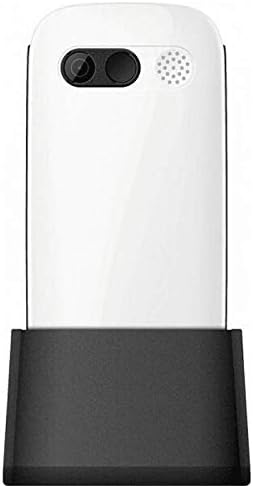
Figure 3: Phone in charging dock.
3. Дастурҳои истифодабарӣ
3.1 Фурӯзон/хомӯш кардан
- Барои фаъол кардан: -ро пахш карда нигоҳ доред Барқ/Занги хотимавӣ тугмаро то равшан шудани экран пахш кунед.
- Барои хомӯш кардани барқ: -ро пахш карда нигоҳ доред Барқ/Занги хотимавӣ button until the power-off options appear, then select 'Power Off'.
3.2 Занг задан
- Аз экрани асосӣ, рақами телефонро бо истифода аз клавиатура ворид кунед.
- -ро пахш кунед Занг занед тугмаи (тугмаи сабз) барои оғоз кардани занг.
- Барои анҷом додани занг, -ро пахш кунед Барқ/Занги хотимавӣ тугма (тугмаи сурх).
3.3 Қабули зангҳо
- When a call comes in, the phone will ring and display the caller's number or name.
- -ро пахш кунед Занг занед button (green button) to answer.
- Барои рад кардани занг, -ро пахш кунед Барқ/Занги хотимавӣ тугма (тугмаи сурх).
3.4 Фиристодан ва қабул кардани паёмҳо
- Navigate to the 'Messages' menu from the main screen.
- Select 'New Message' to compose a text message.
- Рақами гиранда ва паёми худро ворид кунед.
- Тугмаи 'Фиристодан'-ро пахш кунед.
- Received messages will appear in your 'Inbox'.
3.5 Идоракунии мухотибон
The phonebook can store up to 300 names.
- Go to the 'Contacts' or 'Phonebook' menu.
- Select 'Add New Contact' to save a new number.
- Enter the name and phone number, then save.
- To call a contact, select their name from the list and press the Занг занед тугма.
3.6 Истифодаи Bluetooth
Барои пайваст шудан ба дастгоҳҳои Bluetooth:
- Ба "Танзимот"> "Bluetooth" равед.
- Bluetooth-ро "фаъол" кунед.
- Интихоб кунед 'Ҷустуҷӯ devices' to find available Bluetooth accessories.
- Select the desired device and pair them.
3.7 Истифодаи дурахш
The phone includes a built-in flashlight for convenience.
- To turn on the flashlight, locate the dedicated flashlight button (if available) or access it through the 'Tools' menu.
- Press the button or select the option again to turn it off.
4. Нигоҳдорӣ ва нигоҳубин
To ensure the longevity and optimal performance of your Maxcom MM471 phone, follow these maintenance guidelines:
- Тозакунӣ: Барои тоза кардани сатҳи телефон аз матои нарм ва хушк истифода баред. Аз тозакунандаҳои моеъ ё маводҳои абразивӣ худдорӣ намоед.
- Ҳарорат: Do not expose the phone to extreme temperatures (hot or cold) or direct sunlight for extended periods.
- Рутубат: Keep the phone dry. Do not immerse it in water or expose it to high humidity.
- Нигоҳдорӣ: When not in use for a long time, store the phone in a cool, dry place with the battery partially charged.
- Таъсир: Аз партофтани телефон ё дучори таъсири сахти он худдорӣ намоед.
5. Баррасии мушкилот
If you encounter issues with your phone, refer to the table below for common problems and solutions:
| Мушкилот | Сабаби эҳтимолӣ | Ҳалли |
|---|---|---|
| Телефон фурӯзон намешавад | Батарея тамом шудааст ё дуруст гузошта нашудааст. | Батареяро пур кунед. Боварӣ ҳосил кунед, ки батарея дуруст гузошта шудааст. |
| Занг задан ё қабул карда наметавонад | No network signal, SIM card not inserted, or SIM card faulty. | Check network coverage. Reinsert SIM card(s). Contact your service provider. |
| Сифати пасти занг | Weak network signal, interference. | Ба минтақае ҳаракат кунед, ки сигнали беҳтар дорад. Аз монеаҳо канорагирӣ кунед. |
| Батарея зуд холӣ мешавад | Excessive usage, background applications, old battery. | Reduce screen brightness. Close unused applications. Consider replacing the battery if it's old. |
| Клавиатура бе ҷавоб | Хатогии нармафзор, зарари ҷисмонӣ. | Restart the phone. If the problem persists, contact support. |
6. Мушаххасоти техникӣ
Key technical details of the Maxcom MM471 Senior Portable Phone:
- Модели: MM471
- Бренд: Макском
- Ранги: Сафед
- Пайвастшавӣ: блутуз
- Дастгирии SIM: Дугона SIM
- Иқтидори китоби телефонӣ: 300 names
- Вақти гуфтугӯ: То 14 соат
- Интерфейс: Тугмаҳои ҷисмонӣ
- Хусусиятҳои махсус: Large characters, Big buttons, Ergonomic design, Speaker, Flashlight
7. Маълумот оид ба кафолат ва дастгирӣ
For detailed warranty information, please refer to the warranty card included with your product or visit the official Maxcom website. For technical support or service inquiries, please contact your retailer or the manufacturer's customer service department.
Ask a question about this manual
Ask about setup, troubleshooting, compatibility, parts, safety, or missing instructions. Manuals+ will review the question and use this page’s manual context to help answer it.