
1. Муқаддима
The ANYSECU HB880 is a hands-free Bluetooth headset designed for motorcycle helmets, enabling communication with two-way radios and mobile phones. It features Push-to-Talk (PTT) functionality, allowing seamless switching between radio and phone calls, enhancing safety and convenience during rides. This manual provides detailed instructions for installation, operation, and maintenance of your HB880 headset.
2. Мундариҷаи баста
Before installation, please verify that all items listed below are present in your package:
- HB880 Bluetooth Main Unit
- Helmet Speakers (2)
- Микрофони Boom
- Wireless PTT Controller
- 2-Pin Radio Adapter Cable
- Сими пуркунандаи USB
- Helmet Mounting Bracket (Pinch Cock and Sticker options)
- Microphone Windshield Foam

Расми 2.1: Барview of the ANYSECU HB880 Bluetooth Helmet PTT Headset components, including the main unit, speakers, microphone, wireless PTT controller, and radio adapter.
3. Маҳсулот ба охир расидview
The HB880 main unit features intuitive controls for power, volume, and Push-to-Talk (PTT) functions. The wireless PTT controller provides convenient remote activation of the PTT feature.

Расми 3.1: Diagram illustrating the HB880 main unit's connections to a mobile phone, wireless PTT controller, and two-way radio.

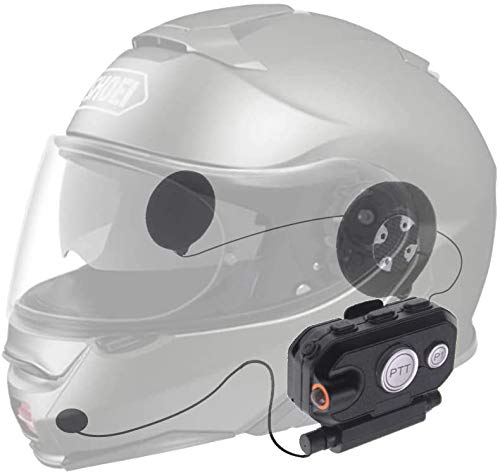
Расми 3.2: The HB880 main unit connected to its helmet speakers and boom microphone.
4. Танзим ва насб
4.1 Пур кардани дастгоҳ
Before first use, fully charge the HB880 main unit. Connect the USB charging cable to the charging port on the unit and to a standard USB power source. Charging typically takes less than 3 hours. The indicator light will change to show charging status.
4.2 Насб кардани кулоҳ
Follow these steps to properly install the HB880 headset into your motorcycle helmet:
- Choose Affixing Method: Select either the pinch cock clip for thin-shelled helmets or the adhesive sticker for thick-shelled helmets. The pinch cock is easier to remove, while the sticker provides a more permanent fit.
- Ҷойгир кардани поя: Attach the chosen mounting pedestal to the right side of your helmet. Ensure it is in a position that allows the main unit to be easily accessible and does not obstruct your vision or helmet functionality.
- Install Earphones and Microphone: Carefully install the earphones inside the helmet, aligning them with your ears. Route the microphone boom towards your mouth, ensuring it is close for clear voice transmission. Hide excess cable within the helmet lining.
- Пайваст кардани воҳиди асосӣ: Slide the HB880 main unit onto the installed pedestal until it locks securely.
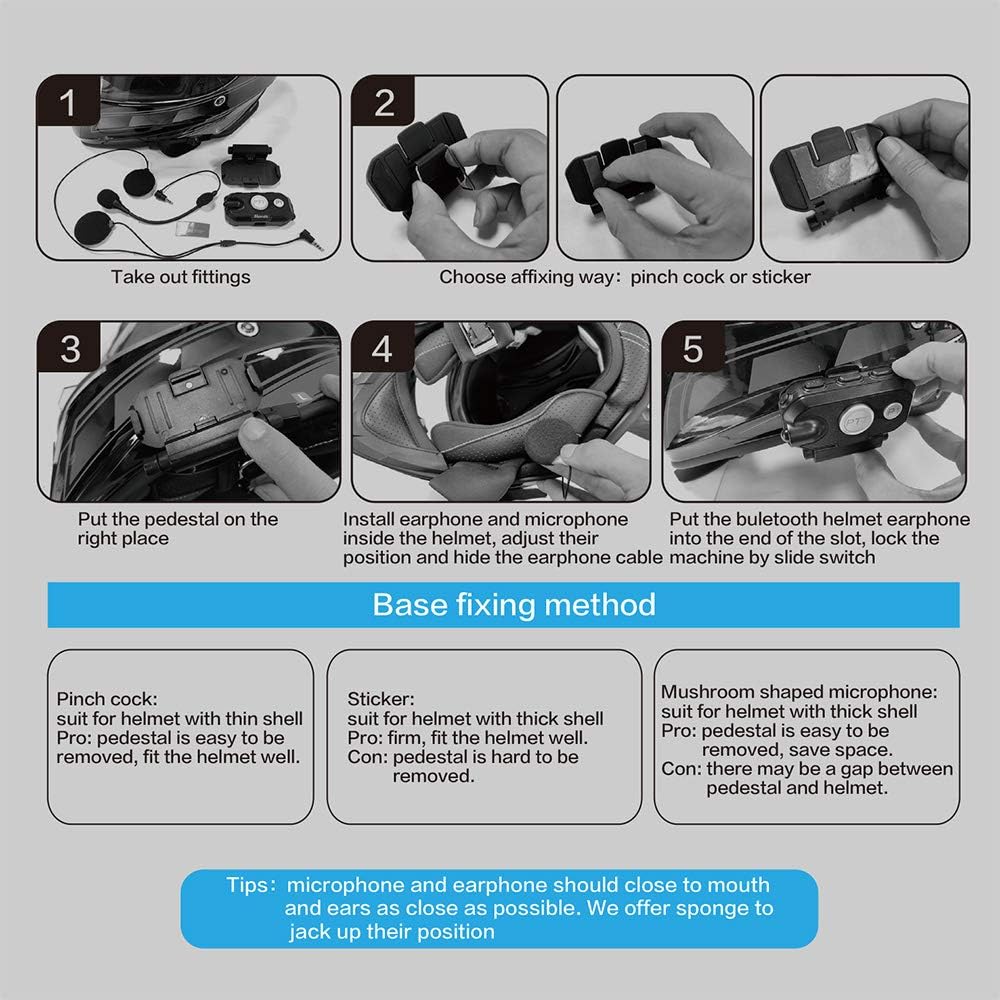
Расми 4.1: Step-by-step guide for installing the HB880 Bluetooth headset components into a motorcycle helmet.
Расми 4.2: Visual representation of the HB880 headset installed on a helmet, connected to a two-way radio via adapter, and paired with a wireless PTT controller.
4.3 Пайвастшавӣ ба радиои дуҷониба
Use the provided 2-pin adapter cable to connect your HB880 main unit to a compatible two-way radio. Ensure the connection is secure.
4.4 Пайвасткунии Bluetooth
The HB880 supports pairing with both mobile phones and the wireless PTT controller.
- Пайвастшавӣ бо телефони мобилӣ:
- Ensure the HB880 is powered off.
- Тугмаи барқро пахш карда нигоҳ доред, то он даме ки чароғи нишондиҳанда зуд дурахшад ва ҳолати ҷуфтшавиро нишон диҳад.
- On your mobile phone, go to Bluetooth settings and search for "HB880" or a similar device name.
- Select the HB880 to pair. Once connected, the indicator light will change.
- Pairing with Wireless PTT Controller:
- Ensure the HB880 is in pairing mode (refer to mobile phone pairing steps).
- Activate pairing mode on the wireless PTT controller (refer to its specific instructions, usually a long press of the PTT button).
- Дастгоҳҳо ба таври худкор пайваст мешаванд.
Note: The HB880 can connect to a phone, an adapter, a wireless PTT controller, and a radio simultaneously.
5. Амалиёт
5.1 Фаъол кардан/хомӯш кардан
- Фаъол: Press and hold the power button until you hear an audible prompt.
- Хомӯш: Press and hold the power button until you hear an audible prompt.
5.2 Назорати баландии овоз
Use the volume buttons on the HB880 main unit to adjust the audio level. Press the '+' button to increase volume and the '-' button to decrease volume.
5.3 Функсияи Push-to-Talk (PTT)
The PTT button on the main unit or the wireless PTT controller activates transmission on your connected two-way radio. Press and hold to transmit, release to listen.
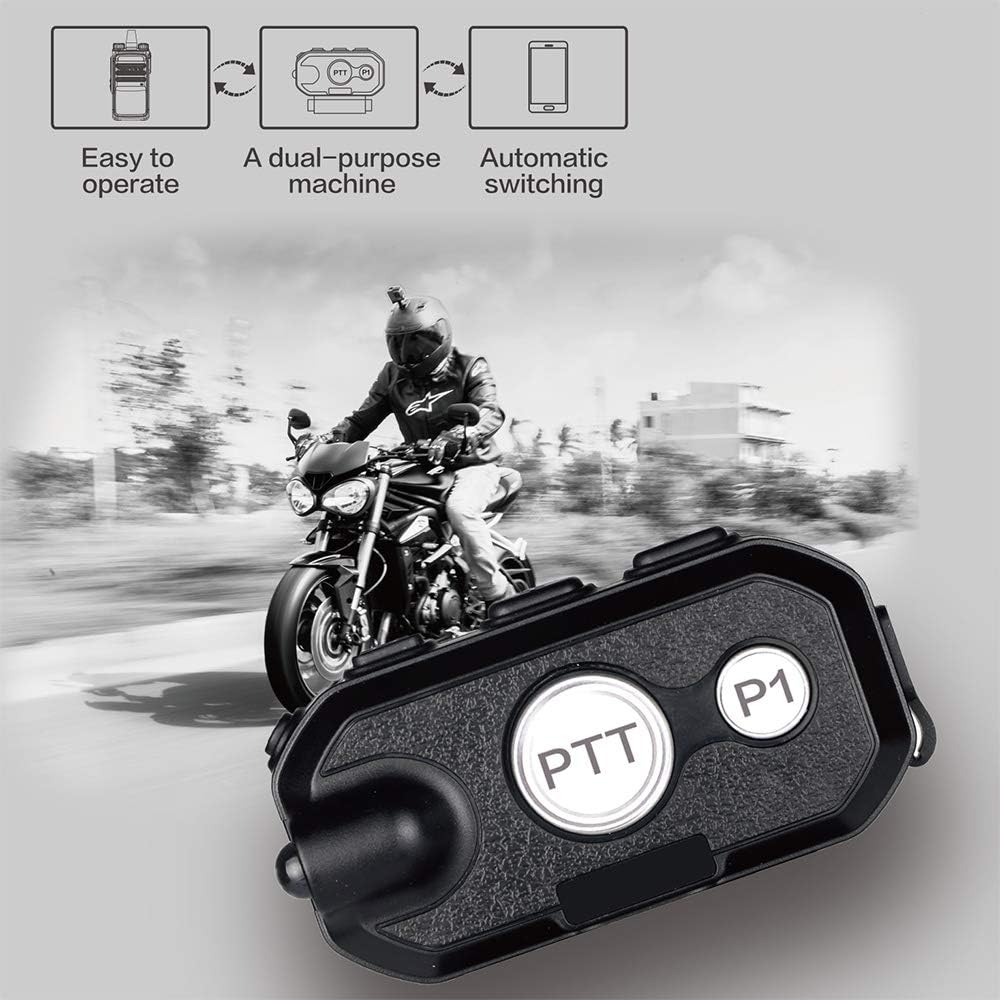
Расми 5.1: The HB880 main unit highlighting the PTT button, shown in a motorcycle riding context.
5.4 Усулҳои алоқа
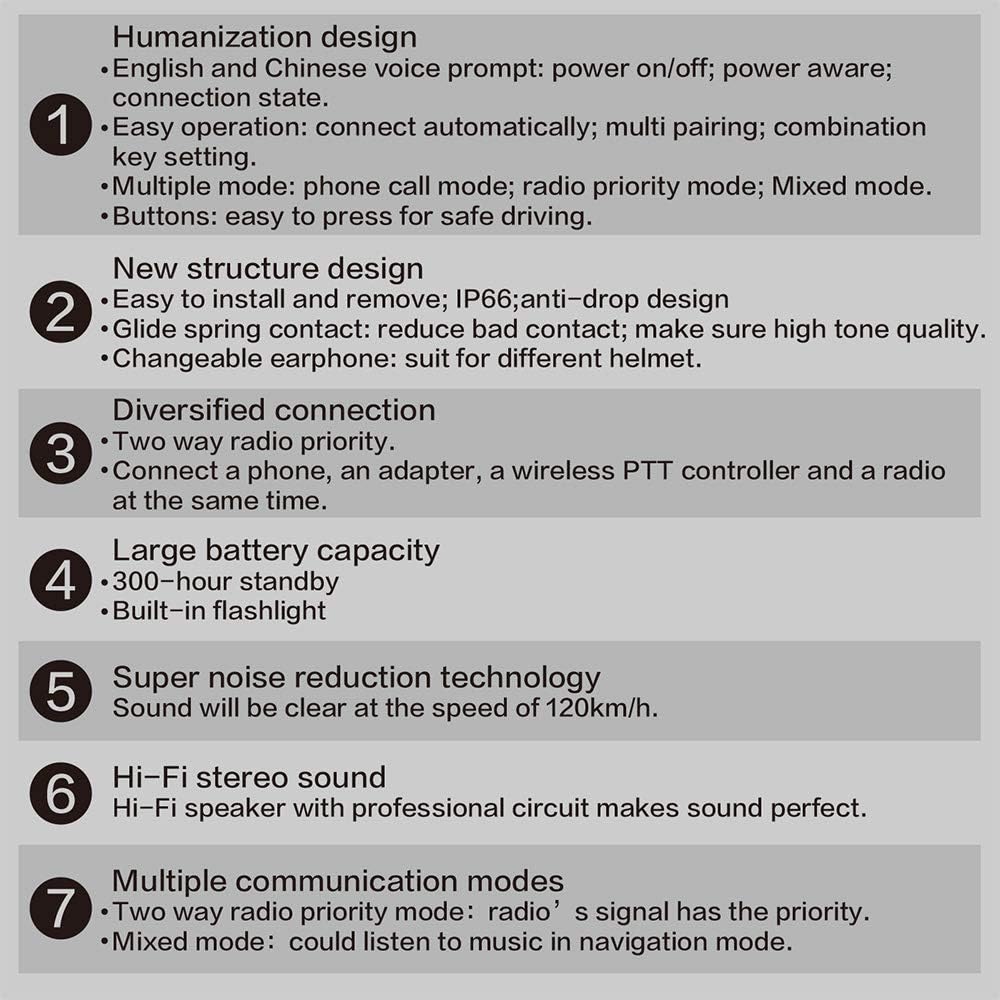
The HB880 supports multiple communication modes:
- Ҳолати занги телефон: When a phone call is received, the headset will automatically switch to phone call mode.
- Radio Priority Mode: Two-way radio signals take priority over other audio sources.
- Ҳолати омехта: Allows listening to navigation audio from a phone while maintaining radio communication.
The device features automatic switching between connected devices based on activity.
6. Нигоҳдорӣ
- Тозакунӣ: Wipe the main unit and other components with a soft, dry cloth. Avoid using harsh chemicals or abrasive cleaners.
- Нигоҳдорӣ: Дастгоҳро дар ҷои хунук ва хушк нигоҳ доред, вақте ки истифода намешаванд.
- Нигоҳубини батарея: To prolong battery life, avoid fully discharging the battery frequently. Charge the device regularly, especially if stored for extended periods.
- Microphone Windshield: Ensure the microphone windshield foam is securely attached to prevent it from falling off during use.
7. Баррасии мушкилот
| Мушкилот | Сабаби эҳтимолӣ | Ҳалли |
|---|---|---|
| No power / Device not turning on | Батареяи кам | Дастгоҳро пурра пур кунед. |
| Cannot pair with phone/PTT controller | Device not in pairing mode; previously paired device interfering | Ensure HB880 is in pairing mode. Disconnect or "forget" previous pairings on your phone/controller and try again. |
| Ҳаҷми садои паст | Volume set too low; poor speaker placement | Increase volume using the '+' button. Ensure speakers are positioned directly over your ears inside the helmet. |
| Intermittent audio / Poor connection | Loose cable connections; interference | Check all cable connections (speakers, microphone, radio adapter). Ensure devices are within Bluetooth range. |
| Тугмаҳо ҷавоб намедиҳанд | Button stuck or malfunction | Gently check if the button is physically stuck. If the issue persists, contact customer support. |
| Microphone foam falls off | Муносибати озод | Secure the foam windshield more firmly, possibly using a small rubber band if necessary. |
8. Мушаххасоти
- Модели: HB880-K
- Версияи Bluetooth: V4.1 Class2
- Реҷаи кор: 10 метр (33 фут)
- Bluetooth Profiles: HFP, HSP, PTT
- Вақти гуфтугӯ: Тақрибан 50 соат
- Вақти интизорӣ: Тақрибан 300 соат
- Вақти пуркунӣ: Камтар аз 3 соат
- Андозаҳо (Воҳиди асосӣ): Тақрибан 5.91 x 3.15 x 3.94 дюйм
- Истеҳсолкунанда: Anysecu
- UPC: 049500289744
Расми 8.1: Summary of key features and specifications for the HB880 headset.
9. Кафолат ва дастгирӣ
Барои гирифтани маълумот дар бораи кафолат ё дастгирии техникӣ, лутфан мустақиман бо фурӯшанда ё истеҳсолкунанда тамос гиред. Квитансияи хариди худро ҳамчун далели харид барои ҳама гуна даъвоҳои кафолат нигоҳ доред.