
Teslong TD450D85L1 Articulating Borescope User Manual
Model: TD450D85L1
1. Муқаддима
The Teslong TD450D85L1 Articulating Borescope is a professional inspection tool designed for visual examination of hard-to-reach areas. It features a two-way 180-degree articulating probe, an integrated 4.5-inch IPS LCD monitor, and high-definition imaging capabilities. This manual provides essential information for the safe and effective use of your borescope.
2. Маълумот оид ба бехатарӣ
- Non-Waterproof Probe: The inspection probe of this borescope is НЕСТ ОБ. Do not submerge the probe or any part of the device in water or other liquids. Doing so will cause damage and void the warranty.
- Avoid using the device in environments with extreme temperatures or high humidity.
- Дастгоҳро аз майдонҳои магнитии сахт дур нигоҳ доред.
- Кӯшиш накунед, ки дастгоҳро қисм-қисм кунед ё тағйир диҳед. Таъмир бояд танҳо аз ҷониби кормандони ваколатдор анҷом дода шавад.
- Ensure the device is fully charged before use to prevent unexpected power loss during inspections.

3. Мундариҷаи баста
Боварӣ ҳосил кунед, ки ҳамаи ҷузъҳои дар поён овардашуда ба бастаи шумо дохил карда шудаанд:
- TD450D85L1 Articulating Borescope Unit (with integrated 4.5-inch IPS monitor)
- Сими барқи USB Type-C
- Корти 8GB MicroSD (пешакӣ насбшуда)
- Қуттии интиқол
- Дастури истифодабаранда

4. Маҳсулот ба охир расидview ва Хусусиятҳо
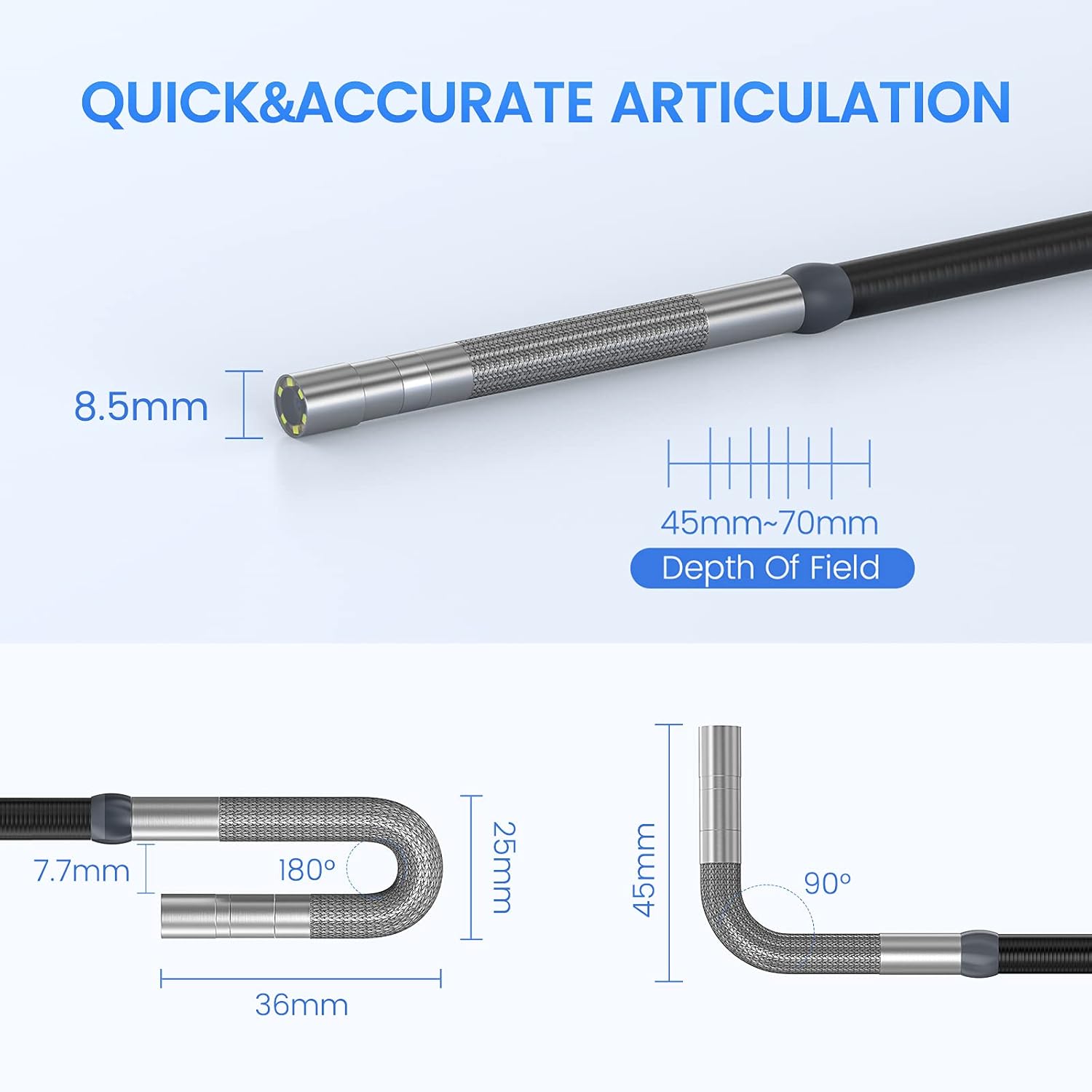
The Teslong TD450D85L1 is an advanced inspection camera designed for detailed visual inspections. It features a flexible gooseneck probe with an 8.5mm diameter and a 2.0MP CMOS sensor, providing 1080P HD image and video capture. The integrated 4.5-inch IPS LCD monitor offers a clear view without the need for external devices or Wi-Fi connections.
Хусусиятҳои асосӣ:
- Кунҷи дуҷониба бо 180°: Allows precise control of the probe tip for navigating complex spaces and maintaining optimal viewкунҷҳо.
- Integrated 4.5-inch IPS LCD Monitor: Provides a clear, real-time display of the inspection area. No smartphone, Wi-Fi, or app required.
- Тасвири баландсифат: 1080P HD resolution with a 2.0MP CMOS sensor for capturing detailed images and videos.
- Равшании танзимшавандаи LED: Built-in highlighting LEDs ensure clear visibility in dark conditions.
- Сабти акс ва видео: Supports JPG image and AVI video recording directly to the included 8GB MicroSD card. Includes a microphone and speaker for audio recording.
- Ҳаёти батареяи дароз: Equipped with a built-in 5000mAh rechargeable battery for extended operation.


5. Танзимот
5.1 Пуркунии ибтидоӣ
- Connect the USB Type-C charging cable to the borescope's charging port.
- Нӯги дигари сими USB-ро ба адаптери стандартии барқии USB (дохил карда нашудааст) ё порти USB-и компютер пайваст кунед.
- Allow the device to charge fully before first use. The charging indicator light will change when charging is complete.
5.2 Насби корти MicroSD
The 8GB MicroSD card is typically pre-installed. If it needs to be inserted or replaced:
- Locate the MicroSD card slot on the side of the monitor unit.
- Gently insert the MicroSD card with the gold contacts facing down until it clicks into place.
- Барои хориҷ кардан, кортро каме дарун тела диҳед, то он даме, ки он берун шавад.

6. Дастурҳои истифодабарӣ
6.1 Фурӯзон/хомӯш кардан
- Барои фаъол кардани дастгоҳ, тугмаи барқро пахш карда нигоҳ доред, то он даме ки экран равшан шавад.
- Барои хомӯш кардани барқ, тугмаи барқро то он даме ки экран хомӯш шавад, пахш карда нигоҳ доред.
6.2 Controlling Articulation
The borescope probe features two-way 180-degree articulation. Use the control knob on the handle to adjust the direction of the probe tip:
- Rotate the knob clockwise or counter-clockwise to bend the probe tip left or right.
- The articulation can be locked in position for stable viewing.

6.3 Танзими равшании LED
The probe tip is equipped with adjustable LED lights to illuminate the inspection area. Use the dedicated button on the monitor unit to cycle through different brightness levels or turn the lights off.
6.4 Аксбардорӣ ва сабти видеоҳо
- Барои гирифтани акс: Ҳангоми зинда будан view, press the Photo button (usually indicated by a camera icon) to capture a still image.
- Барои сабти видео: Press the Video button (usually indicated by a video camera icon) to start recording. Press it again to stop recording. The device will record audio through its built-in microphone.
- All captured media is saved to the installed MicroSD card.
6.5 РеviewВАО
Ба режими бозикунӣ аз менюи асосӣ дастрасӣ пайдо кунед view captured photos and videos. Use the navigation buttons to browse through your media files.
7. Нигоҳдорӣ
- Тозакунӣ: Gently wipe the monitor screen and the probe with a soft, dry cloth. For stubborn dirt on the probe, use a slightly damp cloth and ensure it is completely dry before storage. Do not use abrasive cleaners or solvents.
- Нигоҳдорӣ: Store the borescope in its carrying case in a cool, dry place, away from direct sunlight and extreme temperatures.
- Нигоҳубини батарея: For optimal battery life, charge the device regularly and avoid fully discharging it for extended periods. If storing for a long time, charge it to about 50% every few months.
- Навсозии нармафзор: Истеҳсолкунандаро санҷед webсайтро мунтазам барои навсозиҳои дастраси нармафзор тафтиш кунед.
8. Баррасии мушкилот
| Мушкилот | Сабаби эҳтимолӣ | Ҳалли |
|---|---|---|
| Дастгоҳ фаъол нест. | Батареяи кам. | Дастгоҳро пурра пур кунед. |
| Дар экран тасвир нест. | Probe cable not securely connected. | Ensure the probe cable is firmly connected to the monitor unit. |
| Image is blurry or dark. | Insufficient lighting; dirty camera lens; incorrect focus. | Adjust LED brightness. Clean the camera lens. Ensure the object is within the 45-70mm depth of field. |
| Сабти аксҳо/видеоҳо ғайриимкон аст. | Корти MicroSD пур аст ё дуруст гузошта нашудааст; хатогии корт. | Ворид кардани корти MicroSD-ро санҷед. Нолозимро нест кунед files or replace the card. Format the card if necessary (this will erase all data). |
| Артикуляция сахт ё беҷавоб аст. | Mechanical obstruction; debris in articulation mechanism. | Carefully inspect the probe tip for any obstructions. Do not force articulation. Contact customer support if the issue persists. |
9. Мушаххасоти
| Хусусият | Мушаххасоти |
|---|---|
| Номи модел | Articulating Endoscope Inspection Camera (TD450D85L1) |
| Андозаи экран | 4.5 Inches IPS LCD |
| Ҳалли самаранок | 2 МП |
| Қарори сабти видео | 1080p |
| Диаметри санҷиш | 8.5мм |
| Артикуляция | Two-Way 180 Degrees |
| Macro Focus Range (Depth of Field) | 45-70мм |
| Кунҷи воқеии View | 60 дараҷа |
| Навъи сенсор | CMOS |
| Навъи медиа | Корти Micro SD (8 ГБ дохил карда шудааст) |
| File Формат | JPG (images), AVI (videos) |
| Сабти аудио | Yes (with internal microphone) |
| Технологияи пайвастшавӣ | USB |
| Иқтидори батарея | 5000mAh (пуркунандаи барқ) |
| Сатҳи муқовимат ба об | Not Waterproof (probe) |
10. Кафолат ва дастгирӣ
Your Teslong TD450D85L1 Articulating Borescope comes with a Кафолати 12-моҳа аз рӯзи харид. Ин кафолат камбудиҳои истеҳсолиро фаро мегирад ва кори боэътимодро ҳангоми истифодаи муқаррарӣ таъмин мекунад.
For technical assistance, troubleshooting, or warranty claims, please contact Teslong customer service. Refer to the contact information provided on the official Teslong website or in your product packaging for the most up-to-date support channels.
Please have your model number (TD450D85L1) and purchase details ready when contacting support.