
1. Муқаддима
Thank you for choosing the TOMZON A 4K Camera Drone. This manual provides essential information for the safe operation, setup, and maintenance of your drone. Please read this manual thoroughly before operating the device to ensure proper function and to prevent damage or injury.
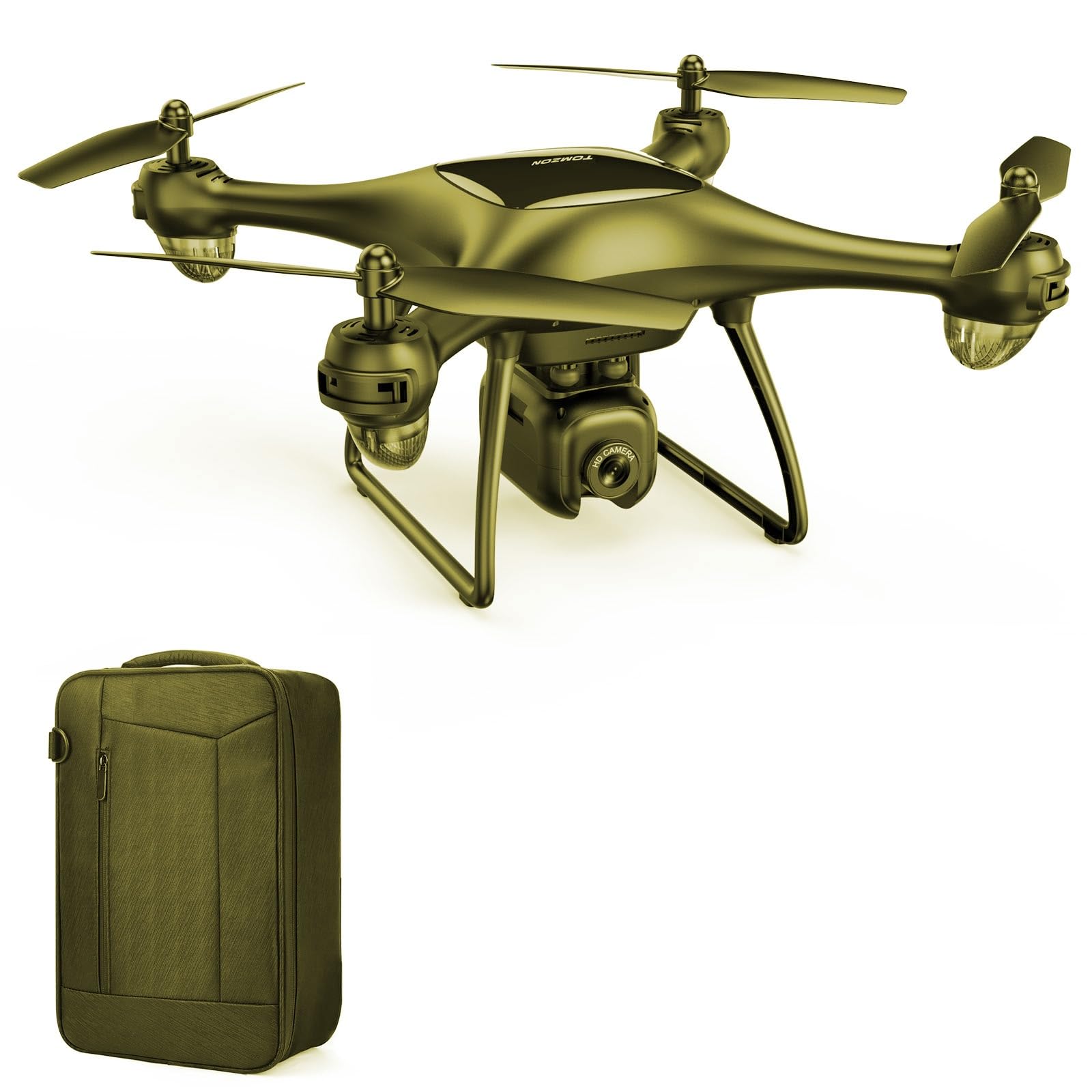
Image 1.1: The TOMZON A 4K Camera Drone. This image displays the drone from a slightly elevated angle, showcasing its compact design and camera.
2. Дастур оид ба бехатарӣ
Adhering to these safety guidelines is crucial for safe operation and to prevent damage to the drone or injury to individuals.
- Санҷиши пеш аз парвоз: Always inspect the drone, propellers, and battery for any damage before each flight.
- Шароити экологӣ: Fly in open areas, away from people, animals, buildings, and power lines. Avoid flying in strong winds, rain, or snow.
- Бехатарии батарея: Use only original TOMZON batteries and chargers. Do not overcharge or puncture batteries. Discontinue use if batteries show signs of swelling or damage.
- Хатти нигоҳ: Maintain visual line of sight with the drone at all times during flight.
- Маҳдудияти синну сол: Ин маҳсулот барои истифодаи калонсолон пешбинӣ шудааст.
- Бехатарии пропеллер: Дастҳо, рӯй ва либосҳои фуҷурро аз пропеллерҳои чархзананда дур нигоҳ доред.
- Қоидаҳои маҳаллӣ: Аз ҳама қонунҳо ва қоидаҳои маҳаллӣ дар бораи амалиёти бесарнишин огоҳ бошед ва риоя кунед.
3. Мундариҷаи баста
Боварӣ ҳосил кунед, ки ҳамаи ҷузъҳои дар поён овардашуда ба бастаи шумо дохил карда шудаанд:
- TOMZON A 4K Camera Drone (1 unit)
- Назорати дурдаст (1 адад)
- Drone Battery (Quantity may vary by package, typically 1-2)
- Сими пуркунандаи USB (1 адад)
- Spare Propellers (4 units)
- Propeller Guards (4 units)
- Carry Bag (1 unit)
- Дастури дастурӣ (Ин ҳуҷҷат)

Image 3.1: TOMZON A 4K Camera Drone and included accessories. This image shows the drone, spare propellers, and propeller guards, providing a visual reference for the package contents.
4. Маҳсулот ба охир расидview ва ҷузъҳо
Familiarize yourself with the main components of your TOMZON A 4K Camera Drone.
4.1 Унсурҳои дрон
- Пропеллерҳо: Four rotating blades that provide lift.
- Моторҳо: Пропеллерхоро ронда.
- Камера: Integrated 4K camera for photo and video capture.
- Бахши батарея: Houses the drone battery.
- Нишондиҳандаҳои LED: Provide status information (e.g., power, pairing, low battery).
- Тугмаи барқ: Барои фаъол/хомӯш кардани дрон.
4.2 Унсурҳои идоракунии дурдаст
- Ҷойстики чап: Баландиро (боло/поён) ва гардишро (чап/рост) идора мекунад.
- Ҷойстики рост: Ҳаракати пеш/қафо ва чап/ростро идора мекунад.
- Тугмаи парвоз/фуруд: One-key takeoff and landing.
- Тугмаи акс/видео: Activates camera functions.
- Гузариш суръат: Adjusts flight speed (low/medium/high).
- Тугмаи барқ: To turn the remote controller on/off.
5. Танзимот
5.1 Пур кардани батареяи дрон
- Сими пуркунандаи USB-ро ба батареяи дрон пайваст кунед.
- Plug the USB end of the cable into a USB power adapter (not included) or a computer's USB port.
- The indicator light on the charging cable will show charging status (e.g., red for charging, green for fully charged).
- Пуркунии барқ одатан тақрибан 60-90 дақиқа мегирад. Ҳангоми пур кардани барқ батареяҳоро беназорат нагузоред.

Image 5.1: TOMZON Drone Batteries and USB Charging Cable. This image illustrates the drone batteries and the USB charging cable used for recharging.
5.2 Насби батареяи дрон
- Боварӣ ҳосил кунед, ки дрон хомӯш аст.
- Open the battery compartment cover on the drone.
- Insert the fully charged battery into the compartment, ensuring it is securely seated.
- Сарпӯши қисмати батареяро пӯшед.
5.3 Attaching Propellers and Propeller Guards
- Identify the correct propellers (marked A or B) and match them to the corresponding motor shafts.
- Gently push the propellers onto the motor shafts until they are secure. Do not force them.
- Attach the propeller guards by snapping them into place around each motor arm. Ensure they are firmly attached to protect the propellers during flight.

Image 5.2: TOMZON Drone Propellers. This image shows a set of four drone propellers, indicating their design and material.

Image 5.3: TOMZON Drone Propeller Guards. This image displays four propeller guards, designed to protect the drone's propellers from impact.
5.4 Pairing the Remote Controller with the Drone
- Дронро ба сатҳи ҳамвор ва ҳамвор ҷойгир кунед.
- Press and hold the power button on the drone until the LED indicators begin to flash.
- Turn on the remote controller. The remote's indicator light will also flash.
- Push the left joystick up to its maximum position, then pull it down to its minimum position.
- The drone and remote indicator lights will become solid, indicating successful pairing.
6. Дастурҳои истифодабарӣ
6.1 Усулҳои асосии идоракунии парвоз
- Гирифтан: After pairing, press the One-Key Takeoff/Landing button, or push both joysticks simultaneously outwards and downwards to start the motors, then push the left joystick up to ascend.
- Ба боло/фуромадан: Барои боло рафтан ҷойстики чапро ба боло тела диҳед, барои поён рафтан ба поён кашед.
- Ба пеш/қафо: Барои парвоз ба пеш, тугмаи ростро ба боло тела диҳед, барои парвоз ба қафо ба поён кашед.
- Left/Right Sideways Flight: Барои парвоз ба чап, джойстики ростро ба чап тела диҳед, барои парвоз ба рост ба рост тела диҳед.
- Ба чап/рост гардиш кунед (яв): Барои гардиш ба чап, джойстики чапро ба чап тела диҳед, барои гардиш ба рост, ростро тела диҳед.
- Фуруд: Press the One-Key Takeoff/Landing button, or slowly pull the left joystick down until the drone lands.
6.2 Camera Operation (4K Camera)
- Аксбардорӣ: Briefly press the Photo/Video button on the remote controller to capture a single photo. The drone's LED indicators may flash once to confirm.
- Сабти видео: Press and hold the Photo/Video button for approximately 2 seconds to start video recording. Press and hold again to stop recording. The drone's LED indicators may flash continuously during recording.
- Нигоҳдорӣ: Photos and videos are typically stored on a microSD card (not included) inserted into the drone's camera slot. Ensure a card is inserted before flight.
- ViewВАО-и инг: Remove the microSD card from the drone and insert it into a card reader to view files on a computer or compatible device.
6.3 Хусусиятҳои махсус
- Нигоҳ доштани баландӣ: Дрон баландии устуворро ба таври худкор нигоҳ медорад, ки идоракунии онро осонтар мекунад.
- Ҳолати бе сар: In this mode, the drone's orientation is relative to the pilot, regardless of the drone's front direction. Activate via the remote controller (refer to remote diagram for specific button).
- Флипҳои 3D: For advanced users, the drone can perform 360-degree flips. Ensure sufficient altitude and clear surroundings before attempting.
7. Нигоҳдорӣ
Нигоҳдории мунтазам умри дароз ва кори оптималии дронро таъмин мекунад.
- Тозакунӣ: Барои тоза кардани корпуси дрон ва линзаи камера аз матои нарм ва хушк истифода баред. Аз истифодаи моеъ ё ҳалкунандаҳо худдорӣ кунед.
- Иваз кардани пропеллер: If propellers are damaged or bent, replace them immediately with spare propellers. Ensure correct A/B propeller placement.
- Нигоҳубини батарея: Батареяҳоро дар ҷои хунук ва хушк нигоҳ доред. Батареяҳоро муддати тӯлонӣ пурра холӣ накунед. Барои нигоҳдории дарозмуддат онҳоро то тақрибан 50-60% пур кунед.
- Бозрасии автомобилӣ: Periodically check motors for debris or obstructions.
8. Баррасии мушкилот
| Мушкилот | Сабаби эҳтимолӣ | Ҳалли |
|---|---|---|
| Дрон ба дурдаст ҷавоб намедиҳад. | Not paired; low battery in drone or remote. | Re-pair the drone and remote. Charge drone battery; replace remote batteries. |
| Дрон ҳангоми парвоз ғарқ мешавад. | Not calibrated; uneven surface at takeoff; strong wind. | Calibrate the drone on a flat surface. Fly in calm conditions. |
| Пропеллерҳо чарх намезананд. | Obstruction; damaged motor; low battery. | Check for obstructions. Ensure battery is charged. Contact support if motor is damaged. |
| Camera not recording/taking photos. | No microSD card; card full; card error. | Insert a formatted microSD card. Check card capacity. Try a different card. |
9. Мушаххасоти
| Хусусият | Тафсилот |
|---|---|
| Бренд | ТОМЗОН |
| Номи модел | 4 К |
| Рақами қисм | T-P5G-B-US |
| Қарори сабти видео | 4K |
| Сатҳи маҳорат | Профессионал |
| Андозаҳои маҳсулот (L x W x H) | 8.07" x 8.07" x 4.13" |
| Ранги | Зард |
| Давраи синну сол (Тавсиф) | Калонсол |
| Батареяҳо дохил карда шудаанд | No (referring to initial purchase, but drone uses rechargeable battery) |
10. Кафолат ва дастгирӣ
TOMZON products are designed for quality and reliability. For warranty information, technical support, or any inquiries regarding your TOMZON A 4K Camera Drone, please contact TOMZON customer service. The brand offers 24/7 consulting services.
Лутфан далели хариди худро барои даъвоҳои кафолат нигоҳ доред.