
1. Муқаддима
This manual provides essential instructions for the installation, operation, and maintenance of your Hikvision 8MP AcuSense WDR Mini Bullet Network Camera, model DS-2CD2083G2-IU. Please read this manual thoroughly before using the product and retain it for future reference.
Маҳсулот ба охир расидview
The Hikvision DS-2CD2083G2-IU is a high-performance 8-megapixel (4K) network camera designed for advanced surveillance. It features AcuSense technology for accurate human and vehicle target classification, Wide Dynamic Range (WDR) for clear imaging against strong backlight, and a fixed 2.8mm lens for a wide field of view. Its IP67 rating ensures robust outdoor performance, and the integrated microphone allows for audio monitoring.
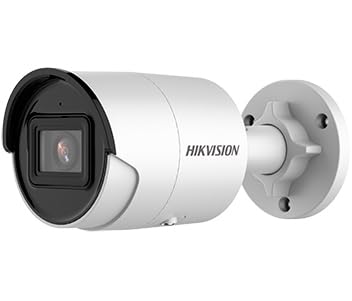
Figure 1: Hikvision 8MP AcuSense WDR Mini Bullet Network Camera (DS-2CD2083G2-IU)
This image displays the Hikvision 8MP AcuSense WDR Mini Bullet Network Camera, highlighting its compact bullet-style design suitable for various installation environments.
Хусусиятҳои асосӣ
- 8 Megapixel (4K) Resolution: Delivers high-quality, detailed video.
- Технологияи AcuSense: Reduces false alarms by accurately classifying human and vehicle targets.
- Диапазони васеи динамикӣ (WDR): Ensures clear images even in scenes with strong contrast.
- Fixed 2.8mm Lens: васеъ таъмин менамояд viewкунҷи дохилӣ.
- Infrared (IR) Illumination: Night vision up to 40 meters.
- Рейтинги IP67 барои обу ҳаво: Suitable for outdoor use in various weather conditions.
- Микрофони дарунсохт: Enables audio monitoring.
- Integrated Card Reader: Supports local storage (microSD card not included).
2. Маълумот оид ба бехатарӣ
Лутфан, чораҳои бехатарии зеринро риоя кунед, то осеб надиҳад ё ба маҳсулот зарар расонад:
- Ensure the power supply meets the camera's requirements (6.5 Watts).
- Камераро дар ҳарорати аз ҳад зиёд, намӣ ё муҳитҳои зангзананда қарор надиҳед.
- Avoid pointing the lens directly at strong light sources, as this may damage the sensor.
- Насбкунӣ бояд аз ҷониби кормандони соҳибихтисос мувофиқи кодексҳои барқии маҳаллӣ анҷом дода шавад.
- Танҳо лавозимоти аз ҷониби истеҳсолкунанда муқарраршударо истифода баред.
- Clean the camera lens with a soft, dry cloth. Avoid harsh chemicals.
3. Танзим ва насб
3.1 Кушодани баста
Carefully unpack the camera and check for any signs of damage. Ensure all components are present. (Typical components include: camera unit, mounting template, screws, waterproof connector, quick start guide).
3.2 Насби ҷисмонӣ
The camera is designed for ceiling mounting. Select a suitable location that provides the desired field of view and is within reach of network and power cables. Due to its IP67 rating, it is suitable for outdoor environments.
- Use the provided mounting template to mark drill holes on the ceiling.
- Сӯрохиҳои заруриро парма кунед ва агар лозим бошад, шамъҳои деворро гузоред.
- Secure the camera base to the mounting surface using the supplied screws.
- Барои фарогирии беҳтарин кунҷи камераро танзим кунед.
3.3 Пайвастшавӣ ба шабака ва барқ
This is an IP network camera. It requires a network connection and power. Power over Ethernet (PoE) is typically supported, simplifying installation by delivering both power and data over a single Ethernet cable. If PoE is not used, a separate 12V DC power adapter (not included) will be required.
- Connect an Ethernet cable from your network switch/router to the camera's RJ45 port. Use the waterproof connector for outdoor installations.
- If not using PoE, connect a 12V DC power adapter to the camera's power input.
- Once connected, the camera will power on. Allow a few minutes for it to boot up.
3.4 Танзимоти ибтидоӣ
Ба камера дастрасӣ пайдо кунед web интерфейс тавассути а web browser using its default IP address (refer to the quick start guide or use Hikvision's SADP tool to discover the IP address). You will be prompted to set a strong password for security. Follow the on-screen instructions to configure network settings, date/time, and other basic parameters.
4. Дастурҳои истифодабарӣ
4.1 Зиндагӣ View ва Сабт
After initial setup, you can view the live feed from the camera through its web interface, a Network Video Recorder (NVR), or Hikvision's client software (e.g., iVMS-4200) or mobile app (Hik-Connect). Configure recording schedules and methods (continuous, motion-triggered) via the camera's settings or NVR.
4.2 AcuSense Smart Features
The AcuSense technology allows the camera to distinguish between humans, vehicles, and other moving objects, significantly reducing false alarms caused by animals, rain, or falling leaves. Configure these detection rules in the camera's event settings to receive more accurate alerts.
- Муайянкунии ҳаракат 2.0: Set up detection zones and sensitivity for human and vehicle events.
- Муайян кардани дахолат: Define virtual boundaries, and the camera will trigger an alarm if a human or vehicle crosses them.
- Муайянкунии убури хат: Similar to intrusion, but for a specific line.
4.3 Диапазони васеи динамикӣ (WDR)
WDR compensates for extreme lighting conditions, such as strong backlight, to ensure that both bright and dark areas of the image are clearly visible. This feature is typically enabled by default but can be adjusted in the image settings.
4.4 Infrared (IR) Night Vision
The camera automatically switches to IR mode in low-light conditions, providing clear black-and-white video up to 40 meters. Ensure no obstructions block the IR LEDs for optimal night vision performance.
4.5 Мониторинги аудио
With its built-in microphone, the camera can capture audio from the surveillance area. Audio settings, including gain control, can be configured in the camera's web interface. Ensure local regulations regarding audio recording are followed.
5. Нигоҳдорӣ
- Тозакунӣ: Линза ва корпуси камераро мунтазам бо матои нарм тоза кунед,amp матоъ. Тозакунакҳои абразивиро истифода набаред.
- Навсозии нармафзор: Ба таври даврӣ аз мақомоти Hikvision тафтиш кунед website for firmware updates. Keeping the firmware updated ensures optimal performance, new features, and security enhancements.
- Санҷиши кабелӣ: For outdoor installations, periodically inspect cables and connections for wear or damage, especially the waterproof connectors.
- Идоракунии парол: Regularly change your camera's password to maintain security.
6. Баррасии мушкилот
| Мушкилот | Сабаби эҳтимолӣ | Ҳалли |
|---|---|---|
| No image/camera offline | No power, network cable disconnected, incorrect IP address. | Check power supply and network cable. Verify IP address using SADP tool. Restart camera. |
| Сифати бади тасвир | Dirty lens, incorrect focus (if adjustable), poor lighting, network bandwidth issues. | Clean the lens. Ensure adequate lighting. Check network connection speed. Adjust image settings (WDR, exposure). |
| Ҳушдорҳои бардурӯғ аз муайянкунии ҳаракат | Sensitivity too high, environmental factors (trees, animals), AcuSense not configured. | Adjust motion detection sensitivity. Configure AcuSense human/vehicle detection. Adjust detection zones. |
| Дастрасӣ намешавад web интерфейс | Суроғаи нодурусти IP, мушкилоти пайвастшавӣ ба шабака, мутобиқати браузер. | Verify IP address. Ensure camera and PC are on the same network segment. Try a different browser. |
If the problem persists after attempting these solutions, please contact Hikvision technical support.
7. Мушаххасоти
| Хусусият | Тафсилот |
|---|---|
| Рақами модел | DS-2CD2083G2-IU |
| Сенсори тасвир | CMOS |
| Макс. Резолюция | 8 МП (4К) |
| Линза | 2.8mm Линзаи собит |
| Диапазони IR | То 40 метр |
| WDR | Дастгир карда шудааст |
| AcuSense | Human and Vehicle Target Classification |
| Аудио | Микрофони дарунсохт |
| Захираи маҳаллӣ | Integrated Card Reader (MicroSD slot) |
| Рейтинги тобовар | IP67 |
| Истеъмоли қувваи барқ | 6.5 Ватт |
| Андозаҳо (L x W x H) | 15 x 15 x 8 см (тақрибан) |
| Навъи васлкунӣ | Монтажи шифт |
| Навъи огоҳӣ | Motion Only (configurable for human/vehicle) |
8. Кафолат ва дастгирӣ
Hikvision products typically come with a limited manufacturer's warranty. Please refer to the warranty card included with your product or visit the official Hikvision webсайт барои шартҳои кафолати муфассал ва шартҳои мушаххаси минтақаи шумо.
For technical support, firmware downloads, or further assistance, please visit the official Hikvision support portal or contact their customer service department. Ensure you have your product model number (DS-2CD2083G2-IU) and serial number ready when contacting support.
Расмии Hikvision Webсайт: www.hikvision.com