
IPRO EPro A25
IPRO EPro A25 Mobile Phone User Manual
Model: EPro A25 | Brand: IPRO
1. Муқаддима
Welcome to the user manual for your new IPRO EPro A25 mobile phone. This guide provides detailed instructions on how to set up, operate, and maintain your device. The IPRO EPro A25 is a reliable feature phone designed for essential communication, featuring dual SIM support, a camera, multimedia capabilities, and a wireless FM radio.
2. Маҳсулот ба охир расидview
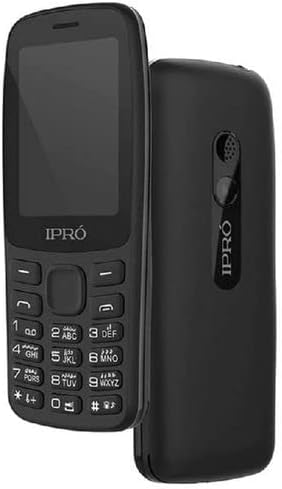
Тасвир: Пеш ва қафо view of the IPRO EPro A25 mobile phone. The front shows the screen and keypad, while the back highlights the speaker and camera area.
The IPRO EPro A25 is a compact and user-friendly mobile phone. Key features include a 2.4-inch screen, dual SIM card slots for managing two numbers simultaneously, a 3.5mm audio jack, MP3/MP4 playback, wireless FM radio, and an HD camera. It also supports a Micro SD card for expandable storage.
3. Оғози кор: Танзимоти ибтидоӣ
3.1 Inserting SIM Cards and Battery
- Сарпӯши қафои телефонро бодиққат бо кашидани сӯрохие, ки одатан дар поён ё паҳлӯ ҷойгир аст, кашед.
- Insert your SIM card(s) into the designated SIM card slots. Ensure the gold contacts face downwards and the cut corner aligns with the slot. This phone supports dual SIMs.
- Контактҳои батареяро бо терминалҳои дохили телефон мувофиқ кунед ва батареяро ба ҷои худ мулоим пахш кунед.
- Replace the back cover, ensuring it clicks securely into position.
3.2 Inserting a Memory Card (Micro SD)
- Locate the Micro SD card slot, typically near the SIM card slots.
- Insert the Micro SD card with the gold contacts facing downwards until it clicks into place.
- Барои хориҷ кардан, кортро оҳиста ба дарун тела диҳед, то он даме ки он берун ояд.
3.3 Пур кардани дастгоҳ
Before first use, fully charge the phone's battery. Connect the charger to the phone's charging port and plug it into a power outlet. The battery indicator on the screen will show the charging status. Disconnect the charger once the battery is full.
4. Амалиёти асосӣ
4.1 Фаъол кардан/хомӯш кардан
To power on, press and hold the Power/End Call key until the screen lights up. To power off, press and hold the Power/End Call key until the power-off options appear, then select 'Power off'.
4.2 Занг задан
From the home screen, enter the phone number using the keypad. Press the Call key (usually green) to initiate the call. To end a call, press the End Call key (usually red).
4.3 Интиқоли паёмҳо
Navigate to 'Messages' from the main menu. Select 'Write message' or 'New message'. Enter the recipient's number or select from contacts, then type your message. Press 'Send'.
4.4 Функсияи камера
Access the 'Camera' application from the main menu. Frame your shot using the screen. Press the center navigation key or a dedicated camera button to capture a photo. Photos are saved to the phone's memory or inserted Micro SD card.
4.5 Multimedia Playback (MP3/MP4)
To play music (MP3) or videos (MP4), transfer your media files to the phone's memory or a Micro SD card. Access the 'Music Player' or 'Video Player' from the main menu, then browse and select your files барои бозикунӣ.
4.6 Wireless FM Radio
Access the 'FM Radio' application from the main menu. This phone supports wireless FM, meaning headphones are not required as an antenna. Scan for available stations and select your preferred one.
5. Нигоҳдорӣ ва нигоҳубин
- Тозакунӣ: Use a soft, dry cloth to clean the phone's screen and body. Avoid liquid cleaners or abrasive materials.
- Нигоҳубини батарея: Do not expose the battery to extreme temperatures. Avoid overcharging or completely draining the battery frequently to prolong its lifespan.
- Нигоҳдорӣ: Телефонро дар ҷои хунук ва хушк, дур аз нури бевоситаи офтоб ва намӣ нигоҳ доред.
- Муқовимат ба об: This phone is not water-resistant. Avoid exposure to water or high humidity.
6. Бартараф кардани мушкилоти умумӣ
| Мушкилот | Ҳалли имконпазир |
|---|---|
| Телефон фаъол нест | Ensure the battery is correctly inserted and fully charged. Try charging for at least 30 minutes. |
| Занг задан/қабул кардан мумкин нест | Check if SIM card is properly inserted. Ensure you have network signal. Contact your service provider if issues persist. |
| Сифати садои паст | Check volume settings. Ensure speaker/earpiece is not blocked. |
| Memory card not detected | Reinsert the memory card. Ensure it is properly formatted and not damaged. |
7. Мушаххасоти техникӣ
| Хусусият | Мушаххасоти |
|---|---|
| Номи бренд | Generic (Manufacturer: iPro) |
| Андозаи экран | 2.4 инч (диагонали экрани намоён: 3"/7 см) |
| Технологияи мобилӣ | 2G (GSM) |
| Технологияи пайвастшавӣ | Bluetooth, WiFi |
| Ранги | multicolor (Product image shows black) |
| Шумораи ковокии SIM корт | Дугона SIM |
| Формаи форма | Шифер |
| Навъи намоиш | LCD |
| Тавсифи камера | Rear, Front (HD Camera mentioned in description) |
| Jack Audio | 3.5мм |
| Дастгирии ВАО | MP3/MP4 |
| Захираи васеъшаванда | Дастгирии корти Micro SD |
8. Кафолат ва дастгирӣ
This product comes with a standard manufacturer's warranty. Please refer to the warranty card included in your product packaging for specific terms and conditions. For technical support, service, or warranty claims, please contact your retailer or the manufacturer's authorized service center. Keep your purchase receipt as proof of purchase.
For further assistance, you may visit the official IPRO website or contact their customer service line, if available in your region.
Ask a question about this manual
Ask about setup, troubleshooting, compatibility, parts, safety, or missing instructions. Manuals+ will review the question and use this page’s manual context to help answer it.