
TOUCARE T9S
TOUCARE T9S Motorcycle Bluetooth Intercom User Manual
Model: T9S | Brand: TOUCARE
Муқаддима
The TOUCARE T9S is a high-performance Bluetooth intercom system designed for motorcycle riders. It enables clear communication between up to four riders, offers music sharing, and integrates with your mobile phone for calls and GPS navigation. With advanced noise cancellation and a robust waterproof design, the T9S ensures a reliable and enjoyable riding experience in various conditions.
Хусусиятҳои асосӣ
- 1200M Maximum Distance: Equipped with Bluetooth 5.0 for high compatibility and stability, allowing group communication within a 1200m intercom range.
- Support 4-Riders Intercom: Full-duplex communication for up to 4 riders simultaneously. Universal pairing function ensures compatibility with most Bluetooth headsets and mobile phones.
- Мубодилаи мусиқӣ: Share music with another rider, enjoy Hi-Fi stereo music, FM radio, or GPS voice guidance.
- Noise Reduction and IP67 Waterproof: DSP and CVC advanced noise reduction technology for clear communication up to 120km/h. IP67 waterproof rating for all-weather use.
- Ultra-Long Standby Battery: 800mAh rechargeable battery provides up to a week of standby time and 15 hours of working time.

Image: The T9S system supports communication for up to four riders over a distance of 1200 meters.

Image: CVC & DSP Noise Cancellation Technology ensures clear and smooth communication even at high speeds.

Image: The IP67 waterproof rating makes the T9S suitable for use in all weather conditions, including water sports.

Image: The T9S offers extended endurance times for talking, music playback, and standby, supporting long-distance travel.
Мундариҷаи баста
Each TOUCARE T9S package includes the following components:
- 1 x Bluetooth Intercom Unit
- 1 x Hi-Fi Speaker Set
- 1 x Boom Microphone
- 1 x Button Microphone
- 1 x кабели USB
- 1 x Насби часпанда
- 1 х Клamp Табақ
- 1 x Калиди Аллен

Image: All components included in the TOUCARE T9S package, ensuring you have everything needed for installation and use.
Маҳсулот ба охир расидview ва Функсияҳои Тугмаҳо
Familiarize yourself with the buttons and indicators on your T9S intercom unit:
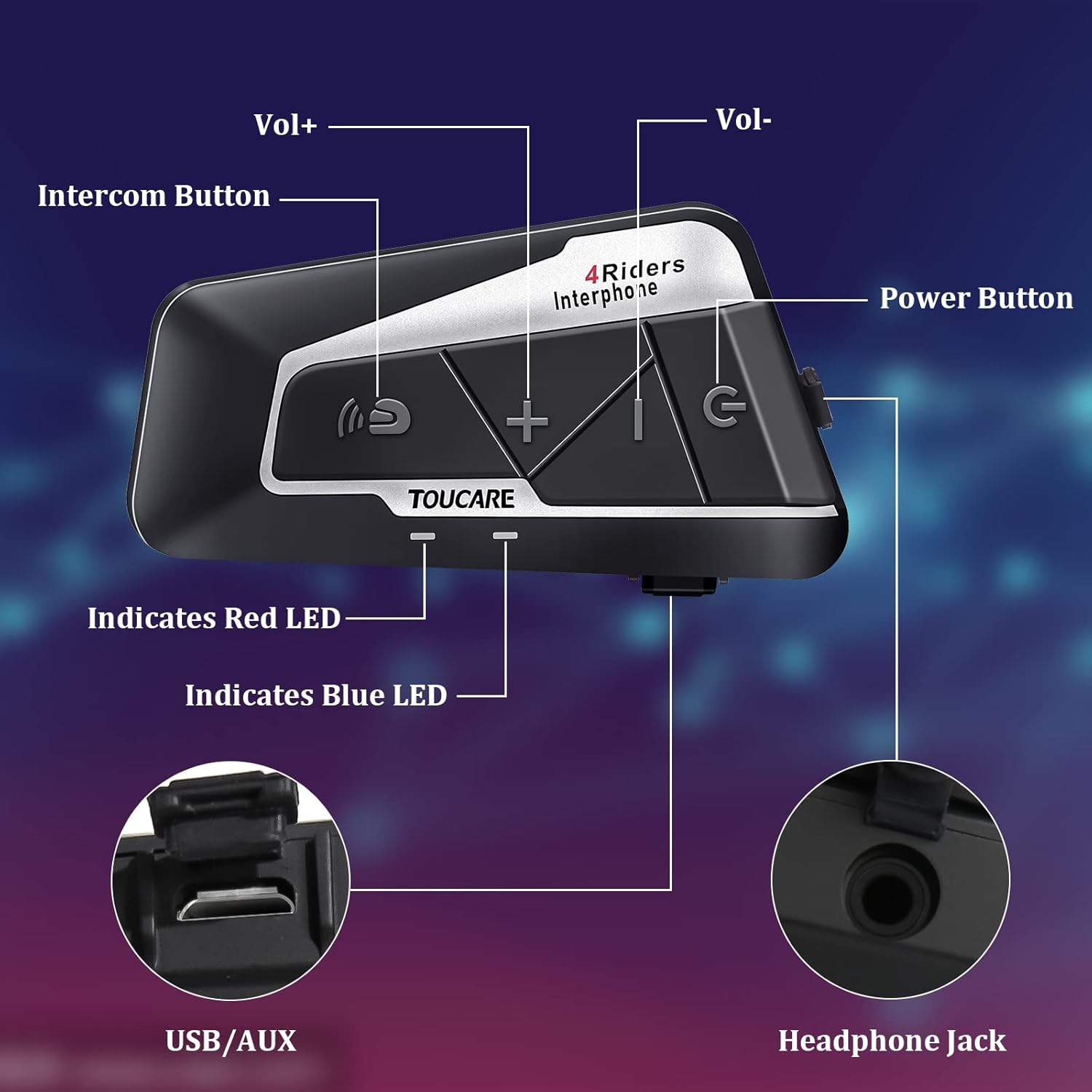
Image: Detailed diagram of the T9S unit, highlighting the location and labels of each button and port.
Power On/Off Button (G)
- Фаъол / Хомӯш: Барои фаъол ё хомӯш кардани дастгоҳ пахш кунед ва нигоҳ доред.
- Paired Mobile Phone: Short press to connect/disconnect with a paired mobile phone.
- Овози барқ: Short press to hear battery level prompt.
- Hang up Bluetooth Intercom: Short press during an intercom call to end it.
- Навозиши мусиқӣ/таваққуф: Барои бозӣ кардан ё таваққуфи мусиқӣ кӯтоҳ пахш кунед.
- Call Answering/Third Party Answer/End/Reject: Зангҳои телефониро идора кунед.
Bluetooth Intercom Button (Intercom Icon)
- Ҳаҷм +: Барои баланд бардоштани садо кӯтоҳ пахш кунед.
- Охирин суруд: Барои гузаштан ба суруди қаблӣ дароз пахш кунед.
- FM Turn Up: Short press during FM mode to tune up.
- FM Turn On/Off: Long press to turn FM radio on or off.
- Рақами охирини такрорӣ: Double press to redial the last dialed number.
Volume - Button (-)
- Ҳаҷм -: Барои паст кардани овози кӯтоҳ пахш кунед.
- Суруди навбатӣ: Барои гузаштан ба суруди навбатӣ дароз пахш кунед.
- FM Turn Down: Short press during FM mode to tune down.
- FM Turn On/Off: Long press to turn FM radio on or off.
- Рақамзании овозӣ: Double press to activate voice dialing (if supported by your phone).

Image: The T9S features ultra-large buttons, designed for easy operation even while wearing gloves.
Дастури насб
Усули насби собит
Follow these steps to securely install the T9S intercom unit on your helmet:
- Locate and Clean: Identify a suitable flat area on the left side of your helmet for mounting. Ensure the surface is clean and dry.
- Prepare Adhesive: Peel off the protective film from the 3M adhesive on the back of the mounting bracket.
- Фишор татбиқ кунед: Firmly press the mounting bracket onto the chosen location on your helmet. Apply consistent pressure for several seconds to ensure a strong bond.
- Воҳиди бехатарӣ: Slide the T9S intercom unit onto the mounted bracket until it clicks securely into place.
- Баландгӯякҳо ва микрофонро насб кунед: Route the speaker and microphone wires inside the helmet lining. Position the speakers inside the ear pockets and the microphone near your mouth for optimal audio.
Дастурҳои амалиётӣ
Пайвастшавӣ бо телефони мобилӣ
- Ensure the T9S is powered off.
- Press and hold the Power On/Off button until the LED indicator flashes red and blue alternately, indicating pairing mode.
- On your mobile phone, enable Bluetooth and search for new devices. Select "TOUCARE T9S" from the list.
- Once paired, the LED will flash blue slowly.
Initiating Intercom Communication
- Ensure all T9S units are powered on and within range.
- To initiate a group intercom, short press the Bluetooth Intercom Button on your unit. The units will attempt to connect.
- To end an intercom call, short press the Power On/Off button.
Навозиши мусиқӣ
- Бозӣ/Таваққуф: Тугмаи фурӯзон/хомӯшро кӯтоҳ пахш кунед.
- Суруди навбатӣ: Тугмаи баландии овозро муддати тӯлонӣ пахш кунед.
- Суруди қаблӣ: Long press the Bluetooth Intercom button.
- Танзими садо: Short press Volume + or Volume - buttons.
Радиои FM
- Фурӯзон/хомӯш кардан: Long press either the Bluetooth Intercom button or the Volume - button.
- Танзим: Short press the Bluetooth Intercom button.
- Танзим кардан: Тугмаи Volume -ро кӯтоҳ пахш кунед.
Ҷавоб додан/қатъи зангҳо
- Ҷавоб ба занг: Short press the Power On/Off button when a call comes in.
- Занги хотимавӣ: Short press the Power On/Off button during a call.
- Рад кардани занг: Long press the Power On/Off button when a call comes in.
- Рақамзании овозӣ: Double press the Volume - button (requires phone support).
- Рақами охирини такрорӣ: Double press the Bluetooth Intercom button.
Мушаххасоти техникӣ
| Хусусият | Мушаххасоти |
|---|---|
| Версияи Bluetooth | 5.0 |
| Bluetooth Profileс дастгирӣ карда мешавад | HSP, HFP, A2DP, AVRCP, AGHSP |
| Соатхои корй | 15 соат |
| Вақти интизорӣ | 350 соат |
| Вақти пуркунии барқ | 3 соат |
| Навъи батарея | Rechargeable Lithium Battery, 800mAh, 3.7V |
| Андозаҳо | 89 x 46 x 30 мм |
| Вазн | 85г |
| Назорати садо | Бекоркунии фаъоли садо (DSP ва CVC) |
| Сатҳи муқовимат ба об | IP67 |
| Технологияи пайвастшавӣ | Бесимӣ |
| Материал | Резин |
| Навъи назорат | Voice Control (via phone), Button Control |
Нигоҳдорӣ
To ensure the longevity and optimal performance of your TOUCARE T9S intercom, follow these maintenance guidelines:
- Тозакунӣ: Агрегатро бо нарм пок кунед, гamp матоъ. Моддаҳои кимиёвии сахт, маҳлулҳои тозакунанда ё шустушӯи қавӣ истифода набаред.
- Нигоҳдорӣ: Дастгоҳро дар ҷои хунук ва хушк дур аз нури бевоситаи офтоб ва ҳарорати аз ҳад зиёд ҳангоми истифода набаромада нигоҳ доред.
- Нигоҳубини батарея: For long-term storage, charge the battery to about 50% every three months to prevent deep discharge and extend battery life.
- Таъсири об: Although IP67 rated, avoid prolonged submersion. Ensure charging port is dry before charging.
- Идоракунии кабелӣ: Handle cables and connectors gently to prevent damage.
Мушкилкушо
If you encounter issues with your T9S intercom, try the following solutions:
Не қудрат
- Батареяро тафтиш кунед: Ensure the unit is fully charged. Connect it to a power source and check if the charging indicator lights up.
- Аз нав танзим кардан: If unresponsive, try holding the Power On/Off button for an extended period (e.g., 10-15 seconds) to force a reset.
Cannot Pair with Mobile Phone/Other Intercoms
- Усули ҷуфт: Ensure the T9S is in pairing mode (LED flashing red and blue alternately).
- Device Visibility: Make sure Bluetooth is enabled on your phone/other intercoms and they are discoverable.
- Тоза кардани таърихи ҷуфтшавӣ: On your phone, forget the T9S device and try pairing again. For intercoms, consult the manual for clearing pairing history if available.
- Масофа: Ensure devices are within close proximity (e.g., 1 meter) during pairing.
Poor Audio Quality/No Sound
- Ҳаҷм: Check if the volume is turned up on both the T9S and the connected device (phone/intercom).
- Мавқеи микрофон: Ensure the microphone is correctly positioned near your mouth and not obstructed.
- Пайвастагии баландгӯяк: Verify that the speakers are securely plugged into the headphone jack.
- дахолат: Аз манбаъҳои халалдоршавии қавии электромагнитӣ дурӣ ҷӯед.
- Нармафзори миёнаравӣ: Истеҳсолкунандаро санҷед website for any available firmware updates that might improve audio performance.
Кафолат ва дастгирӣ
For warranty information, technical support, or service inquiries, please refer to the warranty card included with your product or visit the official TOUCARE webсайт. Квитансияи хариди худро ҳамчун далели харид барои даъвоҳои кафолат нигоҳ доред.
For further assistance, you may also contact TOUCARE customer service through the contact information provided on their official channels.
Ask a question about this manual
Ask about setup, troubleshooting, compatibility, parts, safety, or missing instructions. Manuals+ will review the question and use this page’s manual context to help answer it.