
1. Муқаддима
Ташаккур ба шумо барои харидasing the Muse M-308 BT Bluetooth Speaker. This manual provides essential information for the safe and correct use of your device. Please read it thoroughly before use and keep it for future reference.
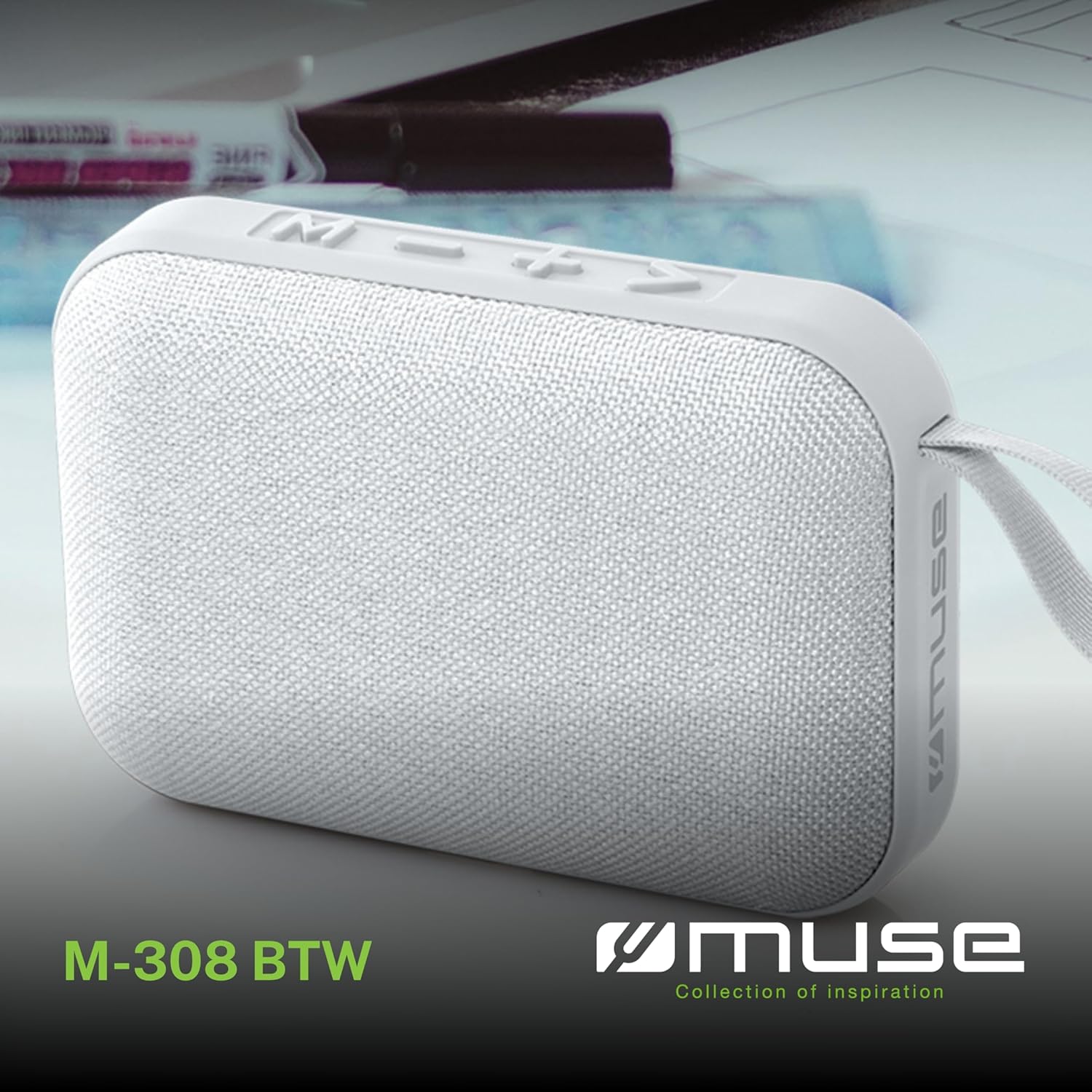
Тасвири 1.1: Пеш view of the Muse M-308 BT Bluetooth Speaker.
2. Хусусиятҳои маҳсулот
- Пайвасти Bluetooth: Овозро аз дастгоҳҳои мувофиқ ба таври бесим ҷараён диҳед.
- Функсияи озоди дастҳо: Integrated microphone for taking calls.
- Навозиши медиавӣ: Supports music playback from USB and MicroSD (TF) cards.
- Пайвасткунии стерео: Connect two M-308 BT speakers for enhanced stereo sound.
- Нишондиҳандаи LED: Provides visual feedback for Bluetooth pairing and charging status.
- Компакт ва сабук: Designed for portability, weighing approximately 200g.
- Батареяи пуркунандаи барқгиранда: 1200mAh capacity for up to 10 hours of playback.
- Қувваи баромад: 5 Watts for clear audio.

Image 2.1: Key features of the Muse M-308 BT speaker.

Image 2.2: Additional functionalities of the Muse M-308 BT speaker.
3. Мундариҷаи баста
Ҳангоми кушодани баста, боварӣ ҳосил кунед, ки ҳамаи ашёҳо мавҷуданд:
- Muse M-308 BT Bluetooth Speaker
- Сими пуркунандаи USB
- Дастури корбар (ин ҳуҷҷат)
4. Идоракунӣ ва Пайвастшавӣ
Бо идоракунии баландгӯяк ва портҳои пайвастшавӣ шинос шавед:

Image 4.1: Top panel with various connections.
- Порти USB: Барои навохтани мусиқӣ аз диски флеши USB.
- Порти Micro-USB: Барои пур кардани баландгӯяк.
- Micro SD (TF) Card Slot: Барои навохтани мусиқӣ аз корти Micro SD.
- Тугмаи ON/OFF: To power the speaker on or off.

Image 4.2: Side panel with control buttons.
- M Button (Mode): Барои гузаштан байни режимҳои Bluetooth, USB ва Micro SD пахш кунед.
- - Button (Volume Down / Previous Track):
- Пахши кӯтоҳ: паст кардани овоз.
- Тугмаи дарозро пахш кунед: Ба суруди қаблӣ гузаред.
- + Button (Volume Up / Next Track):
- Пахши кӯтоҳ: Баланд бардоштани овоз.
- Long press: Go to the next track.
- > Button (Play / Pause / Call):
- Short press: Play or pause music.
- Пахши кӯтоҳ (ҳангоми занги даромад): Ба занг ҷавоб диҳед.
- Long press (during incoming call): Reject call.
- Пахши кӯтоҳ (ҳангоми занг): Зангро хотима диҳед.
5. Танзимот
5.1 Пур кардани баландгӯяк
- Connect the supplied USB charging cable to the Micro-USB port on the speaker.
- Қисми дигари сими USB-ро ба адаптери барқи USB (дохил карда нашудааст) ё порти USB-и компютер пайваст кунед.
- The LED indicator will illuminate to show charging status. It will turn off or change color when fully charged.
5.2 Фурӯзон/хомӯш кардан
- To power on, slide the ON/OFF switch to the 'ON' position. You will hear an audible prompt.
- Барои хомӯш кардани барқ, тугмаи ON/OFF-ро ба ҳолати "OFF" лағжонед.
5.3 Пайвасткунии Bluetooth
- Ensure the speaker is powered on and in Bluetooth mode (indicated by a flashing LED). If not, press the 'M' button to switch to Bluetooth mode.
- Bluetooth-ро дар смартфон, планшет ё дигар дастгоҳи мувофиқ фаъол созед.
- Ҷустуҷӯ available Bluetooth devices and select "M-308 BT" from the list.
- Пас аз ҷуфт кардан, нишондиҳандаи LED милт-милт карданро қатъ мекунад ва устувор мемонад ва шумо садои тасдиқро мешунавед.
- The speaker will automatically connect to the last paired device when powered on, if it is within range.
5.4 Ҷуфткунии стерео (Функсияи TWS)
To pair two M-308 BT speakers for true wireless stereo sound:
- Ensure both speakers are powered on and in Bluetooth pairing mode (LED flashing).
- On one of the speakers (this will be the primary speaker), double-press the 'M' button. The speaker will search for another M-308 BT speaker.
- Once connected, both speakers will emit a confirmation tone, and the LED on the primary speaker will flash slowly, while the LED on the secondary speaker will remain solid.
- Акнун, дастгоҳи худро тавассути Bluetooth ба баландгӯяки асосӣ, тавре ки дар бахши 5.3 тавсиф шудааст, пайваст кунед.
6. Дастурҳои истифодабарӣ
6.1 Навозиши мусиқӣ
- Усули Bluetooth: After successful pairing, start playing music on your connected device. The audio will stream through the speaker.
- Ҳолати USB/Micro SD: Insert a USB flash drive or Micro SD card into the respective port. The speaker will automatically switch to the corresponding mode and begin playing music. If it doesn't, press the 'M' button to cycle through modes.
6.2 Назорати баландии овоз
- Press the '+' button to increase the volume.
- Press the '-' button to decrease the volume.
6.3 Навигатсияи роҳ
- Long press the '+' button to skip to the next track.
- Long press the '-' button to go back to the previous track.
6.4 Зангзании дастӣ
- When a call comes in, the music will pause. Press the '>' button to answer the call.
- To end a call, press the '>' button again.
- To reject an incoming call, long press the '>' button.
7. Нигоҳдорӣ
- Баландгӯякро аз ҳарорати аз ҳад зиёд, нури бевоситаи офтоб ва намӣ дур нигоҳ доред.
- Do not expose the speaker to water or other liquids. This model is not water-resistant.
- Динамикро бо матои мулоим ва хушк тоза кунед. Тозакунанда ё ҳалкунандаҳои абразивиро истифода набаред.
- Кӯшиш накунед, ки баландгӯякро худатон қисм-қисм кунед ё таъмир кунед. Ин кафолатро бекор мекунад.
- Вақте ки батареяро муддати тӯлонӣ истифода намебаред, барои нигоҳ доштани саломатии он ҳадди аққал як маротиба дар се моҳ пур кунед.
8. Баррасии мушкилот
| Мушкилот | Сабаби эҳтимолӣ | Ҳалли |
|---|---|---|
| Баландгӯяк фаъол нест. | Батарея тамом шудааст. | Баландгӯякро бо истифода аз сими USB-и додашуда пур кунед. |
| Тавассути Bluetooth пайваст карда намешавад. | Bluetooth is not enabled on your device or speaker is not in pairing mode. Speaker is too far from the device. | Ensure Bluetooth is active on both devices. Make sure the speaker is in Bluetooth pairing mode (flashing LED). Move the speaker closer to your device (within 10 meters). |
| Садо нест. | Volume is too low. Speaker is not connected. Incorrect mode selected. | Increase the volume on both the speaker and your connected device. Re-pair the Bluetooth connection. Press the 'M' button to cycle through modes (Bluetooth, USB, Micro SD). |
| Music playback from Micro SD card is erratic or "screaming". | вайроншуда files on Micro SD card. Incompatible file формат. | Таъмини аудио files are in a compatible format (e.g., MP3). Try using a different Micro SD card or reformatting the current one and reloading files. |
| Speaker switches between modes (e.g., SD and BT) unexpectedly. | Interference or a temporary software glitch. | Power off the speaker, wait a few seconds, then power it back on. Ensure no other devices are causing interference. If the issue persists, try removing the Micro SD card if it's inserted. |
9. Мушаххасоти
| Номи модел | М-308 БТ |
| Бренд | Муза |
| Технологияи пайвастшавӣ | Bluetooth, симдор |
| Технологияи алоқаи бесим | блутуз |
| Баландгӯяк Максимум қудрати баромади | 5 Ватт |
| Ҳолати баромади аудио | Стерео |
| Навъи баландгӯяк | Баландгӯяки сайёри Bluetooth |
| Хусусиятҳои махсус | блутуз |
| Дастгоҳҳои мувофиқ | Смартфон, планшет |
| Манбаи нерӯ | Батарея |
| Муҳлати батарея | 10 соат |
| Иқтидори батарея | 1200 миллионampсоат пеш |
| Андозаҳои маҳсулот (D x W x H) | 118D x 30B x 76H миллиметр (11.8 x 3 x 7.6 см) |
| Вазни ашё | 200 грамм |
| Материал | Plastic rubber material |
| Is Water Resistant | Не |
| Компонентҳои дохилшуда | Сими пуркунандаи USB |
Image 9.1: Dimensions of the Muse M-308 BT speaker.
10. Кафолат ва дастгирӣ
The Muse M-308 BT Bluetooth Speaker comes with a Кафолати 2 сол аз рӯзи харид.
For technical support, warranty claims, or further assistance, please contact your retailer or visit the official MUSE webсайт барои маълумоти тамос.