
1. Маҳсулот ба охир расидview
The Warrior 18V Cordless 3/8 Inch Drill/Driver Kit is designed for various drilling and driving tasks around the home and workshop. This versatile tool features a variable speed trigger, an electric brake, and 20 torque clutch settings for precise control. A keyless chuck allows for quick and easy bit changes, and a built-in LED light illuminates the work area for improved visibility in dark corners. The included 18V Lithium-Ion battery is interchangeable with other 18 Volt Warrior tools, offering convenience and flexibility.
Хусусиятҳои асосӣ:
- Variable speed, reversible operation
- Electric brake for immediate stopping
- 20 torque clutch settings for diverse applications
- Keyless chuck for quick bit changes
- Integrated LED light for enhanced visibility
- 18 Volt Lithium-Ion battery, interchangeable with other Warrior 18V tools
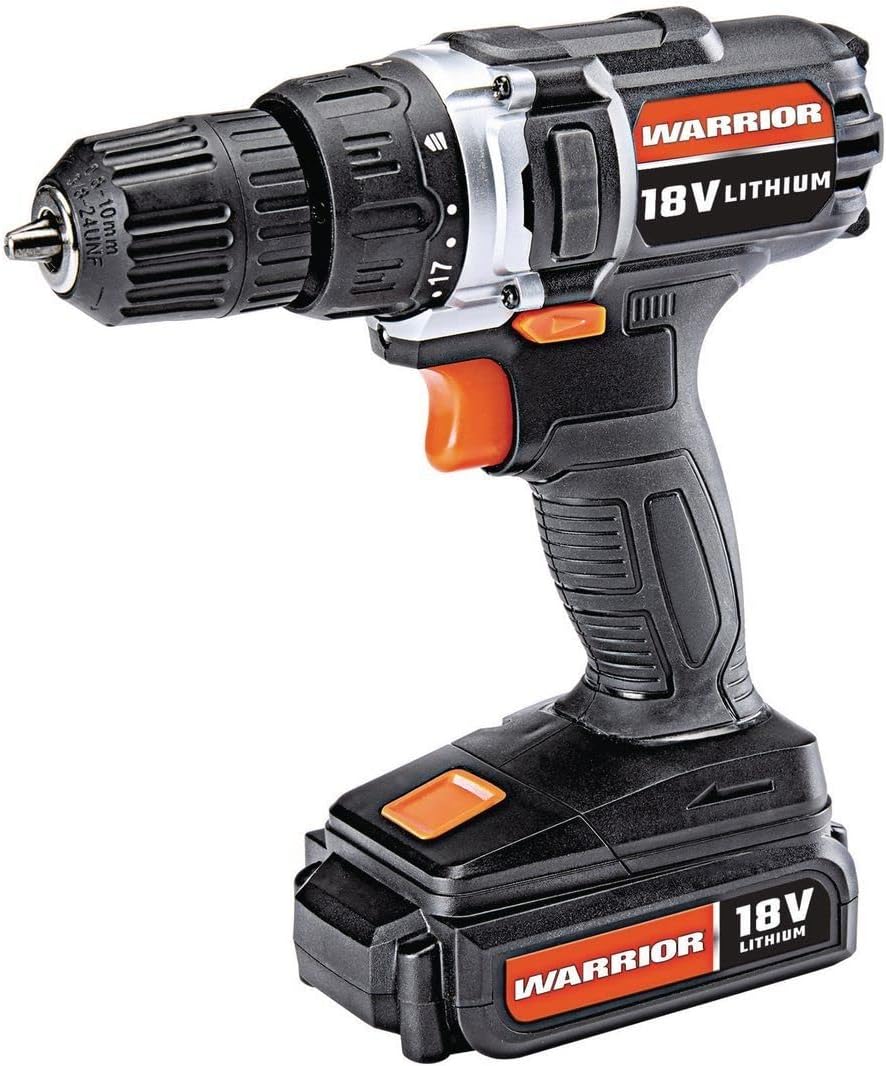
Figure 1: The Warrior 18V Cordless 3/8 Inch Drill/Driver Kit, showcasinтарҳи паймон ва хусусиятҳои асосии он.
2. Танзимот
2.1 Пуркунии батарея ва насби батарея
- Пур кардани батарея: Connect the provided barrel charger to the charging port located on the battery pack. Plug the charger into a standard electrical outlet. The indicator light on the charger will show the charging status (e.g., red for charging, green for fully charged). Ensure the battery is fully charged before first use.
- Насб кардани батарея: Align the battery pack with the base of the drill handle. Slide the battery into place until it clicks securely. Ensure it is firmly seated to prevent accidental detachment during operation.
- Хориҷ кардани батарея: Press the battery release buttons (typically on the sides of the battery pack) and slide the battery out of the drill handle.
2.2 Ворид кардан ва хориҷ кардани пармаҳо
- Чакро кушоед: Rotate the front collar of the keyless chuck counter-clockwise until the jaws are wide enough to accept the desired drill bit or driver bit.
- Битро ворид кунед: Insert the shank of the drill bit or driver bit into the chuck jaws. Ensure the bit is centered and inserted as far as possible without touching the chuck body.
- Чакро сахт кунед: Rotate the front collar of the chuck clockwise until the jaws firmly grip the bit. For maximum grip, give it an extra twist by hand.
- Remove the Bit: Rotate the front collar of the chuck counter-clockwise to loosen the jaws and remove the bit.

Расми 2: Зиёдview of the drill's features, including the 20 clutch settings, LED light, variable speed, and lightweight design.
3. Дастурҳои истифодабарӣ
3.1 Powering On/Off and Variable Speed Control
- To start the drill, press the trigger switch. The speed of the drill is controlled by the amount of pressure applied to the trigger; pressing it further increases the speed.
- To stop the drill, release the trigger switch. The electric brake will engage, stopping the chuck rotation quickly.
3.2 Ротатсия ба пеш / баръакс
- Калиди селектори пеш/акиб дар болои триггер ҷойгир аст.
- Push the switch to the left for forward rotation (for drilling and driving screws).
- Push the switch to the right for reverse rotation (for removing screws or backing out drill bits).
- Вақте ки калид дар мавқеи марказӣ қарор дорад, триггер қулф карда мешавад ва аз оғози тасодуфӣ пешгирӣ мекунад.
3.3 Torque Clutch Settings
- The torque clutch ring is located behind the chuck. It has 20 numbered settings and a drill symbol.
- Rotate the ring to select the desired torque setting. Lower numbers provide less torque, suitable for smaller screws and softer materials to prevent over-driving or stripping. Higher numbers provide more torque for larger screws and harder materials.
- For drilling applications, select the drill symbol setting for maximum torque.
3.4 Чароғи кории LED
- The integrated LED work light automatically illuminates when the trigger is pressed, providing light to the work surface.

Figure 3: The Warrior 18V Cordless Drill in use, demonstrating its application for household tasks like installing a grab bar.
4. Нигоҳдорӣ
4.1 Тозакунии умумӣ
- Keep the tool's air vents clean and free of debris to ensure proper motor cooling.
- Wipe the tool with a clean, damp матоъ. Моддаҳои кимиёвии сахт ё тозакунандаи абразивиро истифода набаред.
- Regularly inspect the chuck jaws for wear and clean any accumulated dust or debris.
4.2 Нигоҳубин ва нигоҳдории батарея
- Батареяро дар ҷои хунук ва хушк аз нури бевоситаи офтоб ва ҳарорати аз ҳад зиёд дур нигоҳ доред.
- Барои нигоҳдории дарозмуддат тавсия дода мешавад, ки батареяро то тақрибан 50% иқтидор пур кунед.
- Avoid completely draining the battery before recharging, as this can reduce its lifespan.
5. Баррасии мушкилот
5.1 Drill Does Not Operate
- Боварӣ ҳосил кунед, ки батарея пурра пур карда шудааст ва дуруст насб шудааст.
- Check that the forward/reverse selector switch is not in the center (locked) position.
- Verify that the charger is disconnected from the battery when attempting to operate the drill.
5.2 Reduced Power or Performance
- The battery may be low on charge. Recharge the battery.
- The torque clutch setting may be too low for the task. Adjust to a higher setting or the drill mode.
- Ensure the drill bit is sharp and appropriate for the material being worked on.
6. Мушаххасоти
| Хусусият | Мушаххасоти |
|---|---|
| Бренд | Ҷанговар |
| Рақами модел | Warior-XXX |
| Манбаи нерӯ | Батареяе |
| Ҷилдиtage | 18 вольт |
| Навъи ҳуҷайраи батарея | Иони литий |
| Суръати максималии гардиш | 900 чархзании |
| Танзимоти момент | 20 Танзимоти муфта |
| Чак навъи | Чаки бе калид |
| Иқтидори пармакунии ҳезум | 1 инч |
| Вазни ашё | 2.47 фунт |
| Материал | Пластмасса |
| Хусусиятҳои махсус | Суръати тағирёбанда, нури LED |
| UPC | 798993496886 |
7. Кафолат ва дастгирӣ
Specific warranty information and customer support contact details were not provided in the product data. Please refer to the product packaging or the manufacturer's official website for the most up-to-date warranty terms and support options.