
Муқаддима
The Wouxun KG-905G Plus is a professional-grade GMRS two-way radio designed for reliable communication. This manual provides essential information for setting up, operating, and maintaining your radio, ensuring optimal performance and longevity. It features Bluetooth audio, USB-C charging, and a rugged IP66 build, making it suitable for various environments and activities.
Мундариҷаи баста
Ҳангоми кушодан, лутфан тафтиш кунед, ки ҳамаи ашёҳои дар поён овардашуда мавҷуд ва дар ҳолати хубанд:
- Wouxun KG-905G Plus Radio
- 2600 mAh Li-Ion Battery with USB-C Charging Port
- Антеннаи ҷудошаванда
- Клипи камарбанд
- Тасмори дастӣ
- Пуркунандаи барқ дар мизи корӣ
- Сими AC
- Дастури молик (ин ҳуҷҷат)

Image: Contents of the Wouxun KG-905G Plus package, including the radio, battery, antenna, desktop charger, AC cord, belt clip, wrist strap, and user manual.
Маҳсулот ба охир расидview
Familiarize yourself with the various components and controls of your KG-905G Plus radio:
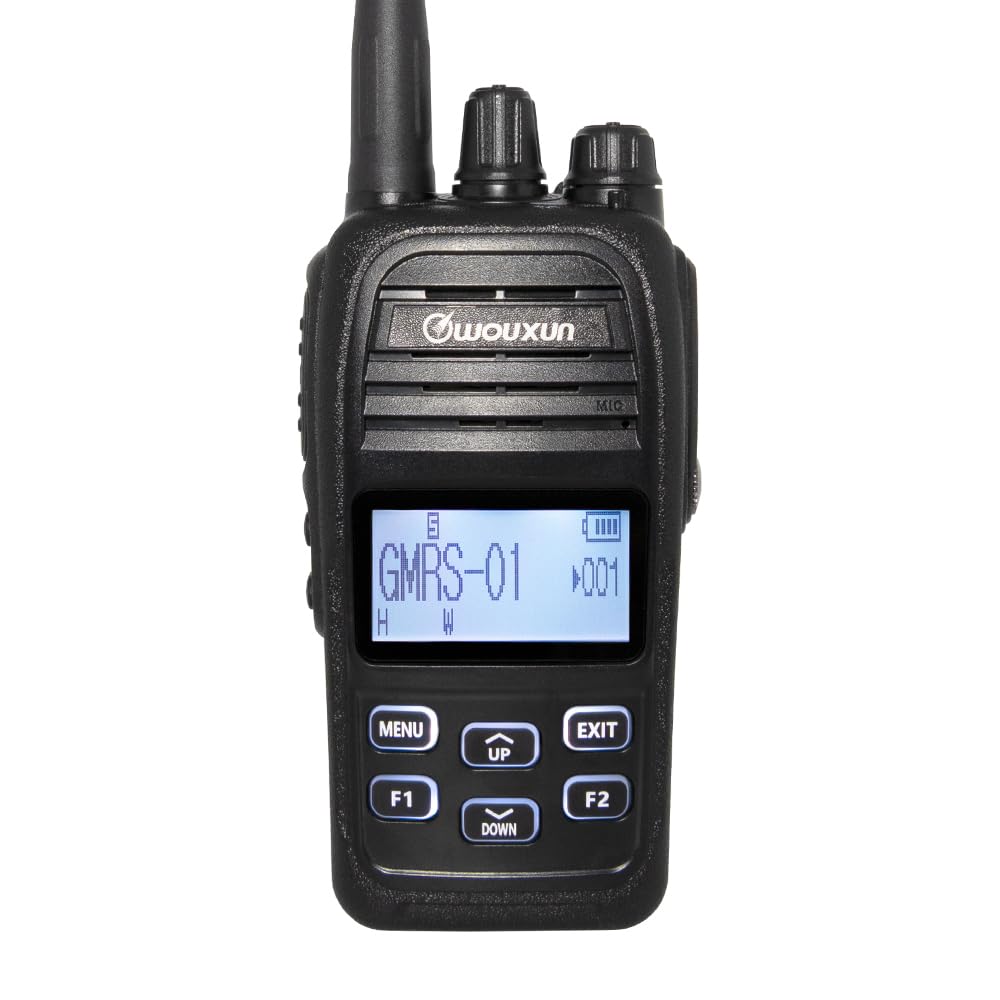
Тасвир: Пеш view diagram of the Wouxun KG-905G Plus radio, highlighting and labeling its key components and controls for easy identification.
- Антенна: Барои интиқол ва қабули сигналҳои радио.
- Тугмаи канал: Rotates to select desired GMRS channels.
- Тугмаи барқ/ҳаҷм: Радиоро фурӯзон/хомӯш мекунад ва садои баландгӯякро танзим мекунад.
- RX/TX LED (Green/Red): Indicates receiving (green) or transmitting (red) status.
- Гӯшаки гӯшӣ: Connects compatible audio accessories.
- Transmit PTT Key: Барои интиқол пахш кунед ва нигоҳ доред ва барои қабул озод кунед.
- Маърузачй: Натиҷаҳои садои қабулшуда.
- Микрофон: Овози шуморо барои интиқол сабт мекунад.
- S1 Key (Short Press/Long Press): Тугмаи функсияи барномарезишаванда.
- S2 Key (Short Press/Long Press): Тугмаи функсияи барномарезишаванда.
- Намоиш: Shows channel number, battery status, and other radio information.
- Меню/Ворид: Accesses the radio's menu and confirms selections.
- Тугмаҳои боло/поён: Navigates through menu options and adjusts settings.
- Exit/Cancel: Менюро мебарорад ё амалиёти ҷориро бекор мекунад.
- F1 Key (Short Press/Long Press): Тугмаи функсияи барномарезишаванда.
- F2 Key (Short Press/Long Press): Тугмаи функсияи барномарезишаванда.
Ташкил кардан
1. Насб ва пуркунии батарея
- Қуттии батареяро бо чуқурҳои қафои радио мувофиқ кунед.
- Батареяро ба боло лағжонед, то он даме, ки ба ҷои он клик кунад.
- To charge, connect the AC cord to the desktop charger and plug it into a power outlet. Place the radio (with battery) into the desktop charger. The charging indicator will illuminate.
- Alternatively, the 2600 mAh Li-Ion battery features a built-in USB-C port. Connect a standard USB-C cable (not included) to the battery and a USB power source for direct charging.
- Боварӣ ҳосил кунед, ки пеш аз истифодаи аввал батарея пурра пур карда шудааст.
2. Замимаи антенна
- Антеннаро бо ақрабаки соат ба пайвасткунаки болои радио то он даме ки бо ангушт маҳкам бошад, винт кунед. Аз ҳад зиёд сахт накунед.
3. Belt Clip and Wrist Strap Attachment
- Attach the belt clip to the designated area on the back of the radio using the provided screws.
- Thread the wrist strap through the loop on the side or top of the radio.
Дастурҳои амалиётӣ
1. Фаъолкунӣ / Хомӯш ва Танзими Ҳаҷм
- Барои фаъол кардан, тугмаи Ҳокимият/Овозро бо ақрабаки соат гардиш кунед, то даме ки клик пахш кунед.
- Барои хомӯш кардани барқ, тугмаи Ҳокимият/Овозро ба муқобили ақрабаки соат то он даме ки клик пахш кунед, гардед.
- Adjust the volume by rotating the Power/Volume knob while the radio is on.
2. Интихоби канал
- Rotate the Channel Knob at the top of the radio to select one of the 22 GMRS simplex channels or 8 GMRS repeater channels.
- The selected channel number will be displayed on the LCD.
3. Интиқол ва қабул
- To transmit, press and hold the Transmit PTT Key on the side of the radio. Speak clearly into the microphone. The RX/TX LED will glow red.
- Release the PTT Key to stop transmitting and return to receive mode. The RX/TX LED will glow green when receiving a signal.

Тасвир: тараф view of the Wouxun KG-905G Plus radio, illustrating the location of the Push-To-Talk (PTT) key and the two programmable side keys (S1 and S2).
4. Menu Navigation and Programmable Keys
- -ро пахш кунед МЕНЮ key to enter the radio's menu.
- -ро истифода баред UP ва ПОЁН keys to navigate through menu options.
- пахш кунед МЕНЮ again to confirm a selection or enter a sub-menu.
- -ро пахш кунед БАРОМАДГОҲ key to return to the previous menu or exit the menu entirely.
- The S1, S2, F1, and F2 keys are programmable. Refer to the advanced settings section (or PC programming software) for assigning specific functions to short and long presses of these keys.
5. Bluetooth Audio
- The KG-905G Plus supports Bluetooth audio for hands-free operation.
- To pair with a compatible Bluetooth headset, access the Bluetooth menu option (refer to your radio's on-screen menu for exact steps).
- Follow the pairing instructions provided with your Bluetooth headset.
6. Оҳангҳои CTCSS/DCS
- To reduce interference and communicate with specific groups, you can set CTCSS (Continuous Tone-Coded Squelch System) or DCS (Digital Coded Squelch) tones.
- Access the CTCSS/DCS settings through the radio's menu. You can set standard and non-standard tones, split tones, and perform tone scans to match existing group settings.
7. Мутобиқсозии намоиш
- The professional LCD allows for user-defined channel names and 7 selectable backlight colors.
- You can set different backlight colors for transmit, receive, and standby modes for quick visual identification. Adjust these settings in the radio's menu.

Image: A collection of Wouxun KG-905G Plus radios, each demonstrating a different customizable backlight color on its display, including blue, red, purple, green, light blue, yellow, and white.
8. Хусусиятҳои иловагӣ
The KG-905G Plus includes several advanced features:
- VOX: Voice-activated transmission for hands-free communication.
- Сканкунии канал: Scans through channels to find active transmissions.
- Скани афзалиятнок: Monitors a priority channel while scanning others.
- Вақтсанҷи вақт (TOT): Давомнокии интиқолро маҳдуд мекунад, то интиқоли тасодуфии дарозро пешгирӣ кунад.
- Selectable Power: Adjust transmit power (high/low) to conserve battery or extend range.
- Wide/Narrow Bandwidth: Selects appropriate bandwidth for communication.
- Ҷилдиtage Метр: Ҳаҷми ҷории батареяро нишон медиҳадtage.
- Супоришҳои овозии англисӣ: Provides audible feedback for operations.
- Радиои FM: Built-in FM broadcast receiver.
- Сониясанҷ: Integrated timing function.
- Компютери барномарезишаванда: Customize radio settings and channels using optional PC software and cable.
Нигоҳдорӣ
Тозакунӣ
- Сатҳи радиоро бо нарм пок кунед, гamp матоъ. Моддаҳои кимиёвии сахт ё тозакунандаи абразивиро истифода набаред.
- Ensure the earphone jack and USB-C port covers are securely closed to maintain IP66 water resistance.
Нигоҳубини батарея
- Avoid overcharging or completely discharging the Li-Ion battery for extended periods.
- Батареяро дар ҷои хунук ва хушк нигоҳ доред, вақте ки истифода намебаред.
Муқовимат ба об (IP66)
The KG-905G Plus is rated IP66, meaning it is dust-tight and protected against powerful water jets. While it can withstand rain and splashes, it is not designed for submersion. Always ensure all port covers are sealed to maintain water resistance.
Мушкилкушо
- Не қудрат: Ensure the battery is properly installed and charged. Check the Power/Volume knob is turned on.
- Интиқол дода наметавонад: Verify the PTT key is fully pressed. Check if the channel is busy or if a timeout timer has been activated. Ensure the antenna is securely attached.
- Cannot Receive: Adjust the volume. Check if the squelch level is set too high. Ensure you are on the correct channel and CTCSS/DCS settings match the transmitting party.
- Сифати аудио: Check antenna connection. Ensure you are within range of the other radio or repeater. Adjust volume.
- Масъалаҳои пайвасткунии Bluetooth: Ensure the radio's Bluetooth is enabled and in pairing mode. Check that the headset is also in pairing mode and within range.
Мушаххасоти
| Хусусият | Мушаххасоти |
|---|---|
| Бренд | Воксюн |
| Рақами модел | KG-905G |
| Ранги | Сиёҳ |
| Шумораи каналҳо | 16 (Pre-programmed GMRS channels, up to 400 custom channels via PC programming) |
| Диапазони басомад | 462 MHz - 467 MHz (GMRS) |
| Масофаи ҳадди аксар | 5 Miles (Varies based on terrain and conditions) |
| Сатҳи муқовимат ба об | IP66 (Dust-tight, protected against powerful water jets) |
| Дастгоҳҳои мувофиқ | PC (for programming), standard power sources, audio accessories |
| Протоколи пайвастшавӣ | GMRS, Bluetooth |
| Навъи танзимкунанда | UHF |
| Батарея | 2600 mAh Li-Ion with USB-C charging |
| Истеҳсолкунанда | Ширкати Quanzhou Wouxun Electronics Co., Ltd |
Маълумот дар бораи кафолат
The Wouxun KG-905G Plus radio comes with a 1-year Wouxun manufacturer warranty. This warranty covers defects in materials and workmanship under normal use. Please retain your proof of purchase for warranty claims. For specific terms and conditions, refer to the official Wouxun warranty policy or contact customer support.
Дастгирӣ
For technical assistance, troubleshooting beyond this manual, or warranty inquiries, please contact Wouxun customer support. Contact information can typically be found on the official Wouxun webсайт ё дар бастаи маҳсулоти шумо.