
Муқаддима
This manual provides detailed instructions for the setup, operation, maintenance, and troubleshooting of your Audioengine A2 HD (HD3) Walnut Computer Speakers and DS1M Metal Stands. Please read this manual thoroughly before using your product to ensure optimal performance and longevity.
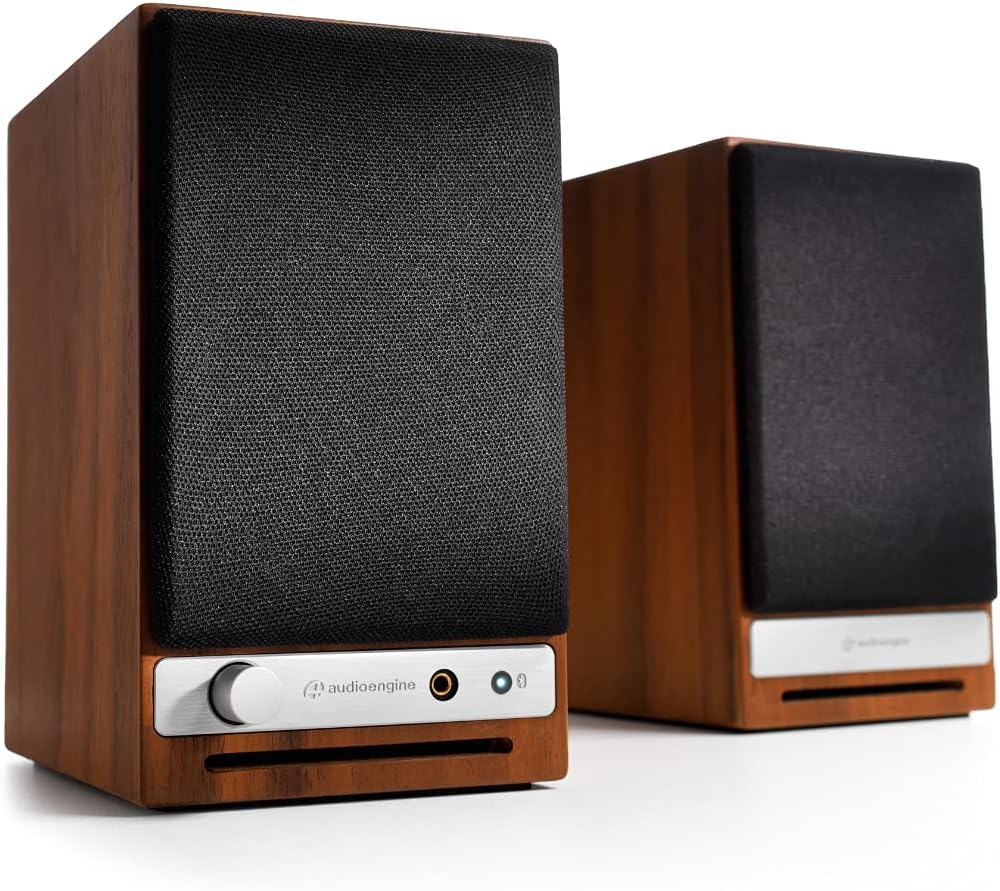
Пеш view of the Audioengine A2 HD speakers in walnut finish with grilles on. The left speaker features a volume knob, headphone jack, and Bluetooth pairing button.
Дар қуттӣ чӣ ҳаст
Your Audioengine A2 HD (HD3) package includes the following items:
- Дастури оғози зуд
- Кабели барқ
- Корти кафолат
Ташкил кардан
Ҷойгиркунии баландгӯяк
For optimal sound quality, position the speakers on a stable surface, such as a desk or bookshelf. The included DS1M Metal Stands are designed to elevate and angle the speakers towards your listening position, which can significantly enhance audio performance by directing sound more accurately. Place the left speaker (with controls) on the left side and the right speaker on the right side of your listening area.

An Audioengine A2 HD speaker is shown placed on a DS1M metal stand, positioned next to a laptop, illustrating a typical desktop setup.

This image displays the dimensions of the DS1M speaker stands, indicating a length of 6 inches (15.2 cm) and a width of 4 inches (10.2 cm).
Пайвастшавӣ
The A2 HD speakers offer multiple connectivity options:
- Вуруд/Хуруҷи RCA: Connect audio sources using RCA cables. The RCA output can be used to connect a subwoofer.
- Вуруди ёрирасон: Use a 3.5mm stereo mini-jack cable for connecting devices like smartphones or tablets.
- Вуруди USB: Connect directly to your computer for high-quality digital audio playback.
- Блутуз: Барои ҷараёни бесими аудио.
Connect the left (active) speaker to the right (passive) speaker using the provided speaker wire. Ensure correct polarity (+ to + and - to -).

Қафо view of the Audioengine A2 HD speakers, highlighting the various input and output ports, including RCA, USB, and speaker wire terminals for connecting the passive speaker.
Пайвастшавии барқ
Connect the power cable to the left speaker and then to a power outlet. The power indicator on the front of the left speaker will illuminate.
Фаъолият
Фурӯзон/хомӯшкунӣ
The speakers will power on automatically when connected to a power source. To turn them off, disconnect the power cable.
Назорати овоз
Adjust the volume using the knob on the front of the left speaker. You can also control the volume from your connected audio source.
Интихоби вуруд
The A2 HD speakers automatically detect and switch to the active input. For Bluetooth, press the Bluetooth pairing button to initiate pairing mode.
Ҷуфти Bluetooth
- Turn on your A2 HD speakers.
- Press and hold the Bluetooth pairing button on the front of the left speaker until the indicator light flashes.
- On your device (smartphone, tablet, computer), go to Bluetooth settings and select "Audioengine A2 HD" from the list of available devices.
- Once paired, the indicator light will turn solid.
Нигоҳдорӣ
Барои нигоҳ доштани намуди зоҳирӣ ва кори баландгӯякҳои шумо:
- Wipe the cabinets with a soft, dry cloth. Avoid using harsh chemicals or abrasive cleaners.
- Keep the speakers away from direct sunlight, heat sources, and moisture.
- Вентилятсияи дурусти атрофи баландгӯякҳоро таъмин кунед.
Мушкилкушо
Садо нест
- Check all cable connections, including power, speaker wire, and audio input cables.
- Ensure the volume knob on the speaker and your audio source is turned up.
- Verify that the correct input source is selected (if applicable, for automatic switching, ensure only one source is active).
- If using Bluetooth, ensure the speakers are properly paired and connected to your device.
Масъалаҳои пайвасти Bluetooth
- Ensure the speakers are in pairing mode (flashing Bluetooth light).
- Delete "Audioengine A2 HD" from your device's Bluetooth list and try pairing again.
- Move your device closer to the speakers to ensure it's within the 100-foot Bluetooth range.
- Restart both your device and the speakers.
Мушаххасоти
| Бренд | Муҳаррики аудио |
| Рақами модел | HD3 |
| Номи модел | A2-HD |
| Навъи баландгӯяк | Рафи китоб |
| Баландгӯяк Максимум қудрати баромади | 60 Ватт |
| Ҷавоби басомад | 50 Гц |
| Технологияи пайвастшавӣ | Ёрӣ, Bluetooth, RCA, USB |
| Ҳолати баромади аудио | Стерео |
| Навъи васлкунӣ | Монтажи болои миз |
| Маводи баста | Вуд |
| Хусусиятҳои иловагӣ | Hi Res Audio, Lightweight, Portable |
| Навъи назораткунанда | iOS, Android |
| Диапазони максималӣ | 30 метр |
| Усули назорат | ламс кунед |
| Андозаи баландгӯяк | 2.75 инч |
| Диапазони Bluetooth | 100 фут |
| Total USB 2.0 Ports | 1 |
| Истифодаи мушаххас барои маҳсулот | Gaming, Home Theatre, Pro Audio |
| Шумораи каналҳои аудиоӣ | 3.0 |
| Импеданс | 10000 Ом |
| Таносуби сигнал ба садо | 95 дБ |
| Дастгоҳҳои мувофиқ | Смартфон, планшет, ноутбук |
| Манбаи нерӯ | Электри симдор |
| Вуруди ҷилдиtage | 110 вольт |
| Шумораи воҳид | 2.0 ҳисоб |
| Технологияи бесим | блутуз |
| Технологияи пайвасти сабвуфер | Симдор |
| Протоколи пайвастшавӣ | блутуз |
| Навъи драйвери аудио | Ронандаи динамикӣ |
Кафолат ва дастгирӣ
Your Audioengine A2 HD (HD3) speakers come with a Кафолати 3 сол. For warranty claims or technical support, please refer to the contact information provided in your Warranty Card or visit the official Audioengine webсайт.
Видеоҳои расмии маҳсулот
Audioengine - Never Settle for Less
This video highlights the Audioengine philosophy of never settling for less, showcasing various life moments enhanced by music. It features different Audioengine products in diverse settings.
20th Anniversary Video
A commemorative video celebrating 20 years of Audioengine, reflecting on the company's journey and commitment to quality audio products.
Doesn't Music Deserve it? Active Wireless Bookshelf Speakers
This video emphasizes the importance of high-quality audio for music, featuring active wireless bookshelf speakers in various home environments.