
1. Муқаддима
The Maxcom MM724 is a simple mobile phone designed for ease of use, featuring straightforward software and practical functions. It is particularly suitable for users who prefer a device without complicated menus. Key features include an emergency SOS button, a built-in flashlight, and Bluetooth connectivity for hearing aid compatibility.
2. Мундариҷаи баста
Лутфан қуттии ҷузъҳои зеринро тафтиш кунед:
- 1 Maxcom MM724 Mobile Phone
- 1 Desktop Charger
- 1 Matching Cords (for charger)
- 1 Дастури корбар (ин ҳуҷҷат)
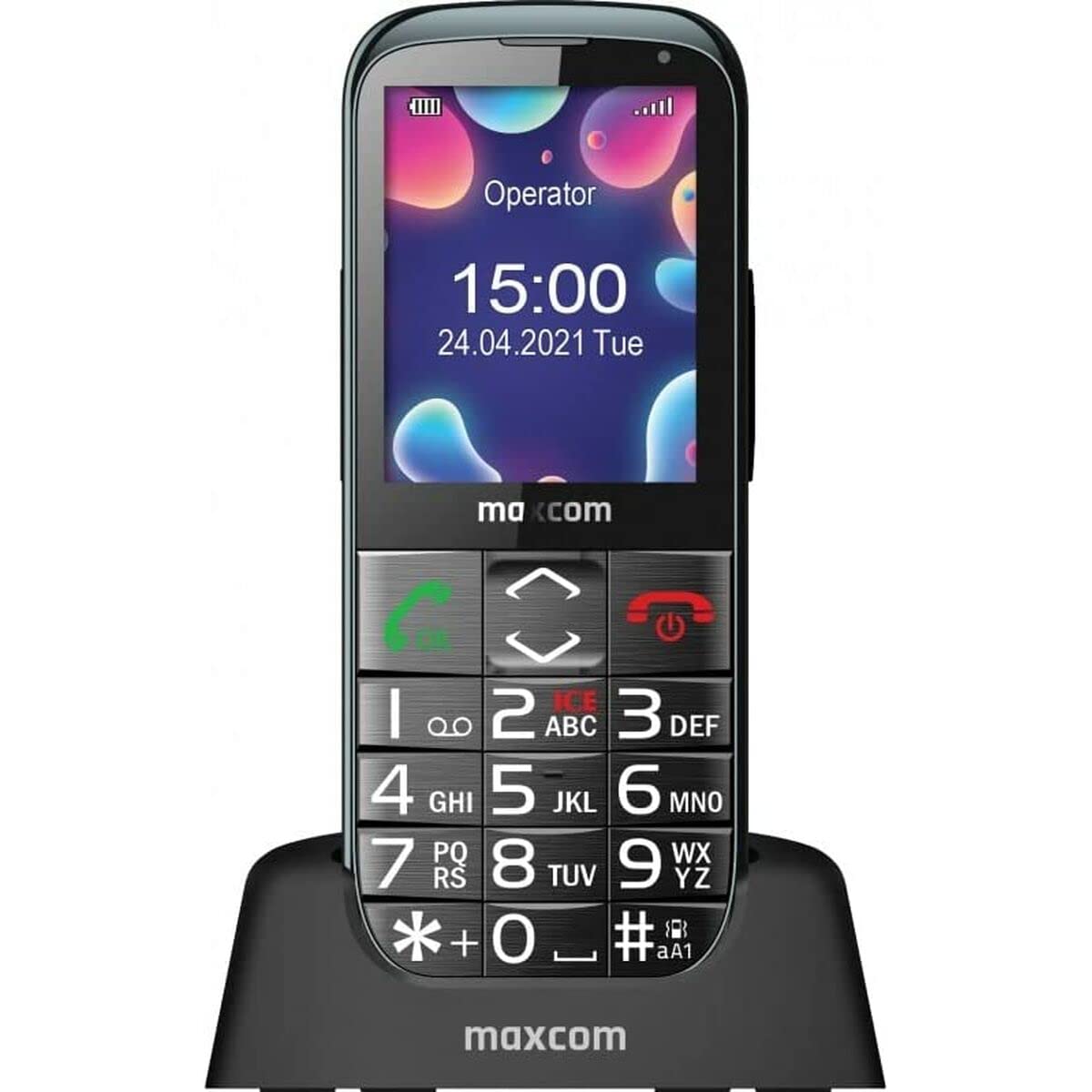
Image: The Maxcom MM724 simple mobile phone, typically black, with a clear display and large buttons.
3. Танзимот
3.1. Ҷойгиркунии SIM корт ва батарея
- Сарпӯши қафои телефонро бодиққат хориҷ кунед.
- SIM корт(ҳо)-и худро ба слот(ҳо)-и таъиншуда бо контактҳои тиллоӣ рӯ ба поён гузоред.
- Батареяро гузоред ва боварӣ ҳосил кунед, ки контактҳо дуруст мувофиқанд.
- Сарпӯши қафоро то он даме ки он бо садои баланд ба ҷои худ ҷойгир шавад, пӯшед.
3.2. Пуркунии дастгоҳ
The Maxcom MM724 uses a convenient desktop charger. To charge your phone:
- Connect the charger cord to a power outlet.
- Place the phone upright into the desktop charging cradle.
- Ensure the charging indicator on the phone or cradle illuminates, indicating that charging has begun.
- For optimal battery life, keep the phone in the cradle when not in use to ensure it is always charged.
4. Дастурҳои истифодабарӣ
4.1. Фурӯзон/хомӯшкунӣ
- Барои фаъол кардан: Тугмаи Фаъолсозӣ/Анҷоми зангро (одатан сурх) то равшан шудани экран пахш карда нигоҳ доред.
- Барои хомӯш кардани барқ: Press and hold the Power/End Call button until the power-off options appear, then confirm.
4.2. Зангҳо ва қабули зангҳо
- Барои занг задан: Dial the number using the keypad and press the Call button (usually green).
- Барои қабули занг: Press the Call button when the phone rings. The phone is designed to ring very loudly to ensure calls are not missed.
- Барои анҷом додани занг: Тугмаи Фаъолсозӣ/Қатъи зангро пахш кунед.
4.3. Фиристодан ва қабул кардани паёмҳо
Navigate to the 'Messages' menu to compose new SMS messages or read incoming ones. Use the keypad to type your message.
4.4. Using the SOS Button
The SOS button is located on the back of the phone and is designed for emergencies.
- Ташкил кардан: Access the phone's settings to pre-define a list of emergency contacts.
- Фаъолсозӣ: In an emergency, press and hold the SOS button. The phone will automatically call the pre-defined contacts in sequence until one answers.
4.5. Activating the Flashlight
The phone features a dedicated button for the flashlight, making it easy to activate when needed. Refer to your phone's specific button layout for its location.
4.6. Bluetooth and Hearing Aid Compatibility
The Maxcom MM724 supports Bluetooth connectivity, allowing it to pair with compatible devices, including certain hearing aids. This enables hands-free calling.
- Ҷуфт кардан: Go to the Bluetooth settings on your phone and enable Bluetooth. Put your hearing aid into pairing mode (consult your hearing aid's manual). Select your hearing aid from the list of available devices on the phone to pair.
- Шарҳ: Compatibility with hearing aids depends on the hearing aid's features. Consult your audiologist for specific compatibility information. The phone also features a ring line and additional gain for improved audio performance with or without hearing aids.
5. Нигоҳдорӣ
- Тозакунӣ: Барои тоза кардани экран ва корпуси телефон аз матои нарм ва хушк истифода баред. Аз истифодаи тозакунандаҳои моеъ ё маводҳои абразивӣ худдорӣ кунед.
- Нигоҳубини батарея: Keep the battery charged regularly. Avoid extreme temperatures, which can affect battery performance and lifespan.
- Нигоҳдорӣ: Вақте ки телефон муддати тӯлонӣ истифода намешавад, онро дар ҷои хунук ва хушк нигоҳ доред.
6. Баррасии мушкилот
- Phone does not power on: Ensure the battery is correctly inserted and charged. Connect the phone to the charger and try again.
- Сигнали шабака нест: Check if the SIM card is properly inserted. Move to an area with better network coverage. Contact your service provider if the issue persists.
- Занг задан/қабул кардан мумкин нест: Verify that you have sufficient credit or an active plan. Check network signal strength.
- Мушкилоти пайвастшавии Bluetooth: Ensure both devices are in pairing mode and within range. Try restarting both the phone and the Bluetooth device.
7. Мушаххасоти
| Бренд | Макском |
| Номи модел | MM724 |
| Низоми амал | Android |
| Андозаи экран | 3 инч |
| Технологияи пайвастшавӣ | блутуз |
| Технологияи мобилӣ | 4G |
| Технологияи шабакаи бесим | GSM |
| Ранги | Сиёҳ |
| Вазни ашё | 85 грамм |
| Интиқолдиҳандаи бесим | Қулф кушода шуд |
8. Кафолат ва дастгирӣ
Warranty information for the Maxcom MM724 mobile phone is typically provided with your purchase documentation or can be found on the official Maxcom website. For technical support or service inquiries, please refer to the contact information provided by your retailer or the manufacturer.