
1. Маҳсулот ба охир расидview
The Phanteks Eclipse G500A DRGB is a high-performance mid-tower chassis designed to accommodate modern PC components with excellent airflow and integrated D-RGB lighting. It features an Ultra-fine Performance Mesh on both the front and top panels, ensuring optimal cooling and dust filtration.

Figure 1: Phanteks Eclipse G500A DRGB Mid Tower Case, Matte White.
Хусусиятҳои асосӣ:
- Тарҳрезии ҷараёни ҳавои баланд: Ultra-fine Performance Mesh on front and top panels for superior cooling and dust filtration.
- Равшании ҳамгирошудаи D-RGB: Built-in D-RGB lighting on the front and side, controllable via manual buttons or motherboard synchronization.
- Мухлисони қаблан насбшуда: Includes three high-performance M25-140 D-RGB fans.
- Дастгирии васеъи хунуккунӣ: Supports up to 420mm radiators in the front and 360mm in the top.
- Интерьери васеъ: Accommodates full-length GPUs and offers vertical GPU mounting options (with optional bracket).
- Нигоҳдории чандир: Multiple HDD and SSD locations, including dedicated SSD brackets and stackable HDD bays.
- Modern Front I/O: Features 10Gbps USB-C, 2x USB 3.0, Microphone/Headphone Combo, Power button, and D-RGB controls.
2. Танзим ва насб
This section provides general guidelines for installing components into your Phanteks Eclipse G500A DRGB chassis. Always refer to your component manuals for specific installation instructions.
2.1 Тайёр кардани шасси
Before installing components, ensure the chassis is placed on a stable, flat surface. Remove the side panels by gently pulling them open (they are hinged) to access the interior.
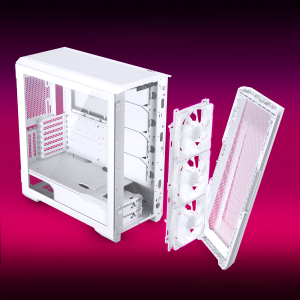
Figure 2: The removable front panel allows for easy installation of fans and radiators.
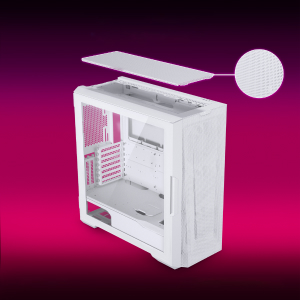
Figure 3: The removable top mesh panel facilitates fan and radiator installation.
2.2 Насби motherboard
The G500A supports ATX, micro-ATX, mini-ITX, and E-ATX motherboards (up to 280mm wide). Install the necessary standoffs for your motherboard form factor, then secure the motherboard with screws.
2.3 Насби воҳиди таъминоти барқ (PSU)
Install the PSU at the bottom rear of the chassis. The G500A supports PSUs up to 250mm in length (195mm if all 4 bottom HDD positions are used).
2.4 Насби дастгоҳи нигаҳдорӣ
The case offers extensive storage options:
- SSD-ҳои 2.5 дюймӣ: Up to 9 dedicated 2.5" drive bays are included.
- Дискҳои сахти 3.5 дюймӣ: Two stackable 3.5" HDD bays are included, expandable up to a total of 10 HDD bays.

Figure 4: Multiple storage options for 2.5" and 3.5" drives.
2.5 Насби корти графикӣ (GPU).
The G500A supports graphics cards up to 435mm in length. For vertical GPU mounting, an optional bracket (PH-VGPUKT4.0_03) or riser cable is required.
2.6 Насби системаи хунуккунӣ
The chassis supports various fan and radiator configurations:
- Дастгирии мухлисон:
- Front: 3x 120mm or 3x 140mm (3x 140mm pre-installed)
- Top: 3x 120mm or 3x 140mm
- Қафо: 1x 120mm ё 1x 140mm
- Liquid Cooling Radiator Support:
- Front: Up to 360mm (120mm radiator) or 420mm (140mm radiator)
- Top: Up to 360mm (120mm radiator) or 280mm (140mm radiator)
- Қафо: 120мм
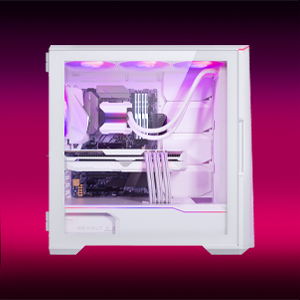
Figure 5: High-end cooling compatibility with various fan and radiator sizes.
2.7 Идоракунии кабел
The G500A provides ample space and Velcro ties for efficient cable management, ensuring a clean interior and optimal airflow. Cover doors help to conceal cables on the backside of the motherboard tray.
2.8 Видеоҳои насбкунӣ
Video 1: Detailed PC Build Guide in the Phanteks Eclipse G500A (13:33).
Video 2: Another comprehensive PC assembly guide featuring the Phanteks Eclipse G500A (14:01).
3. Дастурҳои истифодабарӣ
3.1 Панели пеши вуруд / баромад
Панели вуруд/хуруҷи пеш дастрасии қулайро ба портҳо ва идоракунии муҳим фароҳам меорад:
- Тугмаи барқ: Барои фурӯзон/хомӯш кардани системаи шумо.
- Портҳои USB 3.0 (x2): Барои пайваст кардани дастгоҳҳои USB 3.0.
- USB-C Gen2 Port (x1): For high-speed USB-C connectivity.
- Jack Combo Микрофон/Гушник: Барои вуруд ва баромади аудио.
- D-RGB Mode Button: Cycles through pre-programmed D-RGB lighting effects.
- D-RGB Color Button: Ранги равшании D-RGB-ро тағйир медиҳад.

Figure 6: Front I/O panel with USB-C, USB 3.0, audio, and D-RGB controls.
3.2 Идоракунии равшании D-RGB
The integrated D-RGB lighting can be controlled in two ways:
- Назорати дастӣ: Use the D-RGB Mode and Color buttons on the front I/O panel to cycle through effects and colors without software.
- Ҳамоҳангсозии платаи модарӣ: Connect the D-RGB controller to a compatible motherboard's D-RGB header to enable software control and synchronization with other D-RGB components.

Figure 7: Integrated D-RGB lighting with included M25-140 D-RGB fans.
4. Нигоҳдорӣ
Нигоҳдории мунтазам кӯмак мекунад, ки кори беҳтарин ва дарозмуддати ҷузъҳои компютери шумо таъмин карда шавад.
- Филтратсияи чанг: The Ultra-fine Performance Mesh on the front and top panels acts as a dust filter. Periodically remove these panels and clean the mesh to maintain optimal airflow.
- Тозакунии дохилӣ: Use compressed air to remove dust from inside the chassis, especially from fans, heatsinks, and other components. Ensure the system is powered off and unplugged before cleaning.
- Тозакунии берунӣ: Сатҳи беруниро бо нарм пок кунед, гamp матоъ. Аз тозакунандаҳои абразивӣ ё ҳалкунандаҳо худдорӣ кунед.
5. Баррасии мушкилот
Ин бахш масъалаҳои маъмулиеро, ки шумо метавонед бо корпуси компютери худ дучор шавед, баррасӣ мекунад.
5.1 Масъалаҳои барқ
- Система фаъол нест:
- Ensure all power cables (24-pin ATX, 8-pin CPU, GPU power) are securely connected to the motherboard and components.
- Боварӣ ҳосил кунед, ки тугмаи PSU дар ҳолати "ON" аст.
- Санҷед, ки сими гузариши барқи панели пеш ба сарлавҳаи F_PANEL-и motherboard дуруст пайваст шудааст.
5.2 D-RGB Lighting Issues
- D-RGB not lighting up or incorrect colors:
- Ensure the D-RGB cables from the fans and LED strips are correctly connected to the integrated D-RGB controller.
- If using motherboard synchronization, ensure the D-RGB controller is connected to the motherboard's D-RGB header and that the motherboard's lighting software is configured correctly.
- Verify the D-RGB controller is receiving power (e.g., via SATA power connector).
- Try cycling through modes and colors using the front I/O buttons to rule out software issues.
5.3 Fan Noise or Malfunction
- Садои аз ҳад зиёди мухлисон:
- Check for dust buildup on fan blades and clean if necessary.
- Ensure fans are securely mounted and not vibrating against the chassis.
- Verify fan speeds are controlled appropriately by the motherboard or fan controller.
- Мухлис чарх намезанад:
- Check fan power connections to the motherboard or fan hub.
- Ensure fan headers are enabled in the BIOS/UEFI settings.
6. Мушаххасоти
Detailed technical specifications for the Phanteks Eclipse G500A DRGB Mid Tower Case.
| Хусусият | Мушаххасоти |
|---|---|
| Номи модел | Eclipse G500A DRGB, White |
| Рақами модели ашё | PH-EC500GA_DMW01A |
| Формаи форма | Мандарин |
| Андозаҳо (LxWxH) | 19.69 x 9.45 x 20.28 инч (500 x 240 x 515 мм) |
| Вазни ашё | 23.2 фунт |
| Материал | Шасси пӯлодӣ, шишаи мулоимшуда |
| Дастгирии motherboard | ATX, micro-ATX, mini-ITX, E-ATX (up to 280mm wide) |
| Ҷойҳои васеъ | 7 |
| Дастгирии GPU амудӣ | Yes (with optional bracket PH-VGPUKT4.0_03 or riser cable) |
| Ҷойҳои дохилии 3.5 дюймӣ | 10 (2x included, expandable) |
| Ҷойҳои дохилии 2.5 дюймӣ | 9 (9x дохил карда шудааст) |
| Дар пеши I/O | 2x USB 3.0, USB-C Gen2, Microphone/Headphone Combo, Power Button, D-RGB Mode, D-RGB Color |
| Мухлисони пешакӣ насбшуда | 3x M25-140 D-RGB (Front) |
| Дарозии максималии GPU | 435 мм / 17.2 ин |
| Баландии максималии CPU сардтар | 185 мм |
| Дарозии максималии PSU | 195mm (if all 4 bottom HDD positions used) / 250mm (if 2 bottom HDD used) |
| Усули хунуккунӣ | Fan, Water |
7. Кафолат ва дастгирӣ
Phanteks products are manufactured with high-quality standards. For warranty information and technical support, please refer to the official Phanteks webсайт ё бо хидмати мизоҷони худ тамос гиред.
Маълумот барои тамос:
- Webсайт: www.phanteks.com
- Phanteks Taiwan Inc.: 11F., № 150, Ҷян 1-ум, ноҳияи Чжунхэ. Шаҳри нави Тайпей 235
- Importer EU (Axpertec Int B.V.): Sydneystraat 33, 3047 BP Rotterdam, The Netherlands
- Importer US (Axpertec Inc.): 20465 E Walnut Dr. N, City of Industry, California 91789, United States

Figure 8: Phanteks company and importer details, along with compliance markings (CE, UKCA, RoHS).


