
LEVOIT LTF-F422-WUS
LEVOIT Classic 42-inch Tower Fan User Manual
This manual provides essential information for the safe and efficient operation, maintenance, and troubleshooting of your LEVOIT Classic 42-inch Tower Fan.
Дастурҳои муҳими бехатарӣ
To reduce the risk of fire, electric shock, or injury, please read and follow all instructions and warnings before using this appliance.
- Always place the fan on a stable, level surface.
- Бо шнур ё сими вайроншуда вентиляторро кор накунед.
- вентиляторро аз об дур нигоҳ доред ё гamp минтақаҳо.
- Ангуштон ё ашёи бегонаро ба ягон сӯрохи нагузоред.
- Пеш аз тоза кардан ё анҷом додани ягон хидматрасонӣ вентиляторро аз розетка ҷудо кунед.
- Ин маҳсулот дорои кимиёвӣ мебошад, ки ба иёлати Калифорния маълум аст, ки боиси саратон ва нуқсонҳои таваллуд ё дигар зарари репродуктивӣ мегардад.
Маҳсулот ба охир расидview
The LEVOIT Classic 42-inch Tower Fan (Model: LTF-F422-WUS) is designed to provide powerful and quiet air circulation for your home. It features a DC motor for energy efficiency and a user-friendly design.

Тасвир: Пеш view of the LEVOIT Classic 42-inch Tower Fan in white, showing its sleek design, digital display, and the included remote control. Blue arrows indicate airflow and oscillation.
Хусусиятҳои асосӣ:
- Ҳавои пурқувват: Experience 1252 CFM airflow with speeds up to 25ft/s.
- Амалиёти ором: Operates as low as 25dB, ideal for bedrooms and quiet environments.
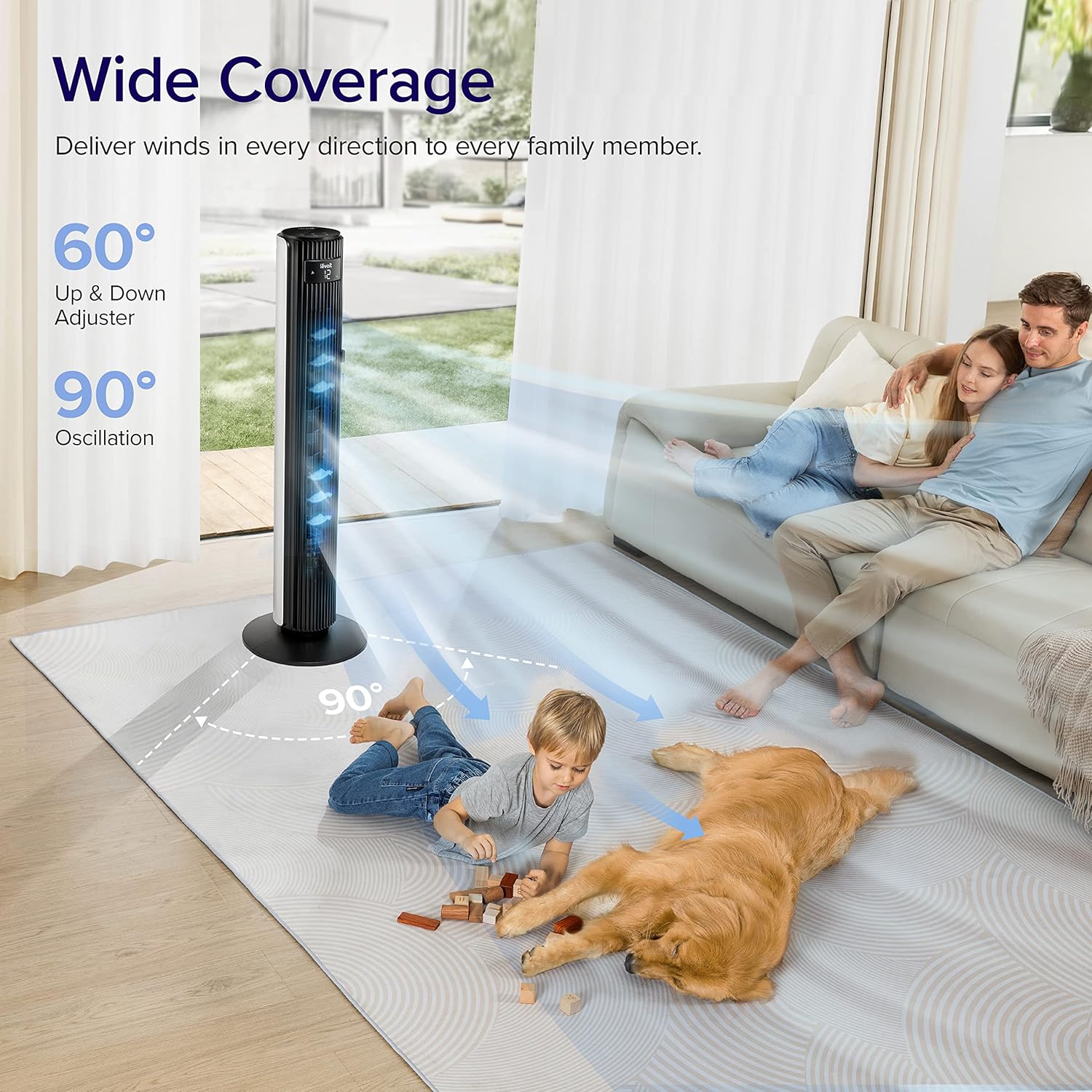
- Тағйирёбии васеъ: Features 90° horizontal and 60° vertical oscillation for comprehensive air distribution.
- Бароҳатии фармоишӣ: Offers 12 speed settings and 4 modes (Normal, Auto, Turbo, Advanced Sleep).
- Temperature-Responsive: Built-in sensor adjusts fan speed based on room temperature in Auto mode.
- Нигоҳдории осон: Detachable back cover and filter for thorough cleaning.
- Тарҳрезии барои истифодабарандагон: Includes a hidden handle and built-in remote storage.
Дастури насб
1. Тафтиши ҷузъҳо ва қуттиҳо
Carefully open the box from the indicated side and remove all components. Ensure all parts are present before proceeding with assembly.
Video: This video demonstrates the unboxing process, base assembly, remote control storage, and fan blade removal for cleaning.
2. Маҷмаи пойгоҳ
The fan base comes in two halves. Align the two pieces and attach them together securely. Unscrew the nut from the bottom of the tower fan, then attach the assembled base to the fan and fasten the nut to secure it.

Image: Diagram illustrating the assembly of the fan base, showing how the two halves connect and attach to the main fan unit.
3. Танзими идоракунии дурдаст
The remote control comes with an insulating tab to preserve battery life. Pull out this tab before first use. The remote can be stored neatly in a dedicated slot on the back of the fan.
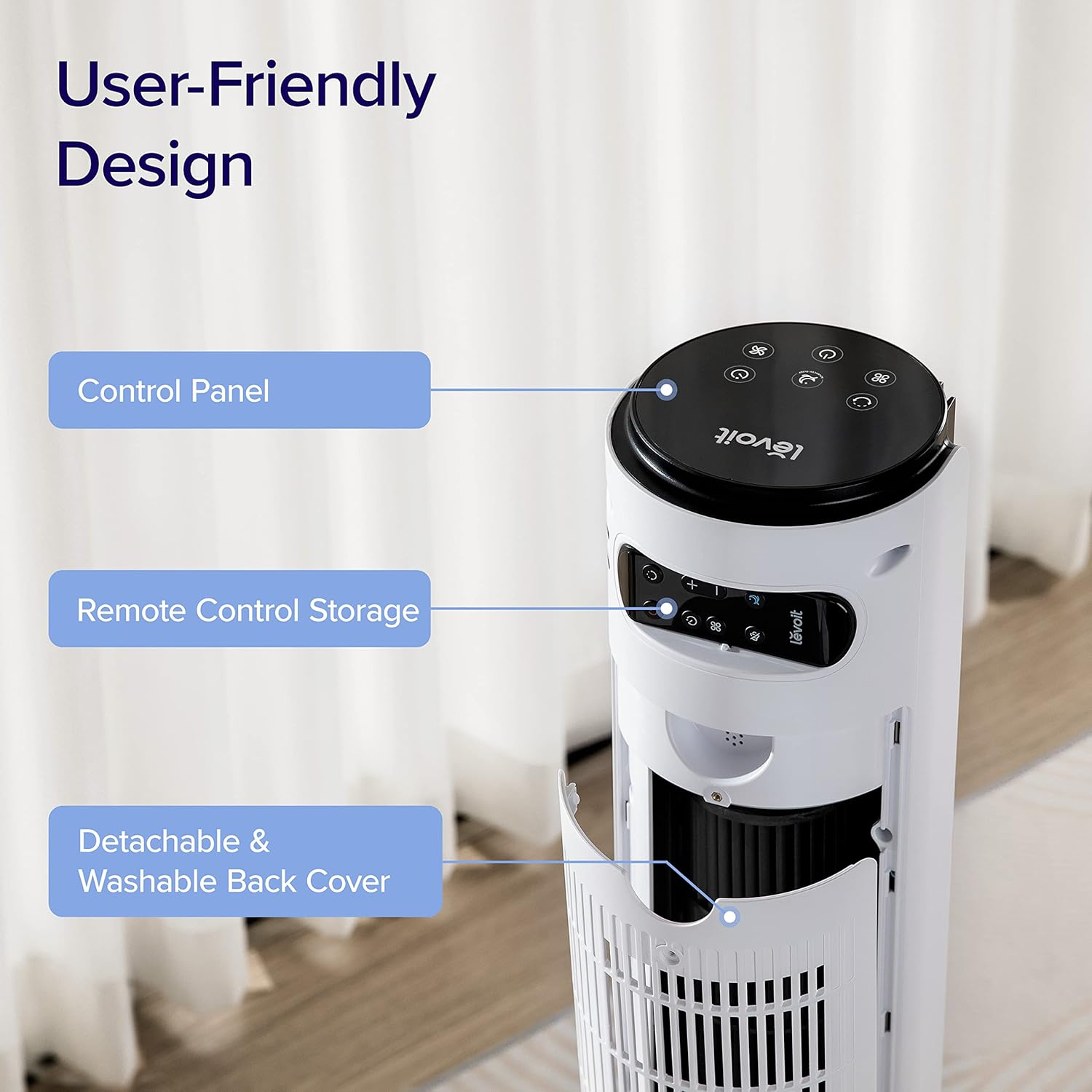
Тасвир: Наздик view of the top rear of the LEVOIT Tower Fan, highlighting the integrated storage compartment for the remote control.
Operating Your Tower Fan
Your LEVOIT tower fan offers various settings for personalized comfort.
1. Панели идоракунӣ ва Намоиш
The fan features a touch-sensitive control panel on top and an LED display on the front. The display shows current settings such as speed, mode, and timer.
Тасвир: аз боло ба поён view of the LEVOIT Tower Fan's control panel with various touch buttons for power, mode, speed, oscillation, and timer. The front LED display shows the current fan speed.
2. Усулҳои амалиёт
- Ҳолати муқаррарӣ: Default mode allowing manual speed adjustment.
- Режими худкор: Fan speed adjusts automatically based on room temperature detected by the built-in sensor.
- Ҳолати турбо: Provides quick cooling and air circulation, starting at the highest speed with oscillation. Speed decreases as room temperature drops.
- Advanced Sleep Mode: Display and sound automatically turn off after 5 seconds. Fan does not oscillate for the first hour, then oscillates and decreases speeds to maintain comfort. Speed then changes by temperature.
3. Speed and Oscillation
- 12-Танзимоти суръат: Choose from gentle breezes (1-3) to storm-strength winds (10-12).
- 90° Horizontal Oscillation: Distributes air across a wide area.
- 60° Vertical Oscillation: Adjusts airflow up to 30° up or down for targeted cooling.

Image: A family and a dog enjoying the wide coverage of the LEVOIT Tower Fan's 90-degree horizontal and 60-degree vertical oscillation, illustrating effective air distribution.
4. Функсияи таймер
Set the fan to automatically turn off after a specified period, up to 12 hours, for energy saving and convenience.
Нигоҳдорӣ ва тозакунӣ
Тозакунии мунтазам кори оптималӣ ва дарозумрии мухлиси шуморо таъмин мекунад.
1. Detachable Back Cover and Filter
Unlike traditional tower fans, the LEVOIT Classic features a detachable back cover and filter for easy and thorough cleaning. This allows access to the wind wheel for maintenance.

Image: Illustration of the LEVOIT Tower Fan's detachable back cover and internal fan blade, submerged in water to demonstrate its washable components for hassle-free cleaning.
2. Дастурҳои тозакунӣ
- Пеш аз тоза кардан вентиляторро аз шабака ҷудо кунед.
- Use a soft cloth or brush to clean the exterior surfaces.
- To clean the internal wind wheel, remove the screw under the remote storage slot, then remove the back cover. Locate and remove the screw at the bottom of the fan blade, then carefully pull out the fan blade. Clean with a soft cloth or water.
- Боварӣ ҳосил кунед, ки ҳамаи қисмҳо пеш аз васлкунӣ комилан хушканд.
Дастур барои ҳалли мушкилот
| Мушкилот | Ҳалли |
|---|---|
| Fan suddenly starts to oscillate. | This is normal in Advanced Sleep Mode. It automatically starts oscillating after one hour of operation. |
| Air output decreased after cleaning the wind wheel. | Ensure screws are aligned with the flat surface of the motor shaft during installation, not the arc surface. Incorrect alignment will reduce air output. |
| Fan suddenly stops. | Check if the timer was accidentally set. Kindly check and try again. |
| Top control panel is not responsive. | Check if the fan is in Advanced Sleep Mode or if the screen is manually turned off. In screen-off state, the operation panel enters a semi-sleep state to prevent accidental touch. Press twice to wake up the panel and then adjust settings. |
Мушаххасоти маҳсулот
- Бренд: ЛЕВОЙТ
- Номи модел: Classic 42-inch
- Рақами модел: LTF-F422-WUS
- Ранги: Сафед
- Андозаҳои маҳсулот: 6.3"D x 6.7"W x 42.4"H
- Вазни ашё: 11 фунт
- Манбаи нерӯ: DC
- Ватtage: 26 ватт
- Сатҳи садо: 25 дБ
- Иқтидори ҷараёни ҳаво: 1252 фут мукааб дар як дақиқа (CFM)
- Шумораи сатҳҳои барқ: 12
- Ларзиш: 90 ° уфуқӣ, 60 ° амудӣ
- Вақтсанҷ: 12 соат
- Усули назорат: Дурдаст, ламс
- Компонентҳои дохилшуда: дурдаст
- Мавод: Пластмасса
- Сертификатсияҳо: CA65, FCC, TSCA
Кафолат ва дастгирӣ
LEVOIT products come with a limited warranty. For detailed warranty information and customer support, please refer to the official LEVOIT webсайт ё бо хидмати мизоҷони худ тамос гиред.
LEVOIT Customer Support:
- Visit the official LEVOIT Store: LEVOIT Store on Amazon
- For further assistance, refer to the contact information provided in your product packaging or on the LEVOIT webсайт.
Ҳуҷҷатҳои марбут - LTF-F422-WUS
 |
Levoit 42-дюймаи бурҷи мухлиси дастури корбар User manual for the Levoit 42-Inch Tower Fan, including safety information, product features, operating instructions, maintenance, troubleshooting, and warranty details. |
 |
Levoit 42-дюймаи бурҷи мухлиси дастури корбар Comprehensive user manual for the Levoit 42-Inch Tower Fan (Model LTF-F422-WUS), covering safety information, operation, maintenance, and troubleshooting. |
 |
Levoit Classic 42-Inch Smart Tower Fan User Manual - Setup, Operation, and Troubleshooting Comprehensive user manual for the Levoit Classic 42-Inch Smart Tower Fan (Model LTF-F422S-WUS). Includes setup instructions, operating guide, safety information, maintenance tips, troubleshooting, and warranty details. |
 |
Levoit Classic 42-Inch Smart Tower Fan User Manual Comprehensive user manual for the Levoit Classic 42-Inch Smart Tower Fan (Model LTF-F422S-WUS), covering setup, operation, safety, maintenance, and troubleshooting. |
 |
Дастури корбар Levoit TempSense 42 DC Tower Fan Дастури корбар барои Levoit TempSense 42 DC Tower Fan (Модели: LTF-F422-KEUR), ки маълумоти муфассалро дар бораи мушаххасот, дастурҳои бехатарӣ, назорат, шеваҳои кор, нигоҳдорӣ, бартараф кардани мушкилот ва кафолат медиҳад. |
 |
Levoit TempSense 42 DC Tower Fan User Manual (LTF-F422-KEUR) - Efficient & Quiet Cooling User manual for the Levoit TempSense 42 DC Tower Fan (Model: LTF-F422-KEUR). Covers setup, operation, safety, maintenance, troubleshooting, and warranty for efficient, quiet home cooling. |
Ask a question about this manual
Ask about setup, troubleshooting, compatibility, parts, safety, or missing instructions. Manuals+ will review the question and use this page’s manual context to help answer it.