
1. Муқаддима
This manual provides comprehensive instructions for the Maxcom Fit FW55 Aurum Pro Smartwatch. It covers essential information regarding product setup, operation, maintenance, and troubleshooting to ensure optimal performance and user experience. Please read this manual carefully before using your device.
2. Мундариҷаи баста
Лутфан тасдиқ кунед, ки ҳамаи ҷузъҳои дар поён овардашуда дар бастаи маҳсулоти шумо мавҷуданд:
- Maxcom Fit FW55 Aurum Pro Smartwatch
- Кабели пуркунандаи барқ
- Дастури корбар (ин ҳуҷҷат)
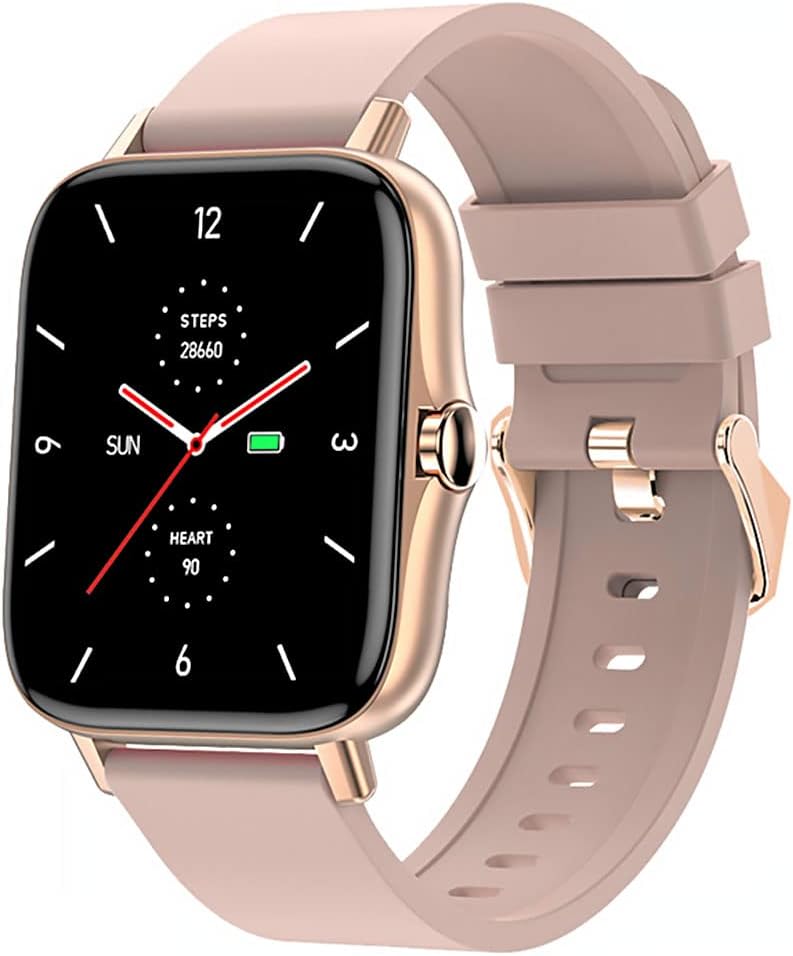
Image 1: Maxcom Fit FW55 Aurum Pro Smartwatch with a pink silicone band. The watch face displays steps, heart rate, and time.
3. Танзимот
3.1. Пур кардани соатҳои смарт
Before initial use, fully charge your Maxcom Fit FW55 Aurum Pro Smartwatch. Connect the provided charging cable to the charging port on the back of the smartwatch and plug the other end into a standard USB power adapter (not included) or a computer's USB port. The watch display will indicate charging status.
- Ensure the charging pins are clean and properly aligned with the watch's charging contacts.
- Пуркунии пурра одатан тақрибан 2 соатро мегирад.
3.2. Пайвастшавӣ бо смартфони худ
To unlock the full functionality of your smartwatch, you need to pair it with your smartphone via Bluetooth.
- Барномаро зеркашӣ кунед: Ҷустуҷӯ the official Maxcom Fit application in your smartphone's app store (iOS App Store or Google Play Store) and install it.
- Bluetooth-ро фаъол созед: Боварӣ ҳосил кунед, ки Bluetooth дар смартфони шумо фаъол аст.
- Барномаро кушоед: Launch the Maxcom Fit application on your smartphone.
- Илова кардани дастгоҳ: Follow the in-app instructions to add a new device. Select "FW55 Aurum Pro" from the list of available devices.
- Тасдиқи ҷуфтшавӣ: A pairing request may appear on both your smartphone and the smartwatch. Confirm the pairing on both devices.
Once successfully paired, the smartwatch will synchronize data with your phone, and you can customize settings through the app.
4. Идоракунии соати интеллектуалӣ
4.1. Фаъол/хомӯш
- Фаъол: Press and hold the side button for a few seconds until the Maxcom logo appears.
- Хомӯш: From the watch face, swipe down to access quick settings, or navigate to the 'Settings' menu. Select 'Power Off' and confirm. Alternatively, press and hold the side button and select 'Power Off'.
4.2. Навигатсияи асосӣ
- Шишаи ламсӣ: The FW55 Aurum Pro features a 1.7-inch touch screen for intuitive interaction.
- Ба боло/поён лағжед: Scroll through notifications, menus, or quick settings.
- Ба чап/рост лағжед: Access different widgets or main functions (e.g., heart rate, activity data).
- Клик кунед: Элементро интихоб кунед ё амалро тасдиқ кунед.
- Тугмаи тарафӣ: Press to return to the watch face or wake the screen. A long press may access power options.
4.3. Хусусиятҳои асосӣ
The Maxcom Fit FW55 Aurum Pro Smartwatch offers a range of features to support your daily activities and health monitoring:
- Пайгирии фаъолият: Қадамҳои тайшуда, масофаи тайшуда ва калорияҳои сӯхташударо назорат мекунад.
- Мониторинги суръати дил: Маълумот дар бораи суръати дилро дар вақти воқеӣ таъмин мекунад.
- Мониторинги хоб: Тарзи хоб ва сифати онро пайгирӣ мекунад.
- Огоҳиҳо: Аз смартфони ҷуфтшудаи шумо огоҳиномаҳо дар бораи зангҳо, паёмҳо ва огоҳиномаҳои барномаро қабул мекунад.
- НИЗОМИ МУАЙЯНКУНИИ ҶАҲОНИИ ҶОИ ИСТ: Integrated GPS for accurate outdoor activity tracking.
- Чеҳраи соатҳои фармоишӣ: Personalize your watch face through the companion app.

Image 2: Maxcom Fit FW55 Aurum Pro Smartwatch featuring a gold metal mesh band. The watch face displays digital time, steps, and heart rate.
5. Нигоҳдорӣ
Proper care and maintenance will extend the lifespan of your smartwatch.
- Тозакунӣ: Regularly wipe the watch screen and body with a soft, dry, lint-free cloth. For stubborn dirt, slightly dampдар матои об. Аз истифодаи кимиёвии сахт ё маводи абразивӣ худдорӣ намоед.
- Нигоҳубини тасма: Clean the watch strap according to its material. Silicone straps can be washed with mild soap and water. Metal straps may require specific cleaning agents.
- Аз ҳолатҳои шадид канорагирӣ кунед: Do not expose the smartwatch to extreme temperatures, direct sunlight for prolonged periods, or corrosive liquids.
- Муқовимат ба об: While the watch may have some water resistance, it is not suitable for diving or high-pressure water activities. Refer to the product specifications for detailed water resistance ratings.
6. Баррасии мушкилот
If you encounter issues with your Maxcom Fit FW55 Aurum Pro Smartwatch, try the following solutions:
- Тамошои фаъол нест: Боварӣ ҳосил кунед, ки соат пурра пур шудааст. Онро ба пуркунандаи барқ на камтар аз 30 дақиқа пайваст кунед.
- Бо смартфон пайваст кардан мумкин нест:
- Боварӣ ҳосил кунед, ки Bluetooth дар телефон ва соати шумо фаъол аст.
- Боварӣ ҳосил кунед, ки соат дар доираи Bluetooth-и телефони шумо қарор дорад.
- Ҳам телефони худ ва ҳам соатҳои смартро аз нав оғоз кунед.
- Кӯшиш кунед, ки дастгоҳро тавассути барнома ҷудо кунед ва дубора пайваст кунед.
- Маълумоти нодуруст (қадамҳо, суръати дил):
- Боварӣ ҳосил кунед, ки соат дар банди дастатон маҳкам пӯшида мешавад, паҳнои як ангушт аз устухони дастатон аст.
- Сенсорро дар қафои соат тоза кунед.
- Update the companion app to the latest version.
- Огоҳиномаҳо гирифта нашудаанд:
- Check notification settings in the Maxcom Fit app.
- Боварӣ ҳосил кунед, ки ба барнома иҷозатҳои огоҳиномаҳои телефони шумо дода шудаанд.
- Verify that the watch is successfully paired and connected to your phone.
If problems persist, consult the Maxcom support webсайт ё бо хидмати мизоҷон тамос гиред.
7. Мушаххасоти
Below are the technical specifications for the Maxcom Fit FW55 Aurum Pro Smartwatch:
| Хусусият | Тафсилот |
|---|---|
| Бренд | Макском |
| Рақами модел | FW55 Aurum Pro |
| Андозаи экран | 1.7 инч |
| Технологияи пайвастшавӣ | блутуз |
| Стандартҳои алоқаи бесим | блутуз |
| Дастгоҳҳои мувофиқ | Смартфон |
| Низоми муайянкунии ҷаҳонии ҷои ист | GPS ҳамгирошуда |
| Шакл | Майдон |
| Шунавандагони мақсаднок | Adult Unisex |
| Компонентҳои дохилшуда | Пуркунандаи барқ |

Тасвири 3: Пеш view of the Maxcom Fit FW55 Aurum Pro Smartwatch with a pink silicone band, highlighting the square display.
8. Кафолат ва дастгирӣ
For warranty information and customer support, please refer to the documentation included with your purchase or visit the official Maxcom webсайт. Барои даъвоҳои кафолат далели хариди худро нигоҳ доред.
For technical assistance or further inquiries, please contact Maxcom customer service through their official channels.