
1. Муқаддима
Thank you for choosing the Maxcom FW36 Aurum SE Smartwatch. This manual provides detailed instructions to help you set up, operate, and maintain your device, ensuring optimal performance and longevity. Please read this manual carefully before using your smartwatch.

Расми 1: Пеш view of the Maxcom FW36 Aurum SE Smartwatch, displaying time and health metrics.
2. Танзимот
2.1 Кушодани қуттӣ ва санҷиши ибтидоӣ
Upon opening the package, verify that all components are present: Maxcom FW36 Aurum SE Smartwatch, charging cable, and this user manual. Inspect the device for any visible damage.
2.2 Пур кардани соатҳои смарт
Before first use, fully charge your smartwatch. Connect the charging cable to the charging port on the back of the watch and to a standard USB power adapter (not included). The battery icon on the screen will indicate charging status. A full charge typically takes approximately 2 hours.
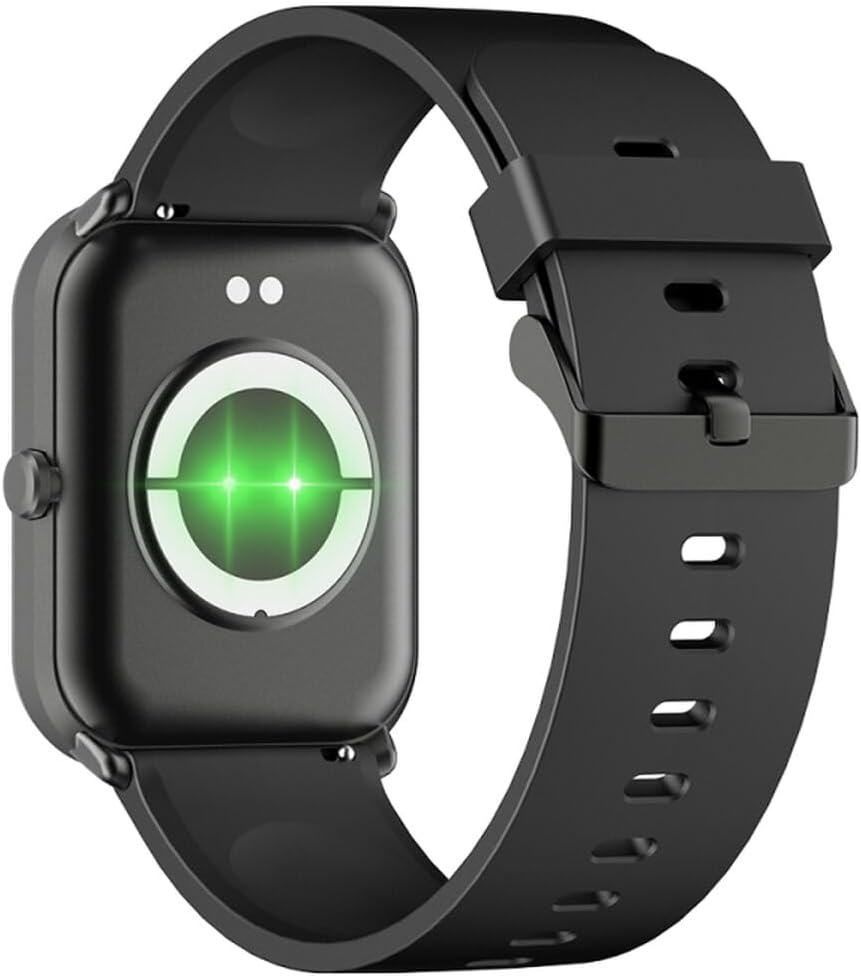
Расми 2: Қафо view of the smartwatch, highlighting the charging contacts and health sensors.
2.3 Фаъол кардан/хомӯш кардан
- Фаъол: Тугмаи паҳлӯиро барои чанд сония пахш карда нигоҳ доред, то он даме ки экран равшан шавад.
- Хомӯш: Аз рӯи соат, барои дастрасӣ ба танзимоти зуд ба поён лағжонед, сипас нишонаи барқро клик кунед ё ба "Танзимот" > "Система" > "Хомӯш кардан" гузаред. Интихоби худро тасдиқ кунед.
2.4 Насб ва пайваст кардани барнома
- Барномаро зеркашӣ кунед: Scan the QR code in the manual (if provided) or search for "GLORY FIT" in your smartphone's app store (Google Play Store for Android, Apple App Store for iOS).
- Бақайдгирӣ / Вуруд: Open the GLORY FIT app and follow the on-screen instructions to create an account or log in.
- Ҷуфт кардан:
- Боварӣ ҳосил кунед, ки Bluetooth дар смартфони шумо фаъол аст.
- Open the GLORY FIT app, go to "Device" or "My Device", and tap "Add Device".
- The app will search for nearby devices. Select "FW36 Aurum SE" from the list.
- Дархости пайвасткуниро ҳам дар смартфони худ ва ҳам дар соатҳои интеллектуалӣ тасдиқ кунед.
Once paired, the smartwatch will synchronize data with your phone, including time and date settings.
3. Дастурҳои истифодабарӣ
3.1 Навигатсияи асосӣ
- Шишаи ламсӣ: Swipe left/right to navigate between main functions (e.g., activity, heart rate). Swipe up to view notifications. Swipe down to access quick settings.
- Тугмаи тарафӣ: Press once to return to the watch face or wake the screen. Press and hold for power options.

Расми 3: Тараф view of the smartwatch, illustrating the physical button and strap design.
3.2 Мониторинги саломатӣ
The Maxcom FW36 Aurum SE Smartwatch features several health monitoring functions:
- Мониторҳои набзи дил: Swipe to the heart rate interface and wait for the measurement to complete. Ensure the watch is snug on your wrist.
- Сенсори оксигени хун: Similar to heart rate, navigate to the SpO2 interface for measurement.
- Мониторҳои фишори хун: Access this function from the main menu or by swiping to its dedicated screen.
- Мониторинги сифати хоб: Соат ба таври худкор тарзи хоби шуморо ҳангоми хоб кардан пайгирӣ мекунад. View detailed reports in the GLORY FIT app.
- Педометр: Tracks your daily steps, distance, and calories burned automatically.
Муҳим: The health data provided by this device is for reference only and should not be used for medical diagnosis or treatment.
3.3 Ҳолати чандрасонаӣ
Access the multi-sport mode from the main menu to select various activities such as running, walking, cycling, etc. The watch will track specific metrics relevant to your chosen activity.
3.4 Огоҳиҳо
Once paired with your smartphone and notification permissions are granted in the GLORY FIT app, your smartwatch will display incoming calls, messages, and app notifications. Swipe up from the watch face to view таърихи огоҳии шумо.
4. Нигоҳдорӣ
4.1 Тозакунӣ
Regularly clean your smartwatch and strap with a soft, dry cloth. For stubborn dirt, use a slightly damp матоъ кунед ва сипас бодиққат хушк кунед. Аз истифодаи кимиёвии сахт ё маводи абразивӣ худдорӣ намоед.
4.2 Муқовимат ба об ва чанг
The Maxcom FW36 Aurum SE Smartwatch is designed to be dust resistant and water resistant. This means it can withstand splashes, rain, and brief immersion in shallow water. However, it is not suitable for hot showers, saunas, diving, or high-speed water sports. Avoid pressing buttons underwater.
4.3 Нигоҳубини батарея
To prolong battery life, avoid fully discharging the battery frequently. Charge the device regularly, even if not in use for extended periods. Store the device in a cool, dry place.
5. Баррасии мушкилот
- Соати интеллектуалӣ фаъол намешавад: Ensure the device is fully charged. Press and hold the side button for an extended period (10-15 seconds).
- Бо смартфон пайваст кардан мумкин нест:
- Ensure Bluetooth is enabled on your phone and the smartwatch is within range.
- Ҳам смартфони худ ва ҳам соатҳои смартро аз нав оғоз кунед.
- Check if the GLORY FIT app has necessary permissions.
- Агар қаблан дастгоҳ ҷуфт карда шуда бошад, кӯшиш кунед, ки ҷудо кунед ва аз нав ҷуфт кунед.
- Хонишҳои нодурусти саломатӣ: Ensure the watch is worn snugly on your wrist, not too tight or too loose. Clean the sensors on the back of the watch. Avoid excessive movement during measurement.
- Огоҳиномаҳо гирифта нашудаанд: Verify that notification permissions are enabled for the GLORY FIT app in your phone's settings. Ensure the app is running in the background.
6. Мушаххасоти
| Модели | FW36 Aurum SE |
| Бренд | Макском |
| Низоми амал | Android |
| Намоиш | 1.69" (4.29 cm) Color Touchscreen, 240 x 280 pixels, Digital, Rounded Corners |
| Иқтидори батарея | 220 мАч литий-ион |
| Пайвастшавӣ | блутуз |
| Сенсорҳо | Heart Rate Monitor, Blood Oxygen Sensor, Blood Pressure Monitor, Pedometer |
| Муҳофизат | Dust Resistant, Water Resistant |
| Барномаи мувофиқ | GLORY FIT |
| Dimensions (W x T x D) | 44.6 mm x 1.04 cm x 35 mm |
| Функсияи GPS | Дастрас нест |
7. Кафолат ва дастгирӣ
The Maxcom FW36 Aurum SE Smartwatch comes with a кафолати ду сол ба мукобили нуксонхои завод. Лутфан далели хариди худро барои даъвоҳои кафолат нигоҳ доред.
For technical support, troubleshooting assistance, or warranty inquiries, please contact Maxcom customer service through their official webсайт ё маълумоти тамос, ки бо ҳуҷҷатҳои хариди шумо оварда шудааст.