
1. Муқаддима
This manual provides detailed instructions for the installation, operation, and maintenance of your CP PLUS 4MP Wi-Fi Floodlight Camera, model CP-F42A. Please read this manual thoroughly before using the product to ensure proper functionality and safety. This camera combines high-resolution video surveillance with integrated floodlighting for enhanced security.
2. Маълумот оид ба бехатарӣ
- Ensure the power supply matches the camera's requirements.
- Кӯшиш накунед, ки камераро қисм-қисм кунед ё тағир диҳед.
- Install the camera in a location where it is protected from extreme weather conditions, although it has an IP54 rating, direct exposure to heavy rain or prolonged submersion is not recommended.
- Keep the camera away from heat sources and direct sunlight.
- Камераро бо эҳтиёт истифода баред, то зарари ҷисмонӣ надиҳед.
- Consult a qualified electrician for installation if you are unsure about electrical wiring.
3. Мундариҷаи баста
Боварӣ ҳосил кунед, ки ҳама ашё дар баста мавҷуд аст:
- CP PLUS 4MP Wi-Fi Floodlight Camera (CP-F42A)
- Адаптери барқ
- Виддаҳо ва симҳои деворӣ
- Дастури оғози зуд (ба ин дастур дохил карда нашудааст)
4. Маҳсулот ба охир расидview
The CP-F42A is an outdoor Wi-Fi floodlight camera designed for surveillance and illumination. It features a 4MP sensor for clear video, H.265 video compression for efficient storage, and a 110° viewing angle. The integrated floodlight provides illumination, and the PIR sensor detects motion up to 12 meters.
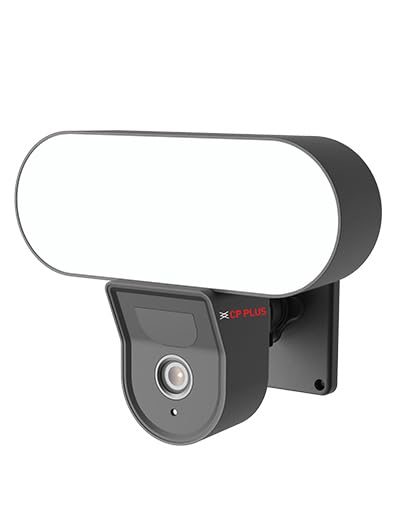
Тасвир: Пеш view of the CP PLUS 4MP Wi-Fi Floodlight Camera CP-F42A, showing the camera lens and the integrated floodlight panel.
Компонентҳои асосӣ:
- Линзаи камера: Видеои 4MP-ро сабт мекунад.
- Floodlight Panel: Равшаниро таъмин мекунад.
- Sensor PIR: Ҳаракатро муайян мекунад.
- Микрофон: Барои вуруди аудио.
- Маърузачй: For two-way audio output.
- Барасмиятдарории кронштейн: Барои насби бехатар.
5. Танзимот
5.1 Насби ҷисмонӣ
- Ҷойгирро интихоб кунед: Ҷойеро бо равшании беруна интихоб кунед view of the area you wish to monitor and within Wi-Fi range. Ensure the mounting surface is sturdy.
- Нуқтаҳои пармакунӣ қайд кунед: Use the mounting bracket as a template to mark the screw holes on the wall.
- сӯрохиҳои пармакунӣ: Drill pilot holes at the marked points. Insert wall plugs if mounting on masonry.
- Камераро насб кунед: Secure the mounting bracket to the wall using the provided screws. Attach the camera to the bracket.
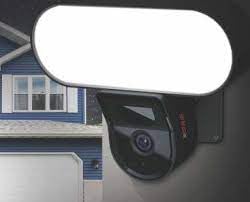
Image: The CP PLUS Floodlight Camera mounted on the exterior of a house, illustrating a typical installation scenario during the day.
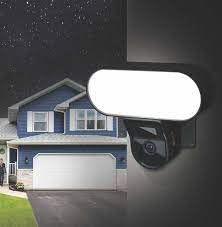
Image: The CP PLUS Floodlight Camera mounted on the exterior of a house at night, with the floodlight illuminated, demonstrating its night-time functionality.
5.2 Пайвастшавии барқ
Connect the provided power adapter to the camera's power input port and then plug it into a suitable electrical outlet. Ensure the connection is secure and protected from moisture.
5.3 Wi-Fi Connection and App Pairing
- Барномаро зеркашӣ кунед: Ҷустуҷӯ the "ezyKam+" app (or the recommended CP PLUS app) on your smartphone's app store (iOS or Android) and install it.
- Ҳисоб кушоед: Барномаро кушоед ва барои ҳисоби нав сабти ном кунед ё агар шумо аллакай дошта бошед, ворид шавед.
- Илова кардани дастгоҳ: Follow the in-app instructions to add a new device. Select "Floodlight Camera" or a similar option.
- Ба Wi-Fi пайваст шавед: The app will guide you through connecting the camera to your home Wi-Fi network. This usually involves scanning a QR code on the camera or entering your Wi-Fi credentials.
- Танзими пурра: Once connected, you can name your camera and adjust initial settings.
Image: Branding for CP PLUS ezyKam+ Wi-Fi Floodlight Full Color Camera, indicating compatibility with Alexa and Google Home, relevant for app pairing and smart home integration.
6. Дастурҳои истифодабарӣ
Access all camera functions through the dedicated mobile application.
6.1 Зиндагӣ View
Open the app and select your camera from the device list to view the live video feed. You can pinch to zoom and pan across the image.
6.2 Сабт ва навозиш
- Сабти дастӣ: Tap the record button in the live view барои оғоз/қатъ кардани сабти дастӣ.
- Сабти ҳодиса: The camera automatically records when motion is detected. These recordings are stored on the installed microSD card (if any) or cloud storage (subscription may be required).
- Бозӣ: Дастрасӣ ба foo сабтшудаtage through the "Playback" or "History" section in the app.
6.3 Муайянкунии ҳаракат ва огоҳиҳо
Configure motion detection sensitivity and areas within the app settings. When motion is detected, the camera can send push notifications to your phone and trigger recording. The PIR sensor has a detection range of 6-12 meters.
6.4 Floodlight Control
The floodlight can be controlled manually via the app or set to activate automatically upon motion detection during specific times or low-light conditions. Adjust brightness and duration settings in the app.
6.5 Аудио дуҷониба
Дар пахши мустақим аз нишонаҳои микрофон ва баландгӯякҳо истифода баред view to communicate with visitors or deter intruders. Press and hold the microphone icon to speak, and release to listen.
6.6 Намоиши шабона
The camera features infrared (IR) night vision for clear black-and-white video in low-light conditions and can also utilize the floodlight for full-color night vision when activated. The night vision range is up to 12 meters.
7. Нигоҳдорӣ
7.1 Тозакунӣ
Wipe the camera lens and floodlight panel with a soft, damp матоъ барои тоза кардани чанг ва лой. Аз маводи кимиёвии сахт ё тозакунандаҳои абразивӣ истифода набаред.
7.2 Навсозии нармафзор
Periodically check the app for available firmware updates. Keeping your camera's firmware up-to-date ensures optimal performance and security features.
7.3 Идоракунии нигаҳдорӣ
If using a microSD card, regularly check its status in the app. Format the card periodically to maintain performance. Back up important recordings before formatting.
8. Баррасии мушкилот
| Мушкилот | Ҳалли имконпазир |
|---|---|
| Камера фаъол нест. | Check power adapter connection and ensure the outlet is functional. |
| Ба Wi-Fi пайваст шудан ғайриимкон аст. | Ensure the camera is within Wi-Fi range. Verify Wi-Fi password. Try resetting the camera and router. |
| Сифати видео. | Check Wi-Fi signal strength. Clean the camera lens. Ensure sufficient lighting. |
| Муайянкунии ҳаракат кор намекунад. | Adjust motion detection sensitivity and area settings in the app. Ensure there are no obstructions. |
| Floodlight not activating. | Check floodlight settings in the app. Ensure it's set to activate on motion or during low light. |
9. Мушаххасоти
| Хусусият | Тафсилот |
|---|---|
| Рақами модел | CP-F42A |
| Резолюция | 4MP (Effective Still Resolution: 4 MP) |
| Фишурдани видео | H.265, MPEG |
| Viewкунҷи ангушт | 110 дараҷа |
| Масофаи PIR | 6~12 Метр |
| Технологияи бесим | Вай-фай |
| Диапазони биниши шабона | 12 Meters (Infrared, Night Color) |
| Меъёри кадр | 20 кадр дар як сония |
| Масштаби оптикӣ | 3x |
| Рейтинги байналмилалии муҳофизат | IP54 |
| Навъи огоҳӣ | Танҳо ҳаракат |
| Манбаи нерӯ | Электри симдор |
| Компонентҳои дохилшуда | Адаптер |
| Андозаҳо (L x W x H) | 20 x 12 x 10 Сантиметр |
| Вазни ашё | 630 гр |
| Истифодаи дарунӣ/берунӣ | Дар берун |
| Технологияи сенсори акс | CMOS |
| Истифодаи тавсияшаванда | Home Security, Night Vision |
10. Кафолат ва дастгирӣ
For warranty information and technical support, please refer to the official CP PLUS webсайт ё бо хидмати мизоҷони худ тамос гиред. Квитансияи хариди худро ҳамчун далели харид барои даъвоҳои кафолат нигоҳ доред.
CP PLUS Official Webсайт: www.cpplusworld.com