
MOUNT PRO B0CHF3PC58
MOUNT PRO Triple Monitor Mount User Manual
Model: B0CHF3PC58
1. Муқаддима
This manual provides detailed instructions for the installation, operation, and maintenance of your MOUNT PRO Triple Monitor Mount. Please read this manual thoroughly before installation to ensure correct setup and safe usage. Keep this manual for future reference.
2. Маълумот оид ба бехатарӣ
Дастурҳои муҳими бехатарӣ:
- Ensure your desk surface is stable and capable of supporting the combined weight of the mount and all monitors.
- Аз ҳадди ниҳоии вазни 17.6 фунт (8 кг) барои як даст зиёд нагиред.
- Use only the provided hardware. If any parts are missing or damaged, contact MOUNT PRO customer service.
- Насбкунии нодуруст метавонад боиси осеби молӣ ё осеби шахсӣ гардад.
- Adjust gas spring tension carefully. Refer to the adjustment section for proper procedure.
3. Мундариҷаи баста
Verify that all components are present before beginning installation. While a complete list is not provided, typical components include:
- Main Pole and Base (C-Clamp and Grommet options)
- Monitor Arms (Gas Spring Arms)
- Плитаҳои VESA
- Клипҳои идоракунии кабел
- Маҷмӯи сахтафзор (виндҳо, шустушӯйҳо, калидҳои Аллен)

Image: Typical package contents for the MOUNT PRO Triple Monitor Mount.
4. Танзим ва насб
The MOUNT PRO Triple Monitor Mount offers two installation methods: C-Clamp and Grommet mounting. Choose the method suitable for your desk.
4.1. Усули васлкуниро интихоб кунед

Image: Illustration of C-Clamp ва имконоти васлкунии Grommet.
- C-Clamp Монтаж: Fits desks with a thickness of 0.39" - 3.15" (10mm - 80mm).
- Монтажи громмет: Fits desks with a thickness of 0.39" - 1.97" (10mm - 50mm) and requires an existing hole in the desk.
4.2. Base Assembly (C-Clamp)
- Attach the L-plate to the bottom of the pole base using the provided screws.
- C-cl-ро таъмин кунедamp to the L-plate.
- Place the assembled base onto your desk and tighten the C-clamp ки онро устуворона таъмин намояд.
Video: Step-by-step guide on how to install the MOUNT PRO Triple Monitor Mount, including base assembly.
4.3. Base Assembly (Grommet)
- If using grommet mounting, detach the bolt from the C-clamp маҷлис.
- Болти ғилдиракдорро аз сӯрохи миз ворид кунед ва онро аз поён бо шайба ва гайка маҳкам кунед.
- Attach the pole base to the grommet bolt.
4.4. Pole Installation
- Connect the upper and lower sections of the pole and secure them with the provided screw.
- Slide the pole onto the mounted base and tighten the securing screw.
4.5. Arm and VESA Plate Installation
- Slide the cable clips and fixators onto the pole at desired heights.
- Attach the monitor arms to the pole, securing them with the fixators.
- Attach the VESA plates to the back of your monitors using the appropriate screws. Ensure the screws are tightened securely.
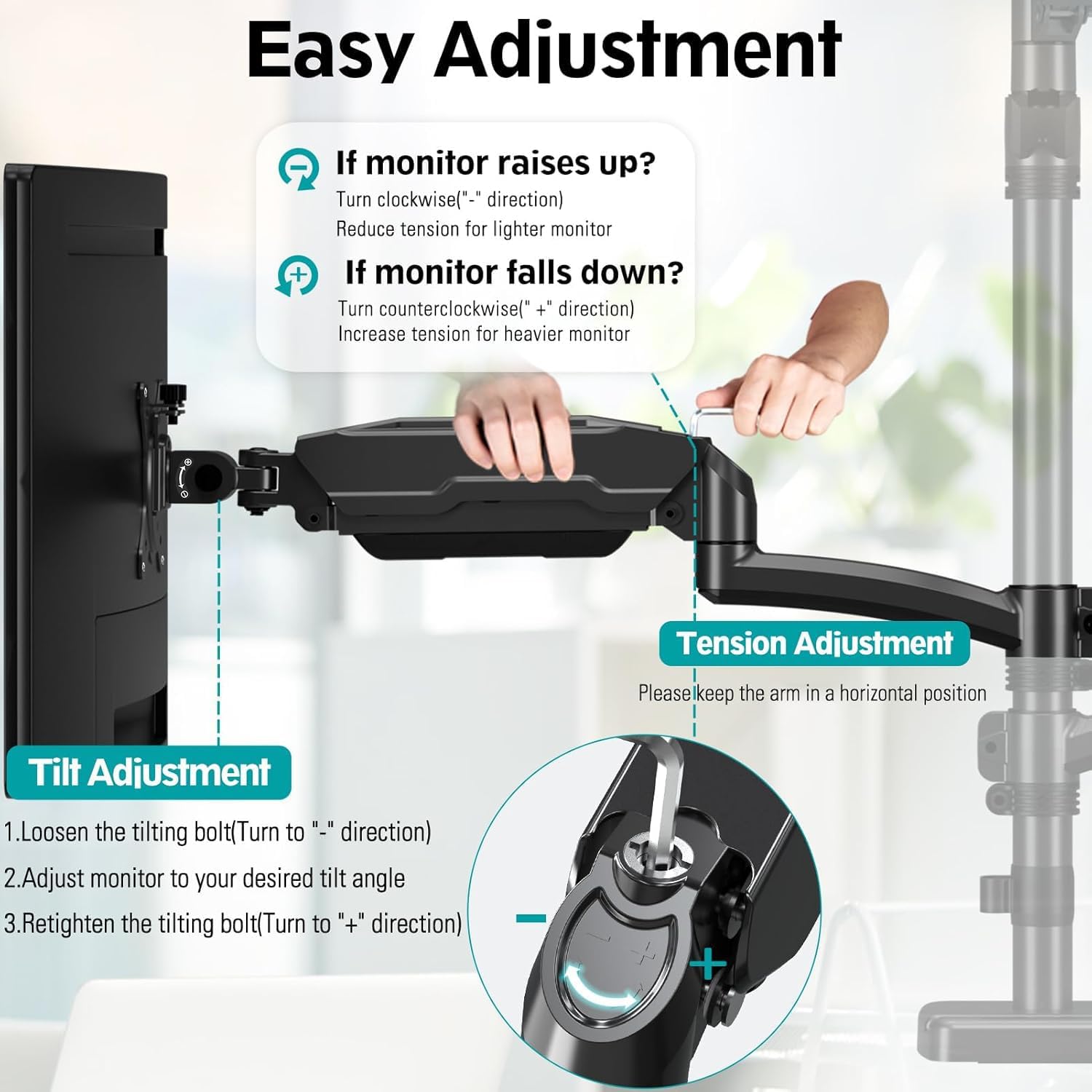
Image: Attaching the VESA plate to the back of a monitor.
4.6. Attaching Monitors
- Carefully slide each monitor (with VESA plate attached) onto the head of its respective arm.
- Мониторро ба дастак бо маҳкам кардани винти қулфкунанда дар сари VESA мустаҳкам кунед.
5. Фаъолият ва танзимот
The MOUNT PRO Triple Monitor Mount offers extensive adjustability for optimal viewтасаллӣ.
5.1. Танзими шиддати пружинаи газ
The gas spring arms allow for smooth height adjustments. Adjust the tension based on your monitor's weight.
- Агар монитор баланд мекунад, turn the tension screw counter-clockwise ("-" direction) to reduce tension for a lighter monitor.
- Агар монитор меафтад, turn the tension screw clockwise ("+" direction) to increase tension for a heavier monitor.
- Keep the arm in a horizontal position during adjustment.

Image: Instructions for adjusting gas spring tension.
5.2. Tilt, Swivel, and Rotation
- Ҷома: Adjust your screen from +90° to -90° for vertical angle. Loosen the tilting bolt, adjust, then retighten.
- Чарх: Swivel the monitor 180° for horizontal angle adjustment.
- Ротатсия: Барои гузаштан байни самтҳои манзара ва амудӣ, мониторро 360° гардонед.

Image: Visual representation of tilt, swivel, and rotation adjustments.
Video: Demonstration of the MOUNT PRO Triple Monitor Mount's full motion capabilities.
5.3. Идоракунии кабел
Utilize the integrated cable management system to keep your workspace tidy.
- Route monitor cables through the cable clips on the arms and along the main pole.
- Secure the cable covers on the arms to conceal the cables.
6. Нигоҳдорӣ
Нигоҳубини мунтазами монитори шумо муддати тӯлонӣ ва бехатар кор карданро таъмин мекунад.
- Тозакунӣ: Монтажро бо нарм тоза кунед, гamp матоъ. Аз тозакунандаи абразивӣ худдорӣ кунед.
- Санҷишҳои даврӣ: Барои боварӣ ҳосил кардан, ки ҳамаи винтҳо ва пайвастҳо маҳкам ва мустаҳкаманд, мунтазам тафтиш кунед. Дар ҳолати зарурӣ, онҳоро дубора маҳкам кунед.
- Баҳори газ: If monitors feel loose or too stiff, re-adjust the gas spring tension as described in Section 5.1.
7. Баррасии мушкилот
Агар шумо бо мушкилот рӯ ба рӯ шавед, ба мушкилоти умумӣ ва роҳҳои ҳалли зерин муроҷиат кунед:
- Монитор паст мешавад ё мавқеъро ишғол намекунад:
- The gas spring tension may be too low for the monitor's weight. Increase tension by turning the screw clockwise ("+" direction).
- Ensure all VESA plate screws and arm connections are securely tightened.
- Monitor is too stiff to move:
- The gas spring tension may be too high. Decrease tension by turning the screw counter-clockwise ("-" direction).
- Маунт худро ноустувор ҳис мекунад:
- Боварӣ ҳосил кунед, ки C-clamp or grommet base is securely fastened to the desk.
- Verify that the main pole is firmly attached to the base.
- Check that the combined weight of your monitors does not exceed the mount's capacity.
8. Мушаххасоти
| Хусусият | Мушаххасоти |
|---|---|
| Бренд | MOUNT PRO |
| Модели | B0CHF3PC58 |
| Мутобиқати андозаи экран | Max 32" (not compatible with 1000R curved screens) |
| Иқтидори вазн барои як бозу | То 17.6 фунт (8 кг) |
| Мутобиқати VESA | 75х75мм, 100х100мм |
| Навъи васлкунӣ | C-Clamp (0.39"-3.15" desk thickness), Grommet (0.39"-1.97" desk thickness) |
| Навъи ҳаракат | Гард кардан, гардиш кардан, хам кардан, буриш кардан |
| Maximum Arm Height | 36.3 inches (from desk surface) |
| Тамдиди даст | То 18.1 дюйм |
| Материал | Алюминий |
| Ранги | Сиёҳ |
9. Кафолат ва дастгирӣ
For warranty information or technical support, please refer to the MOUNT PRO official webсайт ё бевосита бо хадамоти муштариёни худ тамос гиред. Квитансияи хариди худро барои даъвоҳои кафолат нигоҳ доред.
Ask a question about this manual
Ask about setup, troubleshooting, compatibility, parts, safety, or missing instructions. Manuals+ will review the question and use this page’s manual context to help answer it.