
1. Муқаддима
This manual provides detailed instructions for the installation, operation, and maintenance of the DEWIN G2R 63A 2P Automatic Transfer Switch (ATS). This device is designed to automatically switch between two power sources, ensuring continuous power supply to your load.
The DEWIN G2R 63A 2P ATS features a compact structure, small size, and supports 35mm DIN rail installation, making it suitable for household distribution boxes. It offers extremely fast switching speed, resolving power outage issues efficiently.
2. Маълумот оид ба бехатарӣ
Огоҳӣ: хатари зарбаи барқ. Насбкунӣ ва нигоҳдорӣ бояд танҳо аз ҷониби кормандони соҳибихтисос анҷом дода шаванд.
- Always disconnect power before installing or servicing the ATS.
- Боварӣ ҳосил кунед, ки ҳама пайвастҳои ноқилҳо бехатаранд ва ба кодексҳои барқии маҳаллӣ мувофиқанд.
- Агар дастгоҳ вайрон шуда бошад ё ба назар чунин мерасад, ки он кор намекунад, онро истифода набаред.
- The operating environment temperature range is -5°C to +40°C.
- The installation altitude must be below 2000 meters.
- The enclosure protection class of the ATS is IP30.
3. Маҳсулот ба охир расидview
3.1 Хусусиятҳои асосӣ
- Иҷрои баланд: Electromagnetically driven for extremely fast switching, less than 50ms conversion time.
- Сифати баланд: Flame-retardant shell for resistance to extreme environments, strong adaptability, and reliable operation.
- Интиқоли худкор: Designed with common power supply, backup power supply, load power-on indicator, and clear switch status.
- Arc Extinction System: Internal arc extinction system for rapid cooling and arc suppression.
- Истифодаи осон: Modular structure, same-side wire entry for convenient wiring, compact size, supports 35mm DIN rail installation.
3.2 Ҷузъҳо ва андозаҳои маҳсулот
The DEWIN G2R 63A 2P ATS is a compact unit designed for efficient power management.

Расми 1: Пеш view of the DEWIN G2R 63A 2P Automatic Transfer Switch.

Figure 2: Dimensions of the DEWIN G2R 63A 2P Automatic Transfer Switch. The device measures approximately 45mm wide, 70mm high, and 105mm deep, with a 35mm DIN rail mounting width.
3.3 Panel Analysis
Understanding the control panel is crucial for proper operation.

Figure 3: Panel analysis showing common power supply indicator light (I), standby power indicator light (II), common power hand/automatic switch, commonly used power supply closing mechanical indication, operating handle, backup power closing mechanical indication, and load power indicator light.
3.4 Мушаххасоти
| Мушаххасоти | Арзиш |
|---|---|
| Реҷаи корӣ | ON-ON |
| Ҷараёни номиналӣ | 63 А |
| Ҷилди амалиётӣtage | 220 вольт |
| Навъи тамос | Одатан кушода |
| Навъи пайвасткунанда | Криминг |
| Навъи гузариш | Калиди интиқоли худкор |
| Навъи терминал | Бурида |
| Материал | Polycarbonate and Copper |
| Навъи схема | 2-pole common circuit and auxiliary compatible |
| Навъи васлкунӣ | DIN Mount Mount |
| Навъи фаъолкунанда | Электромагнит |
| Шумораи мавқеъҳо | 2 |
| Ҳарорати болоӣ | 40 дарача гарм |
| Control Device Type | Тугмаи механикӣ |
| Усули назорат | ламс кунед |
| Протоколи пайвастшавӣ | ДИН |
| Қувва | 13.86 Ватт |
| Дастгоҳҳои мувофиқ | Household electrical appliances, electronic equipment, 220V AC powered devices |
| Рейтинги байналмилалии муҳофизат | IP30 |
| Compliant Specification | CCC, IEC 60669-2-1:2002 |
| Вазни ашё | 380 грамм |
4. Танзим ва насб
4.1 Васлкунӣ
The ATS is designed for 35mm DIN rail mounting. Ensure the DIN rail is securely fastened within your distribution box or electrical panel.

Figure 4: The image illustrates the 35mm DIN rail installation method and the robust terminals for wiring.
4.2 Диаграммаи пайвастшавӣ
Proper wiring is essential for safe and correct operation. Refer to the diagram below for connecting the common power (I), backup power (II), and load output.
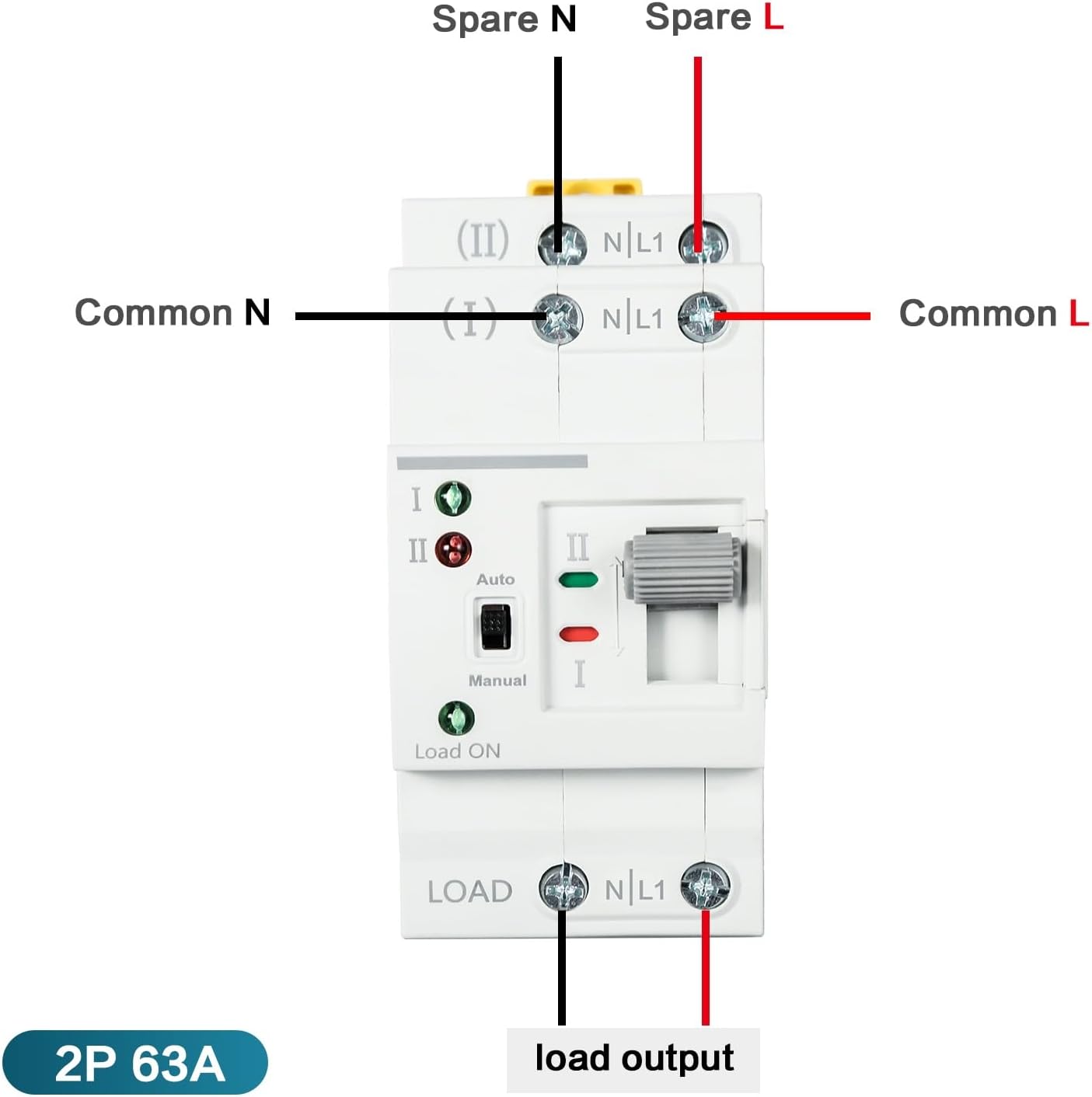
Figure 5: Wiring diagram showing connections for Common N, Common L, Spare N, Spare L, and Load Output. Ensure the input power supply is connected in the correct phase sequence.
5. Дастурҳои истифодабарӣ
The DEWIN G2R 63A 2P ATS supports both automatic and manual operation modes.
5.1 Режими автоматй
In automatic mode, the switch will detect the presence of the common power supply (I) and the backup power supply (II). If the common power fails, the switch will automatically transfer the load to the backup power supply. When common power is restored, it will switch back.
- Set the 'Auto/Manual' switch to 'Auto'.
- The indicator lights (I and II) will show which power source is active.
- The 'Load ON' indicator will illuminate when power is supplied to the load.
5.2 Ҳолати дастӣ
To manually switch between power sources:
- Set the 'Auto/Manual' switch to 'Manual'.
- Use the operating handle to physically switch between position I (Common Power) and position II (Backup Power).
- Ensure the desired power source is selected and the corresponding indicator light is on.
6. Нигоҳдорӣ
The DEWIN G2R 63A 2P ATS is designed for reliable operation with minimal maintenance. However, periodic checks are recommended:
- Санҷиши визуалӣ: Дастгоҳро мунтазам аз назар гузаронед, то нишонаҳои осеби ҷисмонӣ, пайвастҳои суст ё гармии аз ҳад зиёдро пайдо кунанд.
- Тозакунӣ: Keep the device free from dust and debris. Use a dry, soft cloth for cleaning. Do not use liquids or abrasive cleaners.
- Санҷиши терминал: Periodically verify that all terminal screws are tight to prevent arcing and ensure good electrical contact.
Пеш аз анҷом додани ягон таъмир ҳамеша барқро ҷудо кунед.
7. Баррасии мушкилот
If you encounter issues with your ATS, consider the following common problems and solutions:
- No Power to Load:
- Check if both common and backup power sources are active.
- Verify the 'Load ON' indicator is illuminated.
- Ensure the ATS is in 'Auto' mode or manually switched to an active power source. - Failure to Transfer Automatically:
- Confirm the 'Auto/Manual' switch is set to 'Auto'.
- Check the status of both power sources using their respective indicator lights.
- If the issue persists, consult a qualified electrician. - Overheating or Unusual Noises:
- Immediately disconnect power.
- This could indicate a serious electrical fault. Do not attempt to repair it yourself. Contact a qualified electrician.
8. Кафолат ва дастгирӣ
Барои гирифтани маълумот дар бораи кафолат ва дастгирии техникӣ, лутфан ба бастабандии маҳсулот муроҷиат кунед ё бо фурӯшандаи худ тамос гиред. Квитансияи хариди худро ҳамчун далели харид нигоҳ доред.