
1. Муқаддима ва зиёдаview
This manual provides essential instructions for the safe and efficient use of your Maxcom MM135L Basic Mobile Phone. The MM135L is designed for straightforward communication, featuring a user-friendly interface, large keys, and a 1.77-inch screen. It supports 2G networks and includes dual SIM capability, an SOS button for emergencies, and convenient USB-C charging. Please read this manual thoroughly before operating the device.
2. Мундариҷаи баста
Боварӣ ҳосил кунед, ки ҳама ашё дар баста мавҷуд аст:
- Maxcom MM135L Mobile Phone
- Battery (Lithium-Ion, 600 mAh)
- Сими USB
- Эжектори панели SIM
- Дастури корбар (ин ҳуҷҷат)
3. Тарҳбандии дастгоҳ
Familiarize yourself with the physical components of your Maxcom MM135L phone.
Расми 3.1: Қафо view of the Maxcom MM135L phone, showing the blue textured back cover, Maxcom logo, and speaker grille at the top.

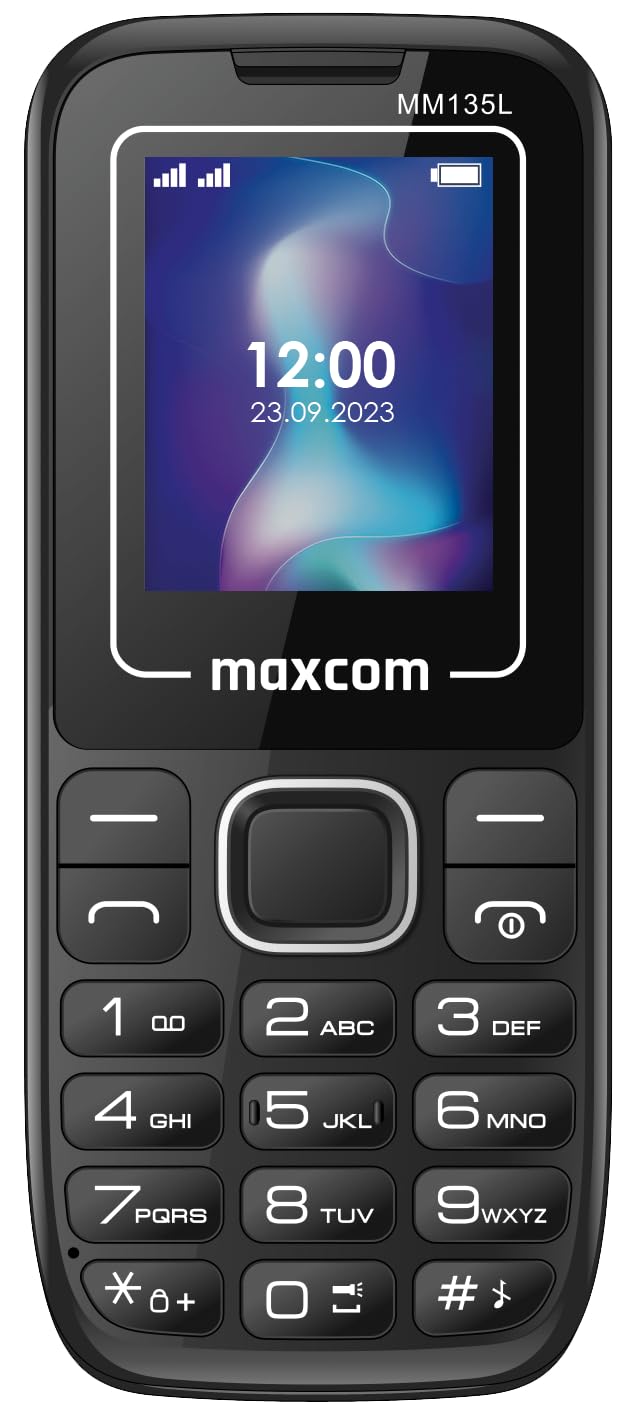
Расми 3.2: Пеш view of the Maxcom MM135L phone, displaying the screen, large numeric keypad, and call/end buttons.

Figure 3.3: Bottom edge of the phone, featuring the USB-C charging port and a 3.5mm headphone jack.

Figure 3.4: Top edge of the phone, highlighting the integrated flashlight.
Компонентҳои асосӣ:
- Экрани намоиш: 1.77-inch LCD for clear text and call information.
- Клавиатураи рақамӣ: Large, tactile buttons for easy dialing and texting.
- Call/End Buttons: Dedicated buttons for managing calls.
- Тугмаҳои навигатсионӣ: Барои паймоиши меню.
- Тугмаи SOS: Located on the rear for emergency calls (refer to Figure 3.1).
- Дурахш: Integrated at the top of the device (refer to Figure 3.4).
- Порти USB-C: For charging the device (refer to Figure 3.3).
- Гӯшаки гӯшмонак: 3.5mm port for audio accessories (refer to Figure 3.3).
4. Танзимот
4.1 Насби батарея
- Сарпӯши қафои телефонро бодиққат хориҷ кунед.
- Контактҳои батареяро бо терминалҳои дохили қисмати батарея ҳамоҳанг созед.
- Батареяро оҳиста ба ҷои худ пахш кунед.
- Сарпӯши қафоро ба ҷои худ гузоред ва боварӣ ҳосил кунед, ки он бо садои баланд садо медиҳад.
4.2 Насби SIM -корт
The Maxcom MM135L supports dual SIM cards.
- With the phone powered off and the back cover removed, locate the SIM card slots.
- Insert your SIM card(s) into the designated slot(s) with the gold contacts facing down, following the orientation indicated on the phone.
- Боварӣ ҳосил кунед, ки кортҳои SIM(ҳо) пурра ҷойгир шудаанд.
- Replace the back cover and battery.
4.3 Пур кардани телефон
The phone uses a USB-C port for charging.
- Connect the USB-C cable to the charging port at the bottom of the phone (refer to Figure 3.3).
- Нӯги дигари сими USB-ро ба адаптери мувофиқи барқии USB ё порти USB-и компютер пайваст кунед.
- Нишондиҳандаи батарея дар экран ҳолати пуркунии барқро нишон медиҳад.
- Пас аз пур шудани батарея пуркунандаи барқро ҷудо кунед.
Шарҳ: For optimal battery life, fully charge the phone before first use.
5. Дастурҳои истифодабарӣ
5.1 Фаъол кардан/хомӯш кардан
- Барои фаъол кардан: -ро пахш карда нигоҳ доред Call/Power тугмаро то равшан шудани экран пахш кунед.
- Барои хомӯш кардани барқ: -ро пахш карда нигоҳ доред Анҷом / Қувва button until the power off options appear, then confirm.
5.2 Зангҳо ва қабули зангҳо
- Барои занг задан: Рақами телефонро бо истифода аз клавиатура ворид кунед ва тугмаи Занг занед тугма.
- Барои ҷавоб додан ба занг: -ро пахш кунед Занг занед вақте ки телефон занг мезанад, тугмаро пахш кунед.
- Барои анҷом додани занг: -ро пахш кунед Поён тугма.
5.3 Фиристодан ва қабул кардани паёмҳо
- Navigate to the "Messages" menu using the navigation keys.
- Select "Create New Message" to compose an SMS.
- Enter the recipient's number and your message, then send.
- Received messages will appear in the "Inbox".
5.4 Using the SOS Button
The SOS button is located on the rear of the phone. It is designed for emergency situations.
- Барои фаъолсозӣ: Press and hold the SOS button for several seconds.
- The phone will automatically sound an alarm and send emergency SMS messages to pre-set contacts.
- It will then automatically call the saved emergency contacts in a loop until a call is answered.
- Ensure emergency contacts are properly configured in the phone settings.
5.5 Функсияи дурахш
The built-in flashlight can be activated for convenience.
- Refer to the phone's specific settings or a dedicated side button for flashlight activation. Typically, a long press on a designated key or a side switch controls it.
6. Нигоҳдорӣ
- Тозакунӣ: Барои тоза кардани сатҳи телефон аз матои нарм ва хушк истифода баред. Аз тозакунандаҳои моеъ худдорӣ кунед.
- Нигоҳубини батарея: Батареяро дар ҳарорати аз ҳад зиёд зери хатар нагузоред. Аз холӣ кардани пурраи батарея зуд-зуд худдорӣ кунед.
- Нигоҳдорӣ: Вақте ки телефон муддати тӯлонӣ истифода намешавад, онро дар ҷои хунук ва хушк нигоҳ доред.
- Муқовимат ба об: Ин телефон ба об тобовар нест. Аз таъсири моеъ худдорӣ намоед.
7. Баррасии мушкилот
| Мушкилот | Ҳалли имконпазир |
|---|---|
| Телефон фаъол нест. | Боварӣ ҳосил кунед, ки батарея дуруст насб ва пур карда шудааст. Пуркунандаро пайваст кунед ва дубора кӯшиш кунед. |
| Занг задан ё қабул карда наметавонад. | Check if the SIM card is properly inserted and activated. Verify network signal strength. Contact your service provider if issues persist. |
| Батарея пур карда намешавад. | Ensure the USB-C cable and charger are securely connected and functional. Try a different charging cable or adapter. |
| Тугмаи SOS кор намекунад. | Verify that emergency contacts are saved in the phone's settings. Ensure the phone has network coverage. |
| Сифати пасти занг. | Move to an area with better network reception. Check the speaker and microphone for obstructions. |
8. Мушаххасоти
| Хусусият | Тафсилот |
|---|---|
| Номи модел | MM135L |
| Андозаи экран | 1.77 инч |
| Навъи намоиш | LCD |
| Резолюция | 128 х 160 |
| Технологияи мобилӣ | 2G |
| Дастгирии SIM | Дугона SIM |
| Навъи батарея | Литий-ион |
| Иқтидори батарея | 600 мАч |
| Порти пуркунандаи барқ | USB-C |
| Андозаҳо (L x W x H) | 7 х 14 х 3.5 см |
| Вазн | 60 гр |
| Хусусиятҳои махсус | SOS Button, Flashlight, Expandable Memory, Fast Charging Support |
9. Кафолат ва дастгирӣ
For warranty information, technical support, or service inquiries, please refer to the warranty card included with your product or contact Maxcom customer service directly. Keep your proof of purchase for warranty claims.