
1. Муқаддима
The LEAUDIO Topping D70 PRO OCTO is a high-fidelity Digital-to-Analog Converter (DAC) designed to deliver exceptional audio performance. Featuring 8 Cirrus Logic CS43198 chips, Bluetooth 5.1 with LDAC support, and a full-color Aurora UI, this device offers advanced audio decoding capabilities up to PCM768kHz/32bit and DSD512. This manual provides detailed instructions for setting up, operating, and maintaining your D70 PRO OCTO to ensure optimal performance.
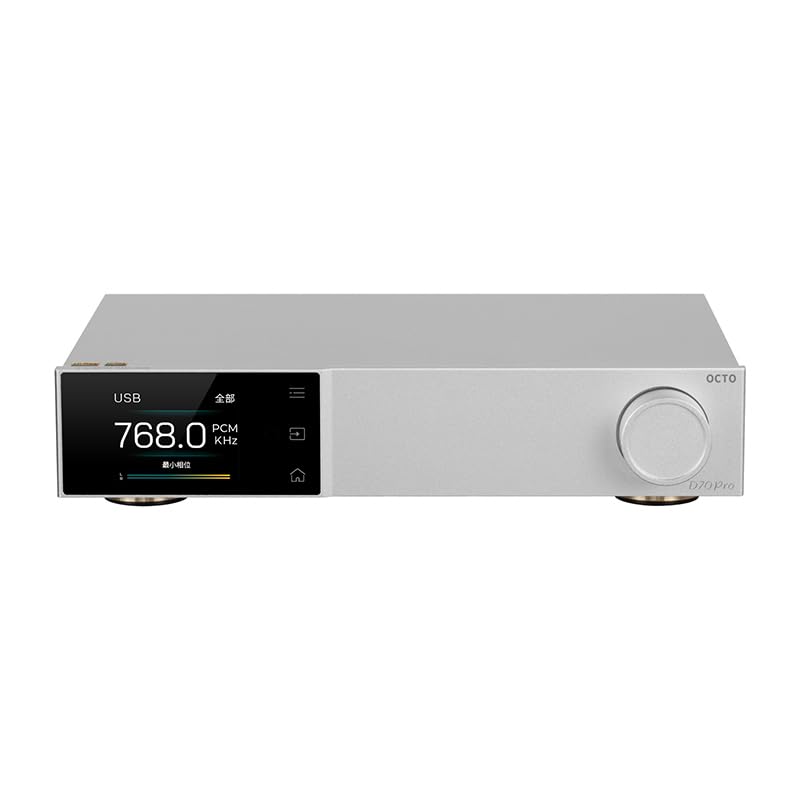
Расми 1: Пеш view of the Topping D70 PRO OCTO HiFi DAC.
2. Мундариҷаи баста
Лутфан бастаро барои ҷузъҳои зерин бодиққат тафтиш кунед:
- Topping D70 PRO OCTO Unit
- Назорати дурдаст
- Сими USB
- Сими барқи AC
- Антеннаи Bluetooth
- Дастури оғози зуд
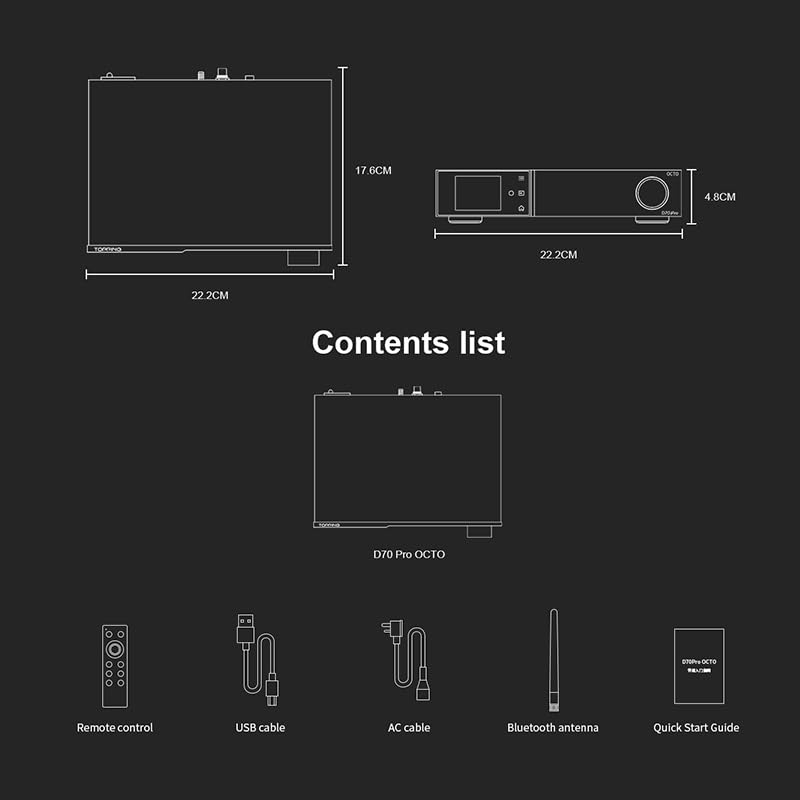
Figure 2: Included accessories: Remote control, USB cable, AC cable, Bluetooth antenna, and Quick Start Guide.
3. Маҳсулот ба охир расидview
The D70 PRO OCTO features a clear layout for easy connectivity and control.
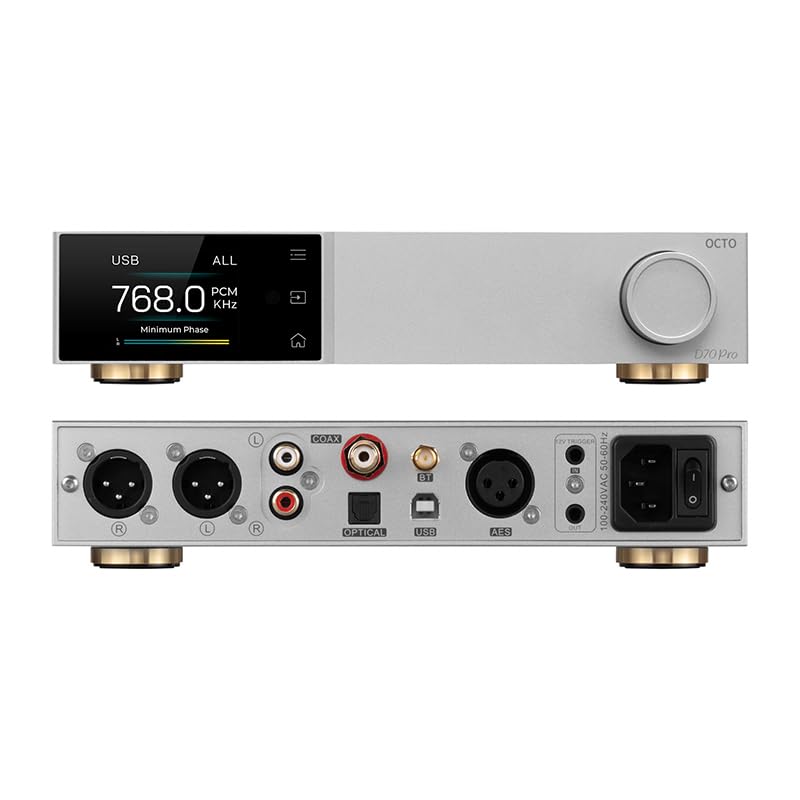
Figure 3: Front panel (top) with display and control knob, and rear panel (bottom) with various input/output ports.
Панели пеши
- Экрани намоиш: Shows current status, input, sample rate, and UI information.
- Тугмаи идоракунӣ: For navigation, volume adjustment, and menu selection.
- Тугмаҳои ламсӣ: Three touch buttons for intuitive control of the Aurora UI.
Панели пушти
- Вуруди USB: Connect to a computer for audio playback.
- Вуруди коаксиалӣ: Вуруди аудиои рақамӣ.
- Вуруди оптикӣ: Вуруди аудиои рақамӣ.
- Пайвасткунаки антеннаи Bluetooth: Барои қабули бесими Bluetooth.
- USB-C (Қувват): Вуруди нерӯ.
- Баромади RCA (чап/рав): Unbalanced analog audio output.
- XLR Output (L/R): Balanced analog audio output.
- Триггери 12В: For synchronized power control with other devices.
- Калиди барқ: Қувваи асосӣ фурӯзон / хомӯш.
4. Танзимот
4.1 Пайвастагии ибтидоӣ
- Connect the Bluetooth antenna to the designated connector on the rear panel.
- Connect the D70 PRO OCTO to a power source using the provided AC power cable.
- Connect your audio source (e.g., computer, CD player) to the appropriate input on the D70 PRO OCTO (USB, Coaxial, or Optical).
- Connect the D70 PRO OCTO's output (RCA or XLR) to your ampбаландгӯяк ё баландгӯякҳои фаъол.
- Turn on the D70 PRO OCTO using the power switch on the rear panel.
4.2 Насби драйвер (Windows)
For Windows operating systems, a specific driver is required for optimal performance, especially for ASIO playback. The D70 PRO OCTO utilizes an XMOS XU316 and Thesycon custom driver. This driver can typically be downloaded from the manufacturer's official website. Other operating systems like Mac, Linux, iOS, and Android are generally driver-free and support plug-and-play functionality.

Figure 4: The D70 PRO OCTO offers wide compatibility with various operating systems, with specific driver requirements for Windows.
5. Амалиёт
5.1 Идоракунии асосӣ
- Фаъол / Хомӯш: Тугмаи асосии барқро дар панели қафо истифода баред.
- Танзими садо: Rotate the control knob on the front panel to adjust the output volume.
- Интихоби вуруд: Press the control knob or use the remote control to cycle through available inputs (USB, Coaxial, Optical, Bluetooth).
5.2 Aurora UI and Display Modes
The D70 PRO OCTO features a full-color Aurora UI with three touch buttons for an enhanced user experience. The display can show various playback information, including sample rate, volume, and input source. You can also switch between different display modes such as FFT (Fast Fourier Transform) and VU (Volume Unit) meters according to your preference.

Figure 5: The Aurora UI offers a full-color screen, touch buttons, customizable functions via the volume knob, and language switching options.
5.3 Bluetooth 5.1 Transmission
The D70 PRO OCTO supports Bluetooth 5.1 with advanced audio encoding protocols including LDAC, aptX-Adaptive, aptX HD, aptX, AAC, and SBC. This allows for high-quality wireless audio streaming from compatible devices.
- Select Bluetooth as the input source on the D70 PRO OCTO.
- Enable Bluetooth on your source device (e.g., smartphone, tablet).
- Ҷустуҷӯ "D70 PRO OCTO" in your device's Bluetooth settings and pair.
- Once paired, audio will be streamed wirelessly to the DAC.

Figure 6: The D70 PRO OCTO supports Bluetooth 5.1 for high-quality wireless audio transmission.
6. Хусусиятҳои асосӣ
- 8x CS43198 DAC Chips: Equipped with eight Cirrus Logic flagship CS43198 chips for superior audio conversion.
- Дастгирии аудиоии баландсифат: Supports PCM up to 768kHz/32bit and DSD512 audio decoding.
- Aurora UI: Full-color screen and three touch buttons for intuitive control and display.
- Усулҳои намоиши бисёрҷониба: Switch between playback information, FFT, and VU meters.
- Bluetooth 5.1: Supports LDAC, aptX-Adaptive, aptX HD, aptX, AAC, and SBC for high-quality wireless streaming.
- Low Distortion and High Dynamic Range: Achieves THD+N <0.00007% and a dynamic range of 134dB for accurate sound reproduction.
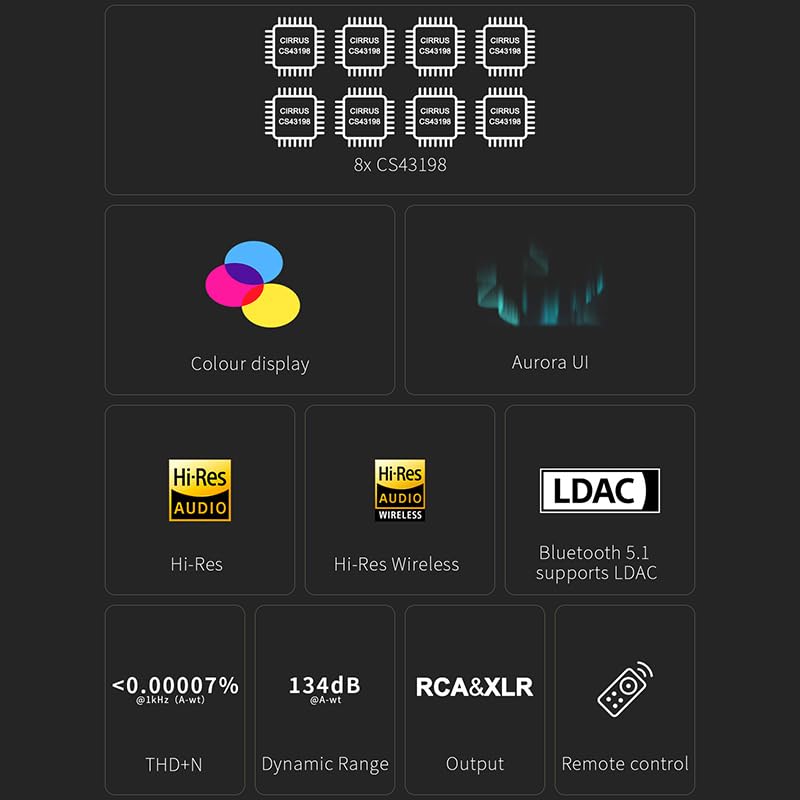
Figure 7: Visual representation of key features including 8x CS43198 chips, color display, Aurora UI, Hi-Res Audio, LDAC, and performance metrics.

Figure 8: Detailed audio performance metrics including THD+N, SNR, DNR, and Noise levels, demonstrating the DAC's high fidelity.
7. Мушаххасоти
| Хусусият | Тафсилот |
|---|---|
| Чипи DAC | 8x Cirrus Logic CS43198 |
| Рамзи PCM | То 768 кГц/32 бит |
| Рамзи DSD | То DSD512 |
| Версияи Bluetooth | 5.1 |
| Кодекҳои Bluetooth | LDAC, aptX-Adaptive, aptX HD, aptX, AAC, SBC |
| THD+N (RCA) | <0.00008% @ 1kHz (A-wt) |
| THD+N (XLR) | <0.00007% @ 1kHz (A-wt) |
| Dynamic Range (RCA) | 128dB @ 1kHz (A-wt) |
| Dynamic Range (XLR) | 134dB @ 1kHz (A-wt) |
| Output Impedance (RCA) | 50 Ом |
| Output Impedance (XLR) | 100 Ом |
| Вурудҳо | USB, Coaxial, Optical, Bluetooth |
| Натиҷаҳо | RCA, XLR |
| Андозаҳо | тахминан. 14.41 x 9.49 x 3.43 инч (Баста) |
| Вазни ашё | тахминан. 4.29 фунт |
| Вуруди нерӯ | USB-C (DC 15V) |
8. Нигоҳдорӣ
To ensure the longevity and optimal performance of your D70 PRO OCTO, follow these maintenance guidelines:
- Тозакунӣ: Use a soft, dry cloth to clean the exterior of the device. Avoid using abrasive cleaners, solvents, or chemical sprays, as they may damage the finish.
- Ҷойгиршавӣ: Дастгоҳро дар рӯи сатҳи устувор ва ҳамвор, дур аз нури бевоситаи офтоб, манбаъҳои гармӣ ва нами аз ҳад зиёд ҷойгир кунед. Дар атрофи дастгоҳ вентилятсияи кофӣ таъмин кунед.
- Қувва: Always use the provided power adapter. Disconnect the power cable during lightning storms or when the unit is unused for extended periods.
- Муносибат: Аз партофтан ё дучори таъсири сахти дастгоҳ худдорӣ намоед.
9. Баррасии мушкилот
If you encounter any issues with your D70 PRO OCTO, please refer to the following common problems and solutions:
| Мушкилот | Сабаби эҳтимолӣ | Ҳалли |
|---|---|---|
| Не қудрат | Power cable not connected or faulty outlet. | Ensure the power cable is securely connected and the outlet is functional. Check the power switch on the rear panel. |
| Баромади садо нест | Incorrect input/output selection, volume too low, or faulty cables. | Verify the correct input source is selected on the DAC. Check volume levels on both the DAC and connected amplifier/speakers. Ensure audio cables are securely connected and not damaged. |
| Мушкилоти пайвасти Bluetooth | Device not in pairing mode, out of range, or interference. | Ensure the DAC is in Bluetooth input mode. Place the source device closer to the DAC. Try unpairing and re-pairing the devices. Avoid sources of strong electromagnetic interference. |
| Аудиои вайроншуда | Input signal too high, faulty cables, or incorrect settings. | Reduce the volume on the source device. Check audio cables for damage. Ensure the DAC's settings (e.g., filter modes) are appropriate for your audio. |
| Windows PC not recognizing DAC | Missing or incorrect USB driver. | Download and install the latest USB driver from the LEAUDIO or Topping official website. Restart your computer and the DAC. |
Агар пас аз кӯшиши ин ҳалли мушкилот мушкилот боқӣ монад, лутфан бо дастгирии муштариён тамос гиред.
10. Кафолат ва дастгирӣ
The LEAUDIO Topping D70 PRO OCTO is covered by a manufacturer's warranty. Please refer to the warranty card included in your package or visit the official LEAUDIO/Topping webсайт барои шартҳо ва шартҳои кафолати муфассал.
For technical support, service, or further inquiries, please contact your retailer or the manufacturer directly. Keep your purchase receipt and product serial number handy when seeking support.