
Муқаддима
This manual provides detailed instructions for the safe and effective operation of your WOUXUN KG-R56 VHF Professional Radio. Please read this manual thoroughly before using the device to ensure proper function and to prevent damage.
Маҳсулот ба охир расидview
The WOUXUN KG-R56 is a compact and robust professional VHF transceiver designed for authorized users, operating within the 66-88 MHz frequency range. It features 256 memory channels, advanced menu functions, and integrated USB Type-C charging. The device is compliant with current R&TTE RED CE standards.
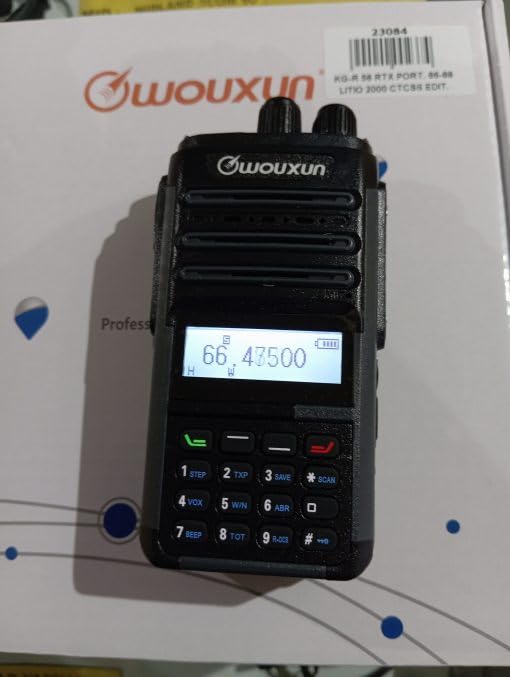
Image: WOUXUN KG-R56 VHF Professional Radio. This image shows the front view of the radio, highlighting its display, keypad, and antenna connection.
Мундариҷаи баста
Боварӣ ҳосил кунед, ки ҳамаи ҷузъҳои дар поён овардашуда дар бастаи шумо мавҷуданд:
- KG-R56 Transceiver
- 7.4V - 2000 mAh Lithium-Ion Battery Pack
- Пуркунандаи барқ
- Таъмини барқ 220V
- Flexible Rubber Antenna
- Клипи камарбанд
- User Manual (in original language)
- Сертификатсияҳо
Ташкил кардан
1. Насби батарея
- Қуттии батареяро бо чуқурҳои қафои радио мувофиқ кунед.
- Қуттии батареяро ба боло лағжонед, то он даме, ки он ба ҷои бехатар клик кунад.
- Барои хориҷ кардан, қулфи озодкунии батареяро пахш кунед (агар мавҷуд бошад) ва батареяро ба поён лағжонед.
2. Пуркунии батарея
The KG-R56 features an integrated USB Type-C port for convenient charging.
- Connect a USB Type-C cable to the radio's USB-C port.
- Connect the other end of the cable to the provided charger or a compatible USB power source.
- The charging indicator light on the radio will show the charging status.
- Пуркунии пурра одатан чанд соатро мегирад. Аз пуркунии аз ҳад зиёди батарея худдорӣ кунед.
3. Пайваст кардани антенна
- Screw the flexible rubber antenna clockwise onto the antenna connector on top of the radio until it is finger-tight.
- Do not overtighten the antenna.
4. Замима кардани клипи камарбандӣ
- Винтҳои додашударо истифода баред, то клипи тасмаро ба минтақаи муайяншуда дар қафои радио пайваст кунед.
Дастурҳои амалиётӣ
1. Фаъол/хомӯш
Rotate the Power/Volume knob clockwise to turn the radio on. Rotate it counter-clockwise until a click is heard to turn it off.
2. Танзими баландии овоз
After powering on, continue rotating the Power/Volume knob to adjust the audio output level to your preference.
3. Интихоби канал
Use the Up/Down arrow keys or the rotary encoder (if present) to select the desired channel or frequency. The display will show the selected channel number, frequency, or channel name.
4. Интиқол ва қабул
- Барои интиқол, тугмаи Push-To-Talk (PTT) -ро дар паҳлӯи радио пахш карда нигоҳ доред. Ба микрофон равшан сухан гӯед.
- Барои қабул тугмаи PTT-ро раҳо кунед.
- Always ensure the channel is clear before transmitting to avoid interference.
5. Навигатсия меню
The KG-R56 features an advanced menu system for managing various radio functions.
- -ро пахш кунед МЕНЮ тугмаи барои дохил шудан ба менюи асосӣ.
- Use the Up/Down arrow keys to scroll through the available menu options.
- пахш кунед МЕНЮ боз ё OK (if available) to select an option.
- Use the Up/Down keys to change settings within a selected option.
- пахш кунед БАРОМАДГОҲ or БОЗГАШТ to return to the previous menu or exit the menu system.
Хусусиятҳои асосӣ
- DTMF Encoding/Decoding: Supports DTMF tones for advanced signaling capabilities.
- CTCSS/DCS: Includes 50 CTCSS groups and 105 DCS groups for selective calling. These can be customized via PC programming software.
- CTCSS/DCS Scanner: Automatically detects CTCSS/DCS tones on a received signal.
- Роҳнамои овозӣ: Provides audible prompts for menu navigation and function selection, enhancing user experience.
- Channel Name Display: Allows for editing and displaying custom channel names for easier identification.
- Battery Capacity Inquiry: Check the current battery level directly from the radio.
- Компютери барномарезишаванда: Customize radio settings, frequencies, and channels using dedicated PC software.
- Selectable Bandwidth: Choose between various channel spacing options (5K/6.25K/10K/12.5K/25K).
- Reverse Frequency Function: Quickly switch between transmit and receive frequencies for specific operations.
- Multiple Scan Modes (TO/CO/SE): Offers various scanning options for monitoring channels efficiently.
- Усулҳои намоиш: Switch between displaying Frequency, Channel Number, or Channel Name.
- TOT (Таймери таймер): Prevents excessively long transmissions by limiting transmission duration.
- Busy Channel Lockout (BCLO): Prevents transmission on an occupied channel, avoiding interference.
- Keypad Lock (Automatic/Manual): Prevents accidental key presses and setting changes.
- Wired Clone Function: Copy settings and configurations from one radio to another using a cable.
- Пуркунии USB Type-C: Conveniently charge the radio via a standard USB-C port.
Нигоҳдорӣ
Тозакунӣ
Сатҳи радиоро бо нарм пок кунед, гamp cloth. Do not use harsh chemicals, abrasive cleaners, or solvents, as these can damage the casing. Ensure the USB-C port cover is closed when not charging to protect against dust and moisture.
Нигоҳубини батарея
- Пеш аз истифодаи аввал батареяро пурра пур кунед.
- Батареяро дар ҳарорати аз ҳад зиёд (гарм ё хунук) нагузоред.
- Агар радио барои муддати тӯлонӣ истифода нашавад, батареяро хориҷ кунед ва онро дар ҷои хунук ва хушк нигоҳ доред.
- Use only WOUXUN approved battery packs and chargers to ensure safety and optimal performance.
Мушкилкушо
| Мушкилот | Сабаби эҳтимолӣ | Ҳалли |
|---|---|---|
| Радио фаъол нест. | Батарея кам аст ё дуруст насб нашудааст. | Батареяро пур кунед ё онро дуруст насб кунед. |
| Интиқол наметавонад. | Busy Channel Lockout (BCLO) active; incorrect frequency/channel; low battery. | Wait for the channel to clear; verify frequency/channel settings; charge battery. |
| No reception or weak signal. | Antenna not attached correctly; squelch level too high; out of range. | Check antenna connection; adjust squelch level; move closer to transmitting station. |
| Клавиатура ҷавоб намедиҳад. | Қулфи клавиатура фаъол аст. | Қулфи клавиатураро ғайрифаъол кунед (барои комбинатсияи мушаххаси тугмаҳо ба дастурҳои истифода нигаред). |
| Пуркунандаи USB-C кор намекунад. | Cable or charger faulty; port dirty. | Try a different USB-C cable/charger; carefully clean the port if visibly dirty. |
| Audio output is distorted. | Volume too high; weak signal; speaker damage. | Adjust volume; check signal strength; contact support if speaker is damaged. |
Мушаххасоти техникӣ
- Модели: KG-R56
- Диапазони басомад: 66-88 МГц
- Шумораи каналҳо: 256
- Фосилаи канал: 5K/6.25K/10K/12.5K/25K
- Модуляция: FM F3E
- Ҷилди амалиётӣtage: 7.4В DC
- Қувваи баромади RF: 5W/1W (интихобшаванда)
- Ҳассосияти қабулкунанда: 0.25 µV (12 dB SINAD)
- Ҳассосияти хомӯшӣ: <0.16 мкВ
- Қувваи баромади аудио: 500 mW at 8 ohms
- Навъи батарея: 7.4V - 2000 mAh Lithium-Ion Pack
- Ҳолати интизорӣ: 50 мА
- Ҳарорати корӣ: -30°С то +60°С
- Андозаҳо (H x W x D): 105 x 63 x 39 mm (without antenna and battery)
- Вазн: 250 g (with battery and antenna)
- Рейтинги байналмилалии муҳофизат: IP54 (Protected from limited dust ingress and water spray from any direction)
- Сатҳи муқовимат ба об: Not designed for immersion in water.
- Хусусиятҳои махсус: Weather-resistant, USB rechargeable
Эзоҳ: Мушаххасот бояд бе огоҳӣ тағир дода шаванд.
Маълумот оид ба бехатарӣ
- Do not operate the radio in explosive atmospheres (e.g., near flammable gases, dust particles, or metallic powders).
- Do not modify the radio. Unauthorized modifications can void your warranty and violate regulatory compliance.
- Keep the radio away from medical devices (e.g., pacemakers) to avoid potential interference.
- Use only WOUXUN approved accessories, including batteries and chargers.
- Do not expose the radio to direct sunlight for extended periods or to extreme heat sources.
- Dispose of batteries properly according to local environmental regulations.
- While rated IP54 for weather resistance, this device is not designed for immersion in water. Avoid exposing it to heavy rain or submersion.
Кафолат ва дастгирӣ
For warranty information or technical support, please contact your authorized WOUXUN dealer or the point of purchase. Keep your purchase receipt as proof of purchase.
For further assistance, you may visit the official WOUXUN website or consult the contact information provided in your original product packaging.