
LEVOIT 5ddce951-f1e5-4fc2-b790-0e25bd06f240
LEVOIT 36" Bladeless Tower Fan & Air Purifier User Manual
Model: 5ddce951-f1e5-4fc2-b790-0e25bd06f240
Brand: LEVOIT
Муқаддима
This manual provides detailed instructions for the safe and efficient operation, maintenance, and troubleshooting of your LEVOIT 36" Bladeless Tower Fan and LEVOIT Core Mini-P Air Purifier. Please read this manual thoroughly before use and retain it for future reference.
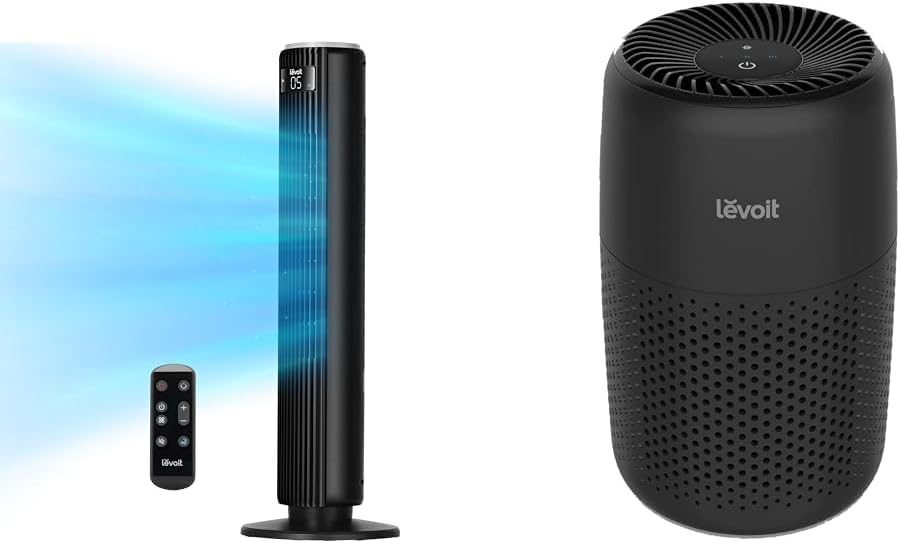
Image: The LEVOIT 36-inch Bladeless Tower Fan and the LEVOIT Core Mini-P Air Purifier shown together, highlighting their compact and modern design.
Маълумоти муҳим оид ба бехатарӣ
Барои кам кардани хатари сӯхтор, зарбаи барқ ё ҷароҳат, лутфан чораҳои бехатарии зеринро риоя кунед:
- Пеш аз тоза кардан ё анҷом додани ҳама гуна хидматрасонӣ дастгоҳро ҳамеша аз розетка ҷудо кунед.
- Ягон вентиляторро бо сим ё штепсельи вайроншуда кор накунед. Вентро партоед ё барои ташхис ва/ё таъмир ба муассисаи хидматрасонии ваколатдор баргардед.
- Симро аз зери қолин нагузоред. Симро бо қолинҳои партофташуда, давандагон ё рӯйпӯшҳои шабеҳ напӯшонед. Симро аз минтақаи ҳаракат дур ҷойгир кунед ва дар он ҷое, ки он бархӯрда нашавад.
- Do not insert or allow fingers or foreign objects to enter any ventilation or exhaust opening as this may cause an electric shock or damage the appliance.
- Воридшавии ҳаво ва ихроҷро ба ҳеҷ ваҷҳ манъ накунед.
- Ин дастгоҳро танҳо тавре истифода баред, ки дар ин дастур тавсиф шудааст. Ҳама гуна истифодаи дигаре, ки аз ҷониби истеҳсолкунанда тавсия дода нашудааст, метавонад боиси сӯхтор, зарбаи барқ ё осеби одамон гардад.
- Дар берун истифода набаред.
- Ин асбоб сими поляризатсияшуда дорад (як теғи аз дигараш васеътар аст). Барои кам кардани хатари зарбаи барқ, ин штепсель пешбинӣ шудааст, ки дар васлаки қутбшуда танҳо як роҳ ҷойгир шавад. Агар сими розетка пурра ба розетка мувофиқ наояд, розеткаро баргардонед. Агар он то ҳол мувофиқат накунад, ба электрики соҳибихтисос муроҷиат кунед. Барои мағлуб кардани ин хусусияти бехатарӣ кӯшиш накунед.
Мундариҷаи баста
- LEVOIT 36" Bladeless Tower Fan
- Идоракунии дурдаст барои Tower Fan
- LEVOIT Core Mini-P Air Purifier
- 3-in-1 Filtration Filter (Pre-installed in Air Purifier)
- Aroma Pad (Pre-installed in Air Purifier)
- Power Adapter for Air Purifier
- Дастури корбар
Маҳсулот ба охир расидview
LEVOIT 36" Bladeless Tower Fan

Image: The LEVOIT 36-inch Bladeless Tower Fan standing upright with its remote control. Blue lines illustrate the powerful airflow emanating from the fan's vertical vent.
The tower fan features a sleek, bladeless design for safety and easy cleaning. It includes a digital display on top, indicating settings such as speed and timer. The base provides stability, and the unit comes with a remote control for convenient operation.
LEVOIT Core Mini-P Air Purifier

Тасвир: Нақшаи наздик view of the LEVOIT Core Mini-P Air Purifier. It is a compact, cylindrical device with a matte black finish and perforated sides for air intake, featuring control buttons on its top surface.
The Core Mini-P Air Purifier is a compact, cylindrical device designed for small to medium-sized rooms. It features a 3-stage filtration system and a fragrance sponge for aromatherapy. Control buttons are located on the top panel.
Ташкил кардан
Setting up the Tower Fan
- Carefully remove the tower fan from its packaging.
- Ensure the base is securely attached. If not, align the base with the fan body and twist clockwise until it locks into place.
- Вендиалро дар сатҳи устувор ва ҳамвор ҷойгир кунед.
- Сими барқро ба васлаки стандартии барқ пайваст кунед.
Танзими тозакунандаи ҳаво
- Тозакунандаи ҳаворо аз бастааш хориҷ кунед.
- Turn the air purifier upside down and twist the base cover counter-clockwise to unlock and remove it.
- Remove the plastic packaging from the 3-in-1 filtration filter.
- Place the filter back into the air purifier, ensuring it is seated correctly.
- Replace the base cover and twist clockwise to lock it.
- Connect the power adapter to the air purifier and then plug it into a standard electrical outlet.
- To use the aromatherapy feature, add 2-3 drops of essential oil (not included) onto the aroma pad located at the bottom of the air purifier.
Дастурҳои амалиётӣ
Operating the Tower Fan
The tower fan can be operated using the control panel on top of the unit or the included remote control.
- Тугмаи барқ: Барои фаъол ё хомӯш кардани вентилятор пахш кунед.
- Тугмаи режим: Cycle through 4 modes: Normal, Turbo, Sleep, and Auto.
- Ҳолати муқаррарӣ: Constant airflow at selected speed.
- Ҳолати турбо: Ҷараёни максималии ҳаво барои хунуккунии зуд.
- Ҳолати хоб: Gradually decreases fan speed for quiet operation.
- Режими худкор: Adjusts fan speed based on ambient room temperature (detected by smart sensors).
- Танзими суръат: Use the '+' and '-' buttons to select from 5 speed settings.
- Тугмаи ларзиш: Press to activate or deactivate 90° oscillation, allowing the fan to sweep air across a wider area.
- Тугмаи вақтсанҷ: Set the fan to automatically turn off after a specified period (up to 12 hours). Each press adds 1 hour.
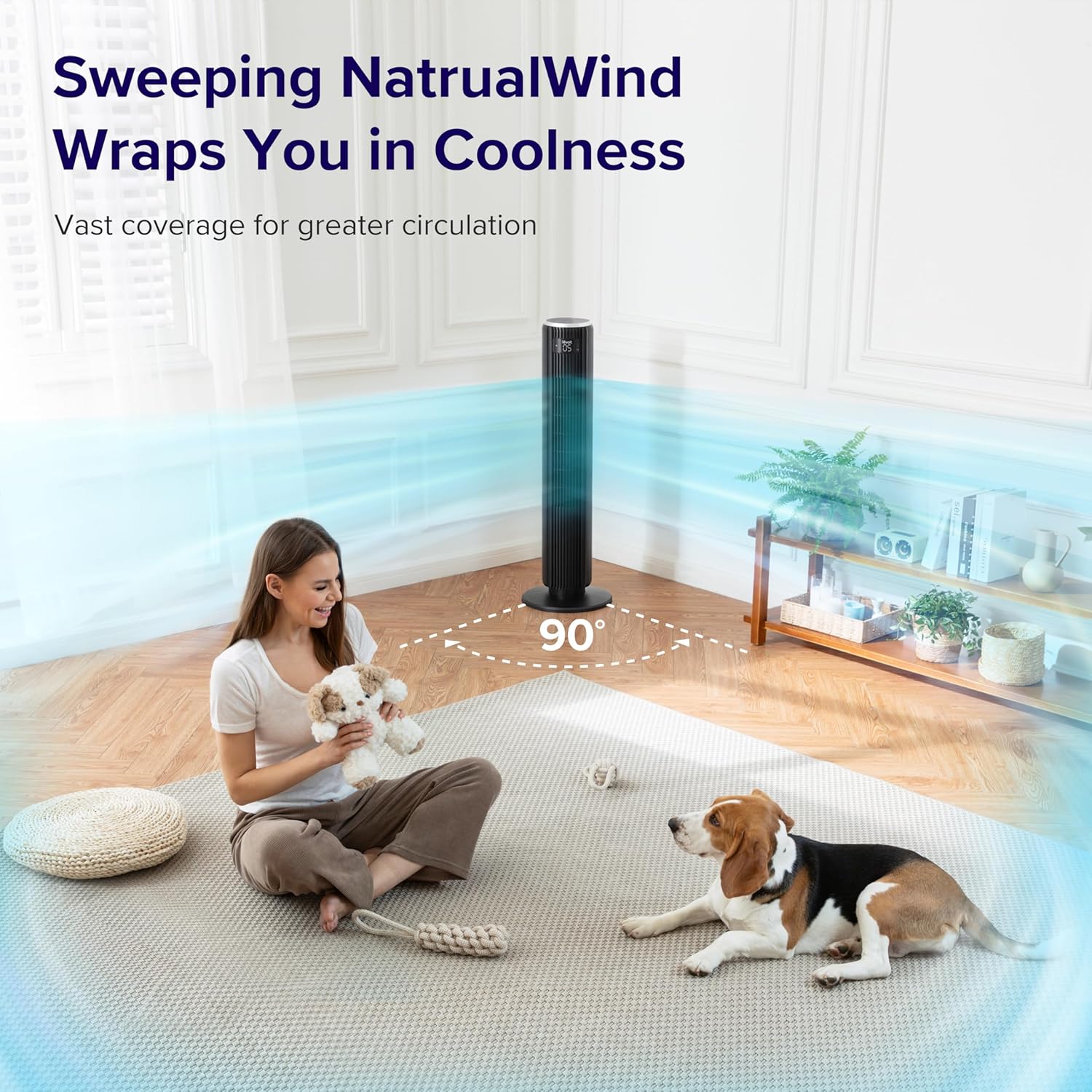
Image: The LEVOIT 36-inch Bladeless Tower Fan is shown oscillating 90 degrees, indicated by blue airflow lines covering a wide area in a living room setting. A person and a dog are comfortably within the fan's cooling range.

Image: The LEVOIT 36-inch Bladeless Tower Fan is positioned in a bedroom, emitting a gentle, natural-feeling breeze, illustrated by light blue airflow lines. A person is meditating peacefully in the background, emphasizing the fan's quiet operation and comfortable airflow.
Истифодабарии тозакунандаи ҳаво
The air purifier is controlled via the touch buttons on its top panel.
- Тугмаи барқ: Press to turn the air purifier on or off.
- Тугмаи суръати мухлиси: Cycle through 3 quiet fan speeds (Low, Medium, High).
- Aroma Feature: The aroma pad allows for the diffusion of essential oils. Add 2-3 drops of essential oil to the pad located at the bottom of the unit. The fan will then circulate the scent.

Image: The LEVOIT Core Mini-P Air Purifier is shown on a nightstand in a bedroom, with a mother and child in the background. Text overlays emphasize "Multi-Layered Protection" including Pre-Filter, Efficient Filter, and Activated Carbon Filter, illustrating its air purification capabilities.

Image: The LEVOIT Core Mini-P Air Purifier is placed on a table in a living room. A hand is shown adding essential oil drops to the aroma pad, demonstrating the "Refresh With Fragrance" feature for destressing and staying focused.
Нигоҳдорӣ
Тоза кардани вентилятори манора
- Пеш аз тоза кардан ҳамеша вентиляторро аз барқ ҷудо кунед.
- нармро истифода баред, гamp матоъ барои пок кардани сатҳҳои берунии вентилятор.
- Тозакунанда ё ҳалкунандаҳои абразивиро истифода набаред.
- For dust accumulation in the air inlet/outlet, use a vacuum cleaner with a brush attachment to gently remove dust.
Cleaning and Filter Replacement for Air Purifier
- Unplug the air purifier before cleaning or replacing the filter.
- Дар беруни онро бо матои мулоим ва хушк пок кунед.
- The 3-in-1 filtration filter should be replaced every 6-8 months, or sooner depending on air quality and usage.
- Барои иваз кардани филтр:
- Turn the air purifier upside down and twist the base cover counter-clockwise to unlock.
- Филтри кӯҳнаро хориҷ кунед ва онро дуруст партояд.
- Insert a new LEVOIT Core Mini-P replacement filter (ensure plastic packaging is removed).
- Replace the base cover and twist clockwise to lock.
- Clean the aroma pad as needed with a damp cloth and allow it to dry completely before reapplying essential oils.
Мушкилкушо
| Мушкилот | Сабаби эҳтимолӣ | Ҳалли |
|---|---|---|
| Fan/Purifier does not turn on. | васл карда нашудааст; васлаки барқ кор намекунад; тугмаи барқ пахш нашудааст. | Ensure unit is securely plugged in. Test outlet with another device. Press the power button firmly. |
| Weak airflow from fan. | Fan speed too low; air inlet/outlet blocked. | Increase fan speed. Check for obstructions and clean air inlets/outlets. |
| Air purifier not effectively cleaning air. | Filter is dirty or expired; plastic packaging not removed from filter. | Replace the filter. Ensure all plastic packaging is removed from the new filter before installation. |
| Фан ғавғо дорад. | Unit not on a level surface; internal obstruction. | Place the fan on a flat, stable surface. Check for any foreign objects inside the fan. |
| Правленияи дурдаст кор намекунад. | Batteries are dead or incorrectly inserted; remote too far from fan. | Replace batteries. Ensure correct polarity. Use remote within range and point towards the fan's receiver. |
Мушаххасоти
LEVOIT 36" Bladeless Tower Fan
- Модели: 5ddce951-f1e5-4fc2-b790-0e25bd06f240
- Манбаи нерӯ: Электри симдор
- Иқтидори ҷараёни ҳаво: 1062 фут мукааб дар як дақиқа (CFM)
- Суръати ҳаво: То 25 фут/с
- Ларзиш: 90°
- Сатҳи садо: То 28 дБ
- Модулҳо: Normal, Turbo, Sleep, Auto
- Суръатҳо: 5
- Вақтсанҷ: 1-12 соат
- Усули назорат: Панели сенсорӣ, дурдаст
- Хусусиятҳои махсус: Bladeless, Temperature Sensor
LEVOIT Core Mini-P Air Purifier
- Модели: Core Mini-P (part of bundle)
- Филтратсия: 3-in-1 (Pre-Filter, Efficient Filter, Activated Carbon Filter)
- Минтақаи фарогирӣ: То 129 фут²
- Сатҳи садо: 25-44дБ
- Суръатҳо: 3
- Хусусиятҳои махсус: Fragrance Sponge for Aromatherapy, Portable
Кафолат ва дастгирӣ
LEVOIT provides a limited warranty for this product. For detailed warranty information, including duration and coverage, please refer to the warranty card included in your product packaging or visit the official LEVOIT webсайт.
For technical support, troubleshooting assistance, or to inquire about replacement parts (such as air purifier filters), please contact LEVOIT Customer Support:
- Webсайт: www.levoit.com
- Почтаи электронӣ: support@levoit.com
- Телефон: (Refer to LEVOIT webсайт барои рақамҳои тамоси минтақавӣ)
Please have your model number (5ddce951-f1e5-4fc2-b790-0e25bd06f240) and purchase information ready when contacting support.
Ask a question about this manual
Ask about setup, troubleshooting, compatibility, parts, safety, or missing instructions. Manuals+ will review the question and use this page’s manual context to help answer it.