
JENABOM B0D49FP524
JENABOM 3.7V Electric Precision Screwdriver Set User Manual
Model: B0D49FP524
1. Муқаддима
Thank you for choosing the JENABOM 3.7V Electric Precision Screwdriver Set. This manual provides detailed instructions for the safe and efficient operation, maintenance, and troubleshooting of your new tool. Please read this manual thoroughly before first use and retain it for future reference.
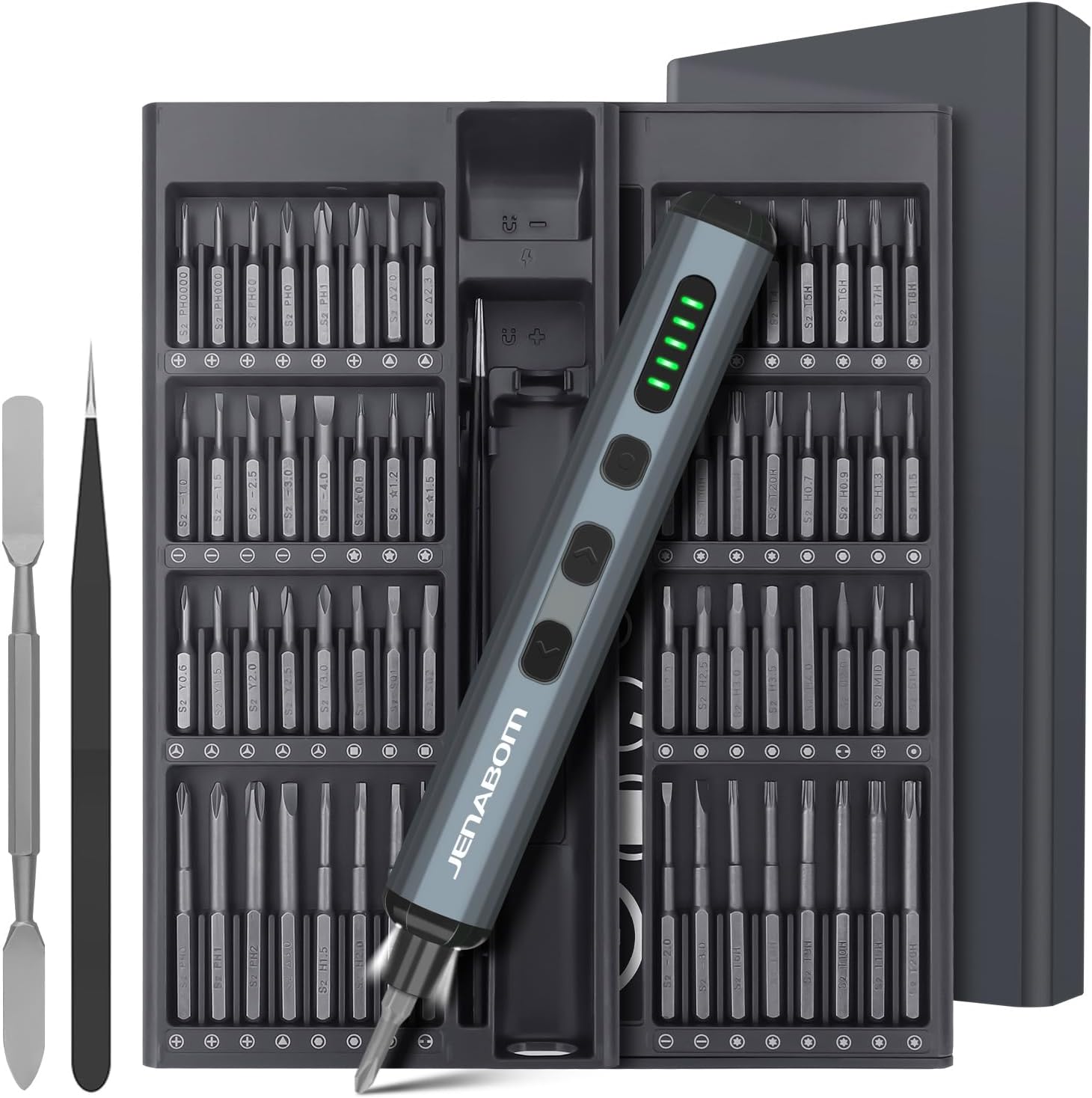
Image 1.1: The JENABOM 3.7V Electric Precision Screwdriver Set, including the screwdriver, magnetic bit case, spudger, and tweezers.
2. Мундариҷаи баста
Боварӣ ҳосил кунед, ки ҳамаи ҷузъҳои дар поён овардашуда дар бастаи шумо мавҷуданд:
- 1 x JENABOM 3.7V Electric Precision Screwdriver
- 64 x S2 Steel Magnetic Bits
- 1 x Magnetic Storage Case for screwdriver and bits
- 1 x Magnetizer/Demagnetizer
- 1 x Metal Spudger
- 1 х Пинцет
- 1 x сими пуркунандаи USB Type-C

Image 2.1: A visual representation of the 64 included S2 steel screwdriver bits.
3. Маҳсулот ба охир расидview
Familiarize yourself with the components of your electric screwdriver:

Image 3.1: Detailed diagram illustrating the main features and buttons of the electric screwdriver.
- Порти пуркунандаи Type-C: Барои пур кардани батареяи дохилӣ.
- Намоиши сатҳи батарея: LED indicators showing remaining battery charge.
- Калиди равшании LED: Activates the integrated LED work light.
- Left Rotation Button: Engages counter-clockwise rotation for unscrewing.
- Right Rotation Button: Engages clockwise rotation for screwing.
- Нури LED: Майдони корро равшан мекунад.
- Дорандаи бит магнитӣ: Securely holds screwdriver bits.

Image 3.2: The magnetic storage case featuring a pop-up mechanism for easy access to bits and the screwdriver.
4. Танзимот
4.1 Пуркунии ибтидоӣ
Before first use, fully charge the electric screwdriver. Connect the provided USB Type-C charging cable to the screwdriver's charging port and a compatible USB power source (e.g., computer, wall adapter). The battery level display LEDs will indicate charging status and full charge.
- A full charge typically allows for approximately 300 screws.
- The screwdriver can be charged while stored in its case via an external USB port on the case.
4.2 Насби битҳои отвертка
The screwdriver features a magnetic bit holder for quick and secure bit changes.
- Select the appropriate S2 steel bit from the magnetic storage case.
- Insert the bit firmly into the magnetic bit holder at the tip of the screwdriver. The magnetic connection will secure the bit in place.
- To remove, simply pull the bit straight out.
5. Дастурҳои истифодабарӣ
5.1 Powering On/Off and Rotation
The screwdriver operates by pressing the rotation buttons:
- -ро пахш кунед Right Rotation Button (clockwise) to drive screws in.
- -ро пахш кунед Left Rotation Button (counter-clockwise) to remove screws.
- Release the button to stop rotation.
5.2 Танзими момент
The electric screwdriver offers a precision torque range for delicate tasks and a manual mode for higher torque requirements.
- Electric Torque: Provides 0.1 Nm to 0.35 Nm of torque, suitable for electronics, watches, cameras, and other precision instruments. The screwdriver automatically adjusts within this range based on resistance.
- Manual Torque: For screws requiring more force, the screwdriver can be used manually, providing up to 3 Nm of torque. Simply continue turning the screwdriver by hand after the electric motor stops or for initial loosening/final tightening.

Тасвири 5.1: Мисamples of the screwdriver in use, demonstrating its adjustable torque for different applications.
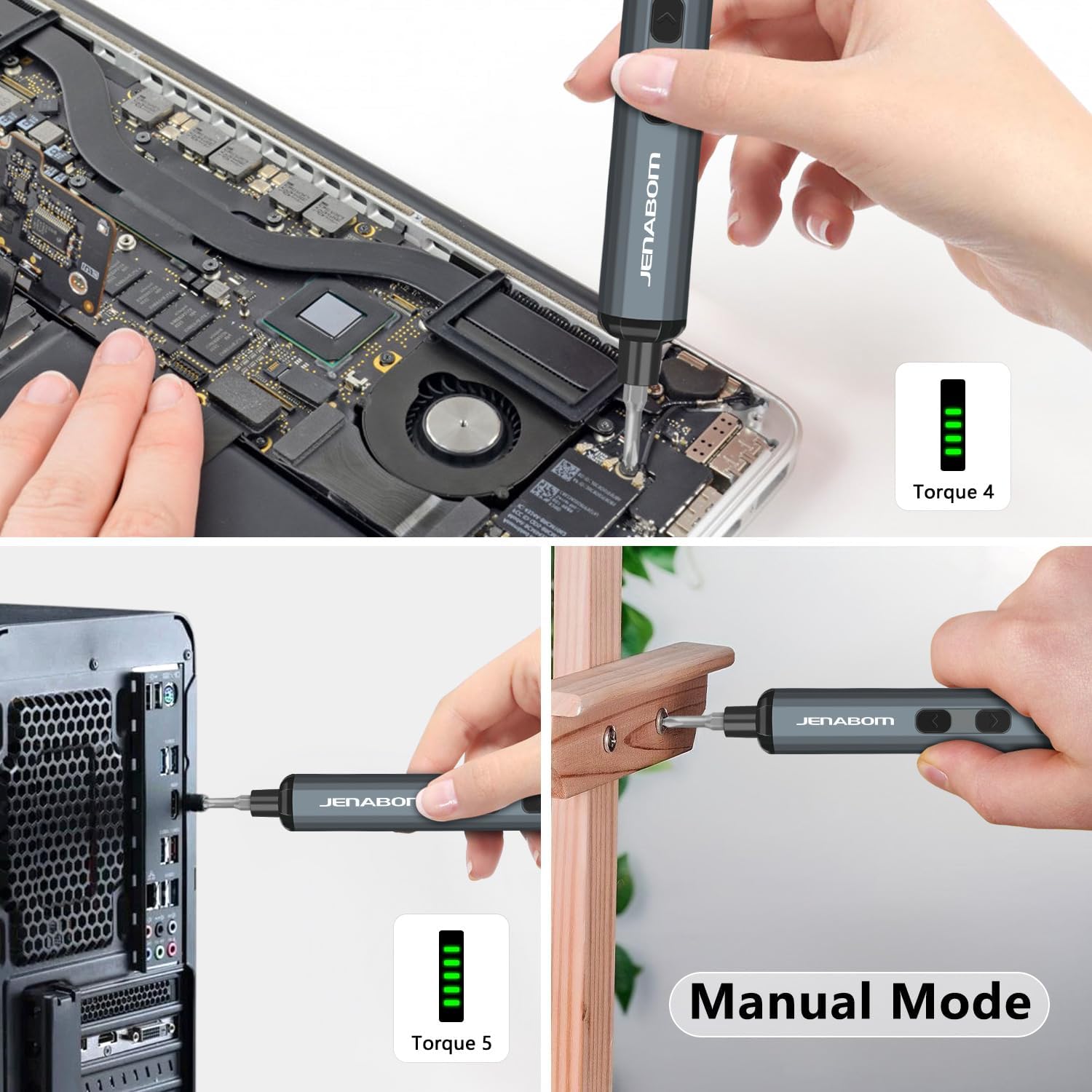
Image 5.2: The screwdriver being used for computer assembly and demonstrating its manual mode capability.
5.3 Равшании LED
The integrated LED light illuminates the work area, making it easier to see screw holes and small components, especially in low-light conditions.
- -ро пахш кунед Калиди равшанидиҳандаи LED барои фурӯзон ё хомӯш кардани чароғ.
6. Нигоҳдорӣ
6.1 Тозакунӣ
- Wipe the screwdriver and bits with a clean, dry cloth after each use to remove dust and debris.
- Аз кимиёвии сахт ё тозакунандагони абразив истифода набаред.
- Ensure the charging port is free of dust and moisture.
6.2 Нигоҳдорӣ
- Store the screwdriver and all accessories in the provided magnetic storage case when not in use. This protects the components and keeps them organized.
- Дар ҷои хунук ва хушк, дур аз нури бевоситаи офтоб ва ҳарорати аз ҳад зиёд нигоҳ доред.
- Аз дастрасии кӯдакон дур нигоҳ доред.
6.3 Нигоҳубини батарея
- Барои дароз кардани мӯҳлати хизмати батарея, пеш аз пур кардани он, аз холӣ кардани пурраи он худдорӣ кунед.
- If storing for extended periods, charge the battery to approximately 50% every 3-6 months.
7. Баррасии мушкилот
| Мушкилот | Сабаби эҳтимолӣ | Ҳалли |
|---|---|---|
| Screwdriver does not turn on/rotate. | Батареяи кам. | Charge the screwdriver fully using the provided Type-C cable. |
| Бургиранда барқ намерасад ё ҳангоми истифода бозистод. | Батареяи кам. | Батареяро пур кунед. |
| Bit slips or does not engage screw. | Incorrect bit size/type. Worn bit. | Ensure the correct bit is selected for the screw head. Replace worn bits. |
| Screwdriver cannot loosen/tighten a screw. | Screw is too tight for electric torque. | Use the manual mode for additional torque (up to 3 Nm). Apply steady pressure. |
| Чароғи LED фурӯзон намешавад. | LED light switch off. Low battery. | Press the LED light switch. Charge the screwdriver. |
8. Мушаххасоти
- Бренд: ЙЕНАБОМ
- Модели: B0D49FP524
- Манбаи нерӯ: Электри симдор (барои барқгиранда)
- Батарея: 350mAh Lithium Ion (дохил)
- Electric Torque: 0.1 Нм - 0.35 Нм
- Manual Torque: То 3 Нм
- Bits Included: 64 Лаҷомҳои пӯлоди S2
- Порти пуркунандаи барқ: USB Type-C
- Вижагиҳо: LED Lighting, Magnetic Bit Holder, Magnetic Storage Case, Battery Level Display
- Вазни ашё: Тақрибан 1.19 фунт (бастаи умумӣ)
- Андозаҳои баста: Тақрибан 9.21 x 3.9 x 1.1 дюйм
9. Маълумот оид ба бехатарӣ
- Always wear appropriate eye protection when using power tools.
- Майдони кори худро тоза ва равшан нигоҳ доред. Ҷойҳои бесарусомон ё торик ба садамаҳо даъват мекунанд.
- Асбобҳои барқиро дар муҳити тарканда, масалан, дар ҳузури моеъҳои оташгиранда, газҳо ё чанг истифода набаред.
- Ҳангоми идора кардани асбоби барқӣ кӯдакон ва шахсони дар назди онҳо бударо дур нигоҳ доред. Парешонҳо метавонад боиси аз даст додани назорат гардад.
- Аз оғози тасодуфӣ худдорӣ намоед. Пеш аз пайваст шудан ба бастаи батарея, бардоштан ё бурдани асбоб, боварӣ ҳосил кунед, ки гузаргоҳ дар ҳолати хомӯш аст.
- Аз ҳад зиёд наравед. Ҳамеша пои дуруст ва мувозинатро нигоҳ доред.
- Use the correct tool for your application. Do not force small tools or attachments to do the job of a heavy-duty power tool.
- Пеш аз ворид кардани ягон танзимот, иваз кардани лавозимот ё нигоҳ доштани асбобҳои барқӣ бастаи батареяро аз асбоб ҷудо кунед.
- Асбобхои электрикии бекорхобидаро дар чойхои дастраси бачахо нигох доред ва ба шахсоне нагузоред, ки бо асбоби электрики ё ин дастур шинос нестанд.
- Нигоҳ доштани асбобҳои барқӣ. Муносибати нодуруст ё бастабандии қисмҳои ҳаракаткунанда, шикастани қисмҳо ва ҳама гуна ҳолати дигареро, ки метавонад ба кори асбоби барқӣ таъсир расонад, тафтиш кунед. Агар вайрон шуда бошад, пеш аз истифода асбоби электрикиро таъмир кунед.
- Асбоби электрики, лавозимот ва битхои асбобхо ва гайраро мувофики ин дастурхо бо назардошти шароити кор ва кори ичрошаванда истифода баред.
10. Кафолат ва дастгирӣ
For warranty information or technical support, please refer to the product packaging or contact JENABOM customer service directly through the retailer where the product was purchased. Please have your model number (B0D49FP524) and purchase date available when contacting support.
You can also visit the official JENABOM store on Amazon for more information: JENABOM Store
Ask a question about this manual
Ask about setup, troubleshooting, compatibility, parts, safety, or missing instructions. Manuals+ will review the question and use this page’s manual context to help answer it.