
Маҳсулот ба охир расидview
The SOLITY GT10K Smart Digital Door Lock offers advanced security and convenience for your home. This keyless entry system integrates seamlessly with smart home ecosystems, providing multiple access methods and robust durability.
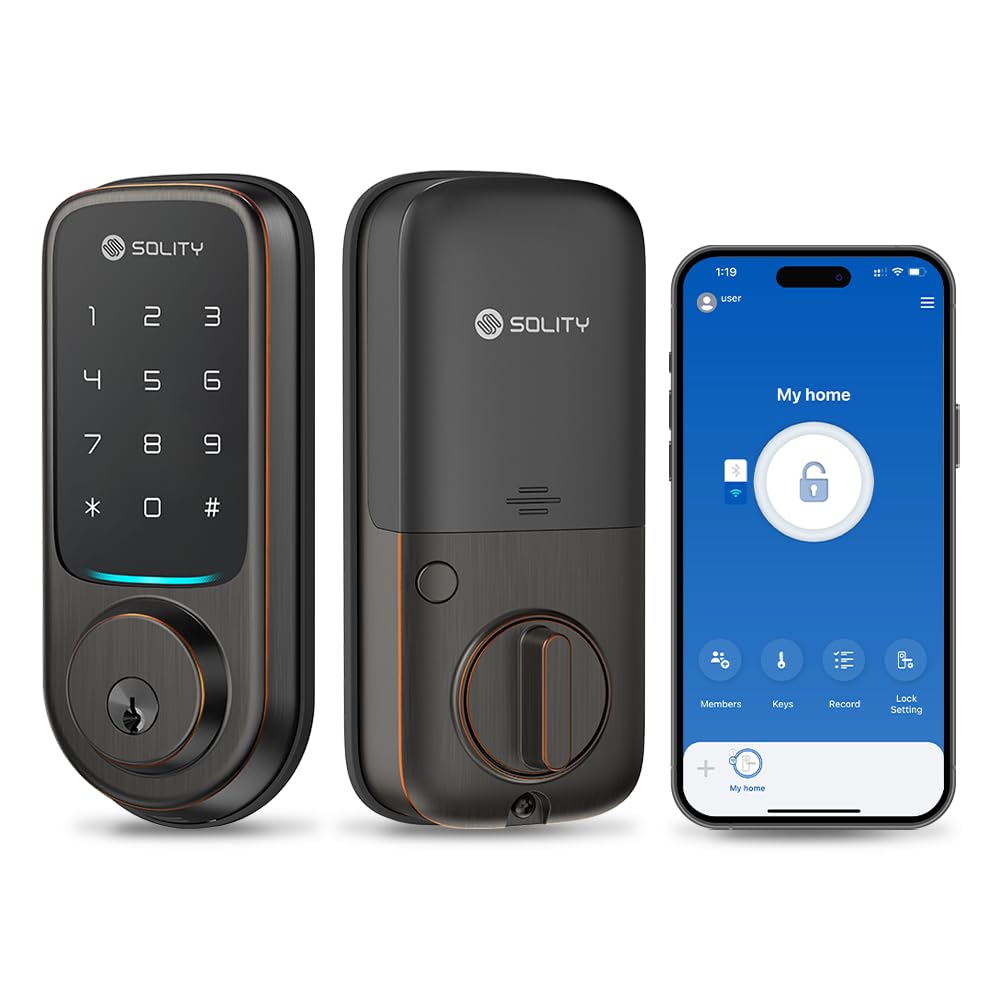
Image: Solity GT10K Smart Digital Door Lock in Oil Rubbed Bronze.

Тасвир: тамомview of Solity GT10K features including Wi-Fi, Bluetooth, touchscreen PIN, ANSI Grade 2, IP54, and 2 backup keys.
Дастури насб
The GT10K is designed for simple installation on standard American doors, accommodating both left and right-hand orientations with basic tools. Ensure your door meets the compatibility requirements before beginning installation.
Video: This video provides a step-by-step guide for installing the Solity GT10K Smart Digital Door Lock, including preparing the door, installing the deadbolt, exterior and interior bodies, and the door sensor.

Image: Diagram illustrating door compatibility and dimensions for the Solity GT10K Smart Lock.
Насби барнома ва пайвастшавӣ
To utilize the smart features of your GT10K lock, download and set up the Smart Solity app.
Image: Instructions for downloading the Smart Solity app, signing up, and adding the lock to the application. Download the app from the Дӯкони барномаҳо ё Google Play.
Video: This video provides instructions on how to download the Solity app and connect it to your smart door lock for remote control and management.
Дастурҳои амалиётӣ
Усулҳои дастрасӣ
The GT10K offers multiple convenient ways to access your home:
- PIN Codes: Utilize the responsive touchscreen keypad for quick entry.
- Назорати барнома: Use the dedicated Solity app for remote access, temporary password generation, and key sharing.
- Traditional Keys: Two backup mechanical keys are provided for manual control.

Image: Visual representation of various access methods for the Solity GT10K, including app control, PIN code, and traditional key.
Интегратсияи Smart Home
Control your door lock via voice commands through Amazon Alexa integration, without the need for an additional hub.

Image: The Solity GT10K Smart Lock is compatible with Amazon Alexa and SmartThings for voice control.
Auto-Lock Features
An advanced magnetic sensor detects if the door is properly closed. Auto-lock functionality engages automatically after an adjustable delay of 5-180 seconds, ensuring your door is always secure.

Image: Diagram explaining the auto-lock features of the Solity GT10K, including timed auto-lock and door sensor detection.
Multilingual Voice Assistance
Navigate lock settings with voice-guided support in multiple languages, including English, Spanish, and French.

Image: The Solity GT10K provides multilingual voice assistance in English, Spanish, and French for user guidance.
Remote App Management
The dedicated app allows for comprehensive management of your lock:
- Real-Time Activity Alerts: Keep track of your door lock status with a detailed event log. Monitor entry times and methods, and receive notifications for activities and low battery.
- Scheduled Access Codes: Generate and manage time-sensitive access codes for guests, housekeepers, or contractors.
- Идоракунии корбар: Grant or revoke permissions instantly, maintaining control over your household's security.

Image: Screenshots of the Solity app demonstrating access method management, log records, and user management features.
Video: This video demonstrates how to program various settings on the Solity GT10K Smart Digital Door Lock, including changing administrator PIN codes, adding user PIN codes, one-time PIN codes, and fingerprints.
Видео: Ин видео баррасиро пешкаш мекунадview of the Solity No-Hub Smart Digital Door Lock's Wi-Fi remote control capabilities and smart features.
Нигоҳдорӣ
Муқовимат ва муқовимат ба обу ҳаво
The GT10K boasts an IP54 certification for dust and water resistance, ensuring reliable operation in various environments. It has undergone rigorous testing for salt spray, impact, and temperature extremes.

Image: Details on the lasting durability of the Solity GT10K, including ANSI Grade 2 certification, IP54 weatherproofing, 200-hour salt spray test, and temperature resistance.
Идоракунии батарея
The lock operates on 4 AA batteries, offering up to 8 months of secure access. The app provides an in-app battery indicator and low battery alerts.

Image: Information on the extended battery life of the Solity GT10K, showing in-app battery indicator and low battery alerts.
Мушаххасоти маҳсулот
| Хусусият | Тафсилот |
|---|---|
| Бренд | SOLITY |
| Рақами модел | GT10 |
| Навъи қулф | Клавиатура |
| Материал | руҳ |
| Андозаҳо L x W x H | 2.75 x 6.52 x 1.25 инч |
| Вазни ашё | 2.11 килограмм |
| Хусусиятҳои махсус | Alarm, Anti-Peeping Password, Auto-Lock, Back-Lit Keypad, Battery Indicator |
| Навъи назораткунанда | Amazon Alexa |
| Усули назорат | Барнома, дурдаст, ламс |
| Протоколи пайвастшавӣ | Вай-фай |
| Ранги | Бронзи равғани молидашуда |
| Навъҳои анҷомёбӣ | Равған рехта мешавад |
| Рейтинги IP | IP54 |
| Дараҷаи ANSI | Синфи 2 |

Image: Detailed dimensions of the Solity GT10K Smart Lock and compatibility requirements for door thickness and hole diameter.
Дастгирӣ
For any inquiries or assistance, please contact our U.S. based support team.

Image: U.S. Based Phone Support for Solity Smart Locks, available Monday - Saturday 9 am - 6 pm EST.
Телефон: (631) 634-6768
Почтаи электронӣ: support@solitysmartlocks.zendesk.com
Webсайт: smartlocksolity.com