
1. Муқаддима
This manual provides detailed instructions for the installation, operation, and maintenance of your Podofo 7-inch Android Car Stereo. This unit is designed to enhance your driving experience with features such as wireless CarPlay, Android Auto, Bluetooth, GPS navigation, FM/RDS radio, and a license plate backup camera. Please read this manual thoroughly before installation and use to ensure proper functionality and safety.
2. Маҳсулот ба охир расидview ва Хусусиятҳо
The Podofo 7-inch Android Car Stereo is an advanced in-dash navigation system with a 1080P touchscreen display. It operates on an Android system with 2GB RAM and 64GB ROM, ensuring smooth performance. Key features include:
- 7-inch 1080P HD Capacitive Touch Screen: Provides clear visuals and responsive interaction.
- Wireless/Wired CarPlay & Android Auto: Seamless integration with your smartphone for navigation, music, calls, and messages.
- Пайвасти Bluetooth: Supports music streaming, hands-free calling, and phonebook access.
- WiFi дарунсохташуда: Allows for app downloads and internet access via hotspot.
- Навигатсияи GPS: Integrated GPS for worldwide map support.
- Радиои FM/RDS: Enjoy your favorite radio stations with clear reception.
- License Plate Backup Camera: Provides a clear, wide-angle, waterproof, and night vision rearview for safe reversing.
- Split-Screen Functionality: Дар экран ҳамзамон ду барномаро истифода баред.
- Дастгирии назорати руль: Integrate with your vehicle's existing steering wheel controls.
- Full RCA Output: Supports video output to external monitors, such as headrest displays.

Тасвир: тамомview of the Podofo car stereo's main features, including CarPlay, Android Auto, voice control, GPS, 2GB RAM + 64GB ROM, 7-inch IPS screen, and AHD 1080P backup camera.
3. Мутобиқат
This Podofo car stereo is designed to fit various Ford models. Please verify your vehicle's compatibility before installation.
- Ford F150: 2004-2008
- Ford F250/F350: 2006-2014
- Ford E250/E350: 2009-2014
- Ford Edge: 2007-2010
- Ford Taurus/Sable: 2008-2009
- Ford Fusion/Milan: 2006-2009
- Ford Focus/Montego/Freestyle: 2005-2007
- Ford Explorer (U251): 2006-2010
- Ford Escape: 2008-2012
- Ford Expedition: 2007-2014
- Ford MKX: 2007-2009
- Ford Mark LT: 2006-2008
- Ford Mustang: 2005-2009

Image: Visual representation of the car stereo installed in a Ford dashboard, with a list of compatible Ford models and years.

Тасвир: Мисamples of Ford dashboards showing where the stereo can be installed (green checkmark) and where it cannot (red X).
4. Мундариҷаи баста
Ҳангоми кушодани баста, боварӣ ҳосил кунед, ки ҳамаи ҷузъҳои зерин мавҷуданд:
- Podofo Car Stereo Unit
- Кабели барқ
- Кабели RCA
- Васлкунаки Canbus бо 3.8 Pin
- Сими USB
- Кабели вуруди пушти камера
- Радиои Антенна
- Антеннаи GPS
- Декодери Canbus
- Микрофони беруна
- Камераи эҳтиётии лавҳаи иҷозатнома
- Дастури корбар
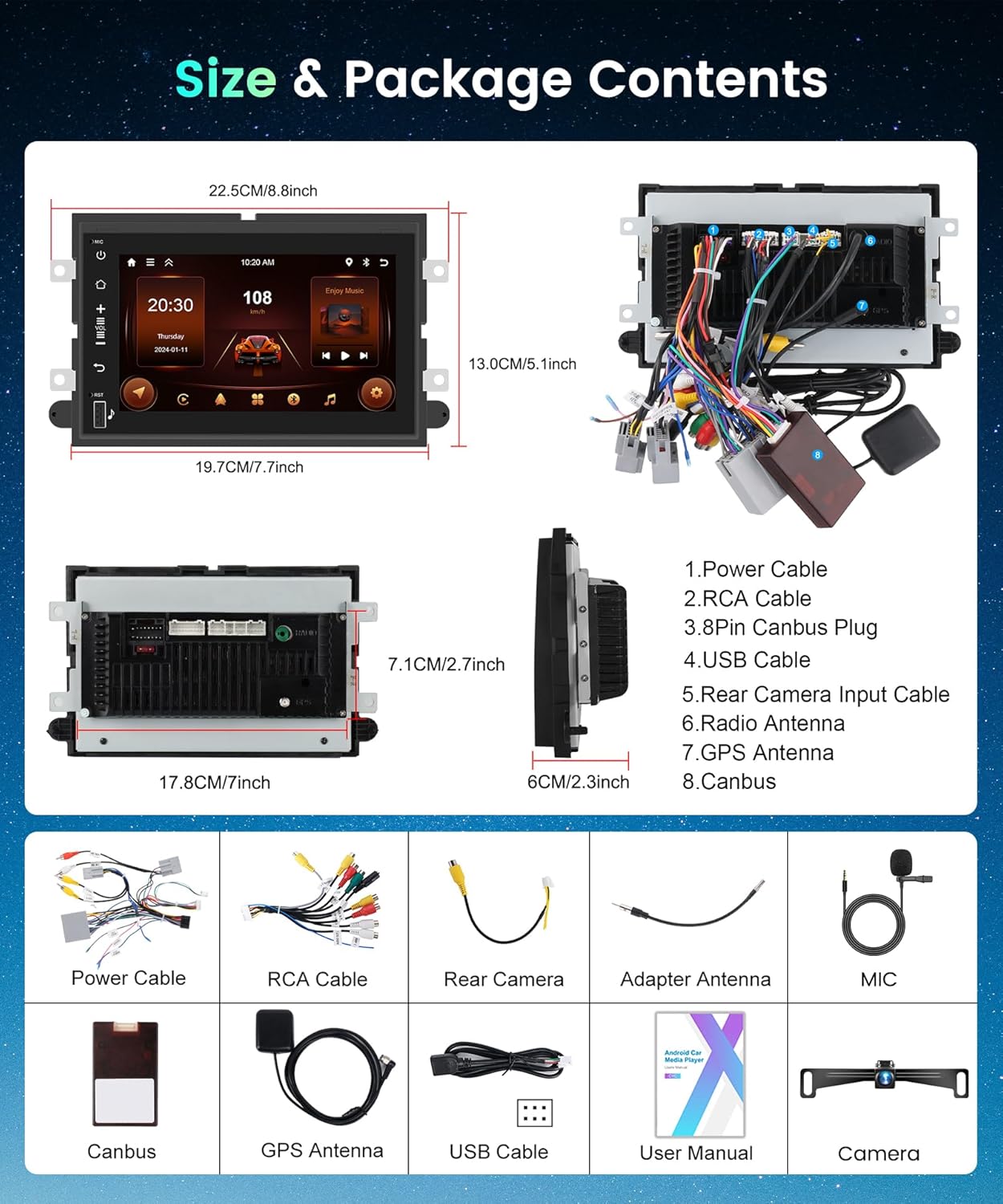
Image: A visual representation of the car stereo unit with its dimensions and all included accessories, such as power cables, RCA cables, USB cables, GPS antenna, external microphone, and backup camera.
5. Танзим ва насб
Насби касбӣ тавсия дода мешавад. Пеш аз оғози насб, боварӣ ҳосил кунед, ки батареяи мошин ҷудо карда шудааст.
5.1 Диаграммаи пайвастшавӣ
Refer to the detailed wiring diagram for correct connections. Improper wiring can damage the unit or vehicle.

Image: Detailed wiring diagrams showing connections for power, RCA outputs, camera input, and other auxiliary inputs/outputs.
5.2 Backup Camera Wiring
Connect the license plate backup camera according to the diagram. The camera automatically activates when the vehicle is shifted into reverse gear.
- Connect the camera's power wire to the vehicle's reverse light power source.
- Connect the camera's video output cable to the 'Rear Camera Input' on the stereo unit.
- Ensure the reverse trigger wire (usually labeled 'BACK' or 'REVERSE') from the stereo's wiring harness is connected to the vehicle's reverse light signal.

Image: Diagram illustrating the connection of the backup camera to the car stereo and the vehicle's reverse lights.
6. Дастурҳои истифодабарӣ
6.1 Wireless/Wired CarPlay & Android Auto
Connect your iPhone or Android smartphone to the car stereo for seamless integration. You can use either a wireless connection (Bluetooth/Wi-Fi) or a wired USB connection.
- Пайвасти бесим: Enable Bluetooth and Wi-Fi on your phone. Pair your phone with the car stereo via Bluetooth. Once paired, the system will prompt you to enable CarPlay or Android Auto wirelessly.
- Пайвасти симӣ: Connect your phone to the stereo's USB port using a certified USB cable. The system will automatically detect and launch CarPlay or Android Auto.
Once connected, you can access navigation apps, music streaming services, make calls, send messages, and use voice assistants (Siri/Google Assistant) directly from the stereo's touchscreen.

Image: Demonstrates wireless and wired connectivity options for CarPlay and Android Auto, showing various app interfaces on the car stereo screen.
6.2 Функсияи Bluetooth
The built-in Bluetooth allows for hands-free communication and audio streaming.
- Ба танзимоти Bluetooth дар стереои мошин равед.
- Дар дастгоҳи мобилии худ Bluetooth-ро фаъол созед ва дастгоҳҳои дастрасро ҷустуҷӯ кунед.
- Select the car stereo (e.g., "Podofo Car Stereo") from the list on your phone and pair.
- Once connected, you can make/receive calls, access your phonebook, and stream audio.

Image: Displays the Bluetooth interface for phone calls and music playback, alongside the FM radio tuning interface.
Радиои 6.3 FM/RDS
Access the FM radio application to tune into your favorite stations.
- Tap the 'Radio' icon on the home screen.
- Барои скан кардани истгоҳҳо, дастӣ ҷӯр кардан ё интихоб кардани истгоҳҳои пешакӣ танзимшуда аз идоракунии экран истифода баред.
- RDS (Radio Data System) provides additional information like station name and song title where available.
6.4 Навигатсияи GPS
The stereo comes with built-in GPS. You can use pre-installed navigation apps or download others via Wi-Fi.
- Боварӣ ҳосил кунед, ки мавҷгири GPS дуруст насб карда шудааст ва равшанӣ дорад view аз осмон.
- Open your preferred navigation application from the home screen.
- Enter your destination and follow the on-screen and voice-guided directions.

Image: An icon representing GPS navigation functionality.
6.5 Split Screen and Mirror Link
Enhance multitasking and content sharing with these features.
- Экрани тақсимшуда: Allows you to run two applications side-by-side (e.g., navigation and music player). Swipe from the side or use the multi-tasking button to activate.
- Пайванди оина: Displays your smartphone's screen directly onto the car stereo. This is useful for apps not natively supported by CarPlay or Android Auto.

Image: Shows the car stereo display utilizing split-screen mode with two applications running simultaneously, and a smartphone screen mirrored onto the stereo.
6.6 Идоракунии чархи руль (SWC)
Configure your steering wheel buttons to control the stereo functions.
- Access the 'Steering Wheel Control' settings in the stereo's menu.
- Follow the on-screen instructions to program each button (e.g., volume up/down, track skip, mode).
- Ensure the SWC wires are correctly connected during installation.
Image: An icon representing steering wheel control functionality.
7. Фаъолияти камераи эҳтиётӣ
The included license plate backup camera provides a clear view of the area behind your vehicle, enhancing safety during reversing maneuvers.
- When the vehicle is shifted into reverse gear, the car stereo automatically switches to the backup camera display.
- The display will show a real-time video feed from the camera, often with superimposed guidelines to assist with parking.
- The camera features night vision for visibility in low-light conditions and is waterproof and dustproof for durability.
Тасвир: Муфассал view of the AHD reversing camera and its features, including HD image, night vision, wide angle, and waterproof design.
8. Мушаххасоти
| Хусусият | Мушаххасоти |
|---|---|
| Бренд | podofo |
| Андозаи экран | 7 инч |
| Резолюция | 1024 х 600 |
| Низоми амал | Android |
| Хотира (RAM) | 2 ГБ |
| Захира (ROM) | 64 ГБ |
| Технологияи пайвастшавӣ | Bluetooth, USB, Wi-Fi |
| Хусусиятҳои махсус | Android Auto, Bluetooth, Carplay, GPS, Touchscreen |
| Компонентҳои дохилшуда | Backup Camera, External Mic, Carplay Car Stereo for Ford |
| Дастгирии системаи навигатсионии моҳвораӣ | Низоми муайянкунии ҷаҳонии ҷои ист |
| Вуруди интерфейси инсон | Шишаи ламсӣ |
| Навъи намоиш | LCD |
| Навъи васлкунӣ | Монтажи панел |
9. Баррасии мушкилот
If you encounter issues with your Podofo car stereo, refer to the following common problems and solutions:
- Не қудрат: Check all power connections, fuses, and ensure the vehicle's ignition is on.
- Овоз нест: Verify speaker connections, volume settings, and audio source selection. Check if the mute function is active.
- Масъалаҳои пайвасти Bluetooth: Ensure Bluetooth is enabled on both the stereo and your phone. Delete previous pairings and try reconnecting. Ensure your phone is within range.
- CarPlay/Android Auto пайваст нест: Try a different USB cable (if wired). Ensure your phone's operating system is up to date. Restart both the stereo and your phone. Check app permissions on your phone.
- Сигнали GPS гум шуд: Ensure the GPS antenna is securely connected and has an unobstructed view of the sky. Move the vehicle to an open area if in a covered or underground location.
- Камераи эҳтиётӣ намоиш дода намешавад: Check the camera's power and video connections. Ensure the reverse trigger wire is correctly connected and receiving a signal when in reverse.
- Экрани сенсорӣ ҷавоб намедиҳад: Try restarting the unit. If the issue persists, a factory reset might be necessary (refer to settings menu).
Барои мушкилоти доимӣ, бо дастгирии мизоҷон тамос гиред.
10. Нигоҳдорӣ
Proper care and maintenance will extend the life of your car stereo.
- Тоза кардани экран: Барои хушхӯю пок кардани экрани сенсорӣ матои мулоим ва ифлосро истифода баред. Барои доғҳои якрав, каме гampматоъро бо об ё тозакунандаи барои экран бехатар. Аз маводи кимиёвии сахт ё маводи абразивӣ худдорӣ намоед.
- Навсозии нармафзор: Ба таври даврӣ навсозиҳои нармафзорро тавассути танзимоти система ё танзимоти истеҳсолкунанда тафтиш кунед webсайт барои таъмини кори беҳтарин ва дастрасӣ ба хусусиятҳои нав.
- Шароити экологӣ: Нагузоред, ки дастгоҳро ба ҳарорати аз ҳад зиёд, нурҳои бевоситаи офтоб барои муддати тӯлонӣ ё намии аз ҳад зиёд дучор кунед.
- Идоракунии кабелӣ: Ensure all cables are securely routed and not pinched or exposed to prevent damage.
11. Кафолат ва дастгирӣ
Your Podofo car stereo comes with a 2-year warranty on labor and parts, covering manufacturing defects from the date of purchase.
11.1 Дастгирии техникӣ
For technical assistance, troubleshooting, or warranty claims, please contact Podofo Tech customer support. Support is available 24/7.

Image: Information on how to find Podofo Tech support, typically through the seller's page or direct contact.
11.2 Нақшаҳои муҳофизатӣ
Extended protection plans may be available for purchase to cover your device beyond the standard warranty period. These plans typically offer additional coverage for accidental damage or extended service.
- Нақшаи 2-солаи муҳофизат
- Нақшаи 3-солаи муҳофизат
- Муҳофизати пурра (навсозии ҳармоҳа)