
1. Муқаддима
This manual provides essential instructions for the safe and effective operation of your Fujifilm S4500 and S4530 Compact Digital Camera. Please read this manual thoroughly before using the camera and keep it in a safe place for future reference. The Fujifilm S4500/S4530 is equipped with a 14MP CCD sensor, a 30x optical zoom Fujinon lens, and is capable of recording 720p HD movies.
2. Маҳсулот ба охир расидview
Familiarize yourself with the main components of your camera.
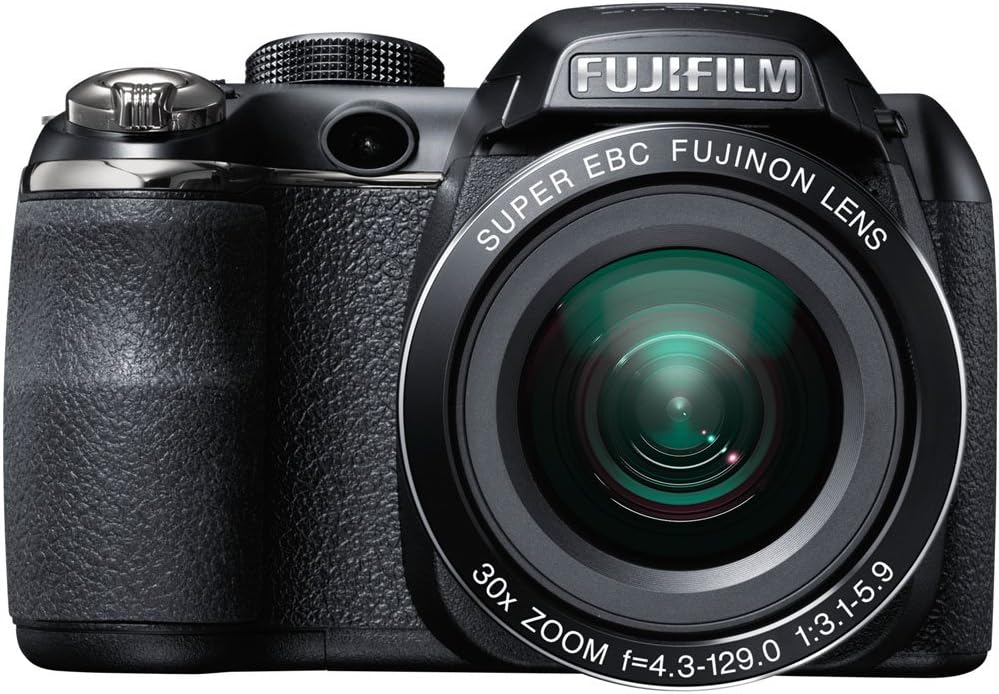
Расми 2.1: Пеш view of the Fujifilm S4500/S4530 camera with the built-in flash in the raised position, showcasing the Fujinon 30x optical zoom lens.

Расми 2.2: Пеш view of the Fujifilm S4500/S4530 camera with the built-in flash in the lowered position, highlighting the lens barrel and grip.

Расми 2.3: Тараф view of the Fujifilm S4500/S4530 camera, showing the ergonomic grip and control layout.
Компонентҳои асосӣ:
- Линза: Fujinon 30x Optical Zoom Lens (24-720mm equivalent).
- Флеш: Built-in pop-up flash.
- Намоиши LCD: 3-inch, 230,000-dot screen for viewing ва навигатсияи меню.
- Viewдарёфткунанда: Электрон Viewдарёфткунанда (EVF).
- Назари Далел: For selecting shooting modes.
- Тугмаи парда: Барои гирифтани аксҳо.
- Фишанги масштаб: Controls optical and digital zoom.
3. Танзимот
3.1. Ҷойгиркунии батареяҳо
- Сарпӯши қисмати батареяро, ки дар поёни камера ҷойгир аст, кушоед.
- Insert four (4) AA alkaline batteries, ensuring correct polarity (+/-) as indicated inside the compartment.
- Сарпӯши қисмати батареяро бехатар пӯшед.
3.2. Ворид кардани корти хотира
- Сарпӯши ковокии корти хотираро, ки одатан дар паҳлӯ ё поёни камера ҷойгир аст, кушоед.
- Корти хотираи SD, SDHC ё SDXC-ро бо нишонааш ба самти дуруст то он даме, ки клик дар ҷои худ ҷойгир кунад, ҷойгир кунед.
- Сарпӯши ковокии корти хотираро бехатар пӯшед.
3.3. Фаъолсозии ибтидоӣ ва танзими сана/вақт
- -ро пахш кунед ФУРУШ/ХОМУШ тугма барои фаъол кардани камера.
- The first time you power on, you will be prompted to set the date and time. Use the directional buttons to navigate and the Меню / Хуб тугма барои тасдиқ.
- Барои анҷом додани танзимоти ибтидоӣ дастурҳои дар экран бударо иҷро кунед.
4. Дастурҳои истифодабарӣ
4.1. Аксбардорӣ
- Камераро фаъол созед.
- Select a shooting mode using the mode dial (e.g., АВТО for automatic settings).
- Тасвири худро бо истифода аз монитори LCD ё электронӣ чаҳорчӯба кунед viewдарёфткунанда.
- Use the zoom lever to adjust the focal length.
- Барои тамаркуз тугмаи пардаро нисфи поён пахш кунед. Ҳангоми ба даст овардани фокус чаҳорчӯбаи фокус сабз мешавад.
- Барои гирифтани акс тугмаи пардаро пурра зер кунед.
4.2. Сабти видео
- Turn the mode dial to the movie recording setting (often indicated by a film camera icon).
- Мавзӯи худро чаҳорчӯба кунед.
- Барои оғози сабт тугмаи сабти филмро (агар мавҷуд бошад) ё тугмаи пардаро пахш кунед.
- Press the button again to stop recording. The camera records in 720p HD resolution.
4.3. Бозсозӣ
- -ро пахш кунед БОЗӢ тугмаи барои ворид шудан ба ҳолати бозӣ.
- Use the directional buttons to scroll through your photos and videos.
- пахш кунед Меню / Хуб ба view options for the selected image/video.
4.4. Усулҳои флешдор
The camera offers various flash modes, including Auto and Red Eye Reduction. To change the flash mode, press the flash button (often indicated by a lightning bolt icon) and use the directional buttons to select your desired mode from the on-screen menu.
5. Нигоҳдорӣ
5.1. Тоза кардани камера
- Линза: Барои нарм тоза кардани чанг аз матои мулоими бе лин ё хасу линза истифода баред. Барои доғҳо, маҳлули махсуси тозакунандаи линзаро истифода баред, на бевосита ба линза.
- Намоиши LCD: Wipe gently with a soft, dry cloth. Avoid pressing too hard.
- Ҳайати камера: Use a soft, dry cloth to wipe away dust and fingerprints. Do not use organic solvents or strong cleaning agents.
5.2. Нигоҳубини батарея
- Вақте ки камера барои муддати тӯлонӣ истифода намешавад, батареяҳоро хориҷ кунед, то аз хуруҷ пешгирӣ кунад.
- Батареяҳоро дар ҷои хунук ва хушк нигоҳ доред.
- Replace all four AA batteries at the same time with new ones for optimal performance.
5.3. Нигоҳдорӣ
When storing the camera, ensure it is turned off, and the lens cap is attached. Store in a dry, well-ventilated area away from direct sunlight, high temperatures, and humidity.
6. Баррасии мушкилот
| Мушкилот | Ҳалли |
|---|---|
| Камера фурӯзон намешавад. | Check if batteries are inserted correctly and are fully charged. Replace with new AA batteries if necessary. |
| Тасвирҳо норавшананд. | Ensure the lens is clean. Press the shutter button halfway to allow the camera to focus before taking the shot. Check if the camera is in a suitable shooting mode for the lighting conditions. |
| Флеш оташ намегирад. | Check the flash mode settings. Ensure the flash is raised if it is a pop-up type. The flash may not fire if the battery level is low. |
| Хатогии корти хотира. | Ensure the memory card is inserted correctly. Try formatting the card (this will erase all data). If the problem persists, try a different memory card. |
| Видео сабт карда намешавад. | Ensure the camera is in video recording mode. Check if there is sufficient space on the memory card. |
7. Мушаххасоти
| Хусусият | Тафсилот |
|---|---|
| Номи модел | Fujifilm S4500 / S4530 |
| Сенсори тасвир | 14 мегапикселӣ 1/2.3 дюймаи CCD |
| Линза | Fujinon 30x Optical Zoom (24-720mm equivalent) |
| Миқёси рақамӣ | То 6.7x |
| Устуворсозии тасвир | Устувории тасвири рақамӣ |
| Намоиши LCD | 3.0 дюйм, 230,000 нуқта |
| Сабти видео | 720p HD (MP4 format) |
| Воситаҳои нигаҳдорӣ | SD / SDHC / SDXC memory cards |
| Ҳассосияти ISO | Auto, 100, 200, 400, 800, 1600, 3200, 6400 (expanded to 51200) |
| Суръати парда | 8 сония то 1/2000 сония |
| Таъмини нерӯ | 4x батареяҳои AA сілтӣ |
| Пайвастшавӣ | HDMI, USB |
| Андозаҳо (тақрибан) | 1.2 фунт (вазни ашё) |
8. Кафолат ва дастгирӣ
This Fujifilm S4500/S4530 camera typically comes with a 90-day limited warranty. Please refer to your purchase documentation for specific warranty terms and conditions. For technical support or service inquiries, please contact Fujifilm customer service or the retailer from whom the product was purchased.