Муқаддима
This instruction manual provides essential information for the installation and proper use of the Generic Sensor Board, model GR30070022. This component is designed as a replacement spare part for specific Delonghi Dehumidifier models. Please read this manual thoroughly before attempting any installation or repair to ensure safe and correct operation.
This part is supplied from the factory as a spare part. Commercial packaging or a retail box is not included with the purchase. You will receive the part exactly as depicted in the product images.
Маълумот оид ба бехатарӣ
Огоҳӣ: Хатари зарбаи барқ
- Always disconnect the dehumidifier from the power supply before attempting any installation, repair, or maintenance. Failure to do so can result in serious injury or death.
- Installation should only be performed by a qualified technician or an individual with extensive experience in appliance repair and electrical safety.
- Wear appropriate personal protective equipment (PPE), such as insulated gloves and safety glasses, during installation.
- Ensure all connections are secure and correctly wired according to the dehumidifier's service manual.
- Do not operate the dehumidifier if any wiring is exposed or damaged.
This sensor board contains sensitive electronic components. Handle with care to avoid damage from static electricity or physical impact.
Маҳсулот ба охир расидview
The GR30070022 Sensor Board is a critical electronic component responsible for monitoring various environmental conditions within your Delonghi dehumidifier, such as humidity levels and temperature. It processes this data and communicates with the main control board to regulate the dehumidifier's operation, ensuring efficient moisture removal.
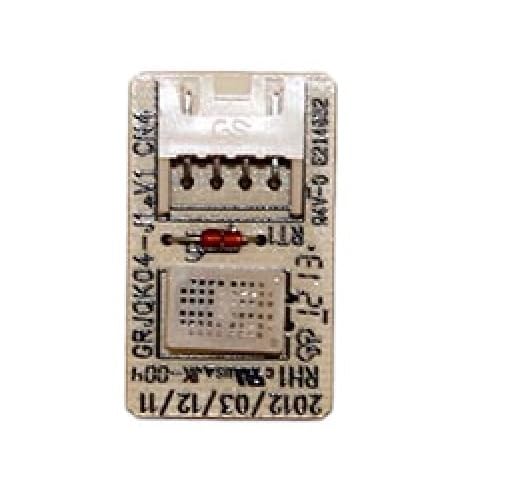
Image 1: The Generic Sensor Board GR30070022. This image displays the electronic circuit board with various components and connectors, illustrating its physical appearance as a replacement part.
Мутобиқати
This sensor board (GR30070022) is compatible with the following Delonghi Dehumidifier models:
- DDS20
- DDS25
- DDS30
- DDSE20
- DDSE25
- DDSE30
- DDSE40
- DDS 20 P
- DDS 25
- DDS 30 COMBI
- DDSE 20
- DDSE 25 COMBI
Please verify your dehumidifier's model number before purchasing and installing this part to ensure compatibility.
Насб ва насб
Professional installation is highly recommended for this component due to the electrical nature and complexity of dehumidifier disassembly.
- Тайёрӣ:
- Ensure the dehumidifier is unplugged from the wall outlet.
- Gather necessary tools, which may include screwdrivers (Phillips, flathead), pliers, and a multimeter for testing.
- Ҷои кори тоза ва равшанро тоза кунед.
- Accessing the Sensor Board:
- Carefully disassemble the dehumidifier casing to gain access to the internal components. Refer to your specific dehumidifier model's service manual for detailed disassembly instructions.
- Locate the existing sensor board. It is typically connected via wiring harnesses to the main control board and various sensors.
- Хориҷ кардани Шӯрои кӯҳна:
- Before disconnecting, take clear photos of all wiring connections to serve as a reference for reassembly.
- Carefully disconnect all wiring harnesses and connectors from the old sensor board. Note their positions.
- Unscrew or unclip the old sensor board from its mounting points.
- Насби тахтаи нав:
- Position the new GR30070022 Sensor Board in the same location as the old one.
- Secure it using the original screws or clips.
- Carefully reconnect all wiring harnesses and connectors to the new board, referring to your photos taken during disassembly. Ensure all connections are firm and correctly seated.
- Бозсозӣ ва озмоиш:
- Пеш аз пурра васл кардани casing, perform a preliminary test. Plug the dehumidifier into a power outlet.
- Turn on the dehumidifier and observe its initial operation. Check for any error codes or unusual behavior.
- If the dehumidifier appears to function correctly, unplug it again and fully reassemble the casing.
- Plug the dehumidifier back in and test its full functionality, including setting humidity levels and observing moisture removal.
If you encounter any difficulties or are unsure about any step, consult a professional appliance repair technician.
Operating the Dehumidifier (After Sensor Board Replacement)
Once the new sensor board is successfully installed, the dehumidifier should operate as intended. Refer to your original Delonghi Dehumidifier user manual for specific operating instructions, including:
- Powering on/off the unit.
- Setting desired humidity levels.
- Understanding display indicators and error codes.
- Emptying the water tank or connecting continuous drainage.
- Using special modes (e.g., Laundry mode, Fan mode).
The sensor board's function is internal and automatic; no direct user interaction with the board itself is required during normal operation.
Нигоҳдорӣ
The sensor board itself typically requires no direct maintenance. However, proper maintenance of the dehumidifier as a whole will help ensure the longevity and correct function of all its components, including the sensor board.
- Филтри ҳавои тоза: Regularly clean or replace the air filter according to your dehumidifier's manual. A clogged filter can restrict airflow, causing the unit to work harder and potentially affecting sensor readings.
- Зарфҳои оби тоза: Periodically clean the water collection tank to prevent mold and mildew growth, which can affect air quality and potentially internal components.
- Вентаҳоро тоза нигоҳ доред: Ensure that the air intake and exhaust vents of the dehumidifier are not blocked, allowing for proper air circulation.
- Ба таври дуруст нигоҳ доред: If storing the dehumidifier for an extended period, ensure it is clean and dry.
Мушкилкушо
If your dehumidifier exhibits issues after replacing the sensor board, consider the following troubleshooting steps:
| Мушкилот | Сабаби эҳтимолӣ | Ҳалли |
|---|---|---|
| Dehumidifier does not power on. | Loose power connection, incorrect wiring, faulty power outlet. | Check power cord, ensure all internal connections to the sensor board and main board are secure. Test the outlet. |
| Dehumidifier runs continuously or not at all. | Sensor board not correctly installed, faulty sensor connection, incorrect humidity setting. | Verify all sensor board connections. Ensure the desired humidity level is set appropriately. |
| Display shows error code related to humidity/temperature. | Sensor board or connected sensors are not functioning correctly, loose connection. | Refer to your dehumidifier's manual for specific error code meanings. Recheck all connections to the sensor board. |
| No water collection. | Low ambient humidity, faulty compressor, fan issue, or sensor board not accurately detecting humidity. | Ensure ambient humidity is above 40-50%. Check for other mechanical issues. Re-verify sensor board installation. |
If troubleshooting steps do not resolve the issue, it is recommended to contact a qualified appliance repair technician or the seller for further assistance.
Мушаххасоти
- Модели: GR30070022
- Навъи: Sensor Board (Replacement Part)
- Мутобиқат: Delonghi Dehumidifiers (DDS20, DDS25, DDS30, DDSE20, DDSE25, DDSE30, DDSE40, DDS 20 P, DDS 25, DDS 30 COMBI, DDSE 20, DDSE 25 COMBI)
- Истеҳсолкунанда: service_parts
- Вазни ашё: 1 фунт
- Андозаҳои баста: 1 x 1 x 1 инч
- Санаи аввалин дастрас: 3 сентябри соли 2024
Кафолат ва дастгирӣ
As a spare part, this sensor board's warranty may be covered under the terms provided by the seller at the time of purchase. Please refer to your purchase documentation or contact the seller directly for specific warranty information.
For technical support regarding the installation or function of this sensor board, it is recommended to contact the seller or a professional appliance repair service. Always provide your dehumidifier's model number and the sensor board's model number (GR30070022) when seeking assistance.