
1. Муқаддима
This manual provides detailed instructions for the installation, operation, and maintenance of your Stinger HEIGH10+ 10.1-inch Infotainment System. Designed specifically for Jeep Wrangler JL (2018-2023) and Gladiator JT (2020-2023) vehicles, this system enhances your driving experience with advanced features and seamless integration.
Please read this manual thoroughly before installation and use to ensure proper function and to maximize the benefits of your new infotainment system.
2. Маълумот оид ба бехатарӣ
Ҳангоми насб ва истифода чораҳои бехатарии зеринро риоя кунед:
- Насбкунии касбӣ тавсия дода мешавад: Due to the complexity of vehicle electrical systems, professional installation by a certified technician is highly recommended.
- Батареяро ҷудо кунед: Пеш аз оғози ҳама гуна корҳои барқӣ, ҳамеша терминали манфии батареяи мошинро ҷудо кунед, то аз занҷири кӯтоҳ ва вайроншавӣ пешгирӣ карда шавад.
- Ноқил: Ensure all wiring connections are secure and properly insulated to prevent electrical hazards. Do not modify the wiring harness.
- Бехатарии ронандагӣ: Do not operate system features that may distract you from driving. Always prioritize road safety.
- Шароити экологӣ: Нагузоред, ки дастгоҳро ба ҳарорати аз ҳад зиёд, нурҳои бевоситаи офтоб барои муддати тӯлонӣ ё намии аз ҳад зиёд дучор кунед.
3. Дар қуттӣ чӣ мавҷуд аст
Пеш аз оғози насбкунӣ тасдиқ кунед, ки ҳама ҷузъҳо мавҷуданд:
- 10.1-inch Touchscreen Display and Infotainment System
- Antenna Adapters for Satellite and AM/FM Radio
- Complete Plug-n-Play Installation Harness
- USB Retention Cables
- Дастури насб
- Jeep Wrangler JL and Gladiator JT Radio Dash Kit (SRK-JW18EH)
- High-Definition Factory Camera Retention Module
- RadioPro Interface for Jeep Wrangler JL and Gladiator JT (2018-2023)
- Link Adapter for Stinger Radio
- SiriusXM Adaptor (retains factory-installed SiriusXM antenna; Tuner sold separately: SXV300V1)
4. Насб ва насб
The Stinger HEIGH10+ system is designed for a plug-and-play installation in compatible Jeep Wrangler JL and Gladiator JT models, minimizing the need for additional modifications.
4.1. Насбкунӣ ба охир расидview
The system includes a vehicle-specific dash kit (SRK-JW18EH) and a RadioPro Interface to ensure seamless integration with your vehicle's existing electronics and controls. Follow the detailed instructions provided in the included Installation Guide for your specific vehicle model.

Figure 4.1: Stinger HEIGH10+ installed in a Jeep dashboard, illustrating the visual upgrade from the factory unit.
4.2. Display Mounting Flexibility
The HEIGH10+ display offers enhanced mounting flexibility compared to previous models. The redesigned bracket allows for greater adjustability, enabling you to select the optimal viewing angle for your vehicle's dashboard. The display can be mounted in either a single-DIN or double-DIN configuration, accommodating various dash layouts.
Video 4.2: A Stinger product manager demonstrates the mounting flexibility and features of the HEIGH10+ system, including its adjustable display bracket.
5. Хусусиятҳои асосӣ
5.1. 10.1" High-Resolution Touchscreen
The HEIGH10+ features a large 10.1-inch HD touchscreen with a resolution of 1280x800. The display is optically bonded and includes anti-glare, anti-reflection, and anti-fingerprint film protection for optimal visibility and durability.

Расми 5.1: Муфассал view of the 10.1" screen, showcasing its protective features and tactile controls.
5.2. бесими Apple CarPlay & Android Auto
Enjoy seamless smartphone integration with MFi-Certified Wireless Apple CarPlay and Android Auto. Access navigation, messages, music, and hands-free calling directly from the touchscreen without needing to plug in your device.

Figure 5.2: Apple CarPlay interface on the HEIGH10+ display.

Figure 5.3: Android Auto interface on the HEIGH10+ display.
5.3. On-Screen Vehicle Information & Off-Road Gauges
Access customizable vehicle-specific screens and apps, including off-road data such as transfer case status, current position (latitude/longitude), altitude, and steering angle. This feature provides critical information for off-road enthusiasts.

Figure 5.4: Off-Road Gauges display on the HEIGH10+ screen.
5.4. Хусусиятҳои аудиои пешрафта
The system includes a built-in HD Radio tuner for clear digital audio. Advanced audio features include 4.5 Vrms & 8-channel RCA outputs with subwoofer control, a 15-band adjustable EQ with 6 user presets, and built-in crossovers (HPF & LPF) for personalized sound tuning.

Figure 5.5: Advanced Audio Equalizer interface.
5.5. Multiple Camera Inputs
Integrate a comprehensive camera system with support for up to 4 AHD 720p or CVBS 480p camera inputs. This allows for front/rear dashcams, blind spot cameras, and a backup camera, enhancing safety and situational awareness.

Figure 5.6: Multi-camera input display.
5.6. Назорати нури RGB
The HEIGH10+ offers direct plug-in and on-screen control for Stinger ENLIGHT10 RGB dynamic LED lighting kits. Adjust colors and brightness directly from the infotainment display to customize your vehicle's ambiance.

Figure 5.7: RGB Lighting control interface.
5.7. Optional iGO Navigation
For reliable, offline mapping, the system supports optional iGO Navigation integration. An SD card for iGO Navigation is sold separately.
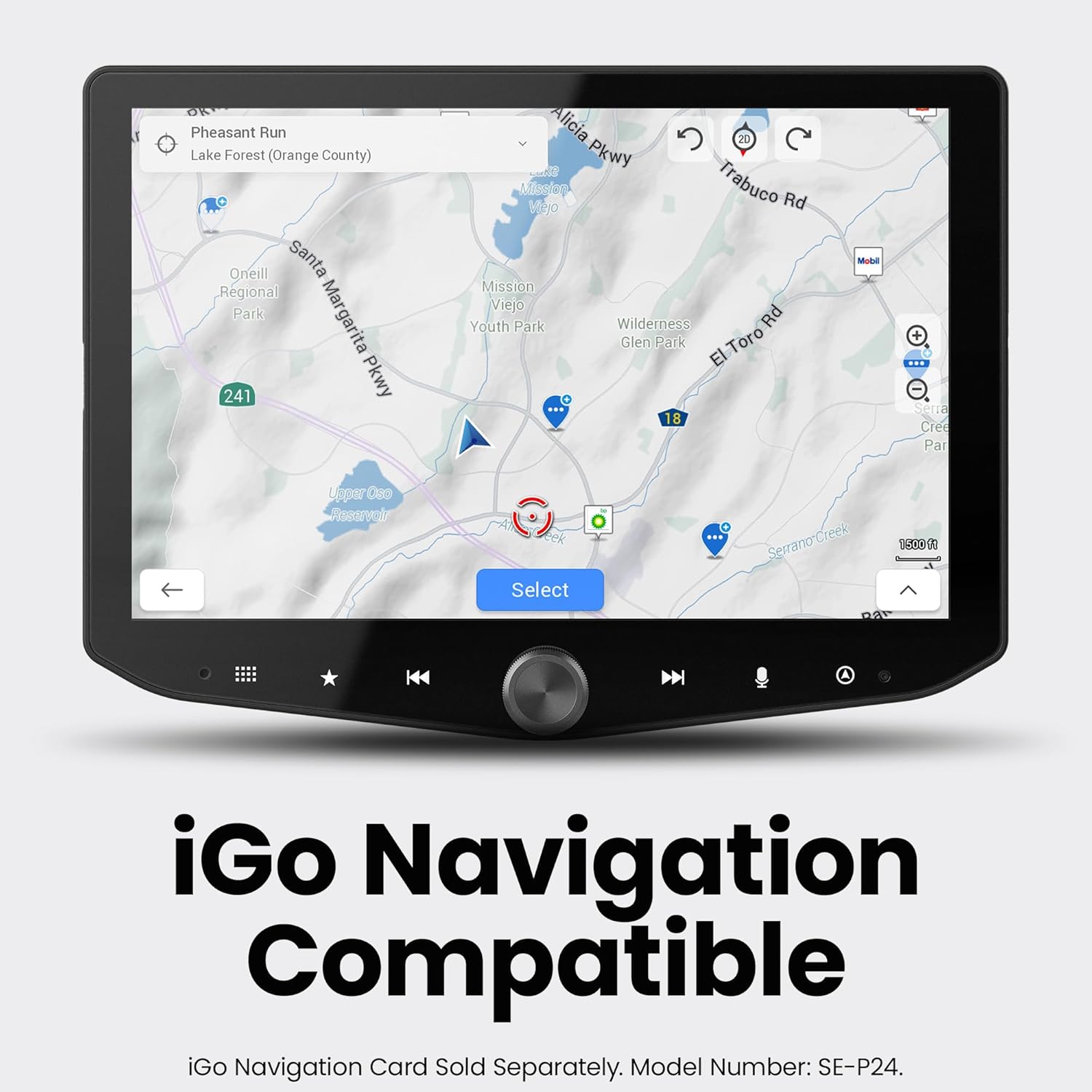
Figure 5.8: iGO Navigation interface.
6. Дастурҳои истифодабарӣ
6.1. Фаъол/хомӯш
- Фаъол: Turn your vehicle's ignition to the ACC or ON position. The system will power on automatically.
- Хомӯш: Turn your vehicle's ignition to the OFF position. The system will power off automatically after a brief delay.
6.2. Навигатсияи экрани сенсорӣ
The 10.1-inch touchscreen is highly responsive. Tap icons to select functions, swipe to navigate menus, and use pinch-to-zoom gestures where applicable (e.g., maps).
6.3. Apple CarPlay / Android Auto
- Пайвасти бесим: Ensure Bluetooth and Wi-Fi are enabled on your smartphone. Select the Apple CarPlay or Android Auto icon on the HEIGH10+ home screen and follow the on-screen prompts to pair your device.
- Пайвасти симӣ: Connect your smartphone to the system's USB-A or USB-C port using a compatible cable. The system will automatically launch Apple CarPlay or Android Auto.
6.4. Амалиёти радио
Select the 'HD Radio' icon from the home screen. Use the on-screen controls to tune to AM/FM stations, scan for available frequencies, and save presets. HD Radio provides crystal-clear digital audio where available.
6.5. Танзимоти аудио
Access the 'Audio Settings' icon to adjust the 15-band equalizer, select from 6 user EQ presets, configure subwoofer control, and set high-pass (HPF) and low-pass (LPF) filters for optimal sound output.
6.6. Камера View Интихоб
Tap the 'Cameras' icon to cycle through available camera views (front, rear, left, right, etc.). Parking guidelines may be displayed on the backup camera feed.
6.7. Off-Road Gauge Monitoring
Select the 'Off-Road' icon to view real-time vehicle data such as pitch, roll, heading, altitude, and tire angle. This information is crucial for navigating challenging terrains.
6.8. Назорати равшании RGB
If an ENLIGHT10 RGB kit is connected, tap the 'ENLIGHT10 RGB' icon to access the control interface. Adjust colors, brightness, and lighting modes directly from the touchscreen.
7. Нигоҳдорӣ
- Тоза кардани экран: Аз матои мулоим ва матои пок каме истифода баред гampened with a screen cleaner or water. Avoid abrasive materials or harsh chemicals that could damage the anti-glare coating.
- Навсозии нармафзор: Periodically check the Stinger website for firmware updates. Updates can improve performance, add features, and resolve issues. Follow the instructions provided with the update package carefully.
- Нигоҳубини умумӣ: Дастгоҳро аз чанг ва партовҳо тоза нигоҳ доред. Боварӣ ҳосил кунед, ки ҳамаи пайвастҳо маҳкам ҳастанд.
8. Баррасии мушкилот
8.1. Не қудрат
- Ҳолати оташгиронии мошинро тафтиш кунед.
- Verify all power connections to the head unit and interface module are secure.
- Inspect vehicle fuses related to the radio/infotainment system.
8.2. Баромади садо нест
- Боварӣ ҳосил кунед, ки садо хомӯш карда нашудааст ё ба ҳадди ақал муқаррар карда нашудааст.
- Check audio settings (EQ, fader/balance) for incorrect configurations.
- Verify speaker connections. If using external ampлифтҳо, пайвастҳои барқ ва сигнали онҳоро санҷед.
8.3. Apple CarPlay / Android Auto Connectivity Issues
- For wireless connection, ensure Wi-Fi and Bluetooth are active on your phone and the system. Try forgetting the device on both ends and re-pairing.
- For wired connection, try a different USB cable (ensure it's a data-capable cable, not just charging).
- Restart your smartphone and the infotainment system.
8.4. Camera Display Issues
- Verify camera connections to the head unit.
- Check camera settings within the infotainment system to ensure correct input selection.
- Ensure the vehicle is in the correct gear (e.g., reverse for backup camera).
9. Мушаххасоти
| Хусусият | Мушаххасоти |
|---|---|
| Бренд | СТИНГЕР |
| Рақами модел | RB10JW18HP. |
| Андозаи намоиш | 10.1 инч |
| Ҳалли намоиш | 1280х800 HD |
| Технологияи пайвастшавӣ | Bluetooth, HDMI, USB |
| Хусусиятҳои махсус | Wireless Android Auto, Wireless Apple CarPlay, Built-In Bluetooth, Equalizer, HDMI; USB-A, USB-C, Touchscreen |
| Дастгоҳҳои мувофиқ | iPhone, Android |
| Ҳолати баромади аудио | Стерео |
| Шумораи каналҳо | 8 |
| Навъи баромади аудио | RCA |
| Усули назорат | ламс кунед |
| Ранги | Сиёҳ |
| Истеҳсолкунанда | Стингер |
| UPC | 609098907712 |
10. Кафолат ва дастгирӣ
The Stinger HEIGH10+ Infotainment System comes with a Кафолати 1-солаи истеҳсолкунанда. For warranty claims, technical support, or additional product information, please visit the official Stinger webсайт ё бевосита бо хадамоти муштариёни худ тамос гиред.
Дастгирии онлайн: www.stinger.com