
1. Маҳсулот ба охир расидview
The COUGAR FV150 RGB is a mid-tower gaming case designed for high-performance PC builds. It features a dual-chamber design, separating the main components from cables, storage drives, and the power supply unit (PSU) for a clean aesthetic and improved airflow. The case supports various motherboard form factors and offers extensive cooling options, including pre-installed ARGB fans.
Хусусиятҳои асосӣ:
- Dual-Chamber Design: равшан таъмин менамояд view of your build through glass panels while concealing cables and other components.
- GPU Support: Accommodates graphics cards up to 400mm in length, with options for vertical GPU orientation.
- Мутобиқати motherboard: Supports Mini-ITX, Micro-ATX, and ATX motherboards.
- Engineered Bottom Fan Bracket: Simplifies fan installation by allowing attachment prior to setup.
- Extensive Fan & Water Cooling Support: Multiple fan mounting points and radiator support up to 360mm.
- Seamless RGB Synchronization: Integrated universal fan hub for easy ARGB lighting control.
- Modern I/O Panel: Includes 2 x USB Type-A and 1 x USB 3.2 Type-C ports.
- Нигоҳдории чандир: Supports combinations of 3.5" HDDs and 2.5" SSDs.
- Magnetic Dust Filters: Located on the top and right side for easy maintenance.

Тасвири 1.1: кунҷӣ view of the COUGAR FV150 RGB case, highlighting its dual-chamber design and pre-installed ARGB fans.
2. Танзим ва насб
Follow these steps for proper installation of your PC components into the COUGAR FV150 RGB case.
2.1 Кушодан ва тафтиши аввалия
- Қуттиро бодиққат аз бастабандӣ берун кунед.
- Ҳангоми интиқол, қуттиро аз назар гузаронед, то ягон аломати зарарро пайдо кунед.
- Remove the tempered glass side panel by unscrewing the thumb screws, if present, or by releasing the latch mechanism.
2.2 Насби motherboard
- Ensure the correct standoffs are installed for your motherboard form factor (Mini-ITX, Micro-ATX, or ATX).
- Place the I/O shield into the rear opening of the case.
- Carefully align your motherboard with the standoffs and I/O shield, then secure it with screws.
2.3 Насби воҳиди таъминоти барқ (PSU)
- The FV150 RGB supports bottom-mount PSUs.
- Slide the PSU into its designated compartment in the secondary chamber from the rear of the case.
- Secure the PSU with screws from the exterior rear of the case.
2.4 Насби диски нигаҳдорӣ
- Locate the drive bays in the secondary chamber.
- For 3.5" HDDs, slide the drive into the appropriate tray and secure it.
- For 2.5" SSDs, mount them to the designated brackets or trays.
2.5 Насби корти графикӣ (GPU).
- Сарпӯшҳои зарурии сӯрохи васеъкуниро дар қафои корпус хориҷ кунед.
- GPU-и худро ба слоти PCIe дар motherboard ҷойгир кунед ва онро бо винтҳо маҳкам кунед.
- The case supports GPUs up to 400mm. For vertical GPU mounting, a separate riser cable and bracket (not included) are required.
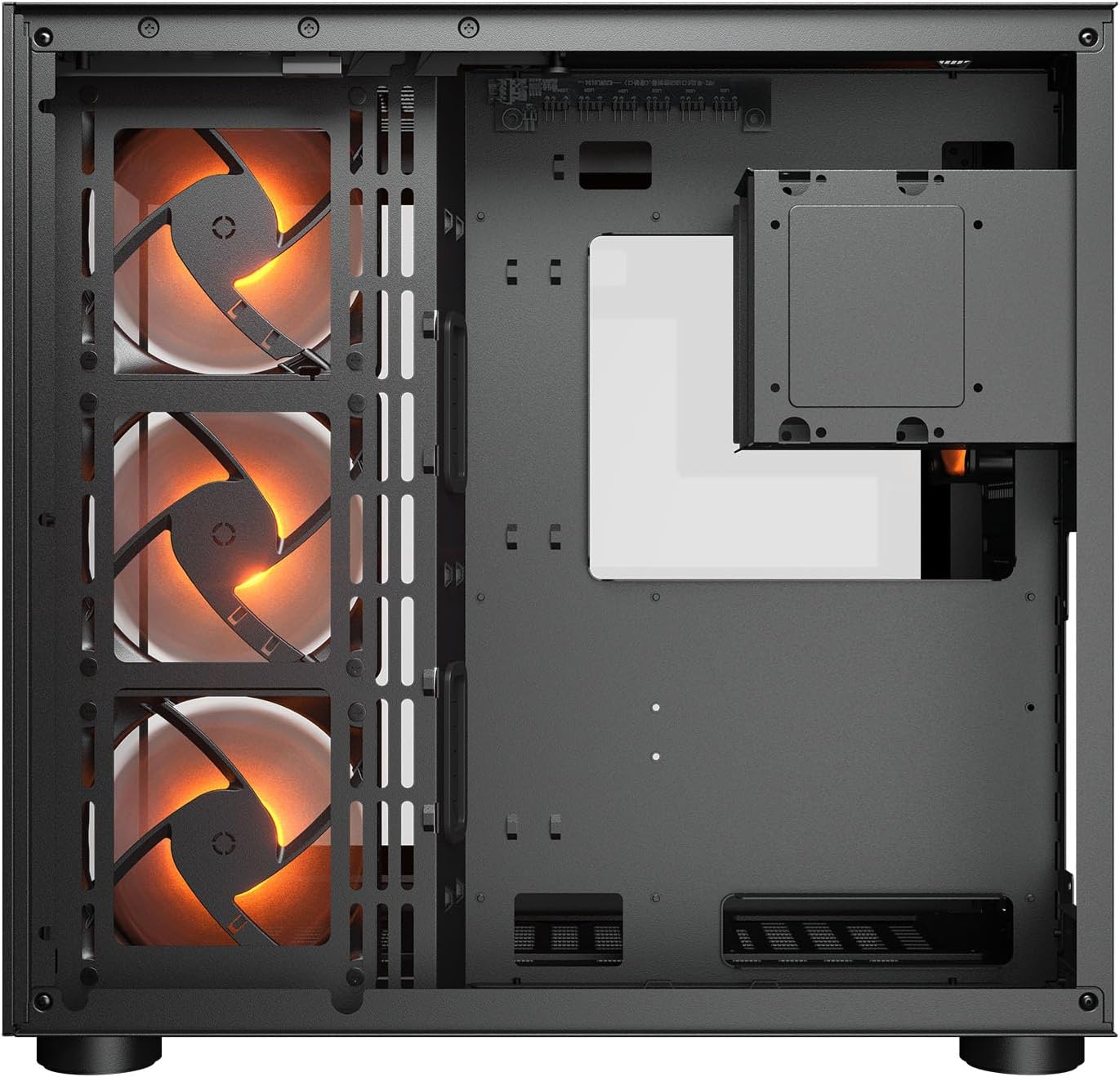
Тасвири 2.1: дохилӣ view illustrating the main chamber for motherboard and GPU installation, with pre-installed side fans.
2.6 Насб кардани вентилятор ва радиатор
- The case comes with 3 x 120mm ARGB side fans and 1 x 120mm ARGB rear fan pre-installed.
- Additional fans can be installed at the top (3 x 120mm or 2 x 140mm) and bottom (3 x 120mm or 2 x 140mm).
- Utilize the engineered bottom fan bracket for easier installation of bottom fans.
- For water cooling, radiators up to 360mm can be mounted on the top and 240mm on the side.

Image 2.2: Top internal view, showing potential mounting locations for additional cooling fans or radiators.
2.7 Идоракунии кабел
- Route all power and data cables through the cutouts to the secondary chamber.
- Истифода баред ample space and tie-down points in the secondary chamber to organize cables for optimal airflow and a clean appearance.
2.8 Connecting Front I/O Panel
- Connect the front panel cables (USB 3.2 Type-C, USB Type-A, audio, power, reset, LED) to the corresponding headers on your motherboard.
3. Дастурҳои истифодабарӣ
Пас аз насб ва пайваст кардани ҳама ҷузъҳо, шумо метавонед системаи худро фаъол созед.
3.1 Фаъолсозии барқ
- Боварӣ ҳосил кунед, ки калиди PSU дар ҳолати 'ON' аст.
- Press the power button on the front I/O panel of the case.
3.2 Назорати равшании RGB
- The integrated universal fan hub allows for easy synchronization of ARGB lighting.
- Connect the hub to your motherboard's ARGB header (5V 3-pin) to control lighting effects via motherboard software.
- Alternatively, use the dedicated RGB button on the front I/O panel to cycle through pre-set lighting modes if not connected to a motherboard header.
4. Нигоҳдорӣ
Нигоҳдории мунтазам кӯмак мекунад, ки кори беҳтарин ва дарозмуддати ҷузъҳои компютери шумо таъмин карда шавад.
4.1 Тоза кардани филтри чанг
- The COUGAR FV150 RGB features magnetic dust filters on the top and right side, along with a ventilated bottom cover.
- Gently remove the magnetic dust filters.
- Clean them using compressed air or by rinsing with water (ensure they are completely dry before reattaching).
- Periodically clean the ventilated bottom cover.
4.2 Тозакунии умумӣ
- Барои тоза кардани сатҳҳои берунии қуттӣ аз матои мулоим ва хушк истифода баред.
- For tempered glass panels, use a glass cleaner and a microfiber cloth to avoid streaks.
- Аз истифодаи кимиёвии сахт ё маводи абразивӣ, ки метавонанд ба марра зарар расонанд, худдорӣ намоед.
5. Баррасии мушкилот
Ин бахш роҳҳои ҳалли мушкилоти маъмулиеро, ки шумо метавонед бо онҳо дучор шавед, пешниҳод мекунад.
5.1 Система фаъол нест
- Санҷиши PSU: Ensure the power supply unit is properly connected to the wall outlet and the PSU switch is in the 'ON' position.
- Пайвастшавӣ ба панели пеши: Verify that the power button cable from the case is correctly connected to the motherboard's front panel header.
- Кабелҳои барқи дохилӣ: Confirm all necessary power cables (24-pin ATX, 8-pin CPU, PCIe for GPU) are securely connected to the motherboard and components.
5.2 Мухлисони чархзананда ё RGB кор намекунанд
- Пайвастҳои вентилятор: Ensure all fan power cables are securely connected to the fan hub or motherboard headers.
- Пайвастҳои RGB: Verify the ARGB cables are correctly connected to the fan hub and the hub is connected to a 5V 3-pin ARGB header on the motherboard.
- Software/Button: If connected to the motherboard, check your motherboard's RGB control software. If not, try pressing the RGB button on the case's I/O panel to cycle modes.
5.3 Портҳои USB кор намекунанд
- Сарлавҳаҳои дохилии USB: Confirm that the USB 3.0 and USB Type-C cables from the front I/O panel are correctly plugged into the corresponding headers on your motherboard.
- Драйверҳои платаи модарӣ: Ensure you have installed the latest chipset and USB drivers for your motherboard.
6. Мушаххасоти
Detailed technical specifications for the COUGAR FV150 RGB Gaming Case.

Image 6.1: Case dimensions for planning your setup.
| Хусусият | Мушаххасоти |
|---|---|
| Номи маҳсулот | FV150 RGB |
| Омили шакли парванда | Мандарин |
| Мутобиқати motherboard | Мини-ITX, Micro-ATX, ATX |
| Андозаҳо (W x H x D) | 300 x 400 x 415 мм (11.8" x 15.7" x 16.3") |
| Панели вуруд / баромад | USB 3.2 Gen 2 Type-C x 1, USB-A 3.0 x 2, 4 Pole Headset Audio Jack, RGB Button |
| 3.5" Drive Bay | 2 |
| 2.5" Drive Bay | 1+1 (converted from 3.5" drive bays) |
| Ҷойҳои васеъ | 7+3 |
| Дастгирии GPU амудӣ | Бале |
| Cooling Fan Support (Top) | 3 x 120 мм ё 2 x 140 мм |
| Cooling Fan Support (Bottom) | 3 x 120 мм ё 2 x 140 мм |
| Cooling Fan Support (Side) | 3х120мм |
| Cooling Fan Support (Rear) | 1х120мм |
| Pre-installed Fans (Side) | 3 x 120mm ARGB (Reversed) |
| Pre-installed Fans (Rear) | 1 x 120mm ARGB |
| Pre-installed Fan Speed | 1000 (± 10%) RPM |
| Pre-installed Fan Connector | 5V 3 Pin (ARGB) / 3 Pin (Fan) |
| Шумораи максималии мухлисон | 10 |
| Water Cooling Support (Top) | 360мм / 280мм / 240мм |
| Water Cooling Support (Side) | 240мм / 120мм |
| Water Cooling Support (Rear) | 120мм |
| RGB Hub Sync with M/B | Бале |
| Макс. Дарозии корти графикӣ | 400 мм (15.7 дар) |
| Макс. Баландии CPU сардтар | 180 мм (7.1 дар) |
| Макс. Дарозии PSU | 210 мм (8.3 дар) |
| Материал | Металл |
| Вазни ашё | 6.83 килограмм |
7. Маълумот дар бораи кафолат
COUGAR products are manufactured to the highest quality standards. This product is covered by a manufacturer's warranty against defects in materials and workmanship. The specific duration and terms of the warranty may vary by region and retailer. Please retain your proof of purchase for warranty claims.
For detailed warranty information, please refer to the official COUGAR webсайт ё фурӯшандаи маҳаллии худ тамос гиред.
8. Дастгирӣ
If you encounter any issues or have questions regarding your COUGAR FV150 RGB Gaming Case that are not covered in this manual, please contact COUGAR customer support.
- Ба COUGAR расмии боздид кунед website for FAQs, driver downloads, and support contact information.
- Contact your retailer for assistance with product returns or exchanges.